คอนแทคเตอร์,เบรกเกอร์,อินเวอร์เตอร์พลังงานแสงอาทิตย์,มิเตอร์ไฟฟ้า,แบตเตอรี่พลังงานแสงอาทิตย์


1.ตำแหน่งหลักและขอบเขตการใช้งาน
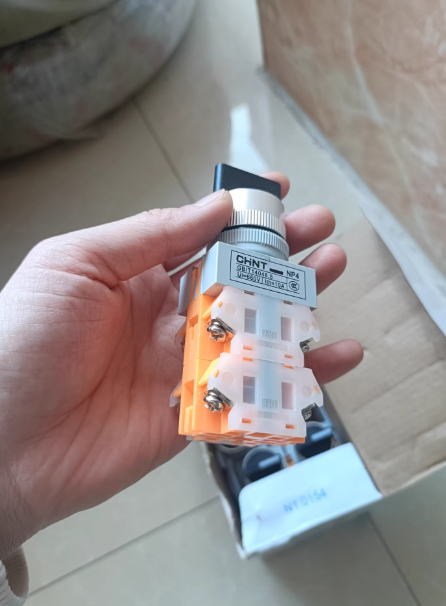
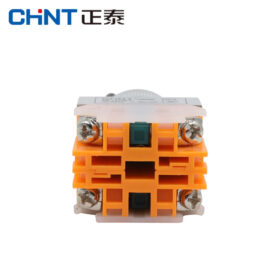
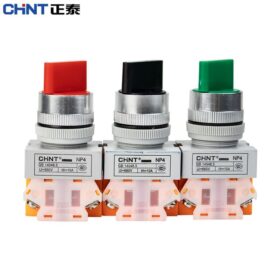
CHINT NP4 Series เป็นอุปกรณ์ควบคุมระดับอุตสาหกรรมที่มีเส้นผ่านศูนย์กลางการติดตั้ง 22 มม. เหมาะสำหรับระบบควบคุมวงจรไฟฟ้ากระแสสลับ 50/60Hz, พิกัดแรงดันไฟฟ้าสูงถึง 380V, และแรงดันไฟ DC สูงถึง 220V. ทำหน้าที่เป็นส่วนประกอบควบคุมสำหรับสตาร์ตเตอร์แบบแม่เหล็ก, คอนแทคเตอร์, รีเลย์, และวงจรไฟฟ้าอื่นๆ. ปุ่มกดพร้อมไฟแสดงสถานะยังใช้สำหรับสถานการณ์บ่งชี้สัญญาณไฟได้.
ซีรีส์นี้สอดคล้องกับ GB/T 14048.5 มาตรฐาน, ด้วยระดับ IP40, และบางรุ่นที่มีไฟแสดงสถานะสามารถสูงถึง IP54.
- กฎการตั้งชื่อโมเดลและการจำแนกประเภท
รูปแบบโมเดล
`NP4-□□□/□`
| ตำแหน่งรหัส | ความหมาย | ตัวอย่าง |
| 1เซนต์ดิจิต | จำนวนการเปิดตามปกติ (เลขที่) รายชื่อผู้ติดต่อ | 0 = ไม่มี, 1 = 1 เลขที่, 2 = 2 เลขที่ |
| 2ลำดับที่ | จำนวนปิดปกติ (เอ็นซี) รายชื่อผู้ติดต่อ | 0 = ไม่มี, 1 = 1 เอ็นซี, 2 = 2 เอ็นซี |
| 3หลักที่ | พิมพ์รหัส | BN = ปุ่มแบน, GN = ปุ่มที่ยกขึ้น, MD = หัวเห็ด, XB = ด้ามจับแบบหมุน, M = หยุดฉุกเฉิน |
| 4หลักที่ | ข้อมูลจำเพาะเสริม | ZS = ล็อค, D = พร้อมไฟแสดงสถานะ, /1 = 1 เลขที่, /2 = 1 เอ็นซี, /3 = 1 เลขที่ + 1 เอ็นซี |
การจำแนกประเภทหลัก
| พิมพ์ | โมเดลตัวแทน | คุณสมบัติการใช้งาน | สถานการณ์การใช้งาน |
| ปุ่มกดรีเซ็ตตัวเอง | NP4-11BN (ปุ่มแบน), NP4-11GN (ปุ่มที่ยกขึ้น) | ดำเนินการเมื่อกด, รีเซ็ตเมื่อปล่อยออกมา | การควบคุมอุปกรณ์แบบเขย่าเบา ๆ, การกระตุ้นสัญญาณชั่วคราว |
| ปุ่มกดล็อค | NP4-11BNZS (การล็อคปุ่มแบบแบน) | ล็อคอยู่ในสถานะการนำไฟฟ้าเมื่อกด, รีเซ็ตเมื่อกดอีกครั้ง | การควบคุมการทำงานของอุปกรณ์ในระยะยาว, การสลับโหมด |
| ปุ่มกดพร้อมไฟแสดงสถานะ | NP4-11DN (ปุ่มยกขึ้นพร้อมไฟ), NP4-01DN | ไฟ LED ในตัว, ผสานรวมฟังก์ชันการควบคุมและการบ่งชี้ | บ่งชี้สถานะพลังงาน, ปลุกความผิด |
| ปุ่มกดหัวเห็ด | NP4-01M/1 (หยุดฉุกเฉิน), NP4-11MD | หัวเห็ดเส้นผ่านศูนย์กลางขนาดใหญ่เพื่อการทำงานที่ชัดเจนและมองเห็นได้ | การปิดระบบฉุกเฉิน, การควบคุมความปลอดภัย |
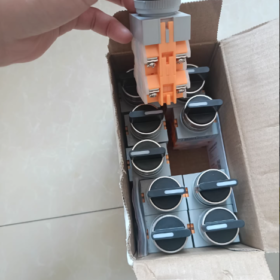
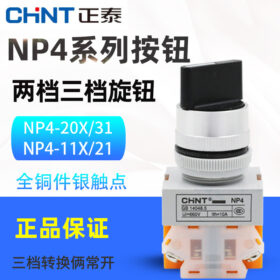
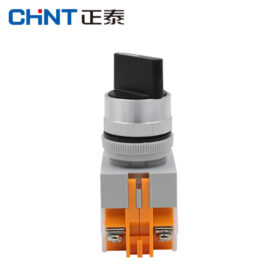
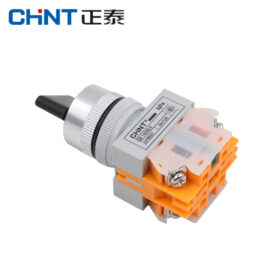
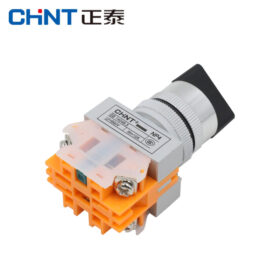
| สวิตช์เลือก | NP4-10XB (2-การล็อคตำแหน่ง), NP4-20X/31 (3-การล็อคตำแหน่ง) | การสลับตำแหน่งหลายตำแหน่งพร้อมการล็อคแบบล็อค | การเลือกโหมดฟังก์ชั่น, การแปลงวงจร |
III. พารามิเตอร์ทางเทคนิคที่สำคัญ
| รายการพารามิเตอร์ | ค่าข้อมูลจำเพาะ | หมายเหตุ |
| จัดอันดับแรงดันไฟฟ้าที่ใช้งาน | ไฟฟ้ากระแสสลับ 380V, กระแสตรง 220V | วงจรควบคุมแรงดันไฟฟ้า |
| จัดอันดับการดำเนินงานในปัจจุบัน | 10ก | จัดอันดับการติดต่อปัจจุบัน |
| ชีวิตเครื่องกล | ประเภทการรีเซ็ตตัวเอง: 1,000,000 รอบ; ประเภทล็อค: 300,000 รอบ; ประเภทตัวเลือก: 100,000 รอบ | สอดคล้องกับมาตรฐานไออีซี 60947-5-1 |
| ชีวิตไฟฟ้า | 500,000 รอบ | เอซี-15: 230วี/2.5เอ, ดีซี-13: 24วี/0.5เอ |
| พารามิเตอร์ไฟ LED | แรงดันไฟฟ้า: 6โวลต์/12V/24V/36V/110V/220V | สี: สีแดง, สีเขียว, สีเหลือง, สีฟ้า, สีขาว |
| มิติการติดตั้ง | 22มม (เส้นผ่านศูนย์กลางการเปิดแผง) | เข้ากันได้กับแผงอุตสาหกรรมมาตรฐาน |
| สภาพแวดล้อม | อุณหภูมิ: -5℃ ~ +40 ℃; ความชื้น: ≤90% (ที่ 25 ℃) | สภาพแวดล้อมก๊าซที่ปราศจากฝุ่นและไม่กัดกร่อน |
- หน้าที่หลักและลักษณะเฉพาะ
- ระบบการติดต่อ: ใช้หน้าสัมผัสโลหะผสมเงินที่มีความนำไฟฟ้าที่ดีเยี่ยม, ความต้านทานการสัมผัสต่ำ, ความต้านทานต่อการเกิดออกซิเดชันของส่วนโค้งที่แข็งแกร่ง, และอายุการใช้งานยาวนาน.
- กลไกการทำงาน: รุ่นรีเซ็ตตัวเองมีสปริงในตัวเพื่อการรีเซ็ตที่เชื่อถือได้; รุ่นล็อคใช้โครงสร้างล็อคแบบกลไกเพื่อการวางตำแหน่งที่แม่นยำ.
- การออกแบบการป้องกัน: หัวกระดุมใช้โครงสร้างที่ปิดสนิท, ซึ่งป้องกันฝุ่นและความชื้นเข้ามาได้อย่างมีประสิทธิภาพและมั่นใจในความปลอดภัยทางไฟฟ้า.
- ติดตั้งง่าย: แก้ไขบนแผงด้วยน็อต, พร้อมปรับความลึกในการติดตั้งได้เพื่อปรับให้เข้ากับแผงที่มีความหนาต่างกัน.
- ตัวเลือกสีที่หลากหลาย: มีให้เลือกหลายสีรวมทั้งสีแดง, สีเขียว, สีเหลือง, สีฟ้า, สีขาว, และสีดำเพื่อให้เป็นไปตามข้อกำหนดบ่งชี้สัญญาณที่แตกต่างกัน.
- สถานการณ์การใช้งานทั่วไป
| ภาคอุตสาหกรรม | การใช้งานเฉพาะ | รุ่นที่แนะนำ |
| ระบบอัตโนมัติทางอุตสาหกรรม | การควบคุมการเริ่ม-หยุดอุปกรณ์ในสายการผลิต, การควบคุมสายพานลำเลียง | NP4-11BNZS (ล็อค), NP4-11DN (พร้อมไฟแสดงสถานะ) |
| อุปกรณ์เครื่องกล | การทำงานของเครื่องมือกล, การควบคุมระบบไฮดรอลิก | NP4-01M/1 (หยุดฉุกเฉิน), NP4-10XB (ตัวเลือก) |
| ไฟฟ้าในอาคาร | การควบคุมพัดลม, ปั๊มน้ำสตาร์ท-หยุด | NP4-11BN (รีเซ็ตตัวเอง), NP4-11GN (ปุ่มที่ยกขึ้น) |
| ระบบรักษาความปลอดภัย | สัญญาณเตือนฉุกเฉิน, การควบคุมการเข้าถึง | NP4-01M/1 (หยุดฉุกเฉิน), NP4-11MD (หัวเห็ด) |
| การควบคุมเครื่องมือ | การตั้งค่าพารามิเตอร์เครื่องมือ, การสลับโหมด | NP4-20X/31 (3-ตัวเลือกตำแหน่ง) |
- คู่มือการเลือกและการติดตั้ง
ขั้นตอนการคัดเลือก
- กำหนดข้อกำหนดการควบคุม: รีเซ็ตตัวเอง (การควบคุมชั่วคราว) หรือล็อค (การควบคุมในระยะยาว).
- เลือกการกำหนดค่าผู้ติดต่อ: 1เลขที่ (เปิดตามปกติ), 1เอ็นซี (ปกติปิด), หรือ 1NO+1NC (ติดต่อรวมกัน).
- พิจารณาฟังก์ชันเพิ่มเติม: จำเป็นต้องมีไฟแสดงสถานะหรือฟังก์ชันหยุดฉุกเฉินหรือไม่.
- ตรงกับสภาพแวดล้อมการติดตั้ง: ข้อกำหนดความหนาของแผงและระดับ IP.
จุดติดตั้ง
- เส้นผ่านศูนย์กลางของช่องเปิดแผงต้องเป็น 22 มม, และขอบของช่องเปิดจะต้องเรียบและไม่มีเสี้ยน.
- ระหว่างการติดตั้ง, ปรับตำแหน่งน็อตก่อน, จากนั้นใส่ปุ่มจากด้านหลังของแผงแล้วขันน็อตให้แน่นเพื่อยึด.
- แยกแยะระหว่างวงจรควบคุม (เอซี/ดีซี) และวงจรไฟแสดงสถานะขณะเดินสายไฟ (ให้ความสนใจกับแรงดันไฟฟ้า LED).
- ตรวจสอบให้แน่ใจว่าขั้วสายไฟแน่นหนาเพื่อหลีกเลี่ยงการสัมผัสที่ไม่ดีซึ่งเกิดจากการคลายตัวและความร้อน.
ปกเกล้าเจ้าอยู่หัว. ตารางอ้างอิงด่วนรุ่นทั่วไป
| แบบอย่าง | พิมพ์ | การกำหนดค่าการติดต่อ | การทำงาน | สี |
| NP4-11BN | ปุ่มแบน | 1NO+1NC | รีเซ็ตตัวเอง | ดำ/ขาว |
| NP4-11BNZS | ปุ่มแบน | 1NO+1NC | ล็อค | แดง/เขียว |
| NP4-11DN | ปุ่มยกขึ้นพร้อมไฟ | 1NO+1NC | รีเซ็ตตัวเอง + สิ่งบ่งชี้ | สีแดง (24วี แอลอีดี) |
| NP4-01M/1 | หยุดฉุกเฉิน | 1เลขที่ | ล็อคหยุดฉุกเฉิน | สีแดง |
| NP4-10XB | ที่จับแบบหมุน | 1เลขที่ | 2-การล็อคตำแหน่ง | สีดำ |
| NP4-20X/31 | สวิตช์เลือก | 2เลขที่ | 3-การล็อคตำแหน่ง | แดง/เขียว |
8. การบำรุงรักษาและการแก้ไขปัญหา
- การตรวจสอบเป็นประจำ: ตรวจสอบความยืดหยุ่นในการใช้งานปุ่ม และดูว่ามีการยกเลิกการสัมผัสทุกไตรมาสหรือไม่.
- การทำความสะอาดและบำรุงรักษา: เช็ดพื้นผิวปุ่มด้วยผ้าแห้ง; หลีกเลี่ยงการใช้สารทำความสะอาดที่มีฤทธิ์กัดกร่อน.
- การแก้ไขปัญหา:
– ปุ่มไม่สามารถรีเซ็ตได้: ตรวจสอบว่าสปริงเสียหายหรือไม่; เปลี่ยนสปริงหรือชุดปุ่มทั้งหมด.
– การติดต่อไม่ดี: ทำความสะอาดหน้าสัมผัสหรือเปลี่ยนชุดหน้าสัมผัส.
– ไฟแสดงสถานะไม่ทำงาน: ตรวจสอบลูกปัดหลอดไฟ LED, แหล่งจ่ายไฟ, และสายไฟ; เปลี่ยนส่วนประกอบที่เสียหาย.
ด้วยลักษณะความน่าเชื่อถือสูง, ฟังก์ชั่นที่หลากหลาย, และติดตั้งง่าย, ปุ่มกดซีรีส์ CHINT NP4 ใช้กันอย่างแพร่หลายในสถานการณ์การควบคุมทางอุตสาหกรรมต่างๆ. สำหรับการคัดเลือก, ควรพิจารณาอย่างครอบคลุมถึงข้อกำหนดการควบคุมเฉพาะ, การกำหนดค่าการติดต่อ, และฟังก์ชั่นเพิ่มเติมเพื่อความปลอดภัยและเสถียรภาพของการควบคุมอุปกรณ์.


NH42-63-318x560.png "สวิตช์ถ่ายโอนอัตโนมัติชนิด CHINT PC (เอทีเอส)NH42-63/4SZ")