 المقاولين,قاطع الدائرة,الاستشعار,التشفير,بلك,محول


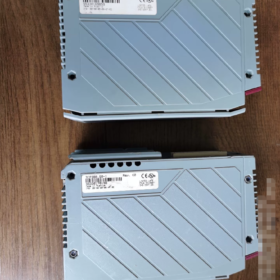
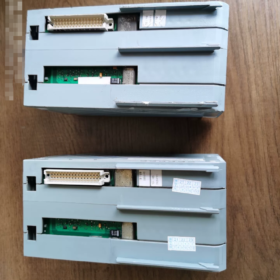
المعلومات الأساسية
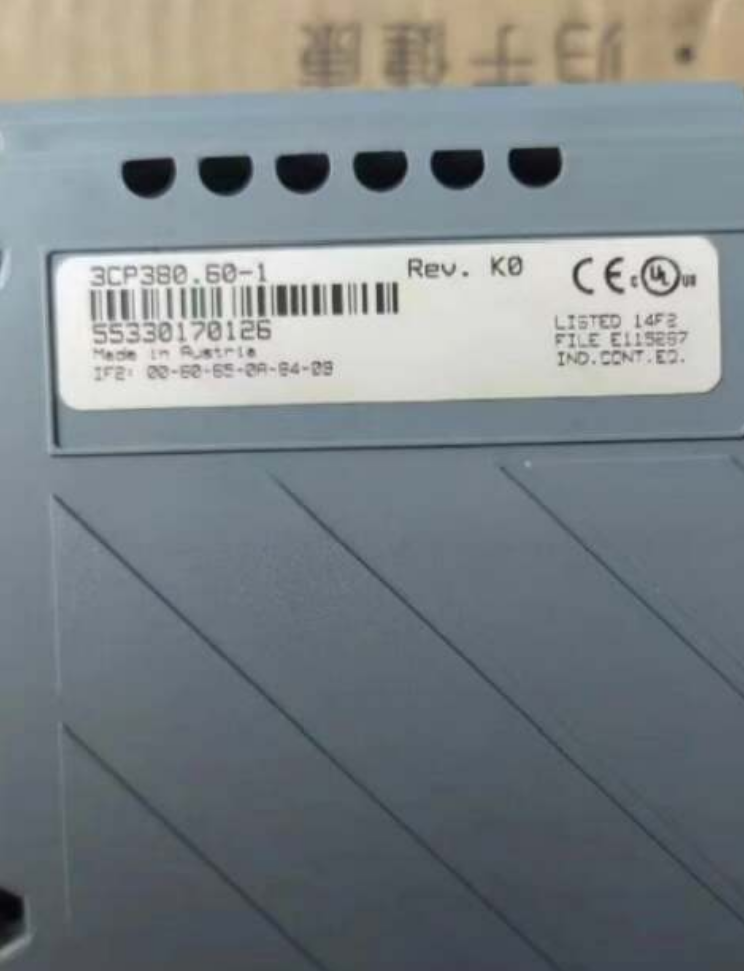
نموذج: 3CP38060-1
منصة: ب&نظام آر 2005 (نظام 2005 PCC CPU Module)
حالة المنتج: Obsolete by Manufacturer Only spare/used units available; no new original factory supply
تحديد المواقع: Mid-to-high performance x86-based PCC controller, supporting logic control and ACOPOS motion control
1 مواصفات الأجهزة الأساسية
| غرض | المعلمة |
| المعالج | Intel Pentium III 500 MHz with FPU; L1 Cache: 2×16 KB, L2 Cache: 256 كيلو بايت |
| Operating DRAM | 64 ميغابايت (for program and task execution) |
| Battery-backed SRAM | 512 كيلو بايت (retains process data and variables after power loss) |
| Program Storage | CompactFlash Card (أمر بشكل منفصل; NOT included with the module) |
| استهلاك الطاقة | تقريبا. 16 دبليو (3 W @24 VDC +13 W @5 VDC, excluding aPCI expansion cards) |
| Backup Battery | مدمج 3 V lithium battery for RTC clock and SRAM data; service life approx. 4 سنين |
| تبريد | Natural convection; Protection Class IP20 |
| درجة حرارة التشغيل | 0 ~ +55°C (داخل خزانة التحكم) |
| بيئة البرمجيات | Automation Studio ≤ V4.0.95; Higher AS versions do NOT support System 2005 |
2 Onboard Native Interfaces
1 IF1: RS232 (9-pin Male D-SUB)
Max baud rate: 1152 kbit/s; for debug communication and third-party serial communication
2 IF2: RJ45 Ethernet 10/100 BASE-T
يدعم مودبوس TCP, UDP, Web Diagnostics, EGD; galvanically isolated
3 IF3: USB11 Type-A
Mainly used for program backup and peripherals; not recommended for permanent online debugging
4 1 × aPCI Expansion Slot
Compatible with IF7xx communication cards: بروفيبوس-DP, يمكنفتح, إيثرنت باور لينك, إلخ
Galvanic Isolation Overview
IF1 ↔ IF2: Isolated
IF2 ↔ IF3: Isolated
IF1 ↔ IF3: Non-isolated
CPU core shares non-isolated potential with IF1 and IF3
3 Front Panel LED Definition
READY: Power supply and hardware status OK
يجري: User tasks executing normally
ERROR: System fault or program error
SERVICE: Low backup battery / CompactFlash card abnormality
قوات التحالف: CompactFlash memory card status
الخفافيش: Backup battery warning
4 انهيار رمز النموذج
3CP38060-1
3سي بي: نظام 2005 CPU series
380: Hardware grade (Pentium III 500, 64 MB DRAM version)
60: Standard variant with CF card slot and aPCI expansion
-1: Hardware revision
> Reference sibling model: 3CP38260-1 (higher specification, larger memory)
5 الوظائف المدعومة
✅ Multi-tasking PCC real-time operating system
✅ Motion control for ACOPOS servo drives
✅ Process data acquisition, complex algorithms and floating-point computation
✅ Built-in Web server for remote monitoring and diagnostics
✅ CEX bus extension for System 2005 وحدات الإدخال/الإخراج
❌ Incompatible with X20 I/O modules (different bus architecture)
6 Spare Part Replacement Solutions
خيار 1: Direct replacement within the same platform (minimal modification, priority for maintenance retrofits)
وحدة المعالجة المركزية المتوافقة: 3CP38260-1
ملحوظات: Program requires no major changes; verify CF card program image and task cycle timing Pin-to-pin plug-and-play compatible
مخاطرة: Also obsolete; supply availability is unstable
خيار 2: Cross-platform upgrade (long-term project migration, System2005 → X20)
Recommended new platform: X20 CPUs (X20CP1485 / X20CP1585)
⚠️ Major Modification Risks
1 Rack and all I/O modules must be fully replaced (System2005 I/O cannot connect directly to X20)
2 CEX bus eliminated; I/O communication migrated to POWERLINK; all wiring and backplanes require rework
3 Program migration and restructuring mandatory; old System2005 projects cannot be downloaded directly to X20 CPUs
4 Communication interfaces and real-time task timing need full re-commissioning
7 اختيار & Operation Pitfall Guide
1 CompactFlash Card Restrictions
Only industrial-grade standard CF cards are supported CFast / CFexpress are incompatible Recommended capacity: 32 MB ~ 512 ميغابايت; high-capacity cards frequently cause recognition failures
2 Battery Maintenance
Risk of SRAM variable loss and RTC clock reset if equipment remains shutdown longer than 4 years Replace internal lithium battery during major overhauls
3 Critical Software Version Limit
Automation Studio V41 and newer cannot create or download projects for System2005 Keep AS V4095 available
4 aPCI Expansion Constraints
Maximum one IF7xx card per slot High-power communication cards increase total power consumption; verify cabinet power margin
5 Acceptance Checklist for Used Module Procurement
Verify CF card read/write and program boot functionality
Inspect battery voltage and check for electrolyte leakage
Test connectivity of Ethernet and serial ports
Run long-duration full-load testing to monitor ERROR LED status
8 Typical Industry Applications
ماكينات التعبئة والتغليف, plastic extrusion lines, آلات النسيج, أدوات الآلة, tire production lines, legacy ACOPOS servo integrated equipment (primarily spare parts maintenance for existing installations)
إذا لزم الأمر, I can provide supplementary materials:
1 RS232 interface pin assignment
2 Fault phenomenon & troubleshooting matrix
3 CF card program backup/cloning procedure
4 Parameter comparison table: 3CP38060-1 VS 3CP38260-1
3CP38060-1 Fault Troubleshooting Matrix: الظواهر, الأسباب الجذرية & Remedial Actions
LED Indicator Related Faults
1 READY LED OFF
أعراض: No READY light after power-up; controller fails to boot
الأسباب الجذرية:
1 Insufficient backplane 24 مصدر طاقة VDC / excessive voltage drop
2 Poor contact of CPU module backplane; DIN rail latch not fully locked
3 Damaged internal power circuit of the module
4 Rack short-circuit triggering overcurrent protection
Remedial Steps:
1 Measure rack supply voltage under no-load and loaded conditions; ensure voltage ≥225 V
2 خارج السلطة, extract CPU, clean backplane gold fingers, reinstall and lock securely
3 Remove all aPCI expansion cards and CF card; perform minimum system power-on test
4 If READY remains off under minimum system configuration → hardware failure, repair or replacement required
2 READY Steady ON, RUN LED OFF
أعراض: Hardware ready, but user program fails to start
الأسباب الجذرية:
1 مفتقد / damaged CF card / corrupted program image
2 CF card exceeds supported capacity limit or consumer-grade CF compatibility issue
3 Incorrect Boot project configuration in the application
4 SRAM data anomaly triggers self-test failure during startup
Remedial Steps:
1 خارج السلطة, extract CF card, verify program files via card reader
2 Use industrial CF cards of 32~512 MB; consumer memory cards prohibited
3 Clear SRAM: Power off and rest for 15 minutes to fully deplete backup battery, then re-power
4 Download Boot & Application again using Automation Studio V4095
3 ERROR Red LED Steady ON / Flashing
أعراض: System operational fault
| Flashing Pattern | وصف الخطأ | دقة |
| Steady ON | Fatal system error, task watchdog timeout, memory fault | Stop operation; audit cyclic program tasks; minimum system test to distinguish hardware/software faults |
| Slow Flashing | CEX I/O bus fault, remote module disconnection | Check CEX bus terminator, wiring and power supply of all I/O modules |
| Fast Flashing | ACOPOS servo drive communication failure | Inspect POWERLINK servo cables and confirm drive power status |
4 SERVICE LED Illuminated
أعراض: Maintenance warning; does not trigger immediate shutdown
الأسباب الجذرية:
1 Low voltage of built-in backup lithium battery (most frequent)
2 CF card read/write error or storage medium aging
Remedial Steps:
1 Schedule downtime to replace the internal 3 V lithium battery; battery leakage risks PCB corrosion
2 Back up programs and replace with new industrial CF card
> ⚠️ Equipment can continue short-term production under warning; replace components promptly to avoid permanent loss of retained variables after power failure
5 BAT LED Illuminated
أعراض: Backup battery warning
السبب الجذري: Aged internal lithium battery with voltage drop
مخاطرة: RTC clock reset and complete loss of 512 KB SRAM retained data after power cycle
دقة: Power off and replace with equivalent 3 V lithium battery; minimize power-off duration during replacement
6 Abnormal CF LED Flashing
Continuous fast flashing: Frequent CF card access, indicative of aging media
No illumination: Mainboard fails to detect CF card
Communication Faults
IF2 Ethernet Communication Failure
الأسباب:
1 Defective network cable or switch port; 100 Mbps controller, incompatible with forced Gigabit negotiation
2 IP address conflict or IP configuration lost in CF card
3 Damaged galvanic isolation circuit on Ethernet port
استكشاف الأخطاء وإصلاحها:
1 Direct PC-to-CPU Ethernet connection, disable PC firewall, scan via Automation Studio
2 Set switch port fixed to 100 Mbps Full Duplex (System2005 CPUs cannot auto-negotiate Gigabit)
3 If Ethernet offline: Use IF1 RS232 serial port for diagnostics and restore Ethernet parameters
Unstable IF1 RS232 Serial Communication
ملاحظة هامة: IF1 and USB share non-isolated ground!
Hazard: Potential serial chip burnout caused by ground potential difference when IF1 connects to third-party equipment
حل: Install active RS232 isolator; prioritize baud rates 19200/38400; avoid permanent operation at 115200 باود
Communication Dropouts of aPCI IF7xx Expansion Cards
Inducing Factors:
1 Incomplete seating of expansion card
2 Exceeded overall power budget of backplane supply
3 Communication protocol not enabled within hardware configuration
استكشاف الأخطاء وإصلاحها: Temporarily remove expansion card and observe system recovery; verify hardware configuration in Automation Studio
Startup & Program-Related Typical Faults
1 Repeated power-on reboot
Inducement: Damaged CF card, excessive power supply ripple on backplane, short-circuit on aPCI card
دقة: Remove peripherals and perform minimum system test
2 All process parameters cleared after power loss
Inducement: Failed backup battery; variables not mapped to SRAM in program
امتياز: BAT LED ON → battery fault; BAT LED Normal → program variable configuration fault
3 Unable to establish online connection via Automation Studio
Hard Constraint: Only Automation Studio V4095 or older versions are supported
Versions higher than V4095 cannot recognize System2005 CPUs; do not attempt newer software
Fallback communication path: Use IF1 RS232 serial debugging if Ethernet fails
البيئية & Latent Hardware Faults
1 ارتفاع درجة حرارة الخزانة (>55درجة مئوية)
أعراض: ERROR alarms and communication dropouts after several hours runtime; recovery after cooling
حل: تحسين تهوية الخزانة; avoid heat-generating components mounted above the CPU; never sustain operation above rated 55°C
2 High vibration operating conditions
أعراض: Random communication flicker, occasional boot failures
سبب: Loose CF card, poor contact of backplane gold fingers
حل: Install CF card retaining clip, fasten all DIN rail mounting screws
⚠️ Strictly Forbidden Operations (Hard Limits)
1 Hot-swap CPU module or aPCI expansion cards! Always cut main power supply, otherwise backplane and CPU may suffer permanent damage
2 Use consumer-grade CF memory cards (camera cards); random program loss will occur frequently
3 Connect IF1 serial port and USB to external equipment with different ground potentials simultaneously; common-mode voltage can destroy interface circuits
4 Ignore battery warning for prolonged periods; battery leakage leads to irreversible PCB corrosion
5 Force switch port Gigabit negotiation to communicate with the CPU; persistent link interruptions will occur





NH42-63-318x560.png "مفاتيح النقل التلقائي من نوع الكمبيوتر الشخصي CHINT (المنشطات الأمفيتامينية)NH42-63/4SZ")



