 접촉기,회로 차단기,감지기,인코더,PLC,변환기

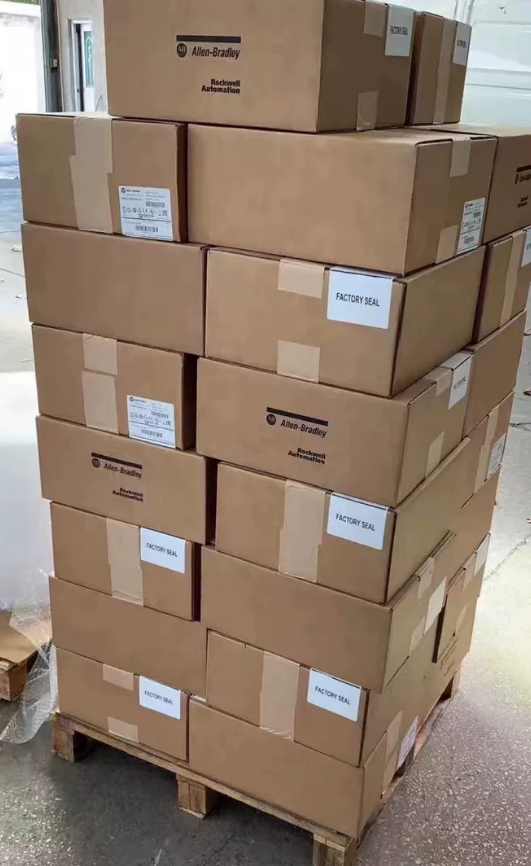

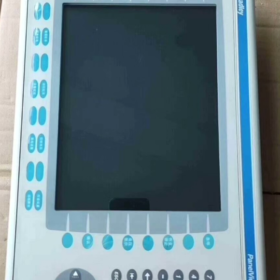
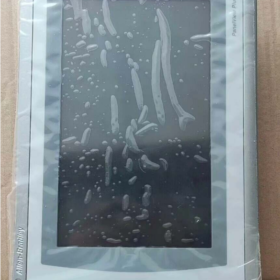
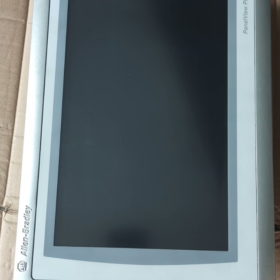
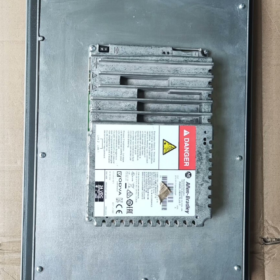
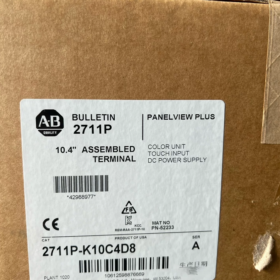
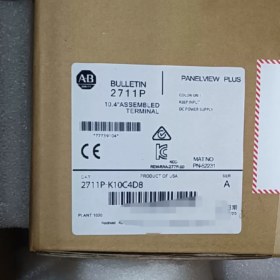
- 모델 번호 분석
| 코드 세그먼트 | 설명 | 세부 | 기능적 영향 |
| 2711피 | 제품 시리즈 | Allen‑Bradley PanelView Plus 6 HMI Series | Base platform: 윈도우 CE 6.0 OS, supports FactoryTalk View ME software |
| 케이 | 입력 유형 | 키패드 + Color Display | 32 기능 키 (F1‑F16, K1‑K16) + numeric keypad + arrow keys; 혹독한 산업 환경에 적합 |
| 10 | 화면 크기 | 10.4‑inch color display | Resolution 640×480 pixels, provides clear process visualization |
| 기음 | 전원 유형 | DC Power | Input voltage range 18–32 VDC (명사 같은 24 VDC), for industrial DC power systems |
| 4 | 메모리 구성 | 512 MB RAM | Supports medium‑complexity HMI applications, stores multi‑screen graphics and historical data |
| D8 | 통신 구성 | Standard communication interface package | 1× Ethernet (이더넷/IP), 1× RS‑232, 2× USB Host ports |
전체 모델 정의: Allen-Bradley PanelView Plus 6 10.4-inch Keypad-Only Color HMI, 512 MB RAM, 직류 전원, standard communications.
단종: 구월 30, 2022.
- 핵심 기술 사양
2.1 기본사양
| 목 | 값 | 메모 |
| 제품 유형 | Industrial Human‑Machine Interface (HMI) | 패널뷰 플러스 6 표준 시리즈 (not Compact) |
| 표시하다 | 10.4‑인치 컬러 TFT, 640×480 | 300 CD/㎡, 500:1 contrast, viewing angle 140°(시간)/120°(다섯) |
| Input Method | Physical keypad (32 기능 키 + numeric keypad) | No touchscreen; ideal for oil, 먼지, glove‑use environments |
| 프로세서 | 32‑bit RISC processor | Ensures fast response and complex graphics rendering |
| 메모리 | 512 MB RAM, 1 GB Flash | Supports data logging and application storage; expandable via CF card |
| 전력 요구 사항 | 18-32VDC (명사 같은 24 VDC), 최대. 20 여 | 저전력 설계, compatible with industrial power systems |
| 유입 방지 | 전면 IP65, 후면 IP20 | Front dust‑tight & water‑tight, suitable for washdown areas |
| 치수 & 무게 | 230 mm × 180 mm × 42 mm, 대략. 3.9 kg | 표준 컷아웃, easy panel mounting |
| 작동 온도 | 0 ~ +55 ℃ (운영 중), ‑20 ~ +70 ℃ (저장) | Wide temperature range for most industrial environments |
| 인증 | UL 508, CE, CSA C22.2 No.213 | Complies with international industrial safety standards |
2.2 커뮤니케이션 능력 (D8 Configuration)
| 인터페이스 | 수량 | 지원되는 프로토콜 | 애플리케이션 |
| 이더넷 | 1 | 이더넷/IP, 모드버스 TCP | PLC 통신, data acquisition, 원격 모니터링 |
| RS‑232 | 1 | DF1, DH‑485, 모드버스 RTU | Legacy PLCs, third‑party devices |
| USB 호스트 | 2 | USB 2.0 | Data backup, program transfer, mouse/keyboard |
| 확장 포트 | 1 | Optional communication modules | 프로피버스, 디바이스넷, 등. |
- 응용 & 선택 가이드
3.1 Typical Industries
| 산업 | 응용 | 장점 | 예 |
| 자동차 | Line control, 장비 모니터링 | Keypad resistant to oil; stable PLC communication | 용접 로봇, 조립 라인, quality inspection |
| 음식 & 음료 | 충전재, 포장, pasteurization | IP65 전면, washdown‑safe, 데이터 로깅 | 일괄 처리 시스템, temperature/pressure monitoring |
| 석유화학 | 펌프/밸브 제어, pipeline monitoring | 넓은 온도, 진동 방지, outdoor/harsh areas | Tank level, 압축기, 압력 조절 |
| 힘 & 에너지 | 변전소 모니터링, generation control | Stable comms, data logging for analysis | Generator monitoring, transformer management |
| 수처리 | Pump stations, wastewater processes | Moisture‑resistant, clear parameter display | Pump control, pH adjustment, flow monitoring |
| Heavy Machinery | 건설, mining equipment | Vibration‑resistant keypad, rugged design | 크레인, excavators, 컨베이어 시스템 |
3.2 선택 참고 사항
- 입력 유형
키패드 전용 (케이): ideal for gloved operators, dirty/dusty environments, fast numeric entry
For touchscreen: select “T” models (예를 들어, 2711P-T10C4D8)
- 메모리
512 MB RAM (암호 4): suitable for ≤ 50 스크린, basic alarms and logging
For complex projects (> 100 스크린, heavy logging): 사용 1 GB RAM (예를 들어, 2711P-K10C8D8)
- 연락
D8 covers most standard PLC applications
PROFIBUS/DeviceNet require optional modules
Remote monitoring supported via Ethernet (OPC UA)
- 설치 & 구성
4.1 설치 단계
- 준비
Panel thickness: 2–5 mm; 차단: 222 × 172 mm
M4 mounting screws
Verify 18–32 VDC power; optional power filter
- 기계적인 설치
Insert HMI into panel cutout, align front flush
Secure from rear with M4 screws, 최대. 토크 1.5 N·m
Maintain ≥ 50 mm clearance at rear for cooling and wiring
- 전기 연결
힘: L+ = 24 VDC 포지티브, L– = negative, PE = protective earth
연락:
이더넷: CAT5e/CAT6 cable to PLC/switch
RS-232: shielded twisted pair for third-party devices
USB: flash drive for program transfer/backup
- System Setup
Create application with FactoryTalk View ME
Download project via USB or Ethernet
Configure communication to PLC
Set up alarms, 데이터 로깅, 보안
4.2 설치시 주의사항
| 목 | 기준 | 세부 |
| 전기 절연 | Separate power and signal wiring | Avoid EMI; use shielded cables, single‑end grounding |
| Thermal Management | Ambient ≤ 55 ℃ | Avoid enclosed spaces; 환기를 보장하다 |
| 진동 저항 | ≤ 1 g (5-500Hz) | Use anti‑vibration mounts, separate from heavy machinery |
| Water Protection | 전면 IP65 | Avoid direct high‑pressure spray; maintain gaskets |
| Safety Grounding | Ground resistance ≤ 10 오 | Reliable PE connection for safety |
- 대사 & 업그레이드 옵션 (Discontinued Unit)
단종: 구월 30, 2022
Rockwell Automation recommended replacements:
5.1 직접 교체 (기능적 호환성)
| 교체 모델 | 주요 차이점 | 호환성 | 업그레이드 혜택 |
| 2711P‑B10C22D9P | 패널뷰 플러스 7, 10.4″, 만지다 + 키패드 | ★★★★★ | +30% 성능, Windows Embedded Compact 7 |
| 2711P‑T10C4D8 | 같은 시리즈, 만지다 + 키패드 | ★★★★★ | 키패드 + touch flexibility |
| 2711P‑K10C8D8 | 같은 시리즈, 1 GB RAM | ★★★★★ | Supports more complex applications |
5.2 Cross-Series Upgrades
| 시리즈 | 추천 모델 | 특징 | Use Case |
| 패널뷰 플러스 7 | 2711P‑B10C22D9P | Modern platform, 더 높은 성능 | 새로운 프로젝트, long‑term support |
| 패널뷰 5500 | 2715P‑T10C21D8 | High‑end, multi‑core, large memory | Complex applications, heavy data |
| PanelView Compact | 2711R‑T10C10 | 콤팩트, 비용 최적화 | Small machines, 예산 프로젝트 |
5.3 Third-Party Alternatives
| 상표 | 모델 | 가격 수준 | 호환성 |
| Weintek | MT8102iE | ~50% | ★★★☆☆ (requires project rewrite) |
| 지멘스 | KTP1000 기본 | ~60% | ★★★☆☆ (supports some A‑B protocols) |
| 미쓰비시 | GOT2000 Series | ~70% | ★★★☆☆ (protocol adaptation required) |
- 유지 & 문제 해결
6.1 예방적 유지보수
| 간격 | 일 | 기준 | 메모 |
| 월간 간행물 | External cleaning | No oil/dust buildup on front | Use dry cloth; no corrosive cleaners |
| 계간지 | 통신 테스트 | Ethernet/RS‑232 stable | Check cables, verify data flow |
| Semi‑annually | Power check | 18–32 VDC stable | Check power supply temperature |
| 매년 | System backup | Full project & data backup | Store securely |
| 모든 2 연령 | 기능 테스트 | All keys & display normal | Verify key response, backlight brightness |
6.2 일반적인 결함 & 솔루션
징후 가능한 원인 우선 사항 해결책 Keypad not responding 1. Key failure 높은 1. Inspect keys 2. Loose keypad connector 2. Reconnect connector 3. Firmware fault 3. Update firmware Communication lost 1. 손상된 케이블 높은 1. 케이블 교체 2. 잘못된 설정 2. Reconfigure IP/parameters 3. Network/PLC fault 3. Check PLC/switch Display abnormal 1. Backlight fault 중간 1. Adjust backlight 2. Driver error 2. Reboot HMI 3. Unstable power 3. Verify power quality System freezes 1. Insufficient memory 높은 1. Optimize project 2. Project error 2. Reload application 3. Hardware fault 3. Repair/replace unit
Allen-Bradley 2711P-K10C4D8 is a 10.4-inch keypad-only PanelView Plus 6 HMI.
Key strengths:
Rugged keypad for harsh, dirty, gloved-operation environments
Standard Ethernet + RS-232 + USB for broad industrial compatibility
IP65 front suitable for food, 음료, and pharma
Stable Windows CE 6.0 platform with FactoryTalk View ME support
권장 사항:
교체용: use 2711P-B10C22D9P (패널뷰 플러스 7) to preserve operation
새로운 프로젝트: prefer PanelView Plus 7 for longer support
예산 프로젝트: evaluate third-party alternatives with project rewrite cost
설치 완료 & Configuration Guide for 2711P-K10C4D8
At a Glance: Covers mechanical install → electrical wiring → system setup → comms → deployment → testing for PanelView Plus 6 10.4-inch keypad HMI. Highlights IP65 sealing, 직류 전원, and D8 communications.
- Pre-Installation
1.1 도구 & 재료
| 범주 | 필수의 | 추천 |
| 도구 | 십자 드라이버, 수준, panel cutter | 토크 렌치 (1.5 N·m), vibration pads |
| 전기 같은 | 24 VDC 공급 (18-32VDC, ≥20 W), 차폐 케이블 | Power filter, 서지 보호기 |
| 연락 | CAT5e/CAT6, RS‑232 shielded cable | USB drive (≥4 GB), 스위치 |
| 소프트웨어 | FactoryTalk View ME 6.0+, RSLinx Classic | RSLinx Enterprise, 터미널 구성 |
| 안전 | 절연 장갑, goggles, ESD strap | Ground resistance meter, 멀티미터 |
1.2 환경점검
작동 온도: 0 ~ +55 ℃; 저장: -20 ~ +70 ℃; no direct sunlight
습기: 10–90% non-condensing
진동: ≤ 1 g (5-500Hz)
전면 IP65, 후면 IP20; sealed enclosure recommended
정리: top ≥51 mm, bottom ≥102 mm, sides ≥25 mm
- 기계적인 설치 (패널뷰 플러스 6 1000)
2.1 컷아웃 치수
| 매개변수 | 값 | 용인 | 메모 |
| 차단 | 222 mm (여) × 172 mm (시간) | ±0.5 mm | Standard 10.4‑inch HMI cutout |
| Panel Thickness | 2–5 mm | — | Affects sealing and clamping |
| Corner Radius | ≥ 2 mm | — | Prevents gasket damage |
2.2 설치 (Critical for IP65)
- Gasket Preparation
Inspect front gasket for damage
Ensure gasket is seated correctly
Install keypad overlay before mounting if used
- 고정
Insert HMI into cutout, press evenly
설치하다 4 mounting clamps (supplied)
Engage clamps until “click”
Verify unit is tight, 수준, and gasket compressed uniformly
- Final Check
Unit secure, 흔들림 없음
Front flush with panel
Rear clearance ≥ 50 mm
- 전기 연결 (DC Power & 접지)
3.1 전원 단자 (18-32VDC)
| 단말기 | Label | 요구 사항 | 안전 |
| Positive | L+ | 24 VDC 포지티브, ≥1.5 mm² | Polarity must not be reversed |
| Negative | L– | 24 VDC 네거티브, ≥1.5 mm² | Complete circuit |
| 지구 | 체육 | 보호 접지, ≥2.5 mm² | Ground resistance ≤ 10 오 |
절차:
- 배선하기 전에 전원을 끄십시오.
- Strip insulation ~6 mm
- Connect PE first, then L–, then L+
- 토크: 0.8–1.0 N·m
- Secure cables to avoid tension
3.2 통신 배선 (D8)
| 인터페이스 | 수량 | 배선 | 애플리케이션 |
| 이더넷 | 1 | CAT5e/CAT6 shielded, RJ45 | PLC comms, data acquisition |
| RS‑232 | 1 | 3‑wire shielded (TX/RX/GND) | Legacy/third‑party devices |
| USB 호스트 | 2 | USB 2.0 | Program transfer, 지원 |
| 확장 | 1 | Optional module | 프로피버스, 디바이스넷 |
Best Practices:
Separate comms and power cables ≥150 mm
Cross at 90° where necessary
Single-end grounding for shields
- System Startup & 기본 구성
4.1 첫 번째 파워업
- Pre-check all connections
- Apply 24 VDC
- Normal sequence: power LED → splash screen → Configuration Mode
- If no display: power off immediately and check wiring
4.2 Terminal Settings
- Enter via F4 (Terminal Settings)
- Key settings:
표시하다: brightness, contrast
Date/Time: sync with PLC
Startup Options: run FactoryTalk View ME application
보안: set admin password, disable desktop
- Ethernet Configuration
Set static IP, subnet, gateway
Save and reboot
Verify with ping
- 통신 설정
5.1 RSLinx Configuration
Add EtherNet/IP Driver
Set scan rate (일반적으로 100 ms)
Browse or add PLC by IP
For legacy PLCs: configure DF1/DH-485 on RS-232
5.2 FactoryTalk Linx Mapping
Import tags from controller
Map HMI tags to PLC tags
Set update rates for critical values
Optional redundant Ethernet paths
- Application Deployment (FactoryTalk View ME)
6.1 Project Preparation
Target: 10.4-인치, 키패드
Limit screens to ~50 for 512 MB RAM
Minimize complex animations
Configure data logging to Flash/CF card
6.2 Download Methods
| 방법 | 단계 | Use Case |
| USB | Save to USB → insert HMI → Transfer → USB → Load | No network, quick commissioning |
| 이더넷 | PC on same subnet → Tools → Transfer → Ethernet | Networked, remote/volume installs |
| CF Card | Write to CF → insert HMI → Transfer → CF Card | Large applications, 지원 |
After download:
Set as primary startup
Enable communications replacement
Save and reboot
- 확인 & 테스트
7.1 Hardware Tests
| 시험 | 방법 | Pass Criteria |
| 키패드 | Press all keys | All respond immediately |
| 표시하다 | 육안검사 | Clear, no flicker/bleed |
| 의사소통 | Ping, tag read/write | 안정적인, no dropouts |
| 힘 | 전압 측정 | 18-32VDC, ripple low |
7.2 Application Tests
Screen navigation, 버튼, numeric entry
PLC read/write
Alarms trigger and acknowledge
Data logging and trend retrieval
- Post-Installation & 안전
8.1 유지보수 일정
| 간격 | 일 |
| 월간 간행물 | Clean front with dry cloth |
| 계간지 | Check communications & 케이블 |
| Semi‑annually | Verify power quality & 온도 |
| 매년 | Backup application & 데이터 |
| 모든 2 연령 | Full functional test |
8.2 Troubleshooting Highlights
| 징후 | Likely Cause | 고치다 |
| 디스플레이 없음 | Power/reversed polarity | Check L+/L–/PE |
| Keys dead | Loose connector / firmware | Reconnect / update firmware |
| Comms drop | IP / 케이블 / 스위치 | Verify IP, replace cable |
| Crashes | 메모리 / project error | Optimize project, reload |
8.3 안전 참고사항
All wiring power-off
PE must be reliable
Use SELV/PELV power supplies (예를 들어, 1606-XLE120E)
Maintain IP65 by inspecting gaskets
- 결론
Installation complete when:
Mechanically secure, IP65 seal intact
24 VDC stable, properly grounded
Network and PLC communications reliable
Application runs automatically without faults
All functions tested and verified
Legacy Note:
Unit discontinued 2022-09-30. 권장 교체: 2711P-B10C22D9P (패널뷰 플러스 7).





NH42-63-318x560.png "CHINT PC형 자동절환스위치 (ATS)NH42-63/4SZ")



