 คอนแทคเตอร์,เบรกเกอร์,เซ็นเซอร์,ตัวเข้ารหัส,บมจ,ตัวแปลง

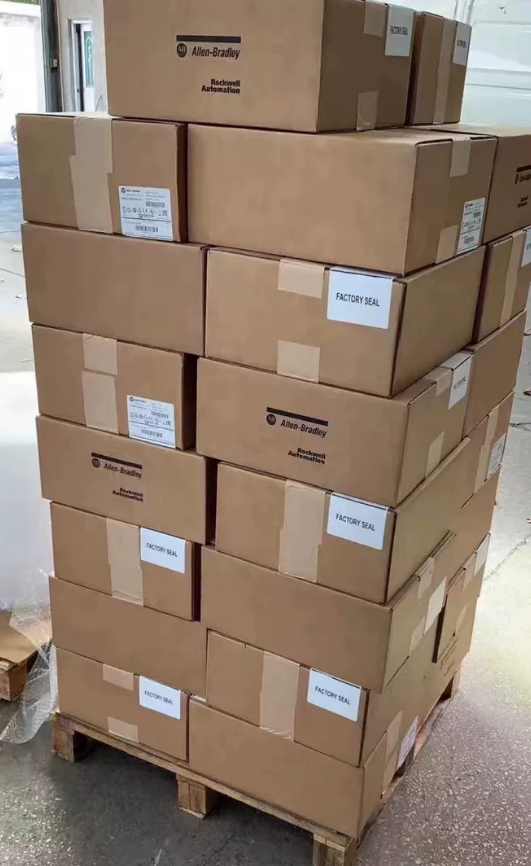

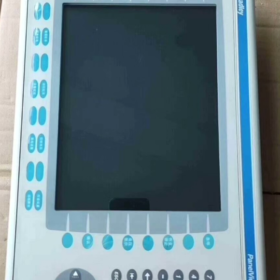
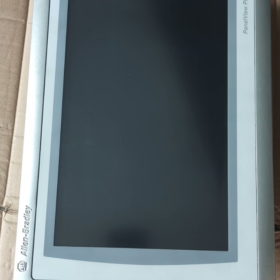
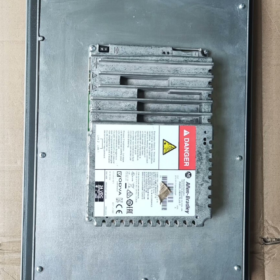
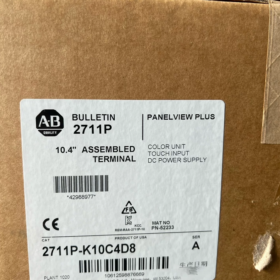
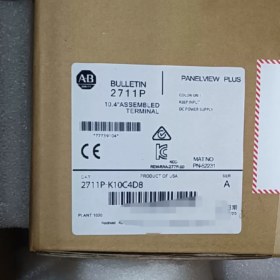
- รายละเอียดหมายเลขรุ่น
| ส่วนรหัส | คำอธิบาย | รายละเอียด | ผลกระทบต่อการทำงาน |
| 2711ป | ซีรี่ส์ผลิตภัณฑ์ | Allen-Bradley PanelView Plus 6 HMI ซีรี่ส์ | แพลตฟอร์มฐาน: วินโดวส์ ซีอี 6.0 ระบบปฏิบัติการ, รองรับซอฟต์แวร์ FactoryTalk View ME |
| เค | ประเภทอินพุต | ปุ่มกด + จอแสดงผลสี | 32 ปุ่มฟังก์ชั่น (F1-F16, K1-K16) + แป้นพิมพ์ตัวเลข + ปุ่มลูกศร; เหมาะสำหรับสภาพแวดล้อมทางอุตสาหกรรมที่รุนแรง |
| 10 | ขนาดหน้าจอ | 10.4‐จอสีขนาดนิ้ว | ความละเอียด 640×480 พิกเซล, ให้ภาพกระบวนการที่ชัดเจน |
| ค | ประเภทพลังงาน | ดีซีพาวเวอร์ | ช่วงแรงดันไฟฟ้าอินพุต 18–32 VDC (ระบุ 24 กระแสตรง), สำหรับระบบไฟฟ้ากระแสตรงอุตสาหกรรม |
| 4 | การกำหนดค่าหน่วยความจำ | 512 เอ็มบี แรม | รองรับการใช้งาน HMI ที่มีความซับซ้อนปานกลาง, เก็บกราฟิกหลายหน้าจอและข้อมูลประวัติ |
| D8 | การกำหนดค่าการสื่อสาร | แพคเกจอินเทอร์เฟซการสื่อสารมาตรฐาน | 1× อีเทอร์เน็ต (อีเธอร์เน็ต/ไอพี), 1× อาร์เอส-232, 2× พอร์ตโฮสต์ USB |
คำจำกัดความของโมเดลแบบเต็ม: อัลเลน-แบรดลีย์ พาเนลวิว พลัส 6 10.4-HMI สีเฉพาะปุ่มกด, 512 เอ็มบี แรม, ไฟกระแสตรง, การสื่อสารมาตรฐาน.
ยกเลิก: กันยายน 30, 2022.
- ข้อมูลจำเพาะทางเทคนิคหลัก
2.1 ข้อมูลจำเพาะพื้นฐาน
| รายการ | ค่า | หมายเหตุ |
| ประเภทสินค้า | ส่วนต่อประสานระหว่างมนุษย์กับเครื่องจักรทางอุตสาหกรรม (เอชเอ็มไอ) | พาเนลวิว พลัส 6 ซีรี่ส์มาตรฐาน (ไม่กะทัดรัด) |
| แสดง | 10.4‐TFT สีขนาดนิ้ว, 640×480 | 300 ซีดี/ตรม, 500:1 ตัดกัน, มุมมอง 140°(ชม)/120°(วี) |
| วิธีการป้อนข้อมูล | ปุ่มกดทางกายภาพ (32 ปุ่มฟังก์ชั่น + แป้นพิมพ์ตัวเลข) | ไม่มีหน้าจอสัมผัส; เหมาะสำหรับน้ำมัน, ฝุ่น, สภาพแวดล้อมการใช้ถุงมือ |
| โปรเซสเซอร์ | 32โปรเซสเซอร์ RISC บิต | รับประกันการตอบสนองที่รวดเร็วและการเรนเดอร์กราฟิกที่ซับซ้อน |
| หน่วยความจำ | 512 เอ็มบี แรม, 1 จีบี แฟลช | รองรับการบันทึกข้อมูลและการจัดเก็บแอปพลิเคชัน; ขยายได้ผ่านการ์ด CF |
| ข้อกำหนดด้านพลังงาน | 18–32 โวลท์ดีซี (ระบุ 24 กระแสตรง), สูงสุด. 20 ว | การออกแบบพลังงานต่ำ, เข้ากันได้กับระบบไฟฟ้าอุตสาหกรรม |
| การป้องกันทางเข้า | ด้านหน้า IP65, IP20 ด้านหลัง | ด้านหน้ากันฝุ่น & กันน้ำได้, เหมาะสำหรับพื้นที่ลุ่มน้ำ |
| ขนาด & น้ำหนัก | 230 มม. × 180 มม. × 42 มม, ประมาณ. 3.9 กก | คัตเอาท์มาตรฐาน, ติดตั้งแผงได้ง่าย |
| อุณหภูมิในการทำงาน | 0 ~ +55 องศาเซลเซียส (ปฏิบัติการ), ‐20 ~ +70 องศาเซลเซียส (พื้นที่จัดเก็บ) | ช่วงอุณหภูมิกว้างสำหรับสภาพแวดล้อมทางอุตสาหกรรมส่วนใหญ่ |
| การรับรอง | แอล 508, ซีอี, ซีเอสเอ C22.2 No.213 | สอดคล้องกับมาตรฐานความปลอดภัยอุตสาหกรรมระหว่างประเทศ |
2.2 ความสามารถในการสื่อสาร (การกำหนดค่า D8)
| อินเทอร์เฟซ | จำนวน | โปรโตคอลที่รองรับ | แอปพลิเคชัน |
| อีเทอร์เน็ต | 1 | อีเธอร์เน็ต/ไอพี, Modbus TCP | การสื่อสารของพีแอลซี, การได้มาของข้อมูล, การตรวจสอบระยะไกล |
| RS-232 | 1 | DF1, DH-485, Modbus RTU | PLC รุ่นเก่า, อุปกรณ์ของบุคคลที่สาม |
| โฮสต์ USB | 2 | ยูเอสบี 2.0 | การสำรองข้อมูล, การถ่ายโอนโปรแกรม, เมาส์/คีย์บอร์ด |
| พอร์ตขยาย | 1 | โมดูลการสื่อสารเสริม | โปรฟิบัส, ดีไวซ์เน็ต, ฯลฯ. |
- การใช้งาน & คู่มือการเลือก
3.1 อุตสาหกรรมทั่วไป
| อุตสาหกรรม | การใช้งาน | ข้อดี | ตัวอย่าง |
| ยานยนต์ | การควบคุมสาย, การตรวจสอบอุปกรณ์ | ปุ่มกดทนทานต่อน้ำมัน; การสื่อสาร PLC ที่เสถียร | หุ่นยนต์เชื่อม, สายการประกอบ, การตรวจสอบคุณภาพ |
| อาหาร & เครื่องดื่ม | การกรอก, บรรจุภัณฑ์, พาสเจอร์ไรซ์ | ด้านหน้า IP65, ล้างทำความสะอาดได้, การบันทึกข้อมูล | ระบบการผสม, การตรวจสอบอุณหภูมิ/ความดัน |
| ปิโตรเคมี | การควบคุมปั๊ม/วาล์ว, การตรวจสอบท่อ | อุณหภูมิกว้าง, ทนต่อการสั่นสะเทือน, กลางแจ้ง/พื้นที่รุนแรง | ระดับถัง, คอมเพรสเซอร์, การควบคุมความดัน |
| พลัง & พลังงาน | การตรวจสอบสถานีย่อย, การควบคุมการสร้าง | การสื่อสารที่เสถียร, การบันทึกข้อมูลเพื่อการวิเคราะห์ | การตรวจสอบเครื่องกำเนิดไฟฟ้า, การจัดการหม้อแปลงไฟฟ้า |
| การบำบัดน้ำ | สถานีสูบน้ำ, กระบวนการบำบัดน้ำเสีย | ทนต่อความชื้น, การแสดงพารามิเตอร์ที่ชัดเจน | การควบคุมปั๊ม, การปรับค่า pH, การตรวจสอบการไหล |
| เครื่องจักรกลหนัก | การก่อสร้าง, อุปกรณ์การทำเหมือง | ปุ่มกดที่ทนต่อการสั่นสะเทือน, การออกแบบที่ทนทาน | รถเครน, รถขุด, ระบบสายพานลำเลียง |
3.2 หมายเหตุการเลือก
- ประเภทอินพุต
ปุ่มกดเท่านั้น (เค): เหมาะสำหรับผู้ปฏิบัติงานที่สวมถุงมือ, สภาพแวดล้อมที่สกปรก/เต็มไปด้วยฝุ่น, การป้อนตัวเลขอย่างรวดเร็ว
สำหรับหน้าจอสัมผัส: เลือกรุ่น “T” (เช่น, 2711P-T10C4D8)
- หน่วยความจำ
512 เอ็มบี แรม (รหัส 4): เหมาะสำหรับ ≤ 50 หน้าจอ, การเตือนและการบันทึกพื้นฐาน
สำหรับโครงการที่ซับซ้อน (> 100 หน้าจอ, การตัดไม้หนัก): ใช้ 1 กิกะไบต์ แรม (เช่น, 2711P-K10C8D8)
- การสื่อสาร
D8 ครอบคลุมการใช้งาน PLC มาตรฐานส่วนใหญ่
PROFIBUS/DeviceNet ต้องใช้โมดูลเสริม
การตรวจสอบระยะไกลรองรับผ่านอีเธอร์เน็ต (โอพีซี ยูเอ)
- การติดตั้ง & การกำหนดค่า
4.1 ขั้นตอนการติดตั้ง
- การตระเตรียม
ความหนาของแผง: 2–5 มม; คัตเอาท์: 222 × 172 มม
สกรูยึด M4
ตรวจสอบกำลังไฟ 18–32 VDC; ตัวกรองพลังงานเสริม
- การติดตั้งเครื่องกล
ใส่ HMI เข้าไปในช่องตัดแผง, จัดตำแหน่งฟลัชด้านหน้า
ยึดจากด้านหลังด้วยสกรู M4, สูงสุด. แรงบิด 1.5 น.ม
รักษา ≥ 50 ระยะห่าง มม. ที่ด้านหลังสำหรับการระบายความร้อนและการเดินสายไฟ
- การเชื่อมต่อไฟฟ้า
พลัง: ล+ = 24 กระแสตรงเป็นบวก, L– = ลบ, PE = สายดินป้องกัน
การสื่อสาร:
อีเทอร์เน็ต: สาย CAT5e/CAT6 ไปยัง PLC/สวิตช์
RS-232: คู่บิดเกลียวหุ้มฉนวนสำหรับอุปกรณ์บุคคลที่สาม
ยูเอสบี: แฟลชไดรฟ์สำหรับถ่ายโอน/สำรองข้อมูลโปรแกรม
- การตั้งค่าระบบ
สร้างแอปพลิเคชันด้วย FactoryTalk View ME
ดาวน์โหลดโครงการผ่าน USB หรืออีเทอร์เน็ต
กำหนดค่าการสื่อสารไปยัง PLC
ตั้งค่าการเตือน, การบันทึกข้อมูล, ความปลอดภัย
4.2 ข้อควรระวังในการติดตั้ง
| รายการ | มาตรฐาน | รายละเอียด |
| การแยกไฟฟ้า | แยกสายไฟและสายสัญญาณ | หลีกเลี่ยงอีเอ็มไอ; ใช้สายเคเบิลหุ้มฉนวน, การต่อสายดินปลายด้านเดียว |
| การจัดการความร้อน | สภาพแวดล้อม ≤ 55 องศาเซลเซียส | หลีกเลี่ยงพื้นที่ปิดล้อม; ให้แน่ใจว่ามีการระบายอากาศ |
| ความต้านทานการสั่นสะเทือน | ≤ 1 ก (5–500 เฮิรตซ์) | ใช้ที่ยึดป้องกันการสั่นสะเทือน, แยกจากเครื่องจักรกลหนัก |
| การป้องกันน้ำ | ด้านหน้า IP65 | หลีกเลี่ยงการฉีดสเปรย์แรงดันสูงโดยตรง; รักษาปะเก็น |
| การต่อสายดินเพื่อความปลอดภัย | ความต้านทานกราวด์ ≤ 10 โอ้ | การเชื่อมต่อ PE ที่เชื่อถือได้เพื่อความปลอดภัย |
- การทดแทน & ตัวเลือกการอัพเกรด (หน่วยที่ถูกยกเลิก)
ยกเลิก: กันยายน 30, 2022
Rockwell Automation แนะนำให้เปลี่ยนใหม่:
5.1 การทดแทนโดยตรง (ความเข้ากันได้ของฟังก์ชัน)
| รุ่นทดแทน | ความแตกต่างที่สำคัญ | ความเข้ากันได้ | อัพเกรดสิทธิประโยชน์ |
| 2711P-B10C22D9P | พาเนลวิว พลัส 7, 10.4″, สัมผัส + ปุ่มกด | ★★★★★ | +30% ผลงาน, Windows ฝังตัวกระชับ 7 |
| 2711P-T10C4D8 | ซีรีย์เดียวกัน, สัมผัส + ปุ่มกด | ★★★★★ | ปุ่มกด + สัมผัสความยืดหยุ่น |
| 2711P-K10C8D8 | ซีรีย์เดียวกัน, 1 กิกะไบต์ แรม | ★★★★★ | รองรับการใช้งานที่ซับซ้อนมากขึ้น |
5.2 การอัพเกรดข้ามซีรี่ส์
| ชุด | รุ่นแนะนำ | คุณสมบัติ | ใช้กรณี |
| พาเนลวิว พลัส 7 | 2711P-B10C22D9P | แพลตฟอร์มที่ทันสมัย, ประสิทธิภาพที่สูงขึ้น | โครงการใหม่, การสนับสนุนระยะยาว |
| แผงมุมมอง 5500 | 2715P-T10C21D8 | ระดับไฮเอนด์, มัลติคอร์, หน่วยความจำขนาดใหญ่ | การใช้งานที่ซับซ้อน, ข้อมูลหนัก |
| PanelView กะทัดรัด | 2711R-T10C10 | กะทัดรัด, ปรับต้นทุนให้เหมาะสม | เครื่องจักรขนาดเล็ก, โครงการงบประมาณ |
5.3 ทางเลือกของบุคคลที่สาม
| ยี่ห้อ | แบบอย่าง | ระดับราคา | ความเข้ากันได้ |
| ไวน์เทค | MT8102iE | ~50% | ★★★☆☆ (ต้องมีการเขียนโครงการใหม่) |
| ซีเมนส์ | KTP1000 พื้นฐาน | ~60% | ★★★☆☆ (รองรับโปรโตคอล A-B บางตัว) |
| มิตซูบิชิ | ซีรี่ย์ GOT2000 | ~70% | ★★★☆☆ (จำเป็นต้องมีการปรับโปรโตคอล) |
- การซ่อมบำรุง & การแก้ไขปัญหา
6.1 การบำรุงรักษาเชิงป้องกัน
| ช่วงเวลา | งาน | มาตรฐาน | หมายเหตุ |
| รายเดือน | การทำความสะอาดภายนอก | ไม่มีคราบน้ำมัน/ฝุ่นเกาะอยู่ด้านหน้า | ใช้ผ้าแห้ง; ไม่มีน้ำยาทำความสะอาดที่มีฤทธิ์กัดกร่อน |
| รายไตรมาส | การทดสอบการสื่อสาร | อีเธอร์เน็ต/RS-232 เสถียร | ตรวจสอบสายเคเบิล, ตรวจสอบการไหลของข้อมูล |
| ทุกครึ่งปี | การตรวจสอบพลังงาน | 18–32 VDC เสถียร | ตรวจสอบอุณหภูมิของแหล่งจ่ายไฟ |
| เป็นประจำทุกปี | การสำรองข้อมูลระบบ | โครงการเต็ม & การสำรองข้อมูล | จัดเก็บอย่างปลอดภัย |
| ทั้งหมด 2 ปี | การทดสอบฟังก์ชัน | กุญแจทั้งหมด & แสดงผลได้ปกติ | ตรวจสอบการตอบสนองที่สำคัญ, ความสว่างของแสงไฟ |
6.2 ข้อผิดพลาดทั่วไป & โซลูชั่น
อาการ สาเหตุที่เป็นไปได้ ลำดับความสำคัญ สารละลาย ปุ่มกดไม่ตอบสนอง 1. ความล้มเหลวที่สำคัญ สูง 1. ตรวจสอบกุญแจ 2. ขั้วต่อปุ่มกดหลวม 2. เชื่อมต่อขั้วต่ออีกครั้ง 3. ข้อผิดพลาดของเฟิร์มแวร์ 3. อัพเดตเฟิร์มแวร์ การสื่อสารสูญหาย 1. สายเคเบิลเสียหาย สูง 1. เปลี่ยนสายเคเบิล 2. การตั้งค่าไม่ถูกต้อง 2. กำหนดค่า IP/พารามิเตอร์ใหม่ 3. เครือข่าย/PLC ผิดปกติ 3. ตรวจสอบ PLC/สวิตช์ แสดงผลผิดปกติ 1. ความผิดพลาดของแบ็คไลท์ ปานกลาง 1. ปรับแสงพื้นหลัง 2. ข้อผิดพลาดของไดรเวอร์ 2. รีบูต HMI 3. พลังไม่เสถียร 3. ตรวจสอบคุณภาพไฟฟ้า ระบบค้าง 1. หน่วยความจำไม่เพียงพอ สูง 1. เพิ่มประสิทธิภาพโครงการ 2. ข้อผิดพลาดของโครงการ 2. โหลดแอปพลิเคชันซ้ำ 3. ความผิดพลาดของฮาร์ดแวร์ 3. ซ่อม/เปลี่ยนเครื่อง
Allen-Bradley 2711P-K10C4D8 เป็น PanelView Plus ขนาด 10.4 นิ้วสำหรับแผงปุ่มกดเท่านั้น 6 เอชเอ็มไอ.
จุดแข็งที่สำคัญ:
ปุ่มกดที่ทนทานสำหรับการใช้งานที่รุนแรง, สกปรก, สภาพแวดล้อมการทำงานที่สวมถุงมือ
อีเธอร์เน็ตมาตรฐาน + RS-232 + USB สำหรับความเข้ากันได้ทางอุตสาหกรรมในวงกว้าง
ด้านหน้า IP65 เหมาะสำหรับใส่อาหาร, เครื่องดื่ม, และยา
Windows CE ที่เสถียร 6.0 แพลตฟอร์มที่รองรับ FactoryTalk View ME
ข้อแนะนำ:
เพื่อทดแทน: ใช้ 2711P-B10C22D9P (พาเนลวิว พลัส 7) เพื่อรักษาการดำเนินงาน
โครงการใหม่: ชอบ PanelView Plus 7 เพื่อการสนับสนุนที่ยาวนานขึ้น
โครงการงบประมาณ: ประเมินทางเลือกของบุคคลที่สามด้วยต้นทุนการเขียนซ้ำโครงการ
การติดตั้งเสร็จสมบูรณ์ & คู่มือการกำหนดค่าสำหรับ 2711P-K10C4D8
โดยสรุป: ครอบคลุมการติดตั้งเชิงกล → การเดินสายไฟฟ้า → การตั้งค่าระบบ → การสื่อสาร → การใช้งาน → การทดสอบ PanelView Plus 6 10.4-ปุ่มกดนิ้ว HMI. ไฮไลท์การปิดผนึก IP65, ไฟกระแสตรง, และการสื่อสาร D8.
- ก่อนการติดตั้ง
1.1 เครื่องมือ & วัสดุ
| หมวดหมู่ | ที่จำเป็น | ที่แนะนำ |
| เครื่องมือ | ไขควงปากแฉก, ระดับ, เครื่องตัดแผง | ประแจปอนด์ (1.5 น.ม), แผ่นสั่นสะเทือน |
| ไฟฟ้า | 24 การจ่ายไฟ VDC (18–32 โวลท์ดีซี, ≥20วัตต์), สายเคเบิลหุ้มฉนวน | กรองไฟ, เครื่องป้องกันไฟกระชาก |
| การสื่อสาร | CAT5e/CAT6, สายเคเบิลหุ้มฉนวน RS-232 | ไดรฟ์ USB (≥4GB), สวิตช์ |
| ซอฟต์แวร์ | FactoryTalk ดูฉัน 6.0+, RSLinx คลาสสิก | RSLinx องค์กร, การกำหนดค่าเทอร์มินัล |
| ความปลอดภัย | ถุงมือหุ้มฉนวน, แว่นตา, สายรัด ESD | เครื่องวัดความต้านทานกราวด์, มัลติมิเตอร์ |
1.2 การตรวจสอบสภาพแวดล้อม
อุณหภูมิในการทำงาน: 0 ~ +55 องศาเซลเซียส; พื้นที่จัดเก็บ: -20 ~ +70 องศาเซลเซียส; ไม่มีแสงแดดโดยตรง
ความชื้น: 10–90% ไม่มีการควบแน่น
การสั่นสะเทือน: ≤ 1 ก (5–500 เฮิรตซ์)
ด้านหน้า IP65, IP20 ด้านหลัง; แนะนำให้ใช้ตู้ที่ปิดสนิท
การกวาดล้าง: ด้านบน ≥51 มม, ด้านล่าง ≥102 มม, ด้านข้าง ≥25 มม
- การติดตั้งเครื่องกล (พาเนลวิว พลัส 6 1000)
2.1 ขนาดคัตเอาท์
| พารามิเตอร์ | ค่า | ความอดทน | หมายเหตุ |
| คัตเอาท์ | 222 มม (ว) × 172 มม (ชม) | ±0.5 มม | คัตเอาท์ HMI มาตรฐาน 10.4 นิ้ว |
| ความหนาของแผง | 2–5 มม | — | ส่งผลต่อการซีลและการหนีบ |
| รัศมีมุม | ≥ 2 มม | — | ป้องกันความเสียหายของปะเก็น |
2.2 การติดตั้ง (สำคัญสำหรับ IP65)
- การเตรียมปะเก็น
ตรวจสอบปะเก็นด้านหน้าว่ามีความเสียหายหรือไม่
ตรวจสอบให้แน่ใจว่าติดตั้งปะเก็นอย่างถูกต้อง
ติดตั้งแผงปุ่มกดก่อนติดตั้งหากใช้งาน
- การแก้ไข
ใส่ HMI เข้าไปในคัตเอาท์, กดอย่างสม่ำเสมอ
ติดตั้ง 4 ที่หนีบยึด (ที่ให้มา)
ใส่แคลมป์จนกระทั่ง “คลิก”
ตรวจสอบหน่วยแน่น, ระดับ, และประเก็นอัดแน่นสม่ำเสมอ
- การตรวจสอบขั้นสุดท้าย
หน่วยปลอดภัย, ไม่โยกเยก
ฟลัชด้านหน้าพร้อมแผง
ระยะห่างด้านหลัง ≥ 50 มม
- การเชื่อมต่อไฟฟ้า (ดีซีพาวเวอร์ & การต่อลงดิน)
3.1 ขั้วไฟฟ้า (18–32 โวลท์ดีซี)
| เทอร์มินัล | ฉลาก | ความต้องการ | ความปลอดภัย |
| เชิงบวก | แอล+ | 24 กระแสตรงเป็นบวก, ≥1.5 มม.² | ขั้วต้องไม่กลับกัน |
| เชิงลบ | ล– | 24 VDC เป็นลบ, ≥1.5 มม.² | ครบวงจร |
| โลก | วิชาพลศึกษา | ดินป้องกัน, ≥2.5 มม.² | ความต้านทานกราวด์ ≤ 10 โอ้ |
ขั้นตอน:
- ปิดเครื่องก่อนเดินสายไฟ
- แถบฉนวน ~6 มม
- เชื่อมต่อ PE ก่อน, แล้วล-, จากนั้น L+
- แรงบิด: 0.8–1.0 นิวตันเมตร
- ยึดสายเคเบิลให้แน่นเพื่อหลีกเลี่ยงความตึงเครียด
3.2 การเดินสายสื่อสาร (D8)
| อินเทอร์เฟซ | จำนวน | สายไฟ | แอปพลิเคชัน |
| อีเทอร์เน็ต | 1 | มีฉนวนหุ้ม CAT5e/CAT6, อาร์เจ45 | การสื่อสาร PLC, การได้มาของข้อมูล |
| RS-232 | 1 | 3- มีฉนวนหุ้มสายไฟ (เท็กซัส/RX/GND) | อุปกรณ์รุ่นเก่า/ของบริษัทอื่น |
| โฮสต์ USB | 2 | ยูเอสบี 2.0 | การถ่ายโอนโปรแกรม, การสำรองข้อมูล |
| การขยายตัว | 1 | โมดูลเสริม | โปรฟิบัส, ดีไวซ์เน็ต |
แนวทางปฏิบัติที่ดีที่สุด:
แยกการสื่อสารและสายไฟ ≥150 มม
ข้ามที่ 90° ในกรณีที่จำเป็น
การต่อสายดินแบบปลายด้านเดียวสำหรับโล่
- การเริ่มต้นระบบ & การกำหนดค่าพื้นฐาน
4.1 เพิ่มพลังครั้งแรก
- ตรวจสอบการเชื่อมต่อทั้งหมดล่วงหน้า
- นำมาใช้ 24 กระแสตรง
- ลำดับปกติ: LED เพาเวอร์ → หน้าจอสแปลช → โหมดการกำหนดค่า
- หากไม่มีการแสดงผล: ปิดเครื่องทันทีและตรวจสอบสายไฟ
4.2 การตั้งค่าเทอร์มินัล
- เข้าทาง F4 (การตั้งค่าเทอร์มินัล)
- การตั้งค่าที่สำคัญ:
แสดง: ความสว่าง, ตัดกัน
วันที่/เวลา: ซิงค์กับ PLC
ตัวเลือกการเริ่มต้น: เรียกใช้แอปพลิเคชัน FactoryTalk View ME
ความปลอดภัย: ตั้งรหัสผ่านผู้ดูแลระบบ, ปิดการใช้งานเดสก์ท็อป
- การกำหนดค่าอีเทอร์เน็ต
ตั้งค่า IP แบบคงที่, ซับเน็ต, เกตเวย์
บันทึกและรีบูต
ยืนยันด้วยปิง
- การตั้งค่าการสื่อสาร
5.1 การกำหนดค่า RSLinx
เพิ่มไดรเวอร์ EtherNet/IP
ตั้งค่าอัตราการสแกน (โดยทั่วไป 100 นางสาว)
เรียกดูหรือเพิ่ม PLC ตาม IP
สำหรับ PLC รุ่นเก่า: กำหนดค่า DF1/DH-485 บน RS-232
5.2 การทำแผนที่ FactoryTalk Linx
นำเข้าแท็กจากคอนโทรลเลอร์
แมปแท็ก HMI กับแท็ก PLC
กำหนดอัตราการอัปเดตสำหรับค่าวิกฤต
เส้นทางอีเธอร์เน็ตสำรองเสริม
- การปรับใช้แอปพลิเคชัน (FactoryTalk ดูฉัน)
6.1 การเตรียมโครงการ
เป้า: 10.4-นิ้ว, ปุ่มกด
จำกัดหน้าจอไว้ที่ ~50 สำหรับ 512 เอ็มบี แรม
ลดขนาดภาพเคลื่อนไหวที่ซับซ้อนให้เหลือน้อยที่สุด
กำหนดค่าการบันทึกข้อมูลลงในแฟลช/การ์ด CF
6.2 ดาวน์โหลดวิธีการ
| วิธี | ขั้นตอน | ใช้กรณี |
| ยูเอสบี | บันทึกลงใน USB → ใส่ HMI → ถ่ายโอน → USB → โหลด | ไม่มีเครือข่าย, การว่าจ้างอย่างรวดเร็ว |
| อีเทอร์เน็ต | พีซีบนเครือข่ายย่อยเดียวกัน → เครื่องมือ → ถ่ายโอน → อีเธอร์เน็ต | เครือข่าย, การติดตั้งระยะไกล/วอลุ่ม |
| ซีเอฟการ์ด | เขียนไปที่ CF → ใส่ HMI → ถ่ายโอน → การ์ด CF | การใช้งานขนาดใหญ่, การสำรองข้อมูล |
หลังจากดาวน์โหลด:
ตั้งเป็นการเริ่มต้นหลัก
เปิดใช้งานการเปลี่ยนการสื่อสาร
บันทึกและรีบูต
- การยืนยัน & การทดสอบ
7.1 การทดสอบฮาร์ดแวร์
| ทดสอบ | วิธี | ผ่านเกณฑ์ |
| ปุ่มกด | กดปุ่มทั้งหมด | ทั้งหมดตอบรับทันที |
| แสดง | ตรวจสายตา | ชัดเจน, ไม่มีการสั่นไหว/เลือดออก |
| การสื่อสาร | ปิง, แท็กอ่าน/เขียน | มั่นคง, ไม่มีการออกกลางคัน |
| พลัง | วัดแรงดันไฟฟ้า | 18–32 โวลท์ดีซี, ระลอกคลื่นต่ำ |
7.2 การทดสอบการใช้งาน
การนำทางหน้าจอ, ปุ่ม, รายการตัวเลข
PLC อ่าน/เขียน
สัญญาณเตือนภัยทริกเกอร์และรับทราบ
การบันทึกข้อมูลและการดึงข้อมูลแนวโน้ม
- หลังการติดตั้ง & ความปลอดภัย
8.1 กำหนดการบำรุงรักษา
| ช่วงเวลา | งาน |
| รายเดือน | ทำความสะอาดด้านหน้าด้วยผ้าแห้ง |
| รายไตรมาส | ตรวจสอบการสื่อสาร & สายเคเบิล |
| ทุกครึ่งปี | ตรวจสอบคุณภาพไฟฟ้า & อุณหภูมิ |
| เป็นประจำทุกปี | แอปพลิเคชั่นสำรอง & ข้อมูล |
| ทั้งหมด 2 ปี | การทดสอบการทำงานเต็มรูปแบบ |
8.2 ไฮไลท์การแก้ไขปัญหา
| อาการ | สาเหตุน่าจะ | แก้ไข |
| ไม่มีการแสดงผล | กำลังไฟฟ้า/ขั้วกลับด้าน | ตรวจสอบ L+/L–/PE |
| คีย์ตายแล้ว | ขั้วต่อหลวม / เฟิร์มแวร์ | เชื่อมต่อใหม่ / อัพเดตเฟิร์มแวร์ |
| การสื่อสารลดลง | ไอพี / สายเคเบิล / สวิตช์ | ตรวจสอบไอพี, เปลี่ยนสายเคเบิล |
| ขัดข้อง | หน่วยความจำ / ข้อผิดพลาดของโครงการ | เพิ่มประสิทธิภาพโครงการ, โหลดซ้ำ |
8.3 หมายเหตุด้านความปลอดภัย
การปิดสายไฟทั้งหมด
พีอีจะต้องมีความน่าเชื่อถือ
ใช้แหล่งจ่ายไฟ SELV/PELV (เช่น, 1606-XLE120E)
รักษา IP65 โดยการตรวจสอบปะเก็น
- บทสรุป
การติดตั้งเสร็จสมบูรณ์เมื่อ:
ปลอดภัยทางกลไก, ซีล IP65 ครบถ้วน
24 กระแสไฟตรงคงที่, ต่อสายดินอย่างเหมาะสม
การสื่อสารผ่านเครือข่ายและ PLC เชื่อถือได้
แอปพลิเคชันทำงานโดยอัตโนมัติโดยไม่มีข้อผิดพลาด
ฟังก์ชั่นทั้งหมดผ่านการทดสอบและตรวจสอบแล้ว
หมายเหตุมรดก:
หน่วยถูกยกเลิก 2022-09-30. แนะนำให้เปลี่ยน: 2711P-B10C22D9P (พาเนลวิว พลัส 7).





NH42-63-318x560.png "สวิตช์ถ่ายโอนอัตโนมัติชนิด CHINT PC (เอทีเอส)NH42-63/4SZ")



