 المقاولين,قاطع الدائرة,الاستشعار,التشفير,بلك,محول

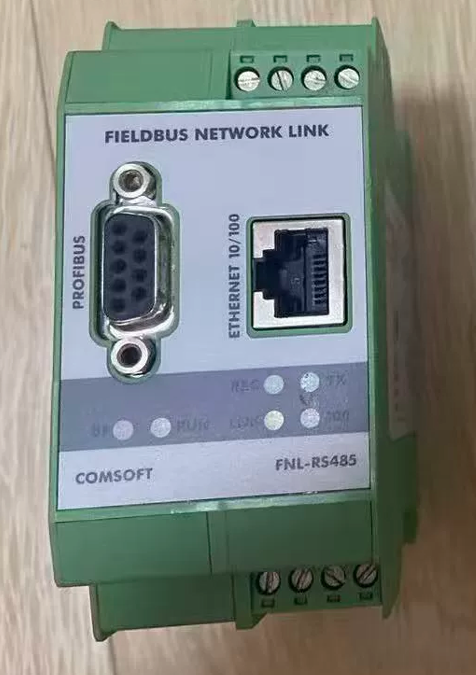
COMSOFT FNL-RS485 Ethernet Gateway
- تعريف النموذج الأساسي
ماركة: COMSOFT, ألمانيا (Original manufacturer of industrial fieldbus protocol gateways)
FNL: Fieldbus Network Link Fieldbus Gateway
RS485: DB9 connector for PROFIBUS DP (Not a standard Modbus-RS485 serial server)
تحديد موضع المنتج: DIN-rail mounted protocol conversion gateway between Ethernet TCP/IP and PROFIBUS DP
- Hardware Interfaces & Pin Definitions
2.1 Front Panel Interface Layout
- RJ45 10/100M Ethernet Port (ETH)
- DB9 Male PROFIBUS DP RS485 Bus Port
- Terminal Block DC24V Power Supply
- RS232 Service Port (For configuration and firmware upgrade)
- Status Indicators: PWR, ETH LINK, BUS, ERR
2.2 Standard PROFIBUS DB9 Pinout
| رقم الدبوس. | إشارة | وصف |
| 3 | ب (Rx/Tx-) | Data Negative |
| 8 | أ (Rx/Tx+) | Data Positive |
| 6 | 5في العاصمة | Power supply for bus terminating resistor |
| 5 | 0V | Isolated Ground |
2.3 Power Specifications
DC 24V ±20%, power consumption ≤3W, حماية قطبية عكسية; DIN35 snap-on rail mounting.
- Core Protocol Functions (Two Operation Modes)
وضع 1: Gateway as PROFIBUS DP Master (Class1/Class2)
Host computers, PLCs or touch panels on the Ethernet side read all I/O data of DP slaves via Modbus TCP.
Supports complete DP/DPV1 protocols with baud rates ranging from 9.6 kbps to 12 ميغابت في الثانية
A single DP bus supports up to 32 slave devices, compatible with inverters, encoders, remote I/O modules and transmitters
Automatically maps DP input/output areas to Modbus TCP holding registers without manual offset conversion
Supports FDT/DTM device diagnosis and reading of DP slave fault codes
وضع 2: Gateway as PROFIBUS DP Slave
Siemens S7-300/400/1500 DP master PLCs connect to Ethernet Modbus TCP devices (IoT platforms, SCADA systems, host computers) via the FNL gateway.
Three Communication Services on the Ethernet Side
- Modbus TCP Slave (الأكثر استخداما): Third-party systems directly read and write PROFIBUS data
- Transparent TCP Socket Transmission: Secondary development with C/Python/LabVIEW to send and receive raw PROFIBUS messages
- Web Configuration Page: Modify IP address, bus parameters, I/O mapping and perform fault diagnosis via web browser
- Key Electrical & المواصفات البيئية
| غرض | المواصفات الفنية |
| العزل الكهربائي | Galvanic isolation between Ethernet and PROFIBUS to resist interference from inverters |
| إيثرنت | 10/100M Base-T, DHCP/static IP, auto MDI/MDI-X |
| درجة حرارة التشغيل | Industrial wide temperature range: -20درجه مئوية ~ +70 درجه مئوية |
| Terminating Resistor | 120Ω resistor must be enabled at both ends of the DP bus (via DIP switch on DP connector) |
| الشهادات | م, UL industrial certifications |
| رمز النظام المنسق | 853810 (Electrical control components) |
- Supporting Configuration Software – CONFIGURATOR II
- Windows compatible (Win7/10/11, .NET Framework required)
- الوظائف الرئيسية:
Scan all FNL gateways in local area network and modify IP addresses
Import GSD files to construct PROFIBUS bus topology
Configure DP master/slave mode, baud rate and cycle time
Visual mapping between DP I/O areas and Modbus TCP registers
Online diagnosis of bus faults, offline slaves and communication error counters
- Supporting FDT DTM: Integrate with TIA Portal, EPLAN and Anybus toolchains for device asset management
- Typical Application Topologies
سيناريو 1: Retrofit for Host Computers Without PROFIBUS Cards
جهاز كمبيوتر / SCADA Software (مودبوس تكب) → Switch → FNL-RS485 (موانئ دبي ماستر) → PROFIBUS DP Inverters / وحدات الإدخال/الإخراج
سيناريو 2: Siemens DP PLC Connecting to IoT Platforms
S7-300 DP Master → FNL-RS485 (DP Slave) → Ethernet → Industrial Gateway / Cloud Platform
سيناريو 3: LabVIEW Automated Testing
LabVIEW TCP Socket → FNL Gateway → PROFIBUS Test Bench Equipment
- استكشاف أخطاء المصفوفة وإصلاحها
| ظاهرة الخلل | السبب الجذري | حل |
| PWR indicator off | انخفاض الجهد / reversed polarity of 24V power supply | Swap positive and negative power lines; measure actual voltage ≥19V |
| Flashing BUS indicator & intermittent communication | Reversed A/B wiring; no terminating resistor on bus | Swap Pin 3 and Pin 8 of DB9 connector; enable 120Ω resistors at both bus ends |
| Gateway undetected by PC | Mismatched IP subnet; damaged Ethernet cable | Set static IP on PC within the same subnet; replace cable and restart gateway |
| Failed Modbus TCP data reading | Incorrect I/O mapping address; offline DP slave | Verify I/O mapping in software; troubleshoot DP bus power supply section by section |
| Steady red ERR indicator | Short circuit on DP bus; inconsistent baud rates among devices | Disconnect bus for sectional troubleshooting; unify baud rate for all devices |
- Model Differentiation Within the Same Series
- FNL-RS485: General-purpose gateway for conversion between Ethernet and PROFIBUS DP (RS485)
- FNL-PA: Gateway for conversion between Ethernet and PROFIBUS PA (Intrinsically safe fieldbus)
- FNL Proxy PN/PB: Conversion gateway between PROFINET IO and PROFIBUS DP
- Domestic Compatible Alternative Solutions
- Anybus AB7000 Series (Ethernet to PROFIBUS DP Gateway)
- Hongke HK-PB-ETH Economical DP-to-Ethernet Gateway

