 Schütz,Leistungsschalter,Sensor,Encoder,SPS,Konverter

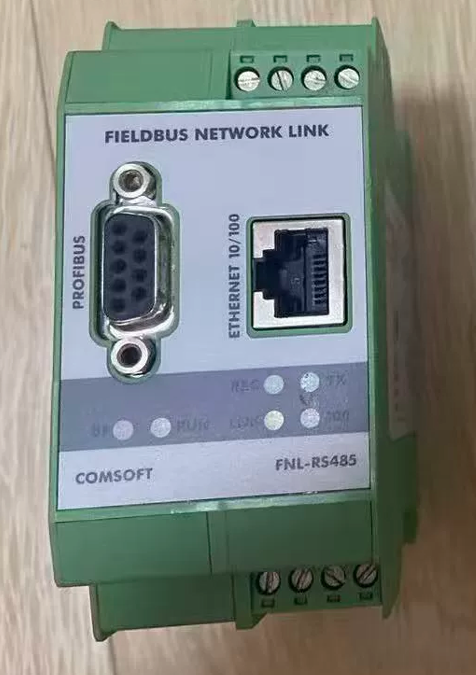
COMSOFT FNL-RS485 Ethernet-Gateway
- Grundlegende Modelldefinition
Marke: COMSOFT, Deutschland (Originalhersteller von industriellen Feldbus-Protokoll-Gateways)
FNL: Feldbus-Netzwerk-Link-Feldbus-Gateway
RS485: DB9-Stecker für PROFIBUS DP (Kein standardmäßiger serieller Modbus-RS485-Server)
Produktpositionierung: Auf der DIN-Schiene montiertes Protokollkonvertierungs-Gateway zwischen Ethernet TCP/IP und PROFIBUS DP
- Hardware-Schnittstellen & Pin-Definitionen
2.1 Layout der Frontplattenschnittstelle
- RJ45 10/100M Ethernet-Port (ETH)
- DB9-Bus-Port für den PROFIBUS DP RS485-Stecker
- Klemmenblock DC24V-Stromversorgung
- RS232-Service-Port (Zur Konfiguration und Firmware-Aktualisierung)
- Statusanzeigen: PWR, ETH-LINK, BUS, ERR
2.2 Standard-PROFIBUS DB9-Pinbelegung
| Pin-Nr. | Signal | Beschreibung |
| 3 | B (Rx/Tx-) | Daten negativ |
| 8 | A (Rx/Tx+) | Daten positiv |
| 6 | 5In DC | Spannungsversorgung für Busabschlusswiderstand |
| 5 | 0V | Isolierter Boden |
2.3 Leistungsangaben
DC 24 V ±20 %, Stromverbrauch ≤3W, Verpolungsschutz; DIN35-Schienenmontage mit Schnappbefestigung.
- Kernprotokollfunktionen (Zwei Betriebsmodi)
Modus 1: Gateway als Profibus-DP-Master (Klasse1/Klasse2)
Host-Computer, SPS oder Touchpanels auf der Ethernet-Seite lesen alle I/O-Daten von DP-Slaves über Modbus TCP aus.
Unterstützt vollständige DP/DPV1-Protokolle mit Baudraten von 9.6 kbps zu 12 Mbit/s
Ein einzelner DP-Bus unterstützt bis zu 32 Slave-Geräte, kompatibel mit Wechselrichtern, Encoder, Remote-I/O-Module und Sender
Ordnet DP-Eingabe-/Ausgabebereiche automatisch den Modbus-TCP-Halteregistern zu, ohne dass eine manuelle Offset-Konvertierung erforderlich ist
Unterstützt die FDT/DTM-Gerätediagnose und das Lesen von DP-Slave-Fehlercodes
Modus 2: Gateway als Profibus-DP-Slave
Siemens S7-300/400/1500 DP-Master-SPS stellen eine Verbindung zu Ethernet-Modbus-TCP-Geräten her (IoT-Plattformen, SCADA-Systeme, Host-Computer) über das FNL-Gateway.
Drei Kommunikationsdienste auf der Ethernet-Seite
- Modbus TCP-Slave (Am häufigsten verwendet): Drittsysteme lesen und schreiben direkt Profibus-Daten
- Transparente TCP-Socket-Übertragung: Sekundäre Entwicklung mit C/Python/LabVIEW zum Senden und Empfangen von Roh-PROFIBUS-Nachrichten
- Webkonfigurationsseite: IP-Adresse ändern, Busparameter, E/A-Zuordnung und Durchführung einer Fehlerdiagnose über einen Webbrowser
- Schlüsselelektrik & Umweltspezifikationen
| Artikel | Technische Spezifikation |
| Elektrische Isolierung | Galvanische Trennung zwischen Ethernet und Profibus zum Schutz vor Störungen durch Wechselrichter |
| Ethernet | 10/100M Base-T, DHCP/statische IP, Auto-MDI/MDI-X |
| Betriebstemperatur | Großer industrieller Temperaturbereich: -20℃ ~ +70℃ |
| Abschlusswiderstand | 120An beiden Enden des DP-Busses muss ein Ω-Widerstand aktiviert sein (über DIP-Schalter am DP-Stecker) |
| Zertifizierungen | CE, UL-Industriezertifizierungen |
| HS-Code | 853810 (Elektrische Steuerungskomponenten) |
- Unterstützende Konfigurationssoftware – CONFIGURATOR II
- Windows-kompatibel (Win7/10/11, .NET Framework erforderlich)
- Hauptfunktionen:
Scannen Sie alle FNL-Gateways im lokalen Netzwerk und ändern Sie die IP-Adressen
Importieren Sie GSD-Dateien, um die PROFIBUS-Bustopologie zu erstellen
Konfigurieren Sie den DP-Master/Slave-Modus, Baudrate und Zykluszeit
Visual mapping between DP I/O areas and Modbus TCP registers
Online diagnosis of bus faults, offline slaves and communication error counters
- Supporting FDT DTM: Integrate with TIA Portal, EPLAN and Anybus toolchains for device asset management
- Typical Application Topologies
Szenario 1: Retrofit for Host Computers Without PROFIBUS Cards
PC / SCADA Software (Modbus TCP) → Switch → FNL-RS485 (DP-Master) → PROFIBUS DP Inverters / I/O-Module
Szenario 2: Siemens DP PLC Connecting to IoT Platforms
S7-300 DP Master → FNL-RS485 (DP Slave) → Ethernet → Industrial Gateway / Cloud Platform
Szenario 3: LabVIEW Automated Testing
LabVIEW TCP Socket → FNL Gateway → PROFIBUS Test Bench Equipment
- Fehlerbehebungsmatrix
| Fehlerphänomen | Grundursache | Lösung |
| PWR indicator off | Unterspannung / reversed polarity of 24V power supply | Swap positive and negative power lines; measure actual voltage ≥19V |
| Flashing BUS indicator & intermittierende Kommunikation | Vertauschte A/B-Verkabelung; Kein Abschlusswiderstand am Bus | Pin tauschen 3 und Pin 8 des DB9-Steckers; Aktivieren Sie 120-Ω-Widerstände an beiden Busenden |
| Gateway wird vom PC nicht erkannt | Nicht übereinstimmendes IP-Subnetz; beschädigtes Ethernet-Kabel | Legen Sie eine statische IP auf dem PC innerhalb desselben Subnetzes fest; Ersetzen Sie das Kabel und starten Sie das Gateway neu |
| Das Lesen der Modbus TCP-Daten ist fehlgeschlagen | Falsche E/A-Zuordnungsadresse; Offline-DP-Slave | Überprüfen Sie die E/A-Zuordnung in der Software; Beheben Sie die Fehler in der DP-Bus-Stromversorgung Schritt für Schritt |
| Ständig rote ERR-Anzeige | Kurzschluss am DP-Bus; Inkonsistente Baudraten zwischen Geräten | Trennen Sie den Bus zur abschnittsweisen Fehlerbehebung; Baudrate für alle Geräte vereinheitlichen |
- Modelldifferenzierung innerhalb derselben Serie
- FNL-RS485: Universelles Gateway zur Konvertierung zwischen Ethernet und Profibus DP (RS485)
- FNL-PA: Gateway zur Konvertierung zwischen Ethernet und Profibus PA (Eigensicherer Feldbus)
- FNL-Proxy PN/PB: Konvertierungsgateway zwischen PROFINET IO und PROFIBUS DP
- Inländische kompatible Alternativlösungen
- Anybus AB7000-Serie (Ethernet-zu-PROFIBUS-DP-Gateway)
- Hongke HK-PB-ETH Wirtschaftliches DP-zu-Ethernet-Gateway

