 Contacteur,disjoncteur,capteur,Encodeur,API,Convertisseur

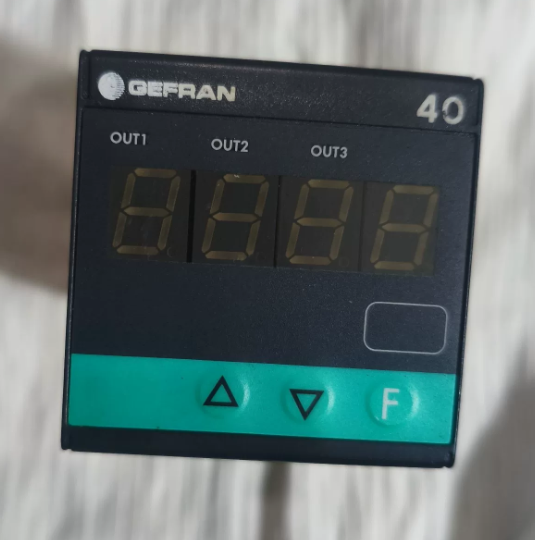
Conclusion: Le remplacement direct est réalisable. Le matériel, le câblage et les fonctions principales sont entièrement compatibles. La seule différence réside dans la version du logiciel et de conformité indiquée par le dernier chiffre, which will not affect normal operation. Below is the breakdown of model codes, differences and replacement guidelines.
- Digit-by-Digit Model Code Comparison (Only the last digit differs)
40T-48-4-00-RR-0-0-0-0 (Numéro de pièce. F000187) vs 40T-48-4-00-RR-0-0-0-1 (Numéro de pièce. F000188)
- 40T: Série (40T48 48×48 mm Indicator / Alarm Unit)
- 48: Panel dimension: 48×48 mm (1/16 DEPUIS)
- 4: 4-affichage LED à chiffres
- 00: Alimentation: 100…240 V AC/DC
- FR: Sortir 1 & Sortir 2: Dual relays (5UN / 250 V et)
- 0: 3ème sortie / Entrée numérique / Transmitter output: Aucun
- 0: Interface de communication / 4th output: Aucun
- 0: Reserved bit
- Dernier chiffre: 0 = Legacy software / Version de base; 1 = Updated software / Compliance certified version (CE, UL, etc.)
- Différences clés
Identical hardware: Disposition des terminaux, dimensions de montage, power supply range, relay contact specifications and input types (Universal input: TC/RTD/Linear signal) are exactly the same. No wiring modification required.
Fonctions identiques: Both support 3 alarm points, on-panel/software programming and parameter password protection. The only distinction is the firmware version and compliance certification. The version ending with 1 is the updated fully compatible firmware.
Numéros de pièces: Model ending with 0 = F000187; Model ending with 1 = F000188.
- Recommandations de remplacement & Remarques
- ✅ Direct replacement: Fully compatible in terms of installation, wiring and terminal definition. No rewiring needed.
- ⚠️ Mandatory operation: Reconfigure parameters (type d'entrée, measuring range, alarm threshold, differential gap, etc.) after replacement. The new firmware is fully compatible with legacy parameter logic.
- Special scenario: If the original equipment requires traceability of special compliance certifications (par exemple. matching UL/CE documents), verify whether strict model consistency is required on site. For general functional use, no issues will occur.
Quick Reference for Replacement: DANGER40T-48-4-00-RR-0-0-0-0 / 40T-48-4-00-RR-0-0-1
- Full Model Code Explanation (Only the last digit differs)
| Segment de code | Contenu | Description | Consistency Between Two Models |
| 1 | 40T | Série de produits: 40T Digital Alarm Controller | Entièrement identique |
| 2 | 48 | Panel Size: 48×48 mm (1/16 Votre norme) | Entièrement identique |
| 3 | 4 | Afficher: 4-digit LED Digital Tube | Entièrement identique |
| 4 | 0 | Alimentation: Wide voltage 100~240 V AC/DC | Entièrement identique |
| 5 | FR | Configuration de sortie: Two independent relay alarm outputs | Entièrement identique |
| 6 | 0 | 3ème sortie / Entrée numérique / Transmitter output: Aucun | Entièrement identique |
| 7 | 0 | Communication port / 4th output: Aucun | Entièrement identique |
| 8 | 0 | Hardware reserved bit: Disabled reserved functions | Entièrement identique |
| 9 | 0 / 1 | Micrologiciel & Compliance Version: | Only difference |
| 0 = Basic firmware | |||
| 1 = Updated firmware (CE/UL certified) |
> Conclusion fondamentale: 100% compatibility in hardware structure, electrical specifications, terminals and functional pins. Direct replacement is supported.
- Spécifications techniques générales (Identical for both models)
| Article | Spécification |
| Dimension de montage | 48×48 mm panel, standard DIN cutout |
| Operating Power | 100 ~ 240 V CA/CC, Power consumption < 3 Virginie |
| Measuring Input | Type universel: Thermocouple (K/J/S/T), Pt100 RTD, linear voltage/current analog signal |
| Display Accuracy | ±0,2% FS, Sampling rate: 10 fois par seconde |
| Sortie relais (FR) | 2-channel passive normally open contacts, Évaluation des contacts: 5UN / 250 V et |
| Température de fonctionnement | 0 ~ +50 ℃ |
| Protection contre la pénétration | Panneau avant: IP65; Terminal side: IP20 |
| Rigidité diélectrique | Withstand voltage 2000 V AC between input, sortie et alimentation |
- Terminal Pin Definition (Universal for on-site wiring, no rewiring)
Standard terminal block on the rear of the device, total 8 bornes. Terminal layout and functions are fully identical for both models.
| Numéro de borne. | Fonction | Instructions de câblage | Remarques |
| 1 | Power L / + | AC Live / DC Positive | Power input |
| 2 | Power N / – | AC Neutral / DC Negative | Power input |
| 3 | Measuring Input + | Sensor signal positive | Connect to thermocouple/RTD/analog output |
| 4 | Measuring Input – | Sensor signal negative | Common end of signal loop |
| 5 | Alarm Relay 1 AUCUN contact | 1st alarm output | Corresponds to the 1st alarm logic |
| 6 | Alarm Relay 1 Commun | Common terminal of Relay 1 | Passive contact, non polaire |
| 7 | Alarm Relay 2 AUCUN contact | 2nd alarm output | Corresponds to the 2nd alarm logic |
| 8 | Alarm Relay 2 Commun | Common terminal of Relay 2 | Passive contact, non polaire |
Supplément: This model has no transmitter output or communication port, and all terminals are fully utilized. Wire strictly in accordance with the above table.
- Panel Keys & Step-by-Step Parameter Configuration (Mandatory after replacement)
Description de la clé
`SET`: Entrer dans le menu / Confirm parameter / Switch menu level
`▲/▼`: Ajuster la valeur / Switch options
`◀`: Shift digit / Return to previous menu
Complete Configuration Steps (General for field application)
Étape 1: Enter Programming Mode
Press and hold `SET` for 3 seconds to enter parameter setting interface. For some units, enter the factory default password 0000 and press `SET` to confirm.
Étape 2: Set Input Signal Type (Core setting)
- Locate parameter `In.Ty` (Type d'entrée)
- Use `▲/▼` to select the sensor type:
`K`: K-type Thermocouple
`Pt`: Pt100 RTD
`0-10`: 0-10V Analog Signal
`4-20`: 4-20mA Analog Signal
- Press `SET` to save and proceed to the next item.
Étape 3: Set Measuring Range
- `Lo`: Set Lower range limit
- `Hi`: Set Upper range limit
- Adjust according to actual process range, then press `SET` to confirm.
Étape 4: Configure Dual Alarm Relays (Corresponding to RR outputs)
- `AL1`: 1st alarm value (for Relay on Terminal 5/6)
- `dF1`: Differential gap of 1st alarm (to prevent frequent relay switching, recommended value: 0.5~2.0)
- `AL2`: 2nd alarm value (for Relay on Terminal 7/8)
- `dF2`: Differential gap of 2nd alarm
- Select alarm mode: High limit alarm / Low limit alarm as required.
Étape 5: Save Parameters & Exit
After all settings are completed, press `◀` repeatedly to return to the main interface. Parameters will be saved automatically.
To lock parameters against accidental modification: Locate `P.cod` and set a custom password.
- On-site Check List after Replacement (Check item by item to avoid faults)
Inspection avant la mise sous tension
- Montage mécanique: Secure the instrument on the panel without looseness; cutout size complies with 48×48 mm.
- Vérification du câblage: Vérifier la puissance, sensor and relay circuits per terminal table; ensure no loose connection, wrong wiring or short circuit.
- Power confirmation: On-site power supply is 100~240 V AC/DC within rated range.
Post-power-on Inspection
- Test de mise sous tension: 4-digit LED lights up normally, no black screen or flickering.
- Signal verification: Compare real-time reading with actual sensor value; ensure deviation is within allowable range.
- Alarm test: Simulate over-limit conditions manually; confirm two relays actuate/de-energize normally and external loads work properly.
- Parameter recheck: Keep range, alarm values and differential gap consistent with original settings.
Compliance Check (Execute as required)
General industrial sites / No certification traceability required: No extra operation needed.
Équipement d'exportation / Strict model & certificate consistency required: The new model ending with 1 is the certified version with complete CE/UL documents for filing.
- Défauts courants & Troubleshooting after Replacement
| Phénomène de défaut | Causes possibles | Solutions |
| Aucun affichage après la mise sous tension | 1. Reversed/loose power wiring | Resserrer les bornes, measure input voltage and restore rated power supply |
| 2. Supply voltage out of range | ||
| Fluctuating / Inaccurate readings | 1. Poor sensor connection | Reconnect sensor cables and verify In.Ty parameter |
| 2. Wrong input type selected | ||
| Normal reading but relay no action | 1. Incorrect alarm value | Recheck AL1/AL2 thresholds and switch alarm mode |
| 2. Wrong alarm mode selected | ||
| Relay switches frequently | Excessively small differential gap | Increase dF1/dF2 value |
| Parameters reset automatically | Failed to exit menu completely / Stuck panel keys | Fully exit setting interface and clean foreign matters on keys |
- Notes complémentaires
- Firmware compatibility: The updated firmware (ending with 1) is fully backward compatible with legacy parameter logic, with no function reduction or protocol mismatch.
- Spare parts procurement: Both models are interchangeable for reordering. The updated version ending with 1 is recommended for wider certification coverage.
- Long-term operation: The two models have identical service life and load capacity, and require no differentiated maintenance standards.

