접촉기,회로 차단기,감지기,인코더,PLC,변환기

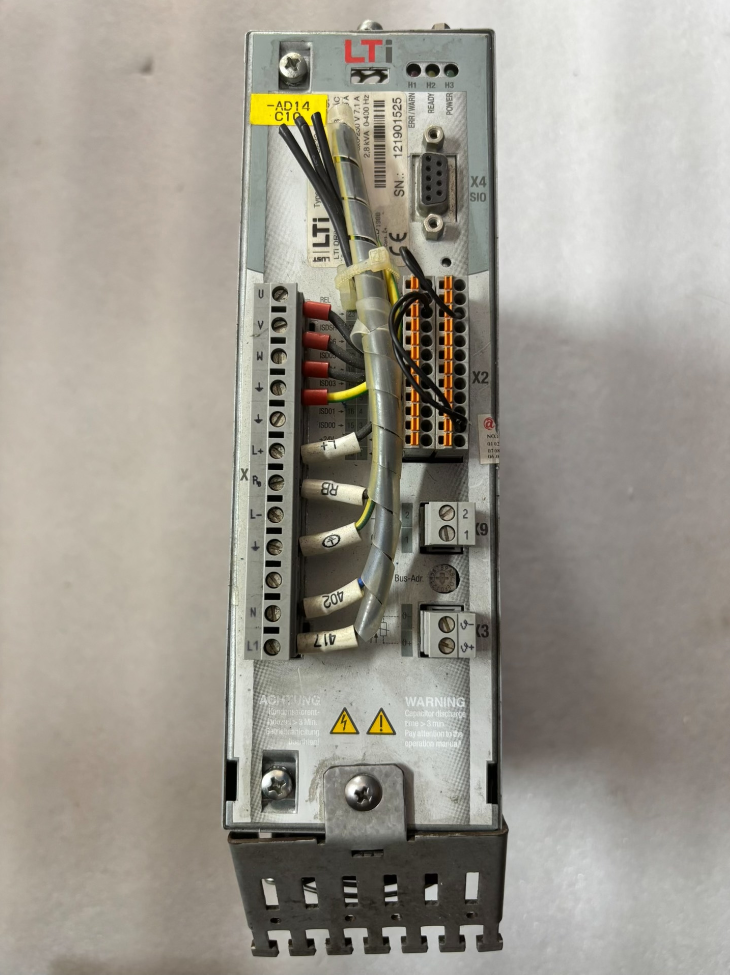

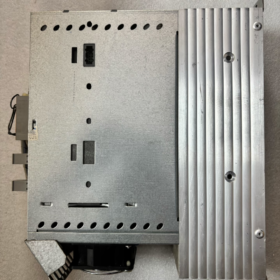
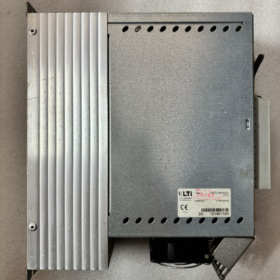
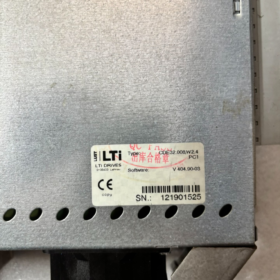
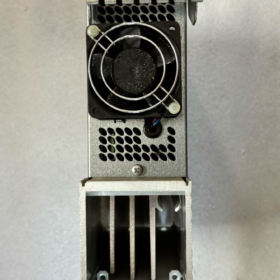
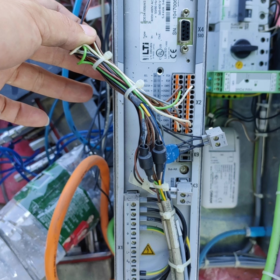
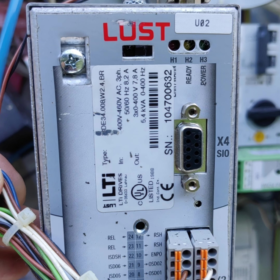
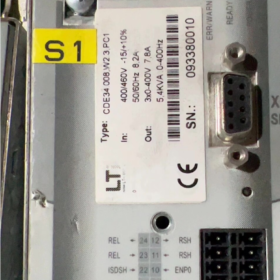
색욕 (독일), 나중에 KEBA에 인수됨. CDE3000 시리즈는 완전히 단종되었습니다., 새로운 잉여 재고 또는 리퍼브 제품만 시장에 나와 있음.
- 모델 코드 분석
CDE32.008.W2.4
- CDE: Product Series → CDE3000 compact 서보 드라이브 (범용 서보, 동기/비동기 모터 지원, 내장 제동 트랜지스터)
- 32: 전압 클래스 코드
32 = 1/3상 AC230V (200…240V)
34 = AC400V급
- 008: Current Rating → Continuous rated output current 7.1A, compatible with ~1.5kW servo motors
- 여: Firmware branch (W platform, distinguished from early C-firmware platform)
- 2.4: Firmware Version V2.4
Common complete order suffix: CDE32.008.W2.4.PC1
PC1 = Standard CANopen (DSP402) 통신 인터페이스; Profibus and other expansion cards optional
- 핵심 전기 사양
| 목 | 사양 |
| 입력 전원 공급 장치 | 1~3-phase AC200–240V 50/60Hz |
| 정격 출력 전류 | 7.1 에이 (마디 없는) |
| Peak Output Current | 14.2 에이 (2× overload capacity) |
| 호환 모터 | Permanent magnet synchronous servo motors / Asynchronous inverter-duty motors |
| 제어 모드 | Position loop, speed loop, torque loop; pulse command & fieldbus control supported |
| 인코더 인터페이스 | 증분 인코더 (TTL/RS422); resolver module optional |
| Built-in Braking | Integrated braking transistor, external braking resistor required |
| 디지털 I/O | 8에서 / 2~하다, ±10V analog input, 릴레이 출력 |
| 통신 표준 | Standard CANopen DSP402; Profibus-DP expandable |
| 냉각방식 | Base plate mounting cooling |
| 작동 주변 온도 | 0℃~+40℃ (캐비닛 설치), 결로금지 |
| 보호 등급 | IP20 (for cabinet internal use) |
- Overview of Hardware Interfaces
X1: Main power input L/N/PE; motor output U/V/W
X2: Control terminal block (불평, 아날로그 신호, enable, 비상 정지)
X4: Keypad port for KP200; communication port for commissioning software
X5: Encoder feedback interface
X9: Motor brake drive (24V brake coil)
외부 액세서리: 제동 저항기, KP200 operator panel, commissioning cable, SmartCard parameter memory card
- 시운전 소프트웨어
소프트웨어 이름: DriveManager (formerly LUST ServoManager)
Supports firmware read/write, parameter download, oscilloscope, electronic gear configuration
Compatible with all W2.0~W2.4 firmware versions; communication via RS232 / USB-to-RS232 cable
- 정지 & 교체 솔루션
⚠️ Original manufacturer ceased production of the CDE3000 series; no direct OEM replacement model available
옵션 1: Same-series spare parts (priority for maintenance)
Interchangeable equivalent: CDE32.008 with any W2.x firmware (W2.2/W2.3/W2.4 mutually compatible; parameters require re-downloading)
메모: CDE32.008 ≠ CDA32.008; hardware pinouts are incompatible, direct replacement not allowed!
옵션 2: KEBA new-generation replacement (complete machine retrofit)
After KEBA acquired LUST, corresponding platform: KeDrive D3 Series
권장 동급 모델: KeDrive D3-230/A008 (AC230V, 7.5A클래스)
위험: 단자배선, software and parameter structures are completely different. Wiring and PLC program reconstruction required; plug-and-play replacement impossible
- 일반적인 오류 코드 (Universal for CDE3000)
| 오류 코드 | 의미 | Typical Causes |
| E-OC | 과전류 | 모터 단락, insulation damage to ground, 모터 실속, 전원 모듈 오류 |
| E-OV | DC 버스 과전압 | No braking resistor during deceleration, 높은 관성 부하 |
| E-UV | DC 버스 저전압 | 입력 단계 누락, supply voltage drop |
| E-ENC | Encoder Fault | Broken encoder cable, 잘못된 배선, faulty encoder |
| E-CPU | System Firmware Error | Corrupted parameters, 메인보드 결함; attempt factory parameter reset |
| E-TMP | Drive Overheat | 열 방출 불량, 과도한 주변 온도 |
- 선택 함정 지침
- Do not confuse CDE / CDB / CDA: Hardware of the three series is mutually incompatible;
- Parameter files of W-firmware and C-firmware drives cannot be interchanged;
- If original unit is CDE32.008.W2.4.PC1, replacement must be equipped with PC1 (CANopen);
- Built-in braking transistor cannot operate without load; matched braking resistor is mandatory;
- For second-hand drives, confirm firmware version first. Outdated firmware may be incompatible with original equipment parameters.
Complete List of Host PC Software for LUST CDE32.008.W2.4 Servo Drive
Two categories must be distinguished:
1) OEM Commissioning Software: 매개변수 튜닝, 펌웨어 업그레이드, oscilloscope, 결함 진단 (특수목적; 정상적인 생산 중에는 장비를 제어할 수 없습니다.)
2) 생산 호스트 제어 소프트웨어: PLC / 산업용 제어 소프트웨어 / 실시간 자동화 생산 제어를 위한 HMI 구성 소프트웨어 (필드버스 또는 펄스 명령을 통해)
드라이브 펌웨어: W2.4 (W 펌웨어 플랫폼), 이전 C 펌웨어 플랫폼용 소프트웨어와 호환되지 않음.
- 공식 전용 시운전 소프트웨어 (OEM 도구만)
- DriveManager (이전 ServoManager) [필수적인]
✅ 호환 버전 요구 사항
최소 버전: V3.40 이상; V3.50 / V3.60 권장
⚠️ DriveManager V3.80은 최신 ServoC 및 KeDrive 플랫폼용으로 개발되었습니다.. CDE3000과의 최적의 호환성을 위해 V3.50을 사용하십시오. (W2.4).
❌ WinConfig는 지원되지 않습니다! WinConfig는 C-펌웨어 CDA 시리즈에서만 작동하며 CDE-W 시리즈에는 연결할 수 없습니다.
통신 연결 방법
X4 터미널: RS232 직렬 포트 (DB9 시운전 케이블) PC COM 포트에 직접 연결; USB-RS232 어댑터 사용 가능, 절연형 컨버터 권장
기본 USB 포트 없음; 드라이브에 대한 직접 USB 연결은 지원되지 않습니다.
핵심 기능
모터 식별, 3루프 PID 튜닝, 매개변수 업로드/다운로드/저장 매개변수 파일
펌웨어 읽기/쓰기 업그레이드 (W2.4를 포함한 모든 W2.x 펌웨어 지원)
내장형 추적 오실로스코프, 전류/위치/속도 실시간 모니터링, 고장 이력 읽기
전자 기어링, 원점 복귀 모드, 리미트 스위치, CANopen 매개변수 구성
지원되는 OS: 윈도우XP / 윈7 / 윈10 (32/64-조금); Win11에는 부분 빌드를 위한 호환성 모드가 필요합니다.
- 로컬 운영자 패널 (기본 HMI, PC 기반 소프트웨어가 아닌)
KP200 / KP300 휴대용 조작반, X4에 연결됨. 로컬 수동 시운전에만 해당; 원격 PC 제어 불가.
- 생산 호스트 제어 소프트웨어 (정상적인 장비 작동을 위해)
CDE32.008.W2.4 (PC1 버전 = 표준 CANopen DS402) 두 개의 제어 채널을 지원합니다:
① CANopen 필드버스 제어; ② 펄스 방향 + 아날로그 제어
(1) CANopen 기반 호스트 제어 소프트웨어 (DS402 프로토콜)
드라이브는 표준 CiA301/CiA402 CANopen을 구현합니다., 컨트롤러 브랜드와 무관한 프로토콜
- 코드시스 V3
CANopen Manager 애드온 포함; 위치/속도/토크 제어를 위해 LUST CDE3000 EDS 파일 가져오기
해당되는: 벡호프, 혁신, 피닉스컨택트, 어드밴텍 및 기타 소프트 PLC 산업용 PC
- TIA 포털 (지멘스 PLC)
CANopen 통신 모듈과 페어링된 S7-1200/1500, EDS 파일을 통해 구성됨
- GX웍스 / GX 웍스3 (미쓰비시)
CANopen 마스터 모듈이 있는 Q/L/R 시리즈
- 모션웍스, 오픈PCS (실시간 모션 컨트롤러)
- 케바 켐로 스튜디오 (KEBA 컨트롤러, LUST 드라이브와 기본적으로 호환 가능)
- 일반 CANopen 모니터링 도구 (시운전만 가능, 장기적인 생산 관리를 위한 것이 아님)
CANalyzer, 침상, CANExplorer, IXXAT CanOpen 모니터
목적: 버스 메시지 모니터링, 문제 해결을 위한 SDO 읽기/쓰기. 프로덕션 호스트 제어 소프트웨어로는 적합하지 않음
중요사항: CDE3000은 기본 EtherCAT을 지원하지 않습니다.; EtherCAT 통신 시도가 실패합니다.!
(2) Profibus-DP 확장 버전 (옵션 CM-DPV1 인터페이스 카드 포함)
드라이브에 Profibus 모듈이 장착된 경우, 호환 가능:
TIA 포털, GX웍스, Profibus 마스터 스테이션을 지원하는 RSLogix 및 기타 소프트웨어
- HMI 구성 & 모니터링 소프트웨어 (간접 서보 제어)
서보에 직접 명령을 내릴 수 없습니다; PLC를 통해 전달되는 지침
와인텍 EBPro, MCGS, 지멘스 WinCC 유연한/WinCC, 인터치, 점화
통신 경로: HMI → PLC → CANopen → CDE32.008 서보
- 중요한 제한 사항 & W2.4 펌웨어의 함정
- ❌ RS232를 통해 서보를 작동하는 전용 PC 제어 소프트웨어가 없습니다.
DriveManager 시운전 전용으로 예약된 X4 RS232. 직렬 포트 실시간 성능이 좋지 않습니다.; 생산 중에는 모션 제어에 RS232를 사용하지 마십시오.. CANopen 버스 사용 / 작동 제어를 위한 펄스 신호.
- ❌ DriveManager는 순전히 시운전용입니다.. 프로덕션 호스트 소프트웨어 역할을 할 수 없습니다.. 조그 테스트 모드만 지원, unsuitable for continuous automated operation.
- ❌ Firmware incompatibility: CDE W-firmware (W2.2/W2.3/W2.4) ≠ C-firmware; parameter files cannot be imported mutually.
- Commissioning Cable: X4 RS232 cable requires dedicated null-modem cross serial cable; straight-through cable fails communication.
- 교체 알림: CDE3000 discontinued. New KEBA KeDrive software cannot detect CDE3000 series and cannot commission this drive.
- Simplified Selection Summary
현장 시운전, 매개변수 백업, 펌웨어 업그레이드: DriveManager V3.50 (Only Option)
Automated production control: PLC software (CODESYS/TIA/GXWorks etc.) + CANopen DS402
Fieldbus troubleshooting: CANExplorer / IXXAT Tools
설치 완료 & Operation Guide for LUST DriveManager (For CDE32.008.W2.4)
중요한 전제 조건
- Recommended Software Version: DriveManager V3.50; V3.60 usable. V3.80 and higher prohibited (new KeDrive software cannot recognize CDE3000 W-firmware)
- Supported Drive: CDE32.008.W2.4 (W 펌웨어 플랫폼)
- 통신 포트: Drive X4 (RS232 commissioning port). No native USB interface; only RS232 / USB-to-RS232 available
- ❌ WinConfig supports only older C-firmware CDA series; cannot connect CDE-W series
- 하드웨어 준비 (Critical Communication Cable Specification)
1.1 X4 Commissioning Port Pin Definition (Drive Side Mini-DIN 5-pin)
| 핀 | 신호 | 설명 |
| 1 | +15다섯 | Power supply for KP200 operator panel; unused for PC commissioning |
| 2 | TxD (Drive Transmit) | → PC Serial RxD |
| 3 | RxD (Drive Receive) | → PC Serial TxD |
| 4 | NC | No connection |
| 5 | 접지 | 신호 접지 |
1.2 Wiring for Custom Commissioning Cable (Null-Modem Cross Cable)
PC DB9 Female ↔ Drive X4
DB9 Pin2 (PC TX) → X4 Pin3 (Drive RX)
DB9 Pin3 (PC RX) → X4 Pin2 (Drive TX)
DB9 Pin5 (접지) → X4 Pin5 (접지)
⚠️ Standard straight serial cable cannot establish communication! Null-modem cross cable required
Prefer FTDI chipset USB-to-RS232 adapters. Low-cost CH340 modules often suffer unstable communication.
- Software Installation Steps (Win7/Win10/Win11)
2.1 Pre-configuration for Windows
1) Enable .NET Framework 3.5 (Control Panel → Programs → Turn Windows features on or off)
2) Use only English paths for installation package; avoid folders with Chinese characters
3) Right-click `Setup.exe` and set compatibility properties:
Compatibility Mode: 윈도우 7
✅ Run this program as administrator
2.2 설치 절차
- Extract installation package and launch `Setup.exe`
- Select English language (Chinese localized versions prone to crash; English recommended for industrial commissioning)
- Install to default path, do not modify installation directory
- 설치 후, right-click desktop shortcut again to confirm: 관리자로 실행 + Win7 compatibility
- 선택 과목: Install supplementary MotorData motor database for motor identification
Common Win11 Issue: Disable Memory Integrity and driver signature enforcement to resolve serial communication anomalies.
- Communication Connection Procedure (최고 우선순위)
Step1 Hardware Power-up
- Drive main power switched on, servo enable not required
- Connect commissioning cable between PC USB-to-serial adapter and drive X4
- Open Windows Device Manager, 할당된 COM 포트 번호를 기록합니다. (예를 들어. COM3)
Step2 Configure Communication inside DriveManager
- Launch DriveManager
- Top Menu: `Communication → Connection Setup`
- Fixed parameters (unchangeable for CDE W-firmware)
인터페이스: RS232
전송 속도: 57600
COM Port: Select the COM port identified in Device Manager
8 데이터 비트, 1 정지 비트, 패리티 없음, hardware flow control disabled
- Click【Connect】to establish connection
✅ Successful Connection: Drive model `CDE32.008 W2.4` displayed on left pane with firmware version
❌ Connection Failure: See troubleshooting checklist below
- Step-by-Step Guide for Core On-site Functions
기능 1: Upload Drive Parameters (지원, Essential for Maintenance)
- Active communication established
- 메뉴: `Active device → Upload parameters`
- Select save location, use English/numbers only for file name and path
- File extension: `.par` parameter file (W-firmware file, incompatible with C-firmware drives)
Recommend creating two separate backup copies before equipment overhaul.
기능 2: Download Parameters to Drive (Restore / Servo Replacement)
- Communication online
- `Active device → Download parameters`
- Select saved `.par` backup file
- Tick required parameter categories on popup window, click Continue
- After download completes, software prompts drive restart; power cycle drive for changes to take effect
⚠️ Parameter files mutually downloadable between W2.2/W2.3/W2.4, but verify key motor parameters after download.
기능 3: 모터 식별 (First-time commissioning for new motor)
전제 조건: Motor decoupled from load and free to rotate; ensure safe working area!
- Communication active, drive powered
- 메뉴: `Setup → Motor Setup`
- Manually input nameplate data: 정격 전류, 정격 속도, pole pairs, encoder line count
- Select encoder type (TTL incremental encoder)
- Click Identification
Static Identification: Motor stationary, measures winding parameters (recommended first)
Dynamic Identification: Motor rotates at low speed for full three-loop parameter tuning
- PID parameters generated automatically after identification; save parameters to drive RAM
기능 4: Operating Mode Configuration (맥박 / 비슷한 물건 / CANopen)
`Setup → Preset Solutions`
Built-in standard templates:
TCT_1: ±10V analog torque mode
SCT_1: Analog speed mode
POT_1: Pulse-direction position mode
CAN_1: CANopen DS402 bus control (standard for PC1 version)
Select template and load for one-click initialization of control mode.
기능 5: Oscilloscope Trace (Fault Capture & Waveform Monitoring)
- `Diagnostics → Oscilloscope`
- Add monitoring variables: Actual position, command position, 속도, DC 버스 전압, 출력 전류
- Configure sampling cycle and trigger conditions (fault trigger / continuous sampling)
- Start acquisition; waveform export supported for failure analysis
기능 6: Fault Reading & 다시 놓기
- `Diagnostics → Fault buffer` to view historical fault codes and real-time data upon fault occurrence
- Fault acknowledge: `Active device → Acknowledge Faults`
기능 7: 펌웨어 업데이트 (W2.4 Flash Upgrade【High Risk】)
⚠️ No power interruption allowed during upgrade! Power loss results in unbootable drive!
- Backup all parameters before operation
- Menu `Extras → Load new firmware`
- Select CDE32 W-platform `.fw` firmware file
- Wait for writing; drive LED flashes alternately
- Automatic reboot; verify firmware version after reconnection
Only W-series firmware permitted; never flash C-firmware!
- Common Errors & Communication Failure Troubleshooting Checklist
Most frequent error: `No response from drive`
- Wrong cable type (straight cable used) → Replace with null-modem cross serial cable
- Incorrect COM port / faulty USB-to-serial driver → Change USB port and re-detect COM device
- Wrong baud rate: 반드시 57600; 9600/115200 invalid
- Drive not powered properly; control supply missing
- KP200 keypad plugged into X4! X4 cannot connect keypad and commissioning cable simultaneously; 하나만 선택하세요
- Software not launched with administrator privileges → Serial port access denied
- Serial debugging tools occupying COM port on PC; close all other serial software
- Mandatory Restrictions Specific to CDE32.008 W2.4
- DriveManager is for commissioning only; cannot serve as real-time production host software. Use CANopen / pulse command for normal operation
- W-firmware `.par` parameter files cannot be imported into C-firmware CDA drives, 그리고 그 반대
- X4 RS232 provides poor real-time performance; strictly forbidden for motion control
- Power cut during firmware upgrade corrupts Bootloader; 전문적인 수리가 필요함
- Do not open identical parameter files alternately with V3.50 and V3.80 software versions
- Avoid Chinese characters, spaces and special symbols in parameter save paths
- Standard On-site Commissioning Workflow
Drive power-up → Connect commissioning cable → Establish communication via DriveManager → Upload original parameter backup → Check fault buffer and clear alarms → Verify motor parameters / perform identification → Configure control mode (CANopen) → 속도/위치 루프 PID 조정 → 오실로스코프를 통한 시험 실행 테스트 → 매개변수 다시 저장 → 검증을 위한 전원 껐다 켜기


NH42-63-318x560.png "CHINT PC형 자동절환스위치 (ATS)NH42-63/4SZ")