 접촉기,회로 차단기,감지기,인코더,PLC,변환기

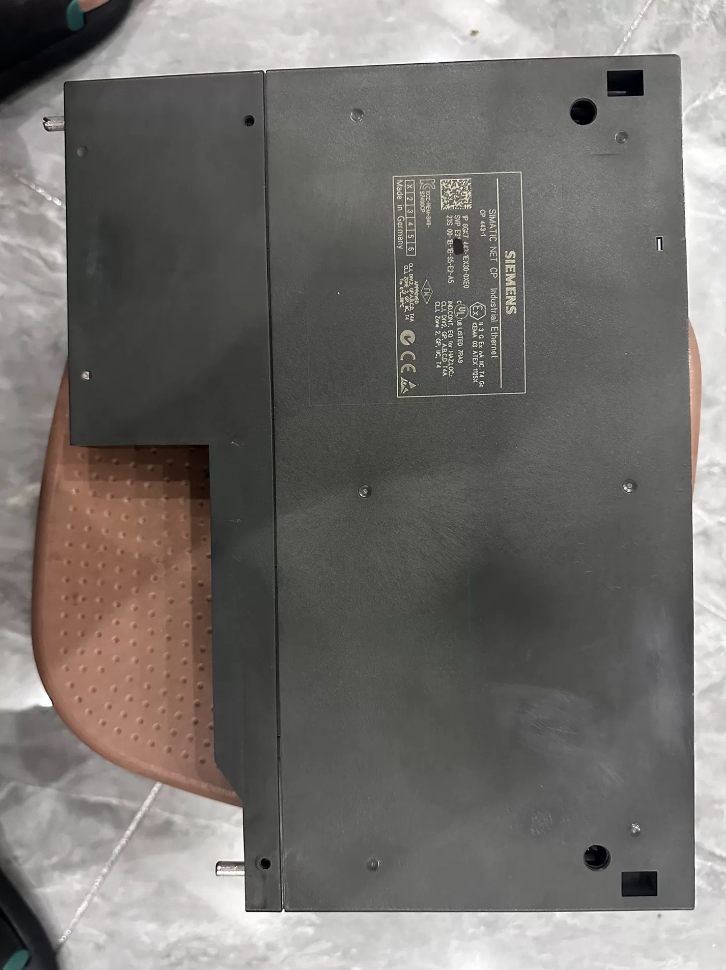

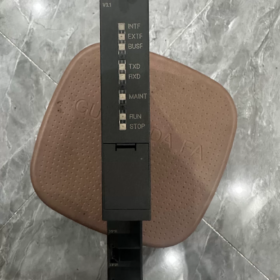
6GK7443-1EX30-0XE0은 CP입니다. 443-1 산업용 이더넷 통신 프로세서 ~의 지멘스 SIMATIC NET 시리즈. SIMATIC S7-400 및 S7-400H 중복 PLC 시스템용으로 특별히 설계되었습니다.. 이 모듈은 PLC 컨트롤러를 산업용 이더넷에 연결하고 PROFINET IO 컨트롤러 역할을 하여 분산된 현장 장치의 실시간 제어를 실현합니다..
이전 CP의 정식 업그레이드 버전으로 443-1 EX20, 2포트 실시간 이더넷 스위치를 통합하고 버스 및 링 네트워크 토폴로지를 지원합니다.. 등시성 실시간 기능이 특징입니다. (IRT) 의사소통, 미디어 중복성, IP 액세스 제어 및 확장된 진단. 중대형 자동화 시스템에서 이더넷 통신 및 PROFINET 네트워킹을 위한 핵심 통신 모듈 역할을 합니다.. 현재, S7-400 시리즈 전체가 제품 수명주기 종료에 들어갔습니다., 이 모델은 주로 유지 관리에 사용됩니다., 기존 시스템의 확장 및 장애 교체.
제품 외관
- 모델 코드 분석
전체 주문 번호: 6GK7 443-1EX30-0XE0
- 6GK7: 제품 카테고리 접두어, SIMATIC NET 산업용 통신 제품 시리즈를 대표하는 제품.
- 443: 하위 카테고리, 통신 프로세서 (CP) S7-400 시리즈 PLC 전용.
- 1: 버스 종류, 산업용 이더넷 인터페이스.
- EX30: 사양 버전 코드, 표준CP 443-1 V3.x 펌웨어 및 통합 2포트 포함 100 Mbps 실시간 스위치.
- 0XE0: 버전 식별자, 맞춤형 기능이 없는 표준 일반 산업용 버전.
- 핵심 기술 매개변수
3.1 통신 인터페이스 매개변수
| 목 | 사양 |
| 수량 & 인터페이스 유형 | 2 × RJ45 산업용 이더넷 포트, 2포트 스위치 내장 |
| 전송 속도 | 10/100 Mbps 자동 협상, 자동 크로스오버 지원 |
| 실시간 성능 | IRT 등시성 실시간 통신 지원; 최소 업데이트 주기: 250 μs |
| 링 중복 | MRP 준수 (미디어 중복 프로토콜); 링 네트워크 복구 시간 ≤ 300 ms |
| 포트 진단 | 각 포트에 대한 독립적인 LINK/ACT LED 표시기; 개별 포트 비활성화 및 수동 속도/이중 구성 지원 |
3.2 통신 프로토콜 & 성능
| 목 | 사양 |
| PROFINET 기능 | PROFINET IO 컨트롤러로 작동; 분산 I/O를 연결합니다., 주파수 변환기, 서보 드라이브 및 기타 현장 장치 |
| S7통신 | PG 프로그래밍을 위한 클라이언트 및 서버 모드 모두 지원, 여러 PLC 간의 HMI 모니터링 및 데이터 교환 |
| 열린 소통 | TCP 지원, UDP, ISO-on-TCP (RFC1006); SEND/RECEIVE 명령을 통해 타사 장치와 통신합니다. |
| 라우팅 기능 | 다양한 네트워크를 통한 프로그램 다운로드 및 장치 액세스를 위한 S7 라우팅 지원 |
| 최대 동시 연결 | 최대 64 통신 연결 |
| 패킷당 최대 데이터 크기 | ISO-on-TCP: 1452 바이트; S7통신: 8 KB |
3.3 전기 같은 & 기계적 매개변수
| 목 | 사양 |
| 전원공급장치 | 5 S7-400 백플레인 버스를 통해 공급되는 V DC; 외부 전원이 필요하지 않습니다. |
| 일반적인 전력 소비 | 대략. 7.5 여 |
| 모듈 폭 | 40 mm (S7-400용 표준 단일 너비 모듈) |
| 슬롯 점유 | 1 S7-400 랙의 슬롯 |
| 장착 방법 | 랙 백플레인 버스에 연결하고 나사로 고정합니다. |
| 순중량 | 대략. 0.45 kg |
| 보호 등급 | IP20 |
3.4 환경 & 인증 매개변수
| 목 | 사양 |
| 작동 온도 | 0℃ ~ +60℃ (수평 장착); 0℃ ~ +40℃ (수직 장착) |
| 저장 / 운송 온도 | -40℃ ~ +70℃ |
| 설치 고도 | 아래에서는 디레이팅이 필요하지 않습니다. 2000 중 |
| 오염도 | 맥스. 오염도 3 |
| 인증 | IEC 61131-2, CE, UL, cULus, FM |
- 호환 범위 & 대체 모델
4.1 호환 가능한 PLC 모델
표준 S7-400 CPU 전체 범위 (CPU 펌웨어 버전 ≥ V4.1; 이전 버전에는 펌웨어 업그레이드가 필요합니다.)
S7-400H 내결함성 중복 CPU; 중복 통신 링크를 위한 이중 CP 구성 지원
안전 관련 통신 애플리케이션을 위한 S7-400F/FH 오류 방지 CPU와 호환 가능
4.2 브랜드 내 대체 모델
동일한 시리즈 내에서 교체품 업그레이드
직접 업그레이드: 레거시 모델 6GK7443-1EX20-0XE0 및 6GK7443-1EX11-0XE0을 완전히 대체합니다.. STEP7 하드웨어 구성에서 모듈 모델을 업데이트하기만 하면 됩니다.. 모든 기본 통신 기능과 역호환되며 IRT 실시간 통신 및 MRP 링 이중화를 포함한 새로운 기능이 추가되었습니다..
고급 버전: 6GK7443-1GX30-0XE0 (CP 443-1 고급의). 장착 1 × 기가비트 이더넷 포트 및 4 × 100 Mbps 스위치 포트. 방화벽을 지원합니다, IPsec 암호화, 웹 서버, FTP, 이메일 및 기타 IT 기능, 높은 보안 및 다중 포트 네트워킹 시나리오에 이상적.
새로운 시스템을 위한 마이그레이션
Siemens 차세대 플랫폼은 SIMATIC S7-1500 시리즈입니다., 해당 이더넷 모듈 6GK7543-1AX00-0XE0 포함 (CP 1543-1).
> 메모: S7-1500 모듈은 S7-400 랙 및 백플레인 버스와 완전히 호환되지 않습니다.. 이는 전체 시스템 마이그레이션 솔루션이므로 직접적인 단일 모듈 교체는 불가능합니다..
4.3 호환성 참고 사항
V4.1보다 낮은 CPU 펌웨어를 사용하는 S7-400 시스템은 EX30 CP와 함께 작동할 수 없습니다.. 먼저 CPU 펌웨어를 V4.1 이상으로 업그레이드하십시오..
기본 IT 기능 (FTP, 웹 서버, 이메일) 이전 CP 모델에서 지원되는 기능은 표준 EX30 버전에서 제거되었습니다.. IT 기능이 필요한 경우 GX30 Advanced 버전을 선택하세요..
- 지원 액세서리 & 확장 구성요소
| 액세서리 유형 | 공통 모델 | 기능 설명 |
| C-PLUG 메모리 카드 | 6GK1900-0AB00-0AA0 | 모듈 구성 및 펌웨어 데이터를 저장합니다.. 프로그램을 다시 다운로드하지 않고도 플러그 앤 플레이 교체 가능 |
| 산업용 이더넷 케이블 | 6XV1840 시리즈 | 안정적인 현장 케이블링을 위한 표준 Cat5e 산업용 차폐 케이블 |
| 빠른 연결 플러그 | 6GK1901-1BB10-2AA0 | 신속한 현장 종료를 위한 도구가 필요 없는 RJ45 산업용 플러그 |
| 중복 동기화 키트 | S7-400H 지원 구성 요소 | 듀얼 CP 구성을 위한 중복 통신 전환 및 상태 동기화 실현 |
- 일반적인 애플리케이션 시나리오
- 매체를 위한 네트워킹 & 대형 PLC 시스템: 야금 분야의 S7-400 제어 시스템에 적용됨, 힘, 석유화학, 수처리 및 기타 산업. 이더넷 데이터 교환을 가능하게 합니다., PLC 간 원격 프로그래밍 및 디버깅, SCADA 호스트, HMI 패널 및 엔지니어링 스테이션.
- PROFINET 분산 제어: ET200 분산 I/O를 연결하는 PROFINET IO 컨트롤러 역할을 합니다., G120 주파수 변환기, V90 서보 드라이브 및 기타 현장 장치, 실시간 산업용 이더넷 제어 시스템 구축.
- 중복 제어 시스템을 위한 통신: S7-400H PLC 시스템의 듀얼 CP 중복 구성은 신뢰성이 높은 생산 시설에 대한 중단 없는 통신을 보장하기 위해 중복 통신 링크를 제공합니다..
- 여러 시스템 간의 데이터 교환: 여러 S7-400 PLC 간에 S7 데이터 통신을 구현합니다., 타사 장비 및 MES 시스템과의 TCP/IP 개방형 통신.
- 산업용 링 네트워킹: 내장된 스위치와 MRP 기능을 활용하여 버스 및 링 산업용 이더넷 네트워크 구축, 외부 스위치 사용 감소 및 네트워크 신뢰성 향상.
- 문제 해결 매트릭스
| 결함 현상 | 근본 원인 | 단계별 솔루션 |
| 모든 표시기 꺼짐, 전원을 켠 후 모듈이 시작되지 않습니다. | 1. 모듈이 완전히 삽입되지 않았습니다., 백플레인 버스 접촉 불량 | 1. 전원을 끈 후 모듈을 다시 삽입하십시오., 백플레인 커넥터가 단단히 연결되었는지 확인하고 나사를 조이세요. |
| 2. 이상 5 V 랙 전원 공급 장치 또는 결함이 있는 전원 모듈 | 2. 측정하다 5 V 백플레인 전압 및 전원 모듈 및 랙 버스 오류 문제 해결 | |
| 3. 모듈의 하드웨어 손상 | 3. 예비 모듈로 테스트; 하드웨어 손상이 확인되면 수리를 위해 보내십시오. | |
| LINK 표시등 꺼짐, 포트 연결 없음 | 1. 케이블이 끊어졌거나 RJ45 커넥터가 잘못 압착되어 있음 | 1. 예비 케이블로 교체하고 배선 순서와 압착 품질을 확인하세요. |
| 2. 원격 장치의 전원이 꺼졌거나 포트에 결함이 있습니다. | 2. 원격 장치의 전원 공급 및 포트 상태를 확인하십시오., 속도와 이중 모드가 일치하는지 확인하세요. | |
| 3. 구성에서 포트가 비활성화되었습니다. | 3. STEP7 하드웨어 구성 열기, 해당 포트를 활성화하고 구성을 다시 다운로드하십시오. | |
| PLC와 호스트 컴퓨터 사이의 통신이 중단되었습니다., 빨간색 SF 표시기가 계속 켜져 있음 | 1. IP 주소 충돌 또는 일치하지 않는 네트워크 세그먼트 | 1. PST 도구를 통해 네트워크 스캔, IP 주소를 확인하고 충돌을 제거하세요 |
| 2. 잘못된 구성 또는 최대 통신 연결 초과 | 2. 하드웨어 구성의 연결 설정을 확인하고 제한 내에서 연결 수량을 확인하세요. | |
| 3. 정체를 일으키는 네트워크 루프 또는 브로드캐스트 폭풍 | 3. 네트워크 토폴로지 검사, 중복 루프를 제거하고 MRP 링 관리를 활성화합니다. | |
| PROFINET IO 장치의 빈번한 연결 끊김 | 1. 열악한 케이블 차폐 및 심각한 현장 전자기 간섭 | 1. 차폐된 산업용 케이블을 사용하십시오., 신호 케이블과 전원 케이블을 분리하고 차폐층을 적절하게 접지하십시오. |
| 2. 전송 제한을 초과하는 과도한 버스 길이 | 2. 제어 케이블 길이 이내 100 m에 대한 100 Mbps Cat5e 케이블; 더 먼 거리를 위해 중계기를 추가하세요 | |
| 3. 너무 짧은 실시간 업데이트 주기로 인한 과도한 통신 부하 | 3. PROFINET 업데이트 주기를 적절하게 늘려 통신 부하를 줄입니다. | |
| MRP 링 네트워크 오류, 중복이 유효하지 않음 | 1. 링의 끊어진 링크 | 1. 링 네트워크의 각 세그먼트를 검사합니다., 결함이 있는 케이블이나 포트를 찾아 수리합니다. |
| 2. 잘못된 링 관리자 구성 | 2. 우선 순위 및 링 도메인을 포함한 링 관리자 설정 확인 | |
| 3. 링이 없는 장치로 인한 토폴로지 이상 | 3. 링과 호환되지 않는 장치를 제거하고 모든 링 노드가 MRP를 지원하는지 확인하세요. | |
| 빨간색 BF 표시기 깜박임, 비정상적인 버스 통신 | 1. 백플레인 버스 접촉 불량 또는 산화된 핀 | 1. 백플레인 커넥터 핀을 청소하고 모듈을 다시 삽입하십시오. |
| 2. 손상된 모듈 펌웨어 또는 CPU와 호환되지 않는 펌웨어 버전 | 2. C-PLUG 카드를 통해 펌웨어를 호환 가능한 버전으로 업데이트하세요., 또는 공장 설정을 복원하고 구성을 다시 다운로드하세요. | |
| 3. C-PLUG 카드 결함 또는 구성 데이터 손상 | 3. C-PLUG 카드 교체 및 구성 데이터 다시 쓰기 |
표시기 설명: SF = 시스템 오류 (빨간색), BF = 버스 오류 (빨간색). 각 RJ45 포트에는 녹색 LINK/ACT 표시기가 장착되어 있습니다..
비교표: CP443-1 EX30 대 EX20
6GK7443-1EX30-0XE0은 6GK7443-1EX20-0XE0의 공식적으로 지정된 업그레이드 교체품입니다.. 향상된 프로토콜 지원 및 실시간 성능으로 완전히 업그레이드된 하드웨어 아키텍처를 채택합니다.. 기본 통신 기능과 하위 호환되며 기존 모델을 직접 대체할 수 있습니다.. STEP7에서 하드웨어 구성을 업데이트하고 교체 후 프로젝트를 다시 다운로드하십시오..
핵심 매개변수 비교
| 비교항목 | 6GK7443-1EX20-0XE0 (이전 버전) | 6GK7443-1EX30-0XE0 (새 버전) |
| 하드웨어 인터페이스 | 1 × RJ45 포트 + 1 × AUI/ITP 동축 포트, 내장 스위치 없음 | 2 × 산업용 RJ45 포트, 내장형 2포트 10/100 Mbps 실시간 스위치, 버스 지원 & 링 토폴로지 |
| 펌웨어 아키텍처 | V2.x 펌웨어 | 차세대 V3.x 펌웨어 |
| 일반적인 전력 소비 | 대략. 8.6 여 | 대략. 7.5 여 (13% 전력 감소) |
| PROFINET 실시간 성능 | RT 실시간 통신만 가능; 분. 업데이트 주기: 1 ms | IRT 등시성 실시간 통신 지원; 분. 업데이트 주기: 250 μs, 고정밀 모션 제어에 적합 |
| 링 중복 | MRP 지원 없음; 외부 링 스위치 필요 | 기본 MRP 미디어 중복 프로토콜 지원; 회복 시간 ≤ 300 ms, 추가 장치가 필요하지 않습니다 |
| 최대 연결 | 32 동시 통신 연결 | 64 동시 통신 연결 (두 배의 용량) |
| IP 접근 제어 | 지원되지 않음 | 기본 액세스 제어 목록 (ACL) IP 액세스 제한 및 네트워크 보안 향상 지원 |
| 빠른 시작 | 지원되지 않음 | 빠른 시작 활성화; 모듈 초기화 시간이 다음으로 단축되었습니다. 30% |
| 프로피에너지 | 지원되지 않음 | 현장 장치의 대기 전력 관리를 위해 지원되는 PROFIenergy 프로토콜 |
| 네트워크 진단 | 기본 포트 상태 진단 | 포트 통계를 포함한 확장된 네트워크 진단, 링크 품질 모니터링 및 오류 위치 |
| 시계 동기화 | 기본 NTP 동기화 | PROFINET IRT를 위한 고정밀 클록 동기화 |
| IT 기능 (FTP/웹/이메일) | 기본 IT 기능 내장 | IT 기능이 내장되지 않은 표준 버전; IT 요구 사항에 맞게 GX30 Advanced 버전을 선택하세요. |
| C-PLUG 메모리 카드 | 지원되지 않음 | 플러그 앤 플레이 모듈 교체를 위해 지원되는 C-PLUG 카드 |
교체 시 주요 사항
- 구성 수정: 교체 후, STEP7 하드웨어 구성에서 모듈 모델을 EX30으로 변경해야 합니다., 프로젝트를 다시 컴파일하고 다운로드하십시오.. 구성 업데이트 없는 핫스왑은 허용되지 않습니다..
- CPU 펌웨어 호환성: EX20 교체에는 CPU 펌웨어 버전 제한이 없으며 모든 S7-400 CPU에서 작동합니다.. 이전 EX11/EX10에서 업그레이드하려면 CPU 펌웨어 ≥ V4.1이 필요합니다..
- 인터페이스 마이그레이션: 기존 AUI/ITP 동축 인터페이스를 사용한 경우, EX30에서 동축 포트가 제거됨에 따라 RJ45 이더넷으로 다시 배선.
- IT 기능 마이그레이션: 원래 시스템이 FTP에 의존하는 경우, 웹 서버, 이메일 알람 및 기타 IT 기능, 6GK7443-1GX30-0XE0으로 업그레이드 (고급 버전) 표준 EX30은 이러한 기능을 지원하지 않기 때문에.
- 이중화 시스템 호환성: S7-400H 시스템에서는 단일 모듈 교체가 가능합니다.. 듀얼 CP 중복 구성도 지원되며 원래 중복 통신 메커니즘과 완벽하게 호환됩니다..



NH42-63-318x560.png "CHINT PC형 자동절환스위치 (ATS)NH42-63/4SZ")



