 คอนแทคเตอร์,เบรกเกอร์,เซ็นเซอร์,ตัวเข้ารหัส,บมจ,ตัวแปลง


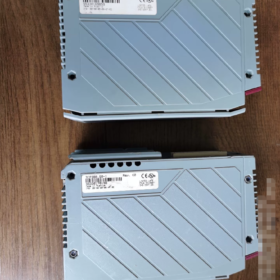
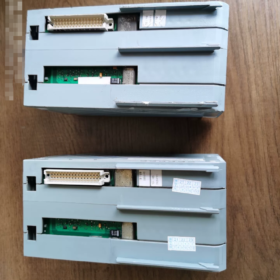
ข้อมูลพื้นฐาน
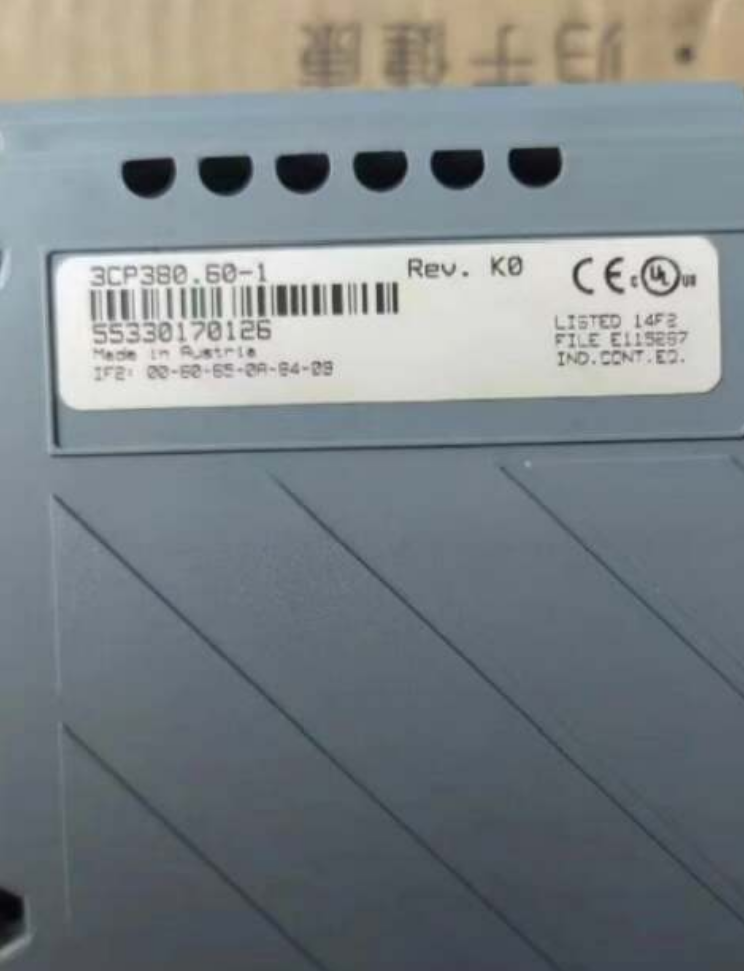
แบบอย่าง: 3CP38060-1
แพลตฟอร์ม: บี&ระบบอาร์ 2005 (ระบบ 2005 PCC โมดูลซีพียู)
สถานะสินค้า: Obsolete by Manufacturer Only spare/used units available; no new original factory supply
การวางตำแหน่ง: Mid-to-high performance x86-based PCC controller, supporting logic control and ACOPOS motion control
1 ข้อมูลจำเพาะของฮาร์ดแวร์หลัก
| รายการ | พารามิเตอร์ |
| โปรเซสเซอร์ | Intel Pentium III 500 MHz with FPU; L1 Cache: 2×16 KB, L2 Cache: 256 เคบี |
| Operating DRAM | 64 เอ็มบี (for program and task execution) |
| Battery-backed SRAM | 512 เคบี (retains process data and variables after power loss) |
| Program Storage | การ์ดคอมแพคแฟลช (สั่งแยกต่างหาก; NOT included with the module) |
| การใช้พลังงาน | ประมาณ. 16 ว (3 W @24 VDC +13 W @5 VDC, excluding aPCI expansion cards) |
| แบตเตอรี่สำรอง | บิวท์อิน 3 V lithium battery for RTC clock and SRAM data; อายุการใช้งานประมาณ. 4 ปี |
| ระบายความร้อน | การพาความร้อนตามธรรมชาติ; ระดับการป้องกัน IP20 |
| อุณหภูมิในการทำงาน | 0 ~ +55°C (ภายในตู้ควบคุม) |
| Software Environment | Automation Studio ≤ V4.0.95; Higher AS versions do NOT support System 2005 |
2 Onboard Native Interfaces
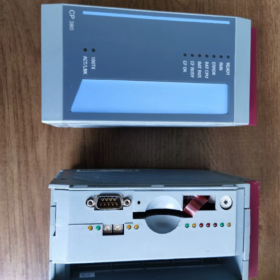
1 IF1: RS232 (9-pin Male D-SUB)
Max baud rate: 1152 กิโลบิต/วินาที; for debug communication and third-party serial communication
2 IF2: RJ45 Ethernet 10/100 เบส-ที
รองรับ Modbus TCP, ยูดีพี, Web Diagnostics, EGD; galvanically isolated
3 IF3: USB11 Type-A
Mainly used for program backup and peripherals; not recommended for permanent online debugging
4 1 × aPCI Expansion Slot
Compatible with IF7xx communication cards: โปรฟิบัส-DP, สามารถเปิดได้, Ethernet POWERLINK, ฯลฯ
Galvanic Isolation Overview
IF1 ↔ IF2: โดดเดี่ยว
IF2 ↔ IF3: โดดเดี่ยว
IF1 ↔ IF3: Non-isolated
CPU core shares non-isolated potential with IF1 and IF3
3 Front Panel LED Definition
READY: Power supply and hardware status OK
วิ่ง: User tasks executing normally
ERROR: System fault or program error
SERVICE: Low backup battery / CompactFlash card abnormality
ซีเอฟ: CompactFlash memory card status
BAT: Backup battery warning
4 รายละเอียดรหัสรุ่น
3CP38060-1
3ซีพี: ระบบ 2005 CPU series
380: Hardware grade (Pentium III 500, 64 MB DRAM version)
60: Standard variant with CF card slot and aPCI expansion
-1: การแก้ไขฮาร์ดแวร์
> Reference sibling model: 3CP38260-1 (higher specification, larger memory)
5 ฟังก์ชั่นที่รองรับ
✅ Multi-tasking PCC real-time operating system
✅ Motion control for ACOPOS servo drives
✅ Process data acquisition, complex algorithms and floating-point computation
✅ Built-in Web server for remote monitoring and diagnostics
✅ CEX bus extension for System 2005 โมดูลอินพุต/เอาท์พุต
❌ Incompatible with X20 I/O modules (different bus architecture)
6 Spare Part Replacement Solutions
ตัวเลือก 1: Direct replacement within the same platform (minimal modification, priority for maintenance retrofits)
ซีพียูที่เข้ากันได้: 3CP38260-1
หมายเหตุ: Program requires no major changes; verify CF card program image and task cycle timing Pin-to-pin plug-and-play compatible
เสี่ยง: Also obsolete; supply availability is unstable
ตัวเลือก 2: Cross-platform upgrade (long-term project migration, System2005 → X20)
Recommended new platform: X20 CPUs (X20CP1485 / X20CP1585)
⚠️ Major Modification Risks
1 Rack and all I/O modules must be fully replaced (System2005 I/O cannot connect directly to X20)
2 CEX bus eliminated; I/O communication migrated to POWERLINK; all wiring and backplanes require rework
3 Program migration and restructuring mandatory; old System2005 projects cannot be downloaded directly to X20 CPUs
4 Communication interfaces and real-time task timing need full re-commissioning
7 การคัดเลือก & Operation Pitfall Guide
1 CompactFlash Card Restrictions
Only industrial-grade standard CF cards are supported CFast / CFexpress are incompatible Recommended capacity: 32 MB ~ 512 เอ็มบี; high-capacity cards frequently cause recognition failures
2 Battery Maintenance
Risk of SRAM variable loss and RTC clock reset if equipment remains shutdown longer than 4 years Replace internal lithium battery during major overhauls
3 Critical Software Version Limit
Automation Studio V41 and newer cannot create or download projects for System2005 Keep AS V4095 available
4 aPCI Expansion Constraints
Maximum one IF7xx card per slot High-power communication cards increase total power consumption; verify cabinet power margin
5 Acceptance Checklist for Used Module Procurement
Verify CF card read/write and program boot functionality
Inspect battery voltage and check for electrolyte leakage
Test connectivity of Ethernet and serial ports
Run long-duration full-load testing to monitor ERROR LED status
8 การใช้งานในอุตสาหกรรมทั่วไป
เครื่องจักรบรรจุภัณฑ์, plastic extrusion lines, เครื่องจักรสิ่งทอ, เครื่องมือกล, tire production lines, legacy ACOPOS servo integrated equipment (primarily spare parts maintenance for existing installations)
หากจำเป็น, I can provide supplementary materials:
1 RS232 interface pin assignment
2 Fault phenomenon & troubleshooting matrix
3 CF card program backup/cloning procedure
4 Parameter comparison table: 3CP38060-1 VS 3CP38260-1
3CP38060-1 Fault Troubleshooting Matrix: ปรากฏการณ์, สาเหตุที่แท้จริง & การดำเนินการแก้ไข
LED Indicator Related Faults
1 READY LED OFF
อาการ: No READY light after power-up; controller fails to boot
สาเหตุที่แท้จริง:
1 Insufficient backplane 24 แหล่งจ่ายไฟกระแสตรง / excessive voltage drop
2 Poor contact of CPU module backplane; DIN rail latch not fully locked
3 Damaged internal power circuit of the module
4 Rack short-circuit triggering overcurrent protection
Remedial Steps:
1 Measure rack supply voltage under no-load and loaded conditions; ensure voltage ≥225 V
2 ปิดเครื่อง, extract CPU, clean backplane gold fingers, reinstall and lock securely
3 Remove all aPCI expansion cards and CF card; perform minimum system power-on test
4 If READY remains off under minimum system configuration → hardware failure, repair or replacement required
2 READY Steady ON, RUN LED OFF
อาการ: Hardware ready, but user program fails to start
สาเหตุที่แท้จริง:
1 หายไป / damaged CF card / corrupted program image
2 CF card exceeds supported capacity limit or consumer-grade CF compatibility issue
3 Incorrect Boot project configuration in the application
4 SRAM data anomaly triggers self-test failure during startup
Remedial Steps:
1 ปิดเครื่อง, extract CF card, verify program files via card reader
2 Use industrial CF cards of 32~512 MB; consumer memory cards prohibited
3 Clear SRAM: Power off and rest for 15 minutes to fully deplete backup battery, then re-power
4 Download Boot & Application again using Automation Studio V4095
3 ERROR Red LED Steady ON / กระพริบ
อาการ: System operational fault
| Flashing Pattern | คำอธิบายข้อผิดพลาด | ปณิธาน |
| Steady ON | Fatal system error, task watchdog timeout, memory fault | Stop operation; audit cyclic program tasks; minimum system test to distinguish hardware/software faults |
| Slow Flashing | CEX I/O bus fault, remote module disconnection | Check CEX bus terminator, wiring and power supply of all I/O modules |
| Fast Flashing | ACOPOS servo drive communication failure | Inspect POWERLINK servo cables and confirm drive power status |
4 SERVICE LED Illuminated
อาการ: Maintenance warning; does not trigger immediate shutdown
สาเหตุที่แท้จริง:
1 Low voltage of built-in backup lithium battery (most frequent)
2 CF card read/write error or storage medium aging
Remedial Steps:
1 Schedule downtime to replace the internal 3 แบตเตอรี่ลิเธียมวี; battery leakage risks PCB corrosion
2 Back up programs and replace with new industrial CF card
> ⚠️ Equipment can continue short-term production under warning; replace components promptly to avoid permanent loss of retained variables after power failure
5 BAT LED Illuminated
อาการ: Backup battery warning
สาเหตุที่แท้จริง: Aged internal lithium battery with voltage drop
เสี่ยง: RTC clock reset and complete loss of 512 KB SRAM retained data after power cycle
ปณิธาน: Power off and replace with equivalent 3 แบตเตอรี่ลิเธียมวี; minimize power-off duration during replacement
6 Abnormal CF LED Flashing
Continuous fast flashing: Frequent CF card access, indicative of aging media
No illumination: Mainboard fails to detect CF card
ข้อผิดพลาดในการสื่อสาร
IF2 Ethernet Communication Failure
สาเหตุ:
1 Defective network cable or switch port; 100 Mbps controller, incompatible with forced Gigabit negotiation
2 IP address conflict or IP configuration lost in CF card
3 Damaged galvanic isolation circuit on Ethernet port
การแก้ไขปัญหา:
1 Direct PC-to-CPU Ethernet connection, disable PC firewall, scan via Automation Studio
2 Set switch port fixed to 100 Mbps Full Duplex (System2005 CPUs cannot auto-negotiate Gigabit)
3 If Ethernet offline: Use IF1 RS232 serial port for diagnostics and restore Ethernet parameters
Unstable IF1 RS232 Serial Communication
หมายเหตุที่สำคัญ: IF1 and USB share non-isolated ground!
Hazard: Potential serial chip burnout caused by ground potential difference when IF1 connects to third-party equipment
สารละลาย: Install active RS232 isolator; prioritize baud rates 19200/38400; avoid permanent operation at 115200 baud
Communication Dropouts of aPCI IF7xx Expansion Cards
Inducing Factors:
1 Incomplete seating of expansion card
2 Exceeded overall power budget of backplane supply
3 Communication protocol not enabled within hardware configuration
การแก้ไขปัญหา: Temporarily remove expansion card and observe system recovery; verify hardware configuration in Automation Studio
Startup & Program-Related Typical Faults
1 Repeated power-on reboot
Inducement: Damaged CF card, excessive power supply ripple on backplane, short-circuit on aPCI card
ปณิธาน: Remove peripherals and perform minimum system test
2 All process parameters cleared after power loss
Inducement: Failed backup battery; variables not mapped to SRAM in program
ความแตกต่าง: BAT LED ON → battery fault; BAT LED Normal → program variable configuration fault
3 Unable to establish online connection via Automation Studio
Hard Constraint: Only Automation Studio V4095 or older versions are supported
Versions higher than V4095 cannot recognize System2005 CPUs; do not attempt newer software
Fallback communication path: Use IF1 RS232 serial debugging if Ethernet fails
ด้านสิ่งแวดล้อม & Latent Hardware Faults
1 อุณหภูมิตู้สูง (>55องศาเซลเซียส)
อาการ: ERROR alarms and communication dropouts after several hours runtime; recovery after cooling
สารละลาย: ปรับปรุงการระบายอากาศของตู้; avoid heat-generating components mounted above the CPU; never sustain operation above rated 55°C
2 High vibration operating conditions
อาการ: Random communication flicker, occasional boot failures
สาเหตุ: Loose CF card, poor contact of backplane gold fingers
สารละลาย: Install CF card retaining clip, fasten all DIN rail mounting screws
⚠️ การดำเนินการที่ต้องห้ามอย่างเคร่งครัด (Hard Limits)
1 Hot-swap CPU module or aPCI expansion cards! Always cut main power supply, otherwise backplane and CPU may suffer permanent damage
2 Use consumer-grade CF memory cards (camera cards); random program loss will occur frequently
3 Connect IF1 serial port and USB to external equipment with different ground potentials simultaneously; common-mode voltage can destroy interface circuits
4 Ignore battery warning for prolonged periods; battery leakage leads to irreversible PCB corrosion
5 Force switch port Gigabit negotiation to communicate with the CPU; persistent link interruptions will occur





NH42-63-318x560.png "สวิตช์ถ่ายโอนอัตโนมัติชนิด CHINT PC (เอทีเอส)NH42-63/4SZ")



