 المقاولين,قاطع الدائرة,الاستشعار,التشفير,بلك,محول

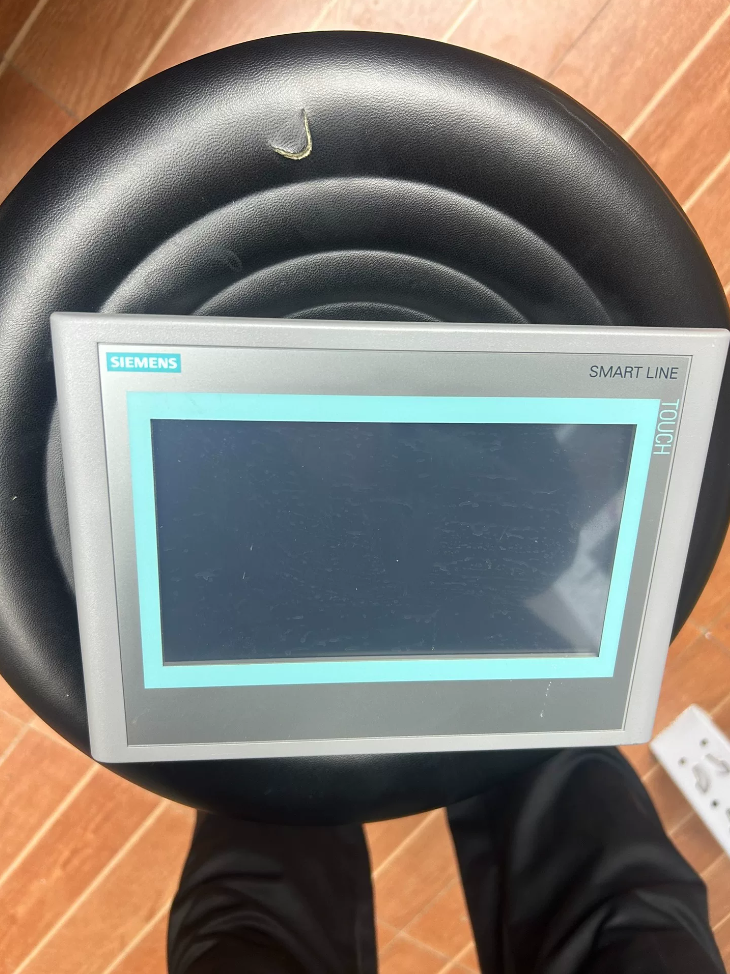

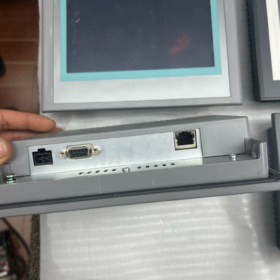
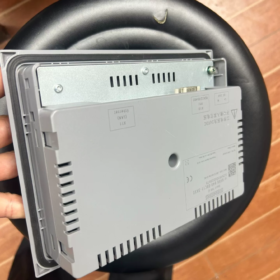
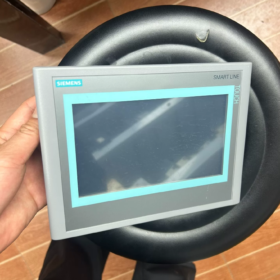
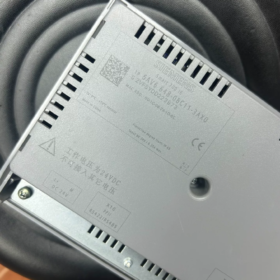
الاسم الكامل: SIMATIC HMI SMART 700 أي (2nd Generation 7-inch HMI)
✅ Product Status: Officially End-of-Life (موسوعة الحياة)
Order Number Breakdown
`6AV6 648-0BC11-3AX0`
6AV6: SIMATIC HMI Human Machine Interface
648: SMART LINE Series
0ب: 7-inch SMART 700 أي (2nd Generation)
ج: Display specification
11: Hardware version
3AX0: Version for Chinese market
المواصفات الفنية الرئيسية
| غرض | المعلمة |
| عرض | 7-inch TFT Wide Screen, Resistive Touch |
| دقة | 800 × 480, 65536 Colors |
| مزود الطاقة | تيار مستمر 24 فولت (19.2~28.8V) |
| Front Panel Dimension | 213 مم × 159 مم |
| Cutout Size | 192 مم × 138 مم |
| Installation Depth | 40.5 مم |
| تصنيف الحماية | الجبهة IP65, خلفي IP20 |
| درجة حرارة التشغيل | 0~50℃ (Horizontal Mounting) |
| درجة حرارة التخزين | -20~+60 درجة مئوية |
| وزن | تقريبا. 765 ز |
واجهات الاتصالات
- RJ45 Ethernet Port
Supported protocols: S7 Protocol (S7-200 سمارت), مودبوس تكب
- Isolated RS422/RS485 (COM Port)
Supports PPI (S7-200), مودبوس ار تي يو, Mitsubishi FX, Omron CP1, Delta DVP and other third-party PLCs
⚠️ Key Distinction: This model has NO USB Host port; USB storage is not supported. Only COM port & Ethernet available!
The upgraded V3 version `6AV6648-0CC11-3AX0` is equipped with USB port; hardware programs are not interchangeable.
متطلبات برامج التكوين
Minimum: WinCC flexible 2008 SP4 CHINA
متناسق: WinCC flexible SMART V3
❗ WinCC Flexible SMART V4/V5 cannot directly open projects created by WinCC flexible 2008 SP4
Replacement Solutions after Discontinuation
Direct Drop-in Replacement
6AV6648-0CC11-3AX0 (SMART 700 IE V3)
✅ Identical cabinet cutout size: 192×138 mm, no cabinet modification required
⚠️ Key Differences:
- V3 equipped with USB Host port, supports program download & data logging via USB flash drive;
- Not compatible with WinCC flexible 2008 SP4;
Projects programmed in 2008 SP4 must be migrated to SMART V3 format via configuration software;
- Rear connector layout is slightly different; double-check wiring during installation.
Higher-Grade Alternative (Basic Panels New Generation)
6AV2123-2GB03-0AX0 KTP700 Basic (7-inch Basic HMI)
Different cutout dimension, cabinet modification required, recommended for new projects.
Compatible PLC Models
سيمنز S7-200 (PPI)
Siemens S7-200 SMART (إيثرنت)
الشعار! 0BA7 and newer
Mitsubishi FX, Omron CP1, Delta DVP, Xinje etc. (مودبوس ار تي يو)
اختيار & On-site Replacement Cautions
- Large stock available on second-hand market. Clearly distinguish 0BC11 (No USB) / 0CC11 (With USB); programs cannot be directly interchanged.
- If the original project is `.hmi` file developed with WinCC flexible 2008, program migration is mandatory when replacing with V3 touchscreen.
- Communication Cable: Use standard PPI cable for S7-200; shielded RS485 cable for third-party PLCs.
- 0BC11 has no USB function; program download is only available via Ethernet or serial port.
I can provide the following materials on request:
COM port pin assignment definition;
Step-by-step wiring & configuration for communication with S7-200 / S7-200 سمارت;
Complete project migration procedure between old and new panels.
Complete Project Migration Procedure:
6AV6648-0BC11-3AX0 (SMART 700 IE V2) → 6AV6648-0CC11-3AX0 (SMART 700 IE V3)
Prerequisite Notice:
Two types of program source from old HMI:
① Original `.hmi` project file (Recommended method)
② Only backup file `.psb` uploaded from touchscreen → Cannot be edited or migrated, can only be downloaded back to V2 touchscreen of the same model!
⚠️ Without original `.hmi` project file, migration to V3 is impossible; full re-configuration is required.
- الاستعدادات
1.1 بيئة البرمجيات
الخيار أ (Most Stable): WinCC flexible SMART V3 / V3 SP2 (Supports direct opening of V2 projects created by WinCC flexible 2008 SP4)
الخيار ب: Open legacy project with WinCC flexible 2008 SP4 China for preprocessing, then open in SMART V3
❌ Do NOT use WinCC flexible SMART V4/V5 for conversion; high risk of compatibility failure. V3 is the designated migration software.
1.2 File Backup (إلزامي)
- Make a separate copy of original `.hmi` project to prevent file corruption during conversion;
- Store project under pure English path, avoid Chinese characters, spaces and special symbols;
- Record original communication parameters: HMI IP address, PLC station address, بروتوكول الاتصال (S7/Modbus RTU).
- Standard Migration Steps (With Original .hmi Project)
خطوة 1: Open Legacy Project
Launch WinCC flexible SMART V3
【File】→【Open】, select legacy `.hmi` project created by WinCC flexible 2008 SP4
Software will pop up project conversion prompt, click【OK】to start automatic conversion.
If conversion fails:
Open project in WinCC flexible 2008 SP4 →【Project】→【Archive】to generate `.cab` archive file;
Back to SMART V3 →【Project】→【Unarchive】and select the `.cab` file to open.
خطوة 2: Change HMI Device Type (Core Operation)
- In project tree on left side, right-click【Device_1 (SMART 700 أي)】→【Change Device Type】
- Select target model:
SIMATIC HMI SMART 700 IE V3 | 6AV6648-0CC11-3AX0
- Confirm modification. Resolution keeps 800×480 consistent, no screen stretching.
خطوة 3: Full Rebuild & تجميع, Troubleshoot Errors
قائمة طعام:【Project】→【Compiler】→【Rebuild All】
Resolve errors and warnings one by one:
- VBS script syntax errors: Partial legacy VBS functions supported by V2 are incompatible with V3. Focus on cyclic screen scripts, button scripts;
- Missing fonts: Replace custom fonts with SimSun / Microsoft YaHei;
- Third-party drivers (مودبوس ار تي يو): Drivers are fully compatible in most cases, لا حاجة للتعديل;
Warnings can be accepted after verification; All errors must be eliminated before downloading!
خطوة 4: Verify Communication Parameters
Open【Connections】to check PLC communication links:
S7-200 SMART Ethernet: Parameters remain unchanged;
RS485 Modbus RTU / PPI: Serial parameters keep consistent;
V2 and V3 share identical COM pin definition, wiring does not need adjustment.
خطوة 5: Download Project to New V3 HMI
- Power on touchscreen and enter【Transfer】mode;
- Set PC IP in the same network segment as HMI;
3.【Project】→【Transfer】→【Transfer】
Optional tick boxes:
✅ Overwrite recipe data logs (As required)
✅ Overwrite user administration
V3 HMI supports USB download; exported project can be transferred via USB flash drive.
- الاختلافات الرئيسية & ملاحظات التكليف
- Hardware Interface Difference
V2 (0BC11): No USB Host; V3 (0CC11): Built-in USB port. USB data logging function works only if configured in project; no adjustment needed for existing projects without USB functions.
- Cutout Dimension
Cabinet cutout 192×138 mm for both models, no cabinet modification required.
- Firmware Matching
Recommended firmware V3.0 or above for new V3 touchscreen. Software will match OS version automatically during download; follow prompt to update HMI OS if required. Do NOT cut off power during OS update.
- الأخطاء الشائعة & الحلول
عيب 1: SMART V3 fails to open 2008 SP4 project, conversion aborted
الحلول:
- Move project to pure English directory;
- Open project in WinCC flexible 2008 SP4 →【Project】→【Archive】;
- Use【Unarchive】function in SMART V3 to load the `.cab` file.
عيب 2: Massive object errors after changing device type
الحلول:
Run Rebuild All; If severe incompatibility occurs, create blank SMART700 IE V3 project, copy screens one by one to avoid global conversion bugs.
عيب 3: Only `.psb` backup file uploaded from old touchscreen
❗ Migration Not Possible!
`.psb` is encrypted HMI image file, only restorable to original V2 touchscreen, cannot be edited or assigned to another device model.
الحلول: Retrieve original `.hmi` project or redevelop the whole project.
- Standard On-site Replacement Procedure (Machine Shutdown)
- Stop equipment, export recipes from old HMI if important process parameters exist;
- خارج السلطة, remove old touchscreen and install new V3 unit;
- Complete wiring: 24قوة الخامس, إيثرنت, RS485 (pin assignment unchanged);
- Download migrated project;
- Verify communication, أزرار, alarms and data display;
- Import backed-up recipes, carry out no-load trial operation.
Summary of Potential Migration Failures: SMART 700 IE V2(0BC11) → V3(0CC11)
- Source File & Project Issues (الأكثر شيوعًا)
- No original `.hmi` project, only `.psb` uploaded backup
`.psb` is encrypted mirror backup, can only be restored to same-model V2 HMI. No editing, no model conversion, cannot migrate to V3.
Many field engineers mistakenly believe uploaded `.psb` can be converted, this is the most frequent misunderstanding.
- Project path contains Chinese characters, spaces or special symbols
The conversion engine of WinCC flexible SMART V3 has poor compatibility with non-English paths, resulting in conversion termination or failure to open project.
- Legacy project file damaged without archiving repair
Long-term repeated editing or unexpected shutdown leads to internal project file corruption.
ظاهرة: Direct opening in V3 fails. الحل البديل: Archive project to `.cab` in WinCC flexible 2008 SP4 then unarchive in V3.
- Excessive project version gap
Project originally created in WinCC flexible 2008 SP2/SP3 without upgrading to SP4. Conversion error is highly likely if imported directly into SMART V3.
- بيئة البرمجيات & Version Mismatch
- Using WinCC flexible SMART V4/V5 for conversion
V4/V5 removes native conversion interface for WinCC flexible 2008 SP4 V2 projects. Not applicable for migration, may cause missing scripts and incomplete conversion.
Recommended migration software: WinCC flexible SMART V3 / V3 SP2.
- Incomplete software installation, missing drivers/patches
Antivirus blocks components during setup; simplified/cracked software lacks conversion modules, leading to sudden crash during conversion.
✅ Requirement: Official complete installation package, disable antivirus before installation.
- Insufficient Windows system permission
Software not launched with【Run as administrator】. Windows blocks temporary file access, conversion terminates midway.
- Internal Project Compatibility Conflicts
(Project can be opened, but heavy compilation errors after device type change)
- VBS Script Compatibility Gap
Some legacy VBS functions supported under WinCC flexible 2008 (V2) are deprecated in SMART V3 runtime library.
Cyclic screen scripts, button scripts and alarm scripts are most vulnerable; extensive global scripts may disable device type modification.
- Incompatible third-party communication drivers
Early customized Modbus RTU configuration or obsolete PLC drivers may be lost after conversion, communication connection parameters invalidated.
- Missing custom fonts
Project uses non-system fonts; text controls abnormal, screen objects fail to load, even compilation crash.
- Complex configuration of recipes, data logs and user rights
Recipe layout and archive path format of V2 are different from V3, triggering recipe component errors after conversion.
- Screen controls & ActiveX components
Third-party ActiveX controls embedded in project are no longer supported by SMART V3. Controls disappear during conversion and cause project loading failure.
- Specific Errors When Changing Device Type
- Project opened successfully, but【Change Device Type】is greyed out
سبب: Incompatible objects detected (invalid scripts, broken controls, illegal variables), software locks device modification function.
حل: Clear all errors first, or create blank V3 project and copy screens individually.
- Incorrect panel model selected
Accidentally select SMART 700 أي (non-V3) or KTP700 Basic, model mismatch leads to compilation error.
Correct target: `SIMATIC HMI SMART 700 IE V3 6AV6648-0CC11-3AX0`
- Download-stage Faults after Successful Conversion
(Project conversion completed, cannot download to new HMI)
- Outdated HMI firmware
Old V3 firmware does not support migrated project. OS update required when prompted.
- Incorrect IP segment or transfer mode setting (Not conversion error, often confused as migration failure).
- Download attempted with unresolved compilation Errors
Warnings can be evaluated; All Error items must be cleared, otherwise project cannot be loaded into HMI.
- Human Operation Mistakes
- Forget to execute【Change Device Type】after opening project, directly download V2 project to V3 HMI → Error prompt: Device model mismatch.
- Run multiple configuration software simultaneously (WinCC flexible 2008 SP4 + SMART V3), process conflict causes conversion anomaly.
Tiered Rapid Troubleshooting Flow
- Confirm file type: Original `.hmi` or uploaded `.psb`? → `.psb` = Migration impossible
- Move project to pure English path, launch SMART V3 SP2 as administrator
- Archive project to `.cab` within WinCC flexible 2008 SP4, open project via【Unarchive】in V3
- Rebuild all and count errors; adopt “copy screens to blank project” method if script/control incompatibility is severe
- Recompile fully after successful device type change, eliminate all Error items





NH42-63-318x560.png "مفاتيح النقل التلقائي من نوع الكمبيوتر الشخصي CHINT (المنشطات الأمفيتامينية)NH42-63/4SZ")



