 Contacteur,disjoncteur,capteur,Encodeur,API,Convertisseur

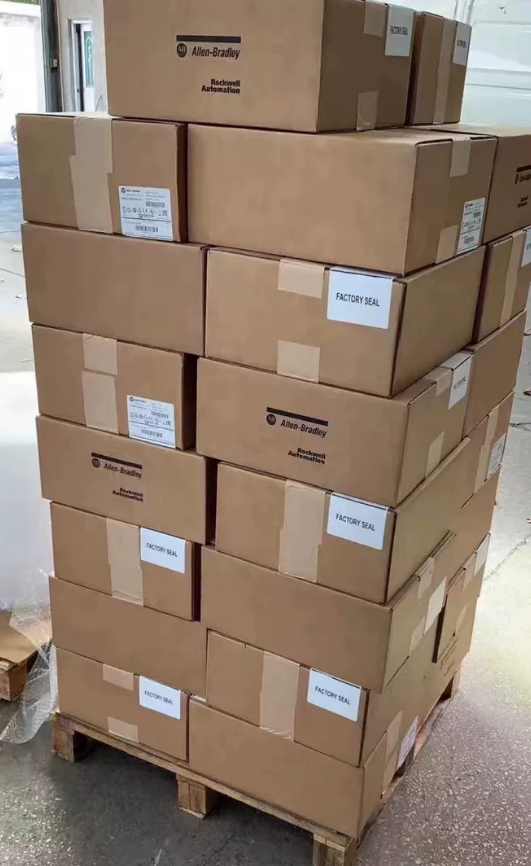

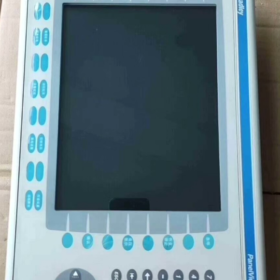
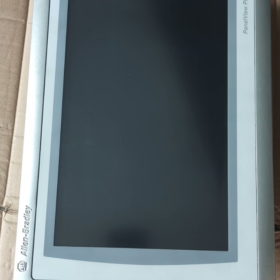
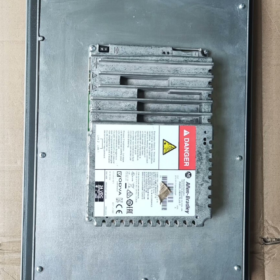
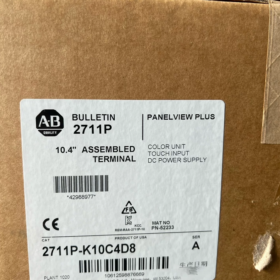
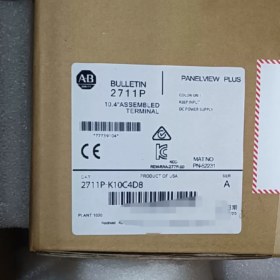
- Répartition du numéro de modèle
| Segment de code | Description | Détails | Impact fonctionnel |
| 2711P. | Série de produits | Allen‑Bradley PanelView Plus 6 Série IHM | Plateforme de base: WindowsCE 6.0 Système d'exploitation, prend en charge le logiciel FactoryTalk View ME |
| K | Type d'entrée | Clavier + Affichage couleur | 32 touches de fonction (F1‑F16, K1‑K16) + pavé numérique + touches fléchées; adapté aux environnements industriels difficiles |
| 10 | Taille de l'écran | 10.4Écran couleur de ‑pouces | Résolution 640×480 pixels, fournit une visualisation claire du processus |
| C | Type de puissance | Alimentation CC | Plage de tension d'entrée 18–32 VCC (nominal 24 VCC), pour systèmes d'alimentation CC industriels |
| 4 | Configuration de la mémoire | 512 Mo de RAM | Prend en charge les applications IHM de complexité moyenne, stocke des graphiques multi-écrans et des données historiques |
| D8 | Configuration des communications | Pack d'interface de communication standard | 1×Ethernet (EtherNet/IP), 1× RS‑232, 2× Ports hôtes USB |
Définition complète du modèle: Allen-Bradley PanelView Plus 6 10.4-IHM couleur à clavier uniquement en pouces, 512 Mo de RAM, Alimentation CC, communication standard.
Discontinué: Septembre 30, 2022.
- Spécifications techniques de base
2.1 Spécifications de base
| Article | Valeur | Remarques |
| Type de produit | Interface Homme-Machine Industrielle (IHM) | PanelViewPlus 6 Série Standard (pas compact) |
| Afficher | 10.4TFT couleur de ‑pouces, 640×480 | 300 cd/m², 500:1 contraste, angle de vision 140°(H)/120°(V) |
| Méthode de saisie | Clavier physique (32 touches de fonction + pavé numérique) | Pas d'écran tactile; idéal pour l'huile, poussière, environnements d'utilisation de gants |
| Processeur | 32Processeur RISC ‑bit | Assure une réponse rapide et un rendu graphique complexe |
| Mémoire | 512 Mo de RAM, 1 Go Flash | Prend en charge l'enregistrement des données et le stockage des applications; extensible via carte CF |
| Exigences d'alimentation | 18–32 VCC (nominal 24 VCC), maximum. 20 W | Conception à faible consommation, compatible avec les systèmes électriques industriels |
| Protection contre la pénétration | Façade IP65, arrière IP20 | Avant étanche à la poussière & étanche, adapté aux zones de lavage |
| Dimensions & Poids | 230 mm × 180 mm × 42 mm, environ. 3.9 kilos | Découpe standard, montage facile sur panneau |
| Température de fonctionnement | 0 ~ +55 °C (fonctionnement), -20 ~ +70 °C (stockage) | Large plage de températures pour la plupart des environnements industriels |
| Certifications | UL 508, CE, CSA C22.2 n°213 | Conforme aux normes internationales de sécurité industrielle |
2.2 Capacités de communication (Configuration D8)
| Interface | Quantité | Protocoles pris en charge | Application |
| Ethernet | 1 | EtherNet/IP, Modbus-TCP | Communication automate, acquisition de données, surveillance à distance |
| RS‑232 | 1 | DF1, DH‑485, Modbus RTU | Automates hérités, appareils tiers |
| Hôte USB | 2 | USB 2.0 | Sauvegarde des données, transfert de programme, souris/clavier |
| Port d'extension | 1 | Modules de communication en option | PROFIBUS, AppareilNet, etc.. |
- Applications & Guide de sélection
3.1 Industries typiques
| Industrie | Applications | Avantages | Exemples |
| Automobile | Contrôle de ligne, surveillance des équipements | Clavier résistant à l'huile; communication stable avec l'automate | Robots de soudage, chaînes de montage, inspection de la qualité |
| Nourriture & Boisson | Remplissage, conditionnement, pasteurisation | Façade IP65, résistant au lavage, enregistrement de données | Systèmes de lots, surveillance de la température/pression |
| Pétrochimique | Commande de pompe/vanne, surveillance des pipelines | Température large, résistant aux vibrations, zones extérieures/difficiles | Niveau du réservoir, compresseurs, régulation de pression |
| Pouvoir & Énergie | Surveillance des sous-stations, contrôle de la production | Communications stables, enregistrement des données pour analyse | Surveillance du générateur, gestion des transformateurs |
| Traitement de l'eau | Stations de pompage, processus de traitement des eaux usées | Résistant à l'humidité, affichage clair des paramètres | Contrôle de la pompe, Ajustement du pH, surveillance du débit |
| Machinerie lourde | Construction, équipement minier | Clavier résistant aux vibrations, conception robuste | Grues, excavatrices, systèmes de convoyeurs |
3.2 Notes de sélection
- Type d'entrée
Clavier uniquement (K): idéal pour les opérateurs gantés, environnements sales/poussiéreux, saisie numérique rapide
Pour écran tactile: sélectionnez les modèles « T » (par ex., 2711P-T10C4D8)
- Mémoire
512 Mo de RAM (code 4): convient pour ≤ 50 écrans, alarmes de base et journalisation
Pour les projets complexes (> 100 écrans, exploitation forestière lourde): utiliser 1 Go de RAM (par ex., 2711P-K10C8D8)
- Communications
D8 couvre la plupart des applications API standard
PROFIBUS/DeviceNet nécessitent des modules optionnels
Surveillance à distance prise en charge via Ethernet (OPC-UA)
- Installation & Configuration
4.1 Étapes d'installation
- Préparation
Épaisseur du panneau: 2–5mm; découper: 222 × 172 mm
Vis de montage M4
Vérifiez l'alimentation 18-32 VCC; filtre de puissance en option
- Installation mécanique
Insérez l'IHM dans la découpe du panneau, aligner la façade à ras
Fixé par l'arrière avec des vis M4, maximum. couple 1.5 N·m
Maintenir ≥ 50 mm dégagement à l'arrière pour le refroidissement et le câblage
- Connexions électriques
Pouvoir: L+ = 24 VCC positif, L– = négatif, PE = terre de protection
Communications:
Ethernet: Câble CAT5e/CAT6 vers PLC/commutateur
RS-232: paire torsadée blindée pour appareils tiers
USB: clé USB pour le transfert/sauvegarde du programme
- Configuration du système
Créer une application avec FactoryTalk View ME
Télécharger le projet via USB ou Ethernet
Configurer la communication avec l'automate
Configurer des alarmes, enregistrement de données, sécurité
4.2 Précautions d'installation
| Article | Standard | Détails |
| Isolation électrique | Câblage d'alimentation et de signal séparé | Évitez les EMI; utiliser des câbles blindés, mise à la terre à une extrémité |
| Gestion thermique | Ambiante ≤ 55 °C | Évitez les espaces clos; assurer la ventilation |
| Résistance aux vibrations | ≤ 1 g (5–500 Hz) | Utiliser des supports antivibratoires, séparé des machines lourdes |
| Protection de l'eau | Façade IP65 | Évitez les pulvérisations directes à haute pression; entretenir les joints |
| Mise à la terre de sécurité | Résistance à la terre ≤ 10 Oh | Connexion PE fiable pour la sécurité |
- Remplacement & Options de mise à niveau (Unité abandonnée)
Discontinué: Septembre 30, 2022
Remplacements recommandés par Rockwell Automation:
5.1 Remplacements directs (Compatibilité fonctionnelle)
| Modèle de remplacement | Différence clé | Compatibilité | Avantages de la mise à niveau |
| 2711P‑B10C22D9P | PanelViewPlus 7, 10.4″, touche + clavier | ★★★★★ | +30% performance, Windows Embedded Compact 7 |
| 2711P‑T10C4D8 | Même série, touche + clavier | ★★★★★ | Clavier + flexibilité tactile |
| 2711P‑K10C8D8 | Même série, 1 Go de RAM | ★★★★★ | Prend en charge des applications plus complexes |
5.2 Mises à niveau inter-séries
| Série | Modèle recommandé | Caractéristiques | Cas d'utilisation |
| PanelViewPlus 7 | 2711P‑B10C22D9P | Plateforme moderne, performances supérieures | Nouveaux projets, un soutien à long terme |
| Vue du panneau 5500 | 2715P‑T10C21D8 | Haut de gamme, multicœur, grande mémoire | Applications complexes, données lourdes |
| PanelView Compact | 2711R‑T10C10 | Compact, coût optimisé | Petites machines, projets budgétaires |
5.3 Alternatives tierces
| Marque | Modèle | Niveau de prix | Compatibilité |
| Weintek | MT8102iE | ~50% | ★★★☆☆ (nécessite une réécriture du projet) |
| Siemens | KTP1000 de base | ~60% | ★★★☆☆ (prend en charge certains protocoles A‑B) |
| Mitsubishi | Série GOT2000 | ~70% | ★★★☆☆ (adaptation du protocole requise) |
- Entretien & Dépannage
6.1 Entretien préventif
| Intervalle | Tâche | Standard | Remarques |
| Mensuel | Nettoyage externe | Aucune accumulation d'huile/poussière sur le devant | Utiliser un chiffon sec; pas de nettoyants corrosifs |
| Trimestriel | Test de communication | Ethernet/RS‑232 stable | Vérifier les câbles, vérifier le flux de données |
| Semestriellement | Vérification de la puissance | 18–32 VCC stable | Vérifier la température de l'alimentation |
| Annuellement | Sauvegarde du système | Projet complet & sauvegarde des données | Stockez en toute sécurité |
| Chaque 2 années | Test de fonctionnement | Toutes les clés & affichage normal | Vérifier la réponse clé, luminosité du rétroéclairage |
6.2 Défauts courants & Solutions
Symptôme Causes possibles Priorité Solution Le clavier ne répond pas 1. Panne de clé Haut 1. Inspecter les clés 2. Connecteur de clavier desserré 2. Rebrancher le connecteur 3. Défaut du micrologiciel 3. Mettre à jour le micrologiciel Communication perdue 1. Câble endommagé Haut 1. Remplacer le câble 2. Mauvais réglages 2. Reconfigurer l'IP/les paramètres 3. Défaut réseau/automate 3. Vérifier l'automate/commutateur Affichage anormal 1. Défaut de rétroéclairage Moyen 1. Ajuster le rétroéclairage 2. Erreur de pilote 2. Redémarrer l'IHM 3. Puissance instable 3. Vérifier la qualité de l'alimentation Le système se bloque 1. Mémoire insuffisante Haut 1. Optimiser le projet 2. Erreur de projet 2. Recharger l'application 3. Défaut matériel 3. Réparer/remplacer l'unité
Allen-Bradley 2711P-K10C4D8 est un PanelView Plus de 10,4 pouces uniquement avec clavier 6 IHM.
Points forts:
Clavier robuste pour les environnements difficiles, sale, environnements d'opération avec des gants
Ethernet standard + RS-232 + USB pour une large compatibilité industrielle
Façade IP65 adaptée aux aliments, boisson, et pharmaceutique
Windows CE stable 6.0 plateforme avec prise en charge de FactoryTalk View ME
Recommandations:
Pour remplacement: utiliser 2711P-B10C22D9P (PanelViewPlus 7) pour préserver le fonctionnement
Nouveaux projets: préférez PanelView Plus 7 pour un support plus long
Projets budgétaires: évaluer les alternatives tierces avec le coût de réécriture du projet
Installation complète & Guide de configuration pour 2711P-K10C4D8
En un coup d'œil: Couvre l'installation mécanique → le câblage électrique → la configuration du système → les communications → le déploiement → les tests pour PanelView Plus 6 10.4-IHM clavier en pouces. Points forts Étanchéité IP65, Alimentation CC, et communication D8.
- Pré-installation
1.1 Outils & Matériels
| Catégorie | Requis | Recommandé |
| Outils | Tournevis cruciforme, niveau, coupe-panneaux | Clé dynamométrique (1.5 N·m), coussinets vibrants |
| Électrique | 24 Alimentation VCC (18–32 VCC, ≥20W), câble blindé | Filtre de puissance, parasurtenseur |
| Communications | CAT5e/CAT6, Câble blindé RS‑232 | Clé USB (≥4 Go), changer |
| Logiciel | FactoryTalk Voir ME 6.0+, RSLinx Classique | RSLinx Entreprise, Configuration des terminaux |
| Sécurité | Gants isolés, des lunettes, Sangle ESD | Compteur de résistance de terre, multimètre |
1.2 Vérification de l'environnement
Température de fonctionnement: 0 ~ +55 °C; stockage: -20 ~ +70 °C; pas de soleil direct
Humidité: 10–90% sans condensation
Vibration: ≤ 1 g (5–500 Hz)
Façade IP65, arrière IP20; boîtier étanche recommandé
Autorisation: haut ≥51 mm, fond ≥102 mm, côtés ≥25 mm
- Installation mécanique (PanelViewPlus 6 1000)
2.1 Dimensions de découpe
| Paramètre | Valeur | Tolérance | Remarques |
| Découper | 222 mm (W) × 172 mm (H) | ±0,5mm | Découpe IHM standard de 10,4 pouces |
| Épaisseur du panneau | 2–5mm | — | Affecte l’étanchéité et le serrage |
| Rayon de coin | ≥ 2 mm | — | Empêche les dommages aux joints |
2.2 Montage (Critique pour IP65)
- Préparation du joint
Inspecter le joint avant pour déceler tout dommage
Assurez-vous que le joint est correctement placé
Installez le revêtement du clavier avant le montage si utilisé
- Fixation
Insérer l'IHM dans la découpe, appuyer uniformément
Installer 4 pinces de montage (fourni)
Engagez les pinces jusqu'à ce qu'un « clic »
Vérifier que l'unité est bien serrée, niveau, et le joint comprimé uniformément
- Vérification finale
Unité sécurisée, pas d'oscillation
Façade affleurante au panneau
Dégagement arrière ≥ 50 mm
- Connexions électriques (Alimentation CC & Mise à la terre)
3.1 Bornes d'alimentation (18–32 VCC)
| Terminal | Étiquette | Exigence | Sécurité |
| Positif | L+ | 24 VCC positif, ≥1,5 mm² | La polarité ne doit pas être inversée |
| Négatif | L– | 24 VCC négatif, ≥1,5 mm² | Circuit complet |
| Terre | PE | Terre de protection, ≥2,5 mm² | Résistance à la terre ≤ 10 Oh |
Procédure:
- Éteindre avant le câblage
- Bande isolante ~6 mm
- Connectez PE en premier, puis L–, puis L+
- Couple: 0.8–1,0 N·m
- Sécurisez les câbles pour éviter les tensions
3.2 Câblage des communications (D8)
| Interface | Quantité | Câblage | Application |
| Ethernet | 1 | CAT5e/CAT6 blindé, RJ45 | Communications API, acquisition de données |
| RS‑232 | 1 | 3‑fil blindé (TX/RX/GND) | Appareils anciens/tiers |
| Hôte USB | 2 | USB 2.0 | Transfert de programme, sauvegarde |
| Expansion | 1 | Module optionnel | PROFIBUS, AppareilNet |
Meilleures pratiques:
Câbles de communication et d'alimentation séparés ≥150 mm
Traverser à 90° si nécessaire
Mise à la terre à une extrémité pour les boucliers
- Démarrage du système & Configuration de base
4.1 Première mise sous tension
- Pré-vérifier toutes les connexions
- Appliquer 24 VCC
- Séquence normale: LED d'alimentation → écran de démarrage → Mode de configuration
- Si aucun affichage: éteignez immédiatement et vérifiez le câblage
4.2 Paramètres du terminal
- Entrez par F4 (Paramètres du terminal)
- Paramètres clés:
Afficher: luminosité, contraste
Date/Heure: synchronisation avec l'automate
Options de démarrage: exécuter l'application FactoryTalk View ME
Sécurité: définir le mot de passe administrateur, désactiver le bureau
- Configuration Ethernet
Définir une adresse IP statique, sous-réseau, porte
Enregistrez et redémarrez
Vérifier avec ping
- Configuration des communications
5.1 Configuration de RSLinx
Ajouter un pilote EtherNet/IP
Définir le taux de numérisation (typiquement 100 MS)
Parcourir ou ajouter un automate par IP
Pour les automates existants: configurer DF1/DH-485 sur RS-232
5.2 Cartographie FactoryTalk Linx
Importer des balises depuis le contrôleur
Mapper les balises IHM aux balises API
Définir les taux de mise à jour pour les valeurs critiques
Chemins Ethernet redondants en option
- Déploiement d'applications (FactoryTalk Voir ME)
6.1 Préparation du projet
Cible: 10.4-pouce, clavier
Limiter les écrans à ~50 pour 512 Mo de RAM
Minimisez les animations complexes
Configurer l'enregistrement des données sur la carte Flash/CF
6.2 Méthodes de téléchargement
| Méthode | Mesures | Cas d'utilisation |
| USB | Enregistrer sur USB → insérer l'IHM → Transférer → USB → Charger | Pas de réseau, mise en service rapide |
| Ethernet | PC sur le même sous-réseau → Outils → Transfert → Ethernet | En réseau, installations à distance/en volume |
| Carte CF | Écrire dans CF → insérer l'IHM → Transférer → Carte CF | Applications volumineuses, sauvegarde |
Après le téléchargement:
Définir comme démarrage principal
Activer le remplacement des communications
Enregistrez et redémarrez
- Vérification & Essai
7.1 Tests matériels
| Test | Méthode | Critères de réussite |
| Clavier | Appuyez sur toutes les touches | Tous répondent immédiatement |
| Afficher | Contrôle visuel | Clair, pas de scintillement/saignement |
| Communication | Ping, balise lecture/écriture | Écurie, pas d'abandons |
| Pouvoir | Mesurer la tension | 18–32 VCC, ondulation faible |
7.2 Tests d'applications
Navigation à l'écran, boutons, entrée numérique
Lecture/écriture automate
Les alarmes se déclenchent et sont acquittées
Enregistrement de données et récupération de tendances
- Post-installation & Sécurité
8.1 Calendrier d'entretien
| Intervalle | Tâche |
| Mensuel | Nettoyer la façade avec un chiffon sec |
| Trimestriel | Vérifier les communications & câbles |
| Semestriellement | Vérifier la qualité de l'alimentation & température |
| Annuellement | Demande de sauvegarde & données |
| Chaque 2 années | Test fonctionnel complet |
8.2 Points saillants du dépannage
| Symptôme | Cause probable | Réparer |
| Pas d'affichage | Alimentation/polarité inversée | Vérifier L+/L–/PE |
| Clés mortes | Connecteur desserré / micrologiciel | Reconnecter / mettre à jour le micrologiciel |
| Chute des communications | PI / câble / changer | Vérifier l'adresse IP, remplacer le câble |
| Crashes | Mémoire / erreur de projet | Optimiser le projet, recharger |
8.3 Notes de sécurité
Mise hors tension de tout le câblage
Le PE doit être fiable
Utiliser des alimentations SELV/PELV (par ex., 1606-XLE120E)
Maintenir IP65 en inspectant les joints
- Conclusion
L'installation est terminée lorsque:
Mécaniquement sécurisé, Joint IP65 intact
24 VCC stable, correctement mis à la terre
Communications réseau et API fiables
L'application s'exécute automatiquement sans erreur
Toutes les fonctions testées et vérifiées
Remarque héritée:
Unité abandonnée 2022-09-30. Remplacement recommandé: 2711P-B10C22D9P (PanelViewPlus 7).





NH42-63-318x560.png "Commutateurs de transfert automatiques de type PC CHINT (ATS)NH42-63/4SZ")



