 Contattore,interruttore automatico,sensore,Codificatore,PLC,Convertitore

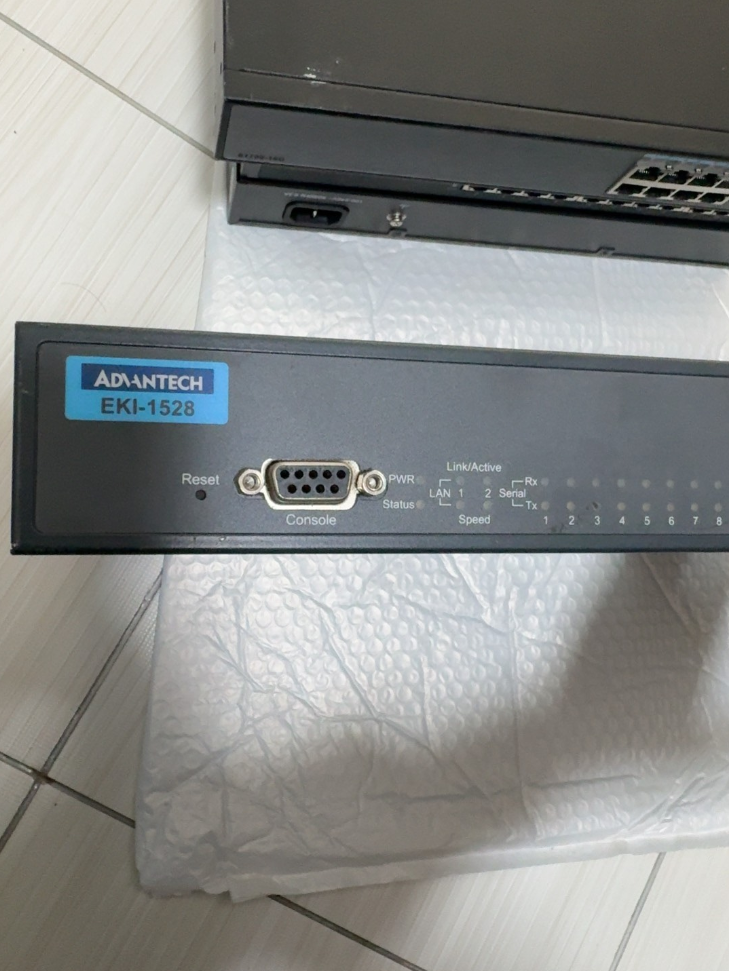

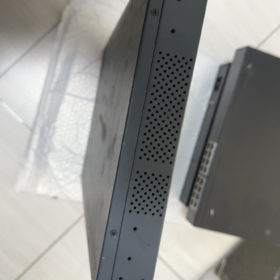
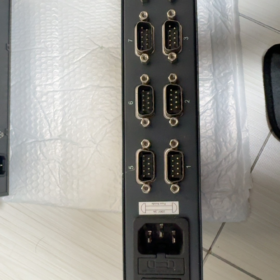
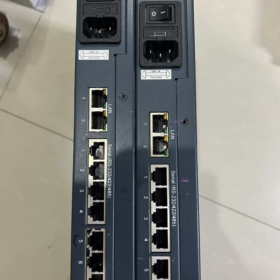
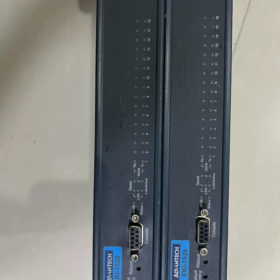
The Advantech EKI-1526 is an industrial-grade 16-port RS-232/422/485 serial device server featuring a 1U rack-mount design and dual Ethernet redundancy. Collega perfettamente i dispositivi seriali tradizionali alla rete Ethernet per la gestione remota e l'acquisizione dati. I suoi vantaggi principali includono tipi di porte seriali configurabili tramite software, ampio intervallo di temperature di esercizio, elevata protezione ESD, e un ricco supporto per il protocollo di comunicazione. È ampiamente applicato nell'automazione industriale, trasporto intelligente, energy management and other fields.
- Definizione del segmento del modello (Standard Nomenclature)
| Segmento | Standard Code | Senso | Descrizione dettagliata |
| EKI | EKI | Advantech Industrial Ethernet Communication Product Line | Embedded Ethernet Interface, focusing on industrial network communication equipment |
| 1526 | 1526 | Product Series Number | 16-port serial device server (1528 is the 8-port version) |
| Codice suffisso | N / IO / TI / VCC, ecc. | Espansione delle funzioni / Power Type | • N: GigabitEthernet |
| • I: Versione per ampie temperature (-40°C~70°C) | |||
| • TI: Wide-temperature + Alimentazione CC | |||
| • VDC: Alimentazione CC (12-48VCC) | |||
| • CE: Compliant with EU CE certification | |||
| Versione | V2 | Hardware Revision | 2nd-generation hardware with upgraded performance, supporting baud rate up to 976.5 kbps |
- Parametri delle specifiche principali (Dati ufficiali)
| Categoria | Parametro | Modello standard (EKI-1526) | Wide-Temp Model (EKI-1526I) | Osservazioni |
| Caratteristiche di base | Tipo di prodotto | 16-Porta seriale del server del dispositivo | Uguale a sinistra | 1Montaggio su rack a U, Custodia metallica SECC, Protezione IP30 |
| Dimensioni (L×A×P) | 438×43,6×259,2 mm | Uguale a sinistra | Montaggio rack standard da 19 pollici | |
| Peso | 3.1 kg | Uguale a sinistra | Escluso l'imballo | |
| Temperatura operativa | -10°C~60°C | -40°C~70°C | Temperatura di conservazione: -40°C~80°C | |
| Umidità | 5%~95% di umidità relativa, senza condensa | Uguale a sinistra | Adattabile ad ambienti industriali umidi | |
| MTBF | >60,000 ore | Uguale a sinistra | Design ad alta affidabilità | |
| Interfaccia di rete | Quantità di porte | 2 ×RJ45 | Uguale a sinistra | Ridondanza LAN supportata, MDI/MDIX automatico |
| Velocità | 10/100 Mbit/s (EKI-1526) | Uguale a sinistra | Doppi indirizzi MAC indipendenti, ridondanza della rete | |
| 10/100/1000 Mbit/s (EKI-1526N) | ||||
| Protezione dell'isolamento | Integrato 1.5 isolamento magnetico kV | Uguale a sinistra | Anti-interferenza elettromagnetica, stabilità migliorata | |
| Comunicazione seriale | Quantità di porte | 16 porti | Uguale a sinistra | Modalità seriale configurabile tramite software |
| Tipo di interfaccia | DB9 (RJ45 opzionale) | Uguale a sinistra | Supporta la commutazione RS-232/422/485 | |
| Velocità di trasmissione | 50~921,6 kbps (Standard) | Uguale a sinistra | Velocità di trasmissione personalizzata supportata | |
| 50~976,5 kbps (Versione V2) | ||||
| Bit di dati | 5, 6, 7, 8 | Uguale a sinistra | Compatibilità flessibile con vari dispositivi seriali | |
| Parità | Nessuno / Strano / Anche / Segno / Spazio | Uguale a sinistra | Piena compatibilità con i protocolli industriali | |
| Bit di arresto | 1, 1.5, 2 | Uguale a sinistra | Soddisfa i requisiti di comunicazione di diversi dispositivi | |
| Protezione | 15Protezione seriale completa KV ESD | Uguale a sinistra | Design antistatico di livello industriale | |
| Caratteristica RS-485 | Controllo automatico del flusso di dati, 2/4-supporto in filo | Uguale a sinistra | Non è richiesta la commutazione manuale della direzione TX/RX | |
| Sistema di alimentazione | Ingresso CA | 100~240 VCA, 50~60 Hz | Uguale a sinistra | Consumo energetico: 5.6W, 0.3A@110V, 0.2A@220V |
| Ingresso CC | 12~48 VCC | Uguale a sinistra | Ampio ingresso di tensione per alimentazione industriale | |
| Protezione | Sovratensione / Sovracorrente / Protezione da inversione di polarità | Uguale a sinistra | Design di protezione dell'alimentazione di livello industriale | |
| Funzioni del software | Modalità operative | COM virtuale, Server/cliente TCP, UDP, GatewayModbus | Uguale a sinistra | Capacità di conversione multiprotocollo |
| Metodi di configurazione | Browser web, Telnet, Utilità Windows, Console seriale | Uguale a sinistra | Flessibile per diversi scenari di gestione | |
| Protocolli di rete | IPv4/IPv6, DHCP, DNS, SNMP MIB-II | Uguale a sinistra | Supporto completo per la gestione della rete | |
| Funzionalità di sicurezza | Protezione tramite password, Filtraggio IP, SSL/TLS (Versione V2) | Uguale a sinistra | Garantire una trasmissione sicura dei dati | |
| Certificazioni | Conformità | CE, FCC, UL, Classe I Div 2 | Uguale a sinistra | Conforme agli standard globali di sicurezza industriale |
- Elenco degli accessori (Ufficialmente consigliato)
| Nome dell'accessorio | Funzione | Quantità consigliata | Osservazioni |
| Kit di montaggio su rack | Staffe di montaggio rack standard da 19 pollici | 1 impostato per unità | Norma inclusa |
| Cavo di alimentazione | Versione CA: Cavo di alimentazione IEC C13 | 1 pz. per unità | Selezionare in base al tipo di alimentazione |
| Versione DC: Cavo di alimentazione terminale Phoenix | |||
| Cavo seriale | Cavo adattatore DB9-RJ45 / Cavo DB9 diretto | 1 pc per porta | Per il collegamento del dispositivo seriale |
| Cavo Ethernet | Cavo di rete Cat5e/Cat6 (1-2M) | 2 pezzi per unità | Per la connessione a doppia porta Ethernet |
| Software di configurazione | Gestione dispositivi Advantech | 1 impostato | Disponibile tramite CD o sito ufficiale |
| Manuale dell'utente | Carta / guida operativa elettronica | 1 copia | Include passaggi rapidi di configurazione |
| Scheda di garanzia | 5-certificato di garanzia di un anno | 1 copia | Garanzia standard per i prodotti industriali Advantech |
- Concorrente & Elenco di sostituzione multimarca (Direttamente compatibile)
| Marca | Modello | Parametri chiave | Compatibilità / Differenza | Raccomandazione di sostituzione |
| Advantech stessa serie | EKI-1526N | 16-porta, GigabitEthernet, IP30 | Maggiore velocità di rete, altre specifiche identiche | Scegli per la trasmissione di rete ad alta velocità |
| Advantech stessa serie | EKI-1526I | 16-porta, ampia temperatura (-40°C~70°C) | Intervallo di temperatura operativa esteso | All'aperto / applicazioni in ambienti difficili |
| Advantech stessa serie | EKI-1528 | 8-porta, stessi altri parametri | Conteggio della metà delle porte, dimensione più piccola | Scenari con meno dispositivi seriali |
| MOXA | Porta N5616-8-DT | 16-porta, RS-232/422/485, doppia LAN | Supporto protocollo simile, software di configurazione più maturo | Utenti che hanno familiarità con l'ecosistema MOXA |
| Siemens | Serie SCALANCE XB-200 | Interruttore industriale + modulo server seriale | Alta integrazione, connessione perfetta con PLC Siemens | Priorità ai sistemi di automazione Siemens |
| Contatto della Fenice | INTERRUTTORE FL 2208 + PSI-MODEM | Interruttore + combinazione gateway seriale | Progettazione modulare, forte scalabilità | Scenari che richiedono un'espansione flessibile delle porte |
| Alternativa domestica | ZLG GCOM80-2NET | 16-porta, ampia temperatura, completo isolamento | 30%-50% prezzo più basso, funzioni pienamente compatibili | Progetti sensibili ai costi & localization demands |
- Linee guida per la selezione & Soluzioni alternative
Mnemonico di selezione
> 16 serial ports with dual LAN, software switch for multi-RS mode;
> I for wide temp, N for gigabit, AC/DC power as required.
Considerazioni chiave sulla selezione (5 Dimensioni)
- Port Quantity Matching
16 serial devices: Choose standard EKI-1526
8 serial devices: Choose EKI-1528 (8-port version)
Più di 16 porte seriali: Daisy-chain multiple units or select EKI-1548 (32-porta)
- Operating Environment Adaptation
Ambiente industriale standard (-10°C~60°C): EKI-1526 standard version
Ambiente estremo (-40°C~70°C): Choose EKI-1526I wide-temperature model
All'aperto / humid environment: Add IP67 protective enclosure
- Network Requirement Evaluation
100Mbps network: EKI-1526 standard
Gigabit / trasmissione dati ad alta velocità: Choose EKI-1526N
Network redundancy & alta affidabilità: Dual LAN auto-switching as standard
- Power Supply Selection
Room / computer room: EKI-1526 (Alimentazione CA)
Campo industriale / no commercial AC: EKI-1526T-VDC (12-48VCC)
Unstable power grid: Add UPS power protection
- Function Expansion Requirements
Security encryption: Choose V2 version (supports SSL/TLS)
GatewayModbus: Standard built-in, no extra license required
Gestione remota: Supporta SNMP, integrabile con il sistema di gestione della rete industriale
Soluzioni alternative consigliate (3 Scenari)
| Scenario applicativo | Soluzione consigliata | Vantaggi |
| Ottimizzazione dei costi | Alternative domestiche (ZLG GCOM80-2NET, Serie Kyland KIEN) | 30%-50% riduzione dei costi, funzione compatibile, soddisfa i requisiti di localizzazione |
| Aggiornamento del protocollo | EKI-1526 + Convertitore di protocolli Advantech | Aggiungi OPCUA, PROFINET e altre conversioni di protocolli industriali |
| Integrazione delle funzioni | EKI-1526V2 + Modulo di edge computing Advantech | Raccolta dati seriale tutto in uno + calcolo perimetrale + accesso alla piattaforma cloud |
- Conformità del trasporto aereo & Certificazione CE (Commercio internazionale)
- Conformità del trasporto aereo
Nessuna batteria al litio integrata / supercondensatore: Classificato come normale apparecchiatura elettronica industriale, nessuna restrizione speciale per il trasporto aereo
Categoria Trasporti: Classe 9 merci pericolose varie (non pericoloso nel trasporto effettivo)
Codice SA: 85176239 (Apparecchiature di comunicazione di rete industriale)
Norma di imballaggio: Conforme alla norma ISTA 3A per evitare danni da trasporto
- Informazioni sulla certificazione CE
Direttive conformi: 2014/30/Unione Europea (EMC), 2011/65/Unione Europea (RoHS), 2014/35/Unione Europea (LVD)
Standard di prova: IN 55011 (EMI industriale), IN 61000-6-2 ( Immunità industriale)
Numero di certificazione: Disponibile sul sito ufficiale di Advantech inserendo il numero di modello completo
- Casi di applicazione & Adattamento del settore
Casi applicativi tipici
- Fabbrica intelligente: Collegare 16 PLC/sensori; adottare la doppia ridondanza Ethernet per l'acquisizione dei dati della linea di produzione; supporta la conversione del protocollo Modbus TCP/RTU e la connessione continua del sistema MES.
- Rete intelligente: Rete 16 dispositivi di sottostazione seriale (relè di protezione, contatori di energia); il modello ad ampia temperatura si adatta alle condizioni esterne; la doppia LAN garantisce una trasmissione dati affidabile.
- Transito ferroviario: 16-raccolta dati dai sensori del canale per le carrozze ferroviarie; L'alimentazione CC si adatta al sistema del veicolo; elevata protezione ESD contro ambienti elettromagnetici complessi.
- Industria petrolchimica: Monitoraggio remoto di 16 dati strumentali nelle raffinerie; Classe I Div 2 La certificazione soddisfa i requisiti delle aree pericolose; supportare la configurazione remota e la diagnosi dei guasti.
Guida all'adattamento del settore
| Industria | Vantaggi dell'adattamento | Configurazione consigliata |
| Automazione industriale | Gestione centralizzata multiseriale, conversione di protocollo flessibile | EKI-1526N + Software COM virtuale + Interruttore industriale |
| Energia & Energia | Design ad ampia temperatura, alta affidabilità, ridondanza doppia LAN | EKI-1526I + Alimentazione CC + Modulo di protezione contro i fulmini |
| Transito ferroviario | Compatibile con l'alimentazione del veicolo, resistente alle vibrazioni, EMC migliorata | EKI-1526TI-VDC + Staffa di montaggio antiurto |
| Petrolchimico | Certificazione antideflagrante, gestione remota, basso consumo energetico | EKI-1526I + Isolatore di sicurezza + Alimentazione ridondante |
Advantech EKI-1526 è un server per dispositivi seriali di livello industriale altamente affidabile e flessibile. Con il suo design ad alta densità a 16 porte, modalità seriali configurabili tramite software, e ridondanza doppia LAN, risponde perfettamente alle esigenze di trasformazione della rete dei dispositivi seriali nei siti industriali. Supporta più modalità operative, inclusa Virtual COM, TCP/UDP e gateway Modbus, può essere perfettamente integrato nei principali sistemi di automazione industriale per realizzare la gestione remota e l'acquisizione dati delle apparecchiature seriali tradizionali. Le sue versioni per un'ampia gamma di temperature e le molteplici opzioni di alimentazione ne estendono ulteriormente l'applicabilità in ambienti estremi e scenari speciali.
Elenco completo dei modelli della serie EKI-1526
- 16-Modelli principali del porto
| Modello completo | Velocità LAN | Temp. operativa | Alimentazione elettrica | Caratteristiche principali |
| EKI-1526 | 10/100Mbit/s | -10℃~60℃ | CA 220 V | Standard 16-port RS232/422/485 |
| EKI-1526I | 10/100Mbit/s | -40℃~70℃ | CA 220 V | Versione industriale per ampie temperature |
| EKI-1526N | 10/100/1000Mbit/s | -10℃~60℃ | CA 220 V | Standard + Dual Gigabit LAN |
| EKI-1526NI | 10/100/1000Mbit/s | -40℃~70℃ | CA 220 V | Wide-temperature + Dual Gigabit |
| EKI-1526-VDC | 10/100Mbit/s | -10℃~60℃ | 12~48VDC | DC power version |
| EKI-1526I-VDC | 10/100Mbit/s | -40℃~70℃ | 12~48VDC | Wide-temperature + DC power |
| EKI-1526N-VDC | 10/1000Mbit/s | -10℃~60℃ | 12~48VDC | Gigabit + DC power |
| EKI-1526V2 | 10/100Mbit/s | Standard Temp | AC | V2 hardware, higher baud rate + SSL encryption |
- Modelli della serie correlata (8/32-Port Alternative)
| Modello | Porte seriali | Posizionamento | Direct Replacement Scenario |
| EKI-1528 | 8 Porti | Small-site application | ≤8 serial devices, spazio & cost saving |
| EKI-1548 | 32 Porti | High-density cabinet | Sopra 16 porte seriali, one unit replaces two EKI-1526 |
Unified Model Suffix Definition
Nessun suffisso: Standard temperature -10~60℃, 100Mbps LAN, AC220V power
IO: Industrial wide-temperature -40℃~70℃
N: Network upgraded to Dual Gigabit Ethernet
VCC: Supports 12~48VDC wide-range DC input
TI: Wide-temperature + industrial vehicle-grade DC adaptation
V2: 2nd-gen hardware, max baud rate 976.5kbps, SSL/TLS encryption supported
Quick Hardware Wiring Steps
- Power on the device: AC for mains power / DC for 12-48V DC input
- Network port: LAN1/LAN2 connect to switch or PC, è supportata la ridondanza dual LAN
- Porta seriale: DB9 si collega ai dispositivi RS232/485/422; cambio modalità tramite pagina web
- Indicatore di alimentazione: PWR acceso fisso = normale; LINK lampeggiante = comunicazione di rete attiva
Passaggi di base della configurazione Web
- Imposta l'IP del PC sullo stesso segmento: 192.168.1.X
- Inserisci l'IP predefinito nel browser: 192.168.1.1
- Nome utente predefinito / password: "amministratore." / amministratore`
- Impostazioni di base:
Modifica IP dispositivo, maschera di sottorete, porta
Configurazione seriale globale: velocità di trasmissione unificata / bit di dati / parità / bit di arresto
Modalità seriale: seleziona COM virtuale / Server TCP / Cliente TCP / Gateway Modbus come richiesto
3 Guide comuni alla configurazione delle applicazioni
- Modalità COM virtuale (Più comune)
Applicazione: Software seriale legacy / Software SCADA utilizzato come porta COM locale
- Imposta la modalità seriale su COM virtuale nella pagina web
- Installa Advantech Device Manager sul PC
- Cerca dispositivo → associa le porte seriali → assegna automaticamente COM3~COM20
- Utilizzare il numero COM corrispondente direttamente nello SCADA o nel software applicativo
- Modalità gateway Modbus (Per PLC & Metri)
Applicazione: Converti Modbus RTU in Modbus TCP per strumenti seriali su Ethernet
- Impostare la modalità seriale su Modbus Gateway nella pagina web
- Configurare i parametri seriali: 9600/8N1 da abbinare allo strumento
- Imposta l'indirizzo dello slave e l'intervallo di polling
- Accesso host tramite Modbus TCP utilizzando l'IP del dispositivo + numero di porta
- Configurazione di ridondanza Dual LAN (Anti-disconnessione Dual Link)
Applicazione: Linee di produzione critiche, rete elettrica, sale computer non presidiate
- Accedere a Rete → Ridondanza nell'interfaccia web
- Abilita la ridondanza Dual LAN
- Collegare LAN1 e LAN2 rispettivamente a switch diversi
- Commutazione automatica senza interruzioni e nessuna perdita di dati in caso di guasto di un cavo di rete
Risoluzione dei problemi rapida
- Impossibile accedere alla pagina Web: Imposta l'IP del PC su 192.168.1.xxx, disattivare il firewall
- Errore di comunicazione seriale: Cambia la modalità RS232/485/422 nella pagina web, verificare la velocità di trasmissione e la parità
- COM virtuale offline: Aggiorna driver, impostare l'IP statico del dispositivo, evitare l'IP dinamico DHCP
- Doppia LAN senza commutazione: Confermare che la ridondanza sia abilitata; assicurarsi che due interruttori non siano nello stesso circuito
Guida completa alla configurazione della ridondanza Dual LAN Advantech EKI-1526
L'EKI-1526 supporta la ridondanza dual LAN Master-Backup con tempo di commutazione <1 secondo. Dopo l'abilitazione tramite l'interfaccia utente Web, rileva automaticamente gli errori di collegamento ed esegue un failover continuo per garantire una comunicazione industriale ininterrotta.
- Principio di funzionamento della ridondanza Dual LAN
L'EKI-1526 è dotato di due porte Ethernet indipendenti (LAN1/LAN2) e indirizzi MAC indipendenti:
Porto Maestro: Trasporta tutto il traffico di rete durante il normale funzionamento
Porta di backup: Monitora lo stato della porta master in tempo reale e subentra solo in caso di guasto della porta master
Meccanismo di commutazione: Passa automaticamente alla porta di backup quando il collegamento LAN viene interrotto (disconnessione del cavo / guasto dell'interruttore), tempo di commutazione <1 secondo senza perdita di dati
Meccanismo di ripristino: Dopo il ripristino della porta master, configurabile per il ritorno automatico o per rimanere sulla porta di backup
- Preparazione della connessione hardware
Topologie consigliate (Evitare singoli punti di guasto)
| Modalità di connessione | Descrizione | Scenario applicativo |
| Ridondanza a doppio switch | LAN1 allo switch A, LAN2 allo switch B; entrambi gli switch si collegano alla rete principale | Linee di produzione critiche, stanze non custodite; prevenire il guasto del singolo interruttore |
| Switch singolo, doppia porta | LAN1/LAN2 si collegano a porte diverse dello stesso switch | Budget limitato; proteggere solo da una porta singola / guasto del cavo |
| Doppia segmentazione della rete | LAN1 per la rete di produzione, LAN2 per la rete di gestione; servizio & gestione isolata | Scenari di sicurezza che richiedono l'isolamento della rete |
Passaggi di cablaggio hardware
- Spegnere il dispositivo, collegare i dispositivi seriali e l'alimentazione
- Collegare LAN1/LAN2 agli switch (consigliati doppi interruttori)
- Accendere; controllare gli indicatori: PWR acceso fisso, entrambe le spie LAN LINK lampeggiano normalmente
- Passaggi dettagliati di configurazione Web
- Impostazioni di rete di base (Obbligatorio)
- Imposta l'IP statico del PC: 192.168.1.X (stesso segmento di quello predefinito del dispositivo)
- IP predefinito di accesso al browser: 192.168.1.1, login: "amministratore/amministratore".
- Andare su Configurazione Ethernet → Ethernet 1: Imposta l'IP della porta principale, maschera di sottorete, porta
- Andare su Configurazione Ethernet → Ethernet 2: Imposta l'IP della porta di backup (consigliato lo stesso segmento, per esempio. 192.168.1.2), maschera di sottorete, porta
- Fare clic su Salva, il dispositivo si riavvia automaticamente (Di 1 minuto)
- Abilita la ridondanza Dual LAN (Configurazione principale)
- Accedere nuovamente all'interfaccia utente Web dopo il riavvio
- Accedere a Rete → Ridondanza
- Selezionare Abilita ridondanza Dual LAN
- Seleziona la modalità di ridondanza:
Master-Backup (Predefinito): LAN1 come master, LAN2 come backup, failover automatico in caso di errore
Bilanciamento del carico: Entrambe le porte funzionano contemporaneamente per la condivisione del traffico (supportato da firmware parziale)
- Imposta la modalità Indietro:
Auto: Torna automaticamente al master dopo il ripristino (Predefinito)
Manuale: Rimani sulla porta di backup; interruttore manuale richiesto dopo il ripristino del master
- Imposta l'intervallo di rilevamento: Predefinito 1 secondo, regolabile 500ms~10s (1è raccomandato)
- Fare clic su Salva, la ridondanza ha effetto immediato
- Configurazione avanzata (Opzionale)
| Parametro | Valore consigliato | Descrizione |
| Pacchetto battito cardiaco | Abilitare | Abilita il rilevamento del battito cardiaco per una maggiore precisione degli errori |
| Intervallo di battito cardiaco | 100SM | Intervallo di invio del battito cardiaco; più breve = rilevamento più rapido |
| Conteggio failover | 3 | Cambia solo dopo 3 fallimenti consecutivi per evitare false commutazioni |
| Rilevamento collegamento inattivo | Abilitare | Rilevamento del collegamento del livello fisico (disconnessione del cavo ecc.) |
- Test della funzione di ridondanza
- Test di errore di collegamento
- Stato normale: Stato Web → Stato rete mostra LAN1 attiva, Attesa LAN2
- Scollegare il cavo LAN1:
Indicatore del dispositivo: LAN1 spenta, LAN2 fissa
Aggiornamenti sullo stato del Web: LAN2 diventa attiva, passaggio <1S
Verificare la comunicazione seriale tramite COM virtuale / ModBus TCP, nessuna interruzione
- Ricollegare il cavo LAN1:
La moda automobilistica: LAN1 ritorna attiva, LAN2 diventa Standby
Modalità manuale: Rimani su LAN2; passaggio manuale richiesto nell'interfaccia utente Web
- Test di guasto dell'interruttore
- Spegnere lo switch collegato alla porta master
- Il dispositivo passa alla porta di backup interna 1 secondo
- Ripristinare l'alimentazione dell'interruttore principale e verificare che lo switchback funzioni normalmente
- Risoluzione dei problemi comuni
| Fenomeno di guasto | Possibile causa | Soluzione |
| Impossibile abilitare la ridondanza | Versione firmware troppo vecchia | Aggiorna all'ultimo firmware dal sito ufficiale |
| Comunicazione interrotta dopo la commutazione | IP della porta di backup errata | Assicurati padrone & porte di backup dello stesso segmento con gateway coerente |
| Frequenti false commutazioni | Intervallo di rilevamento troppo breve | Estendere l'intervallo a 2 secondi, impostare il conteggio dei failover su 5 |
| Nessun ripristino automatico dopo il ripristino del master | Passa alla modalità Indietro impostata su Manuale | Passare ad Auto o passare manualmente in Web |
| Entrambe le porte LAN inattive | Conflitto di configurazione di rete | Controllare le impostazioni duplicate di IP e maschera di sottorete |
- Mnemonico di configurazione
> Tre passaggi per la ridondanza dual LAN: impostare prima l'IP, abilitare la ridondanza in secondo luogo;
> I doppi interruttori evitano il punto singolo; verificare sempre il failover dopo la configurazione.
- Selezione dell'hardware: I siti critici scelgono il doppio switch; i siti ordinari scelgono la porta doppia con switch singolo
- Pianificazione IP: Le porte master e backup consigliano lo stesso segmento di rete per una facile gestione & passaggio
- Selezione della modalità: Il controllo industriale dà priorità a Master-Backup; la raccolta dei dati può utilizzare il bilanciamento del carico
- Politica di ritorno: I siti non presidiati selezionano Automatico; i siti di intervento manuale selezionano Manuale
- Convalida del test: Eseguire il test di failover del collegamento dopo la configurazione per garantire una ridondanza affidabile in caso di guasti effettivi
La ridondanza dual LAN EKI-1526 può essere configurata rapidamente tramite l'interfaccia Web. Il core è abilitare la ridondanza e impostare correttamente l'IP master/backup e la policy di switchover. Collaborazione con la topologia a doppio switch, elimina efficacemente i guasti puntuali nelle reti industriali e garantisce un'elevata affidabilità della comunicazione dei dispositivi seriali. Si consiglia una verifica funzionale completa dopo la distribuzione.





NH42-63-318x560.png "Commutatori automatici di tipo PC CHINT (ATS)NH42-63/4SZ")



