Contattore,interruttore automatico,inverter solare,contatore elettrico,batterie solari

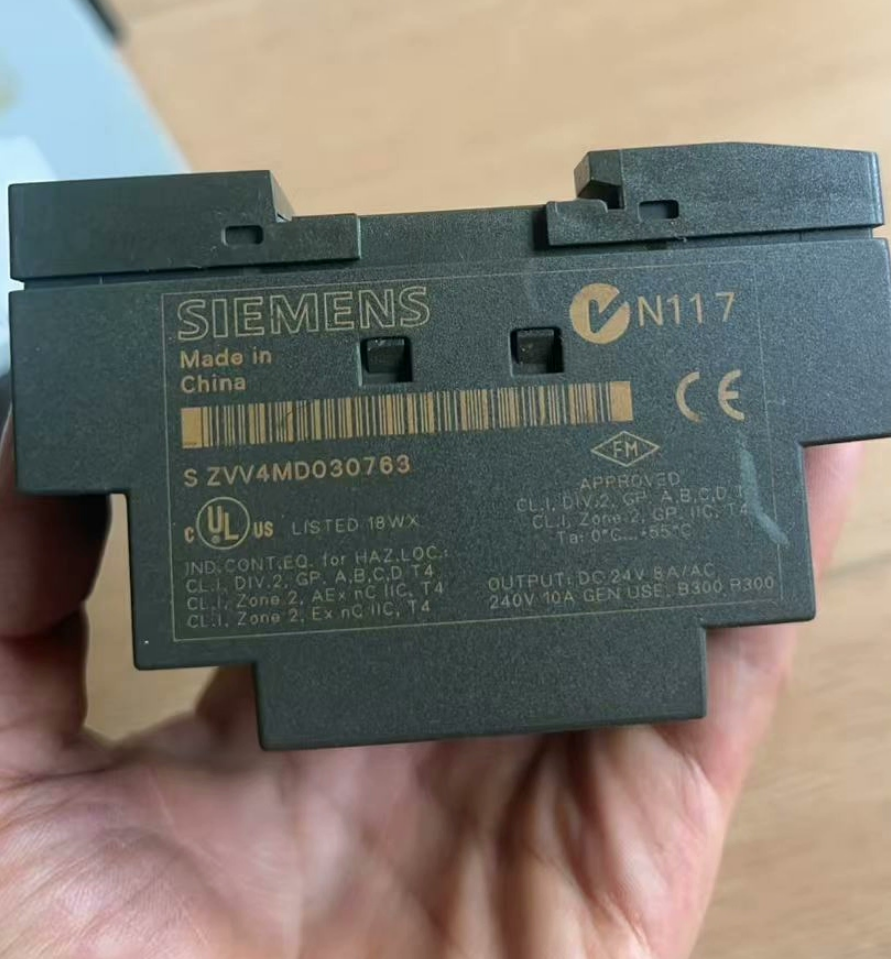

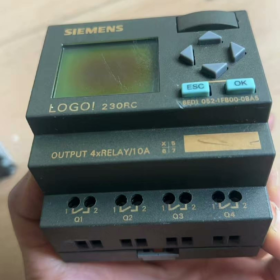
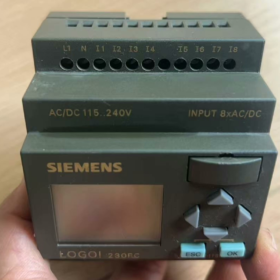
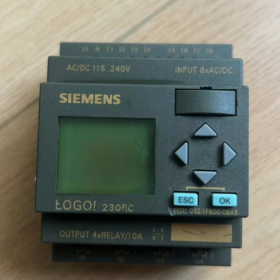
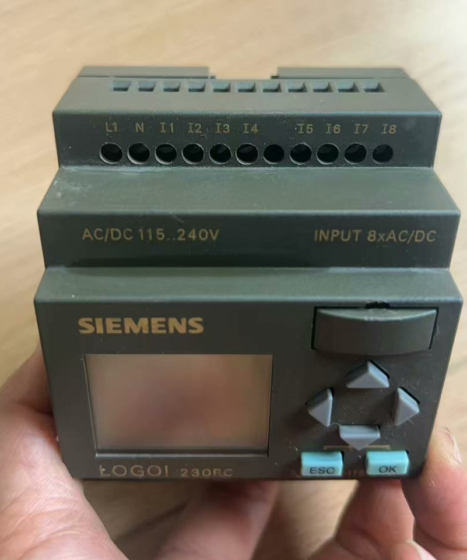
This is the Siemens LOGO! 230RC Smart Logic Controller (Version 0BA5), designed for small-scale automation scenarios. It features 8 channels of 230V AC/DC digital inputs, 4 channels of relay outputs, 130 function block memory capacity, and supports modular expansion, making it suitable for replacing traditional relay circuits. This model has been discontinued; the official upgraded version is 6ED1052-1FB00-0BA6, and a higher-tier alternative is the LOGO! 8 Series 230RCE (per esempio., 6ED1052-1FB08-0BA2).
- Model Breakdown
| Segment | Senso | Descrizione |
| 6ED | Serie di prodotti | Siemens LOGO! Logic Module Series |
| 1052 | Tipo di prodotto | Basic Unit |
| 1FB | Specification Code | 230V AC/DC power supply, with display screen, relay outputs |
| 0 | Version Code | Basic Version |
| 0BA5 | Hardware Version | LOGO! 0BA5 Series (Discontinued) |
- Parametri fondamentali
2.1 Power Supply and Physical Characteristics
Power Supply Voltage: 115-240V AC/DC (100-253A DC)
Power Consumption: Approximately 15VA (AC), 18W (DC)
Dimensioni: 72mm × 90mm × 55mm (Width × Height × Depth)
Peso: 0.23kg (approx. 0.51 lbs)
Metodo di montaggio: Standard DIN rail mounting (compliant with EN 50022 standard)
2.2 I/O Configuration
| Tipo | Quantity | Specification | Caratteristiche |
| Digital Inputs | 8 channels | 230V AC/DC | Divided into two groups (4 channels per group), same phase required within each group, internal interconnection supported between groups |
| Digital Outputs | 4 channels | Relay Outputs | Maximum 10A for resistive loads, 3A for inductive loads, maximum switching voltage of 250V AC/30V DC |
| Input Frequency | – | Max. 4Hz | Suitable for standard switch signal acquisition |
| Output Short-Circuit Protection | – | External fuse required | 10A slow-blow fuse recommended |
2.3 Memory and Performance
Function Block Capacity: 130 standard function blocks
Program Memory: Sufficient for storing complex logic control programs
Real-Time Clock: Built-in, backup battery supports approximately 80 hours of data retention
Cycle Time: Typical value < 10SM (depending on program complexity)
- Caratteristiche funzionali
3.1 Core Control Functions
Built-in complete standard function block library: Logic gates (AND/OR/XOR/NOT), timers (TON/TOF/TP), counters (CTU/CTD), comparators, weekly/daily timers, ecc.
Supports basic arithmetic operations, Pulse Width Modulation (PWM), and analog value processing (expansion module required)
Integrated real-time clock for implementing time-controlled tasks
3.2 Expandability and Communication
Supports LOGO! series expansion modules (digital I/O, analog I/O, communication modules)
Connectable to PC via LOGO! programming cable for programming with LOGO! Soft Comfort software
No built-in Ethernet interface (characteristic of Version 0BA5); network communication achievable via expansion modules
3.3 Funzionamento e manutenzione
Built-in LCD display supporting local parameter setting and status monitoring
Password protection function to prevent unauthorized program modifications
Fault diagnosis function for quick system issue localization
Compliant with EN 55 011 Class B electromagnetic compatibility standard, suitable for industrial and civil environments
- Installation and Maintenance
4.1 Punti chiave dell'installazione
Installation Location: Avoid direct sunlight, humidity, dust, e ambienti con gas corrosivi; ambient temperature 0-55℃, relative humidity 5-95% (nessuna condensa)
Specifiche di cablaggio:
Connessione di alimentazione: L1/N (AC) or L+/L(DC), protective grounding required
Input Wiring: Maximum length of unshielded cable is 100 metri, same phase must be connected for inputs in the same group
Output Wiring: Independent wiring recommended for each output channel to avoid overload
DIN Rail Mounting: Snap-in design for easy installation, 10mm heat dissipation space recommended
4.2 Raccomandazioni per la manutenzione
Regularly check the tightness of terminal connections to prevent loosening
Clean the display screen and housing to avoid dust accumulation affecting operation
Program Backup: Regularly back up programs using LOGO! Soft Comfort to prevent data loss
Backup Battery Replacement: Replace the CR2032 button battery when real-time clock data cannot be retained
4.3 Common Fault Handling
| Fenomeno di guasto | Possibili cause | Soluzioni |
| No power indicator | Power not connected or damaged | Check power connections, measure voltage, replace power module if necessary |
| No response to input signals | Incorrect wiring, abnormal input voltage | Check input wiring, measure input voltage, verify signal type matching |
| Outputs not operating | Load overload, damaged output relays | Check load, replace fuses, replace output module if necessary |
| Program loss | Depleted backup battery | Replace battery and re-download program |
- Upgrade and Replacement Recommendations
5.1 Official Direct Replacement Model
6ED1052-1FB00-0BA6 (Version 0BA6):
Direct replacement for Version 0BA5, hardware-compatible with direct program porting
Performance improvement: Function block capacity increased to 200, faster operation speed
Recommended as the first choice for one-to-one replacement
5.2 High-Tier Upgrade Option (LOGO! 8 Series)
6ED1052-1FB08-0BA2 (LOGO! 230RCE):
Function block capacity increased to 400, supporting more complex programs
Built-in Ethernet interface with integrated web server, supporting remote monitoring and control
Supports data logging, user-defined web pages, and MQTT communication (Version 8.4)
Requires programming with LOGO! Soft Comfort V8.4 or higher, compatible with legacy projects
5.3 Replacement Strategy Recommendations
| Scenario applicativo | Recommended Replacement Model | Replacement Notes |
| Simple relay replacement | 6ED1052-1FB00-0BA6 | Direct replacement without program modification |
| Network communication required | 6ED1052-1FB08-0BA2 | Programming software update and network parameter reconfiguration required |
| Analog control required | 6ED1052-1FB08-0BA2 + Analog Expansion Module | Hardware expansion needed, program adaptation to new modules required |
| Budget constraints | 6ED1052-1FB00-0BA6 | Highest cost-performance ratio, meeting basic control requirements |
- Scenari applicativi
Small pump/fan control
Automatic control of lighting and air conditioning systems
Door/window/access control system control
Control of small production lines such as conveyors and packaging machines
Replacement of traditional relay circuits to improve system reliability and flexibility
As the 230RC model of the LOGO! 0BA5 Series, Siemens 6ED1052-1FB00-0BA5 is a mature and reliable smart logic controller suitable for small-scale automation projects. Although discontinued, there are clear official replacement models. It is recommended to select the appropriate replacement product based on actual needs; for network communication and more powerful functions, upgrading to the LOGO! 8 Series 230RCE model is recommended.
Siemens LOGO! 230RC Programming Software: In-Depth Guide to LOGO! Soft Comfort
Core Overview: The official programming software for LOGO! 230RC (including 6ED1052-1FB00-0BA5) is LOGO! Soft Comfort, with the latest stable version being V8.3. It supports two graphical programming methods: Function Block Diagram (FBD) and Ladder Diagram (LAD), and provides core functions such as offline simulation, online monitoring, program backup and restoration. It is backward compatible with all LOGO! series controllers, perfectly adapts to the 230RC Version 0BA5, and enables communication via dedicated programming cable or USB interface.
- Software Overview
LOGO! Soft Comfort is a PC-based programming software developed by Siemens exclusively for LOGO! series smart logic controllers. Its core positioning is an “easy-to-use and intuitive engineering tool”, designed to help users quickly implement programming, simulation and debugging of small-scale automation projects.
Developer: Digital Industries Division, Siemens AG
Supported Systems: Windows 7/8/10/11 (64-bit recommended), Linux, Mac OS X
Core Value: No professional programming background required; logic control program design can be completed through drag-and-drop operations, significantly lowering the threshold for small-scale automation project development
Official Positioning: IL “soulmate” of LOGO! controllers, providing full-process support from project creation to device debugging
- Version Evolution and Compatibility
2.1 Main Version History
| Version | Release Time | Key Features |
| V6.x | Early Version | Basic functions, supporting LOGO! Version 0BA4 and earlier |
| V7.x | Mid Version | Enhanced simulation functions, supporting LOGO! 0BA5 Series |
| V8.0 | 2019 | Full support for LOGO! 8 Series, added Ethernet communication function |
| V8.3 | Latest Stable Version | Optimized user interface, enhanced compatibility, supporting all LOGO! series |
| V8.4 | Beta Version | Added MQTT communication support, enhanced data logging function |
2.2 Compatibility Notes
Backward Compatibility: Version V8.3 fully supports LOGO! 230RC Version 0BA5 without additional settings
Program Porting: Programs for Version 0BA5 can be directly opened, edited and downloaded to new hardware in V8.3
Hardware Adaptation: Supports all LOGO! basic units and expansion modules, including digital I/O, analog I/O, communication modules, ecc.
- Detailed Core Functions
3.1 Programming Environment and Methods
Double Programming Modes: Simultaneously supports Function Block Diagram (FBD) and Ladder Diagram (LAD) graphical programming methods to meet different user habits
Intuitive Interface: Left-side function block library, middle programming area, right-side property setting panel with clear layout and easy operation
Function Block Library: Built-in complete standard function blocks, compreso:
Logic gates (AND/OR/XOR/NOT, ecc.)
Timers (TON/TOF/TP, ecc.)
Counters (CTU/CTD, ecc.)
Comparators, arithmetic operations, PWM, real-time clock, ecc.
3.2 Simulation and Debugging Tools
| Function | Descrizione | Valore |
| Offline Simulation | Test program logic without connecting hardware, supporting input signal simulation | Reduce debugging costs and shorten development cycle |
| Online Monitoring | Real-time display of program running status, supporting forced variable value testing | Quickly locate logic errors and improve debugging efficiency |
| Program Comparison | Compare differences between offline program and controller program | Ensure program consistency and prevent misoperations |
| Fault Diagnosis | Display controller running status, error codes and I/O status | Quickly troubleshoot hardware and software issues |
3.3 Project Management and Documentation
Project Archiving: Complete project file saving with version management support
Automatic Documentation Generation: Generate professional documents such as program circuit diagrams and I/O allocation tables
Annotation Function: Support adding detailed annotations to function blocks and variables to improve program readability
Print Output: Print program circuit diagrams, parameter tables, ecc., for on-site maintenance
3.4 Communication and Data Interaction
Programming Connection: Support connection to LOGO! 230RC via dedicated programming cable (LOGO! USB-Cable) or USB interface
Program Transfer: Realize program upload, download and update between PC and controller
Data Backup: Support complete backup and restoration of controller programs and parameters
Extended Communication: Realize Ethernet, Modbus and other protocol communications with communication modules (LOGO! 8 Series required)
- Adaptation Key Points with LOGO! 230RC 0BA5
4.1 Metodo di connessione
Recommended Solution: Use Siemens original LOGO! USB programming cable (6ED1057-1AA01-0BA0) with plug-and-play support
Connection Steps:
- Install LOGO! Soft Comfort software and drivers
- Connect the programming cable to the PC USB interface and the LOGO! 230RC programming port
- The software automatically identifies the device and establishes a communication connection
4.2 Programming Limitations and Optimization
Function Block Capacity: Version 0BA5 supports 130 standard function blocks; V8.3 software can display used/available function block count in real time
Program Optimization: The software provides automatic optimization functions to help reduce the number of function blocks used and improve program operation efficiency
Parameter Setting: Support direct configuration of LOGO! 230RC parameters such as input filtering and output delay in the software
4.3 Program Porting and Upgrade
0BA5 → 0BA6 Porting: Programs can be directly opened in V8.3 and downloaded to Version 0BA6 hardware without modification
0BA5 → LOGO! 8 Aggiornamento: The software automatically converts program format and supports function expansion; note that some advanced functions require hardware support
- Installation and Usage Process
5.1 Software Installation
Full Installation of V8.3:
- Download the full V8.3 installation package from the Siemens Industry Support Center
- Unzip and run the installer, accept the license agreement
- Select installation path and complete component installation
- Install programming cable drivers (if using USB connection)
Upgrade Installation: Install an earlier version (per esempio., V8.0) first, then run the V8.3 upgrade package
5.2 Basic Usage Steps
- Create a new project → Select LOGO! 230RC 0BA5 model
- Drag required function blocks from the function block library to the programming area
- Connect function blocks and set parameters (per esempio., timer time, counter value)
- Test program logic via offline simulation and correct errors
- Connect hardware and download the program to LOGO! 230RC
- Monitor running status online and perform on-site debugging
- Back up the program and generate project documentation
5.3 Common Problem Solving
| Problem | Cause | Solution |
| Errore di comunicazione | Incorrect cable connection, drivers not installed | Check connections, reinstall drivers, restart software |
| Program Download Failure | Exceeded maximum number of program function blocks | Optimize program to reduce function block usage, or upgrade hardware |
| Simulation Abnormality | Incorrect simulation of input signals | Check simulation settings to ensure input signals meet logical requirements |
- Advanced Functions and Application Skills
6.1 Macro Module Function
Common logic can be encapsulated into macro modules for reuse to improve programming efficiency
Supports macro module parameterization to adapt to different application scenarios
6.2 Password Protection
Supports setting access passwords for programs to prevent unauthorized modifications
Divided into user-level and administrator-level passwords for flexible access control
6.3 Cooperation with LOGO! Display Screen
Configure the display content of the LOGO! 230RC LCD screen in the software
Support custom display interfaces for convenient on-site operation and monitoring
- Summary and Recommendations
LOGO! Soft Comfort is the optimal programming tool for the LOGO! 230RC 0BA5 controller. Its intuitive graphical interface, powerful simulation functions and comprehensive project management capabilities make small-scale automation project development simple and efficient.
Usage Recommendations:
- Prioritize the latest stable version V8.3 for optimal compatibility and function support
- Verify logic using the offline simulation function before developing complex programs to reduce on-site debugging time
- Regularly back up project files and set password protection for important programs
- For network communication and advanced functions, upgrade to the LOGO! 8 Series (per esempio., 230RCE) and use V8.3 software to achieve more powerful automation control

NH42-63-318x560.png "Commutatori automatici di tipo PC CHINT (ATS)NH42-63/4SZ")