 접촉기,회로 차단기,감지기,인코더,PLC,변환기

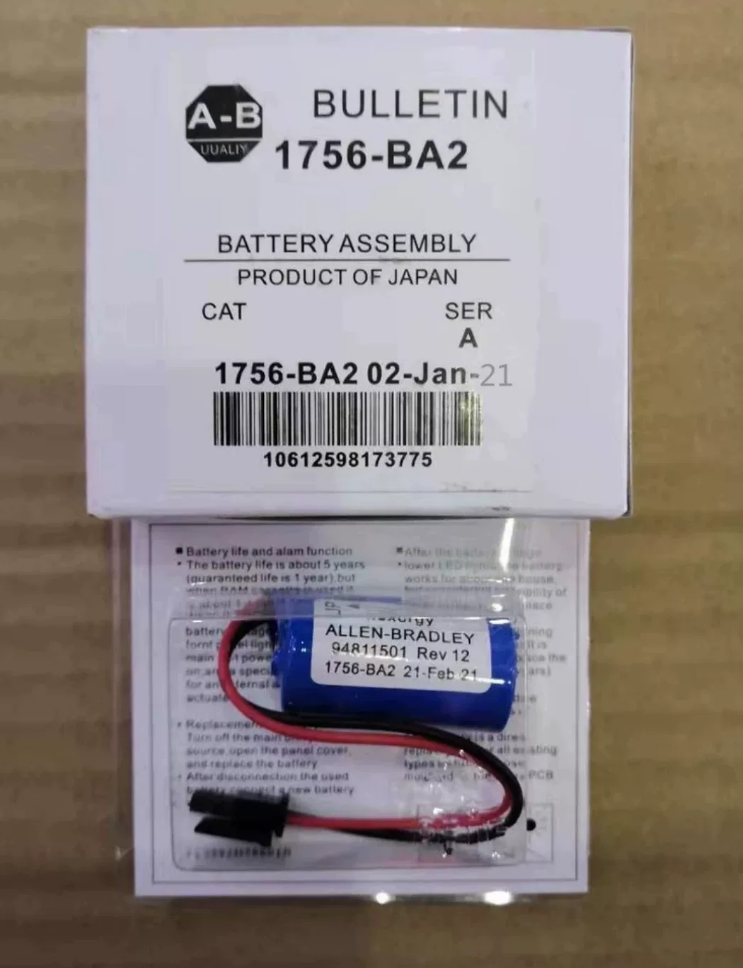

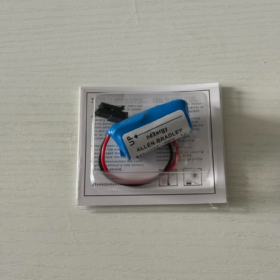
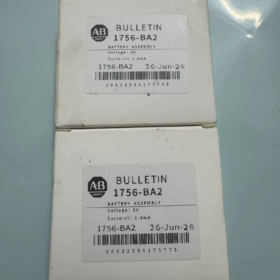
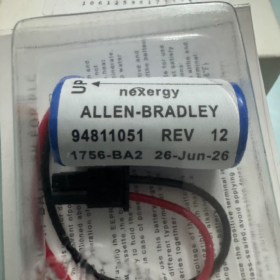
Rockwell ControlLogix Controller Memory Backup 리튬 배터리 Assembly
✅ Model Definition
1756: ControlLogix 5560 플랫폼 시리즈
학사: Battery Assembly
2: 2nd-generation backup battery, only compatible with 1756-L6x B revision CPUs. Not interchangeable with 1756-BA1.
📌 Core Purpose
When main power fails, it supplies power to the controller SRAM volatile memory to retain user programs, tag data, real-time clock and fault logs. Without this battery, memory data will be lost after power cycle, requiring program re-download.
Non-rechargeable lithium thionyl chloride primary battery.
📋 Key Technical Specifications
| 목 | 사양 |
| Cell Chemistry | Li‑SOCl₂ Lithium Thionyl Chloride (Primary Lithium Battery) |
| 정격전압 | 3.0 VDC |
| Typical Capacity | 1200 mAh |
| 커넥터 | Red/black lead wires with dedicated keyed connector |
| 작동 온도 | -40℃ ~ +85℃ |
| Shelf Life (Uninstalled, 25℃) | 대략. 10 연령; annual self-discharge ≤1% |
| 서비스 수명 (Installed, 25℃) | 대략. 5 연령; high cabinet temperature significantly shortens service life |
| 설치 방법 | 핫스왑 가능 |
| Alarm Signal | BAT indicator ON; Type10 fault code in Logix software, 에스:9/1 low battery status bit |
🧩 Compatible Controllers
✅ Only for B revision L6x CPUs:
1756-L61B / L62B / L63B / L64B
❌ Revision A L6x CPUs use 1756-BA1. The two models have incompatible connectors and electrical characteristics and cannot be swapped.
📉 Product Lifecycle
Official Status: EOL End of Life. Sales termination date: 2027-12-31. Rockwell does not provide a direct OEM replacement model. Source genuine or compatible replacement batteries from the aftermarket.
🛠️ Maintenance & 문제 해결
- Back up the program before replacement. Hot-swap is supported, but program backup is recommended as a safety precaution.
- Low voltage threshold approx. 2.5다섯; battery alarm triggers below this value.
- Replace promptly after alarm to prevent data loss during unexpected power outage.
- Waste lithium batteries are hazardous goods. Dispose per hazardous waste regulations; do not discard casually.
📦 HS Code Reference
8537101190 (Electrical control assemblies)
⚠️ Common Misconceptions
- It is NOT a 24V power supply battery, despite incorrect labeling by many vendors. It is only a 3V memory backup battery and cannot power the entire PLC.
- 비충전식. Do NOT apply external charging power.
- L6A and L6B batteries are not interchangeable. Verify CPU serial number revision before ordering.
SOP: 1756-BA2 ControlLogix CPU Backup Lithium Battery Replacement
적용 가능한 장치: 1756-L61B / L62B / L63B / L64B (B-revision CPU)
Battery Model: 1756-BA2 (1756-BA1 is strictly prohibited as a replacement)
작동 모드: Rack hot-swap (추천; prevents SRAM loss of program, tags and clock)
문서 버전: V1.0
위험 수준: 낮은; Hot-swap is forbidden in hazardous / 폭발 위험 지역 (power-down operation mandatory)
- 목적
Standardize replacement procedure for the 1756-BA2 backup lithium battery. Prevent loss of programs, 태그, real-time clock and fault logs; avoid ESD damage to CPU, short circuit and fire hazards of lithium batteries; establish maintenance records.
- Pre-Job Safety Requirements
- Operators shall be qualified and familiar with ControlLogix platform. Wear properly grounded anti-static wrist strap.
- Notify field operators before work, record production status. Isolate process interlocks if required.
- 도구: Anti-static wrist strap, small flat screwdriver, 절연 테이프, 멀티미터, notebook, Logix 디자이너 / RSLogix5000 software.
- Spare part verification: New 1756-BA2, inspect for bulging or electrolyte leakage, confirm model label.
- Lithium battery warning: Lithium thionyl chloride primary battery, 비충전식. Do not puncture, crush, incinerate or short circuit.
- Hazardous / explosive classified areas: Hot-swap prohibited. Lockout / Tagout (마음) power cut required. Power-down replacement will clear SRAM memory; full program download is required after replacement.
- Replacement Triggers
Replace when any condition below is met:
CPU front panel BAT red indicator steady ON
Logix software reports Type10 (Battery Fault), 에스:9/1 low battery bit set
Battery casing bulging or electrolyte leakage
Reaching scheduled maintenance cycle (5-year service life at 25℃; preventive replacement every 2~3 years if cabinet temperature>40℃)
- 사전 작업 준비
- Connect PC to PLC, upload complete ACD project file online and make dual backup (현지의 + server). Save recipes, tags and custom user data.
- Review CPU fault log, confirm only low battery alarm exists without other major faults; record fault codes.
- Confirm CPU revision is B-version (1756-L6xB). Confirm battery compartment is located at lower front of CPU.
- Inspect new battery: intact housing, undamaged connector; measure open-circuit voltage ≥3.0VDC.
- Prepare insulating tape for old battery to wrap terminals immediately after removal to avoid short circuit.
- Standard Operating Steps (Non-explosive Area | Hot-Swap)
Keep rack powered on. CPU can stay in Program or Run mode. Onboard CPU capacitor maintains SRAM power for short duration.
- Wear anti-static wrist strap and ensure good ground connection.
- Open battery compartment door on front of CPU, depress latch and gently pull out battery tray.
- Pinch connector latch, pull old battery connector straight out. Do not tug wires.
- Remove old battery and immediately wrap both terminals with insulating tape to prevent positive/negative short circuit.
- Retrieve new 1756-BA2, align keyed connector orientation with CPU socket, insert steadily until latch clicks into locked position.
Keyed connector prevents reverse insertion; do not force fit.
- Place new battery into tray, slide tray back into compartment and close compartment door.
- Online via software: clear old battery fault; observe BAT indicator. Red BAT light shall turn off within 5~10 seconds.
- 확인하다: 에스:9/1 low battery bit reset, no new fault codes generated.
- 선적 서류 비치: Mark replacement date and next scheduled replacement date on label inside control cabinet.
- Upload project again, verify program and tag integrity; confirm system clock works normally.
- Alternative Procedure (Explosive Area / Mandatory Power-Down Replacement)
⚠️ Power-down replacement clears SRAM memory; 프로그램, tags and clock will be lost. Complete backup must be finished beforehand.
- Perform LOTO lockout/tagout and cut rack power supply.
- Open battery compartment, disconnect old battery and insulate terminals.
- Install new battery, plug in connector and reset battery tray.
- Restore rack power and power up CPU.
- Connect PC to CPU, download full ACD program, recipes and tags.
- Calibrate CPU real-time clock, clear faults, validate I/O and interlock logic.
- Confirm normal equipment operation, remove LOTO handover back to operators.
- Post-Operation Verification Checklist (Mandatory Inspection)
✅ CPU BAT indicator extinguished
✅ Type10 battery fault cleared in Logix fault list
✅ Controller S:9/1 = OFF
✅ Controller system time correct
✅ Program, tag and recipe data consistent with backup copy
✅ No new Major Faults
✅ Battery connector no overheating, loose connection or corrosion
- Waste Battery Disposal (Lithium Thionyl Chloride Hazardous Waste)
- Terminals of removed battery must be insulated. Do not place bare terminals together with metal tools.
- Do not discard into general domestic waste. Hand over to qualified hazardous waste recycler as lithium battery hazardous waste.
- Do not incinerate, crush or submerge in water.
- 일반적인 결함 & 메모
- BAT indicator remains ON: Check connector fully seated; verify battery model is BA2; measure battery voltage; inspect socket pin corrosion.
- Strictly prohibit substitution by 1756-BA1, incompatible connector hardware.
- Complete hot-swap quickly. Do not leave battery disconnected for extended time (CPU internal capacitor hold-up time is limited).
- Do not touch leaking fluid if battery bulges or leaks. Wear gloves, seal separately and dispose as hazardous waste.
- Spare battery storage: Store in original packaging in cool and dry environment at 25℃, avoid high temperature.
1756-BA2 Backup Battery Application Scenarios
Compatible with Rockwell ControlLogix 1756-L61B / L62B / L63B / L64B (B-revision CPU)
핵심 기능: SRAM memory retention battery, 3V primary lithium battery. Does NOT supply power to the whole PLC.
- 일반적인 애플리케이션 시나리오
- Continuous Process Production Lines (가장 일반적인)
화학적인, 제약, 종이, 야금, 수처리, 고무, plastic extrusion and other 24-hour continuous production.
Scenario feature: Unplanned shutdown not permitted; risk of grid voltage sag or short blackouts.
Battery function: Upon mains failure, maintain SRAM contents including user program, real-time tags, production recipes, fault history and system clock. Auto resume operation after power recovery, no program re-download required, no production data loss.
Operation preference: Hot-swap battery replacement without production interruption.
- Plant Utility & Auxiliary Systems
Compressed air station, circulating water, 공조, boiler, electrical substation auxiliary control systems.
Scenario feature: Mostly unattended control rooms, frequent power disturbances, 원격 모니터링.
Battery function: Preserve alarm logs, accumulated metering data and system clock, maintain time synchronization with SCADA host, prevent clock reset after each power-up.
- 자재 취급 & Warehouse Automation
자동화창고, 라인 정렬, belt conveyor systems.
Scenario feature: Frequent equipment start-stop; motor inrush current causes voltage dips.
Battery function: Prevent SRAM memory corruption caused by voltage disturbance, avoid repeated program download and position data reset after power loss.
- OEM Export Complete Machinery
Large packaging machines, 테스트 벤치, shield machine auxiliary controls, complete test rigs.
Scenario feature: Multiple power cycles during factory transportation and overseas commissioning.
Battery function: Retain CPU program and parameters during long-distance transport with power off. Equipment ready for commissioning once powered on at site.
- Hazardous / Explosive Classified Zones (화학적인 / 기름 & 가스)
Operation restriction: Hot-swap forbidden.
요구 사항: Battery replacement must be performed with equipment LOTO and power off. Power-down replacement erases SRAM; program re-download required after replacement.
- 적용할 수 없는 시나리오
- ❌ Cannot act as UPS backup power: Cannot supply power to CPU or I/O modules; only maintains SRAM memory. PLC will shut down for extended power outages.
- ❌ 1756-L6xA (Revision A CPU): Revision A CPUs use 1756-BA1. BA2 connector mismatch and cannot be installed.
- ❌ 1756-L7x / L8x New Generation ControlLogix: L7/L8 CPUs use onboard flash memory and do not require this external BA-series battery.
III. Maintenance Strategy by Scenario
| 응용 시나리오 | Ambient Temp | Recommended Replacement Cycle | Replacement Method |
| 에어컨이 완비된 중앙 제어실 | ~25℃ | 5-year preventive replacement | Hot-swap |
| High-temperature cabinet (야금 / 종이, 40~55℃) | Elevated | 2~3-year preventive replacement | Hot-swap |
| Hazardous classified area | 어느 | Replace on alarm + 3-year preventive cycle | LOTO power-down replacement |
| OEM machine static storage | Room temp | Check voltage before shipment; replace if storage >7 연령 | Machine power-down replacement |
- Scenario-Related Risks
- 고온 환경: Accelerates battery degradation, early low-battery alarms and risk of catastrophic data loss upon power failure.
- Non-stop long-run plant: BAT alarms are easily overlooked. If battery fully depletes, power outage will erase programs and tags, leading to extended downtime.
- Repeated short power outages: Accelerates battery consumption and shortens service life.
1756-BA2 Battery Mounting Location (For direct insertion into SOP)
Applicable to 1756-L61B / L62B / L63B / L64B (B-revision ControlLogix CPU)
Physical Location
Small snap-on plastic access door for battery compartment on lower right of CPU front panel, adjacent to BAT indicator and serial port. Not on module top, rear or chassis backplane.
CPU plugs into slots of 1756 차대. Battery compartment is integrated into CPU body, occupies no extra chassis slot.
A plastic battery tray sits inside the compartment. A dedicated 2-pin keyed socket is mounted internally. The 1756-BA2 with red/black lead wires plugs into this socket, and the battery cell rests inside the tray.
Quick A/B Revision CPU Battery Compartment Identification (Field Checkpoint)
- B-rev L6x (uses 1756-BA2): CF card slot is on CPU front panel. Battery compartment small door is lower right on front; open door for battery hot-swap.
- A-rev L6x (uses 1756-BA1): CF card slot is on CPU bottom. Battery compartment construction differs and BA2 cannot be fitted.
Structural Description (for SOP inclusion)
- 주택: Small snap latch access door on CPU front panel. Press latch gently and flip open.
- 내부: Plastic tray holding battery, red/black cable assembly with keyed connector plugged into onboard CPU battery header.
- BAT battery alarm LED: Beside battery compartment for direct visual battery status indication.
Field Operation Notes
Pull out tray after opening door, disconnect connector, replace battery, slide tray back and close door.
Hot-swap with rack powered on is permitted in non-hazardous areas.
Maintenance label can be pasted on inner side of compartment door to record battery replacement date (Rockwell recommended practice).
한 문장 요약 (SOP subsection: 장착 위치)
The 1756-BA2 battery is installed in the built-in battery compartment at the lower right of the front panel of 1756-L6xB series CPU. The compartment has a snap-on access door and an internal dedicated keyed battery socket holding the battery tray. The CPU is inserted into ControlLogix chassis slots. The battery compartment is part of the CPU and does not consume additional chassis slot resources.





NH42-63-318x560.png "CHINT PC형 자동절환스위치 (ATS)NH42-63/4SZ")



