 Contactor,întrerupător de circuit,senzor,Codificator,PLC,Convertor

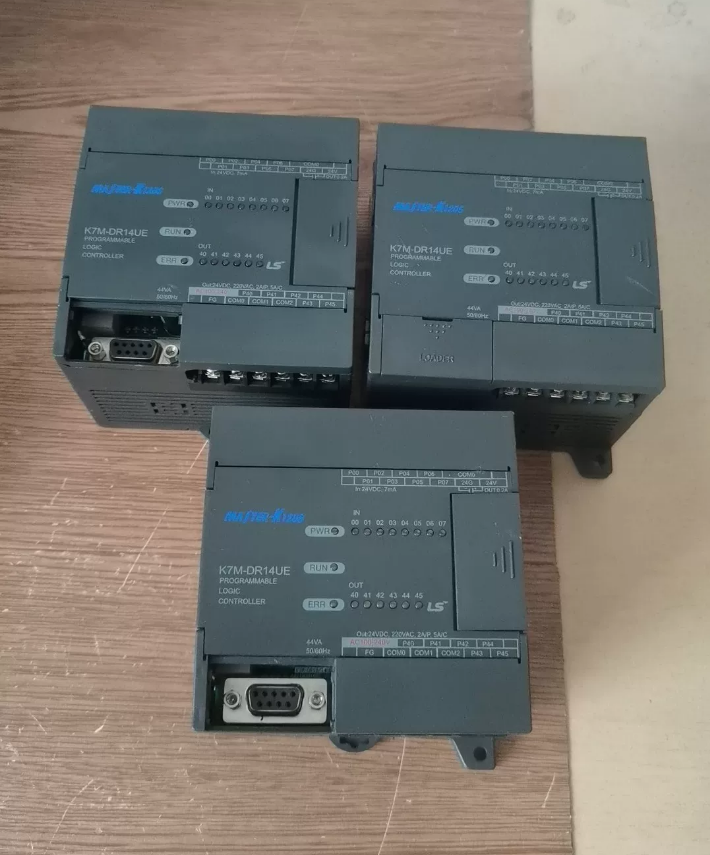

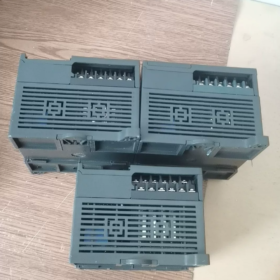
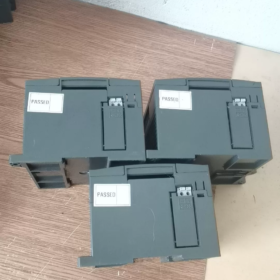
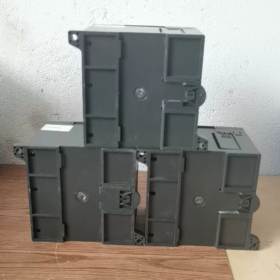
Decodarea codului modelului
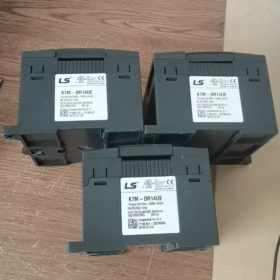
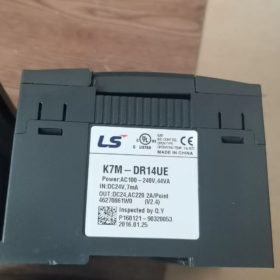
K7M-DR14UE
- K7M: Unitatea principală CPU din seria MASTER-K120S
- D: Intrare digitală DC24V
- R: Ieșire releu
- 14: Total de puncte I/O 14 (8DIN + 6DO)
- U: Sursă de alimentare cu gamă largă AC85~264V (Alimentat AC)
- E: Varianta economica
Distincţie: Model standard K7M-DR14U (fara E). Funcțiile hardware diferă și nu pot fi înlocuite direct.
- Specificații electrice de bază
| Articol | Caietul de sarcini |
| I/O totală | 14 puncte; 8DIN / 6DO |
| Intrare digitală | Intrare la chiuvetă DC24V (NPN), optoizolat, X00~X07 |
| Ieșire releu | 6 iesiri releu Y00~Y05; Sarcină rezistivă pe contact: AC250V/2A; DC30V/2A; Nu se aplică pentru comutarea de înaltă frecvență |
| Alimentare electrică | Intrare AC 85~264V cu gamă largă |
| Capacitatea programului | 2K pași |
| Reținerea programului | Supercondensator de rezervă; Nu este nevoie de baterie cu litiu |
| Comunicare la bord | Numai RS485 (Nu RS232 pe modelul economic); Modbus RTU și LS protocol proprietar acceptat |
| Capacitate de expansiune | Max. 3 module de expansiune; I/O total maxim 120 puncte |
| Funcții de mare viteză | Fără contor de mare viteză încorporat, ieșire impuls sau control PID pentru versiunea economică |
| Montare | Montare pe șină DIN |
| Mediul de operare | 0~55°C, fara condens, mediu industrial rezistent la praf |
- Distincție cheie & Note de selecție
- K7M-DR14UE (Economie) VS K7M-DR14U (Standard)
DR14UE: Numai RS485; Fără contor de mare viteză, ieșire în impuls sau PID, rentabil;
DR14U: RS232+RS485 la bord; suportă contor de mare viteză, poziționare și PID;
⚠️ Logica programului este compatibilă, dar funcțiile hardware variază. Verificați cerințele procesului înainte de înlocuire.
- Tip ieșire: DR(Releu) vs DT(tranzistor)
DR releu: Potrivit pentru electrovalve și contactoare, ieșire de impulsuri de înaltă frecvență indisponibilă;
Tranzistor DT: Folosit pentru controlul impulsului servo/pas cu pas.
- Software de programare
Nume software: KGL-WIN (Doar pentru Windows)
Comunicare pentru descărcare: RS485; Este necesar un cablu de programare dedicat LS.
- Aplicații tipice
Mică automatizare autonomă, echipamente transportoare, utilaje auxiliare de ambalare, linii de asamblare simple, control HVAC, control logic pentru sisteme de panouri de joasă tensiune;
❌ Nu este potrivit pentru: Poziționare servo, ieșire de impulsuri de înaltă frecvență, control al temperaturii PID în buclă închisă (funcții hardware absente pe modelul economic).
- Modele economice de referință din aceeași serie
K7M-DR10UE:6D/4C
K7M-DR14UE:8MAR/6 (Model acoperit aici)
K7M-DR20UE:12D/8C
K7M-DR30UE:18DI/12DO
- Depanare comună & Ghid de cablare
- Nu supraîncărcați contactele de ieșire ale releului. Utilizați relee intermediare pentru sarcini comutate frecvent;
- Cablaj RS485: Nu inversați liniile A/B; instalați rezistențe de terminare la ambele capete ale magistralei;
- Intrarea digitală acceptă numai semnale DC24V NPN; Senzorii PNP nu pot fi conectați direct;
- Programele sunt susținute de supercondensator. Risc de pierdere a programului dacă durata de oprire depășește 72 ore.
Software de programare pentru LS K7M-DR14UE (MASTER-K120S)
Numele complet al software-ului
KGL-WIN (scris și ca KGLWIN)
✅ Software compatibil cu unică; XG5000/XGWorks nu poate fi utilizat pentru seria K120S (Software XG exclusiv pentru seria XGT PLC, nu confunda).
- Versiune recomandată
Lansare mainstream stabilă: KGL-WIN V3.66
Suportă seria completă MASTER-K: K10S/K80S/K120S(K7M)/K200S; complet compatibil cu procesorul economic K7M-DR14UE.
- Limbaje de programare acceptate
Diagrama de scară LD (Cel mai utilizat pe scară largă)
Lista de instrucțiuni IL
Diagrama de funcții secvenţiale SFC
❗Textul structurat ST nu este acceptat (limitarea software-ului a versiunii vechi)
- Note de compatibilitate cu sistemul de operare
Dezvoltat inițial pentru Windows XP / Win7
Win7: Instalați și rulați direct;
Win10 / Win11 (64-pic): Modul de compatibilitate obligatoriu
Operațiunea: Faceți clic dreapta pe Setup.exe → Proprietăți → Compatibilitate → Verificați Executați acest program în modul de compatibilitate pentru Windows 7 + Rulați ca administrator. În caz contrar, pot apărea erori de comunicare sau blocări ale software-ului.
- Metode de comunicare pentru descărcarea programului
K7M-DR14UE versiune economică echipată numai cu RS485, fara port RS232
Două soluții de descărcare:
- Cablu de depanare USB la RS485 (Cablaj A/B);
- Convertor RS232/485 + Cablu de descărcare dedicat LS.
Protocoale de comunicare: Protocolul Cnet proprietar LS, Modbus RTU.
- Comparație importantă pentru a evita greșelile
| Seria PLC | Software de programare |
| MASTER-K120S (K7M-xxx) | KGL-WIN |
| Seria XGT (XGK/XGI) | XG5000 / XGWorks |
- Informații suplimentare
Software-ul este gratuit, fara criptare, dongle hardware nu este necesar;
Acceptă monitorizarea online și funcția manuală de forță I/O;
Fără simulare offline. Hardware-ul PLC fizic este obligatoriu pentru depanare.
Dacă este necesar, pot oferi:
① Procedura de configurare a parametrilor de comunicare KGL-WIN
② RS485 descărcare definiție pinout cablu
③ Lista de verificare pentru depanarea erorilor de încărcare/descărcare a DR14UE
Introducere completă la interfața de operare KGL-WIN (LS MASTER-K120S / Seria K7M)
Model aplicabil: K7M-DR14UE, Versiunea software recomandată V3.66 Versiunea chineză
Premisa importanta: KGL-WIN este un software vechi de arhitectură Windows. Fără simulare offline încorporată, hardware PLC fizic necesar pentru depanare; acceptă numai LD Ladder Diagram / Lista de instrucțiuni IL / Diagrama de funcții secvenţiale SFC, Textul structurat ST nu este acceptat.
- Aspect global al interfeței (De sus în jos)
- Bara de meniu
- Bara de instrumente Viteză standard
- Bara de instrumente pentru elemente de scară
- Panoul din stânga: Fereastra Proiectului (Arborele proiectului)
- Zona Centrală: Fereastra Editor principal al programului
- Fund: Mesaj / Fereastra de informații
- Cel mai de jos: Bara de stare
- Funcția detaliată a fiecărei zone
2.1 Bara de meniu de sus (Interfața de utilizare chineză)
| Meniu | Funcții la fața locului de înaltă frecvență |
| Proiect | Proiect nou, deschide/salva proiect; Selectarea modelului PLC (MASTER-K120S obligatoriu); program & import/export comentarii; setarea parametrilor de comunicare, opțiuni de proiect |
| Edita | Copie, tăiat, pastă, găsi(Ctrl+F), înlocui, sari la pas(Ctrl+G), editarea comentariilor pe scară |
| Vedere | Comutați Diagrama cu scară ↔ Lista de instrucțiuni【Ctrl+Spațiu】; adresa de afișare/comentar; referințe încrucișate ale operanzilor; reglați lățimea scării |
| Online | Conectați PLC, încărcarea programului, descărcarea programului, RUN/STOP PLC, monitor online, forța I/O, forța de eliberare, ștergeți memoria PLC【Meniul de depanare de bază】 |
| Instrument | Trusa de instrumente pentru elemente de scară; verificarea sintaxei programului; tabelul de monitorizare a operanzilor; configurarea tipăririi |
| Fereastră | Aspect flotant, resetați aspectul interfeței |
| Ajutor | Instruction manual, software version information |
⚠️ Critical step for new project: Select MASTER-K120S as PLC model. Wrong selection leads to download failure for K7M-DR14UE.
2.2 Tier1: Bara de instrumente Viteză standard
Common icons:
New Project|Open|Save|Program Syntax Check|Connect PLC|Download Program|Upload Program|Start Monitor|Stop Monitor|Run PLC|Stop PLC|Find
2.3 Tier2: Bara de instrumente pentru elemente de scară (Core for Programming)
Only active under Ladder Diagram mode, shortcut keys:
F3: Contact în mod normal deschis
F4: Contact normal închis
F5: Horizontal Line
F6: Vertical Line
F9: Output Coil
F10: Application Instructions (Timer T, Counter C, MOV transfer, arithmetic operations etc.)
Arrow cursor: Selection mode (move components)
2.4 Panoul din stânga: Fereastra Proiectului (Arborele proiectului)
Fixed four nodes after project creation:
- Program
Double-click to open ladder editor; location for all logic rung programming.
- Parametru
Not commonly used for DR14UE economy CPU without high-speed counter/PID; parameters for high-speed functions available for standard CPUs.
- Variable/Comment
Add Chinese comments for X/Y/M/T/C/D operands; comments can be saved locally or downloaded to PLC for maintenance convenience.
- Atribuire I/O
Preview native I/O: X00~X07 (Intrări), Y00~Y05 (Ieșiri); preview address allocation of expansion modules.
2.5 Central Program Editor Window
Core workspace with multi-tab support:
- Ladder Diagram Mode (Cele mai comune)
Program logic written by rung; conducting branches are highlighted automatically during online monitoring;
- Instruction List Mode (Mnemonic)
Display mnemonic codes; convenient for instruction copy and error troubleshooting; toggle shortcut 【Ctrl+Space】;
- Diagrama de funcții secvenţiale SFC
Step flow programming, less widely adopted.
Editing Mode Distinction
Offline Mode: Grey title bar; program editing only, no PLC connection;
Online Monitor Mode: Highlighted title bar, real-time operand refresh; I/O force available.
2.6 Bottom Message Window
Two primary functions:
- Syntax error alert: Red text prompts address error, illegal instruction after compilation;
- Communication log: Display connect/disconnect status, download progress, PLC fault codes.
2.7 Bottommost Status Bar (Indispensable for Debugging)
Information from left to right:
- Step number and rung number of cursor position;
- Communication Status: Offline / Online;
- PLC operation mode: RUN / STOP;
- Monitor enable status;
- Insert / Overwrite mode;
- Detected PLC model information.
- Standard Operating Workflow (Step-by-step Operation)
- Project → New Project → Select Model【MASTER-K120S】
- Double-click Program under left project tree to open ladder editor
- Program logic with ladder element toolbar
- Click Program Check to eliminate syntax errors
- Project → Communication Setting: Select COM port (corresponding COM number of USB-to-485 adapter), protocol CNET
- Online → Connect PLC
- Online → Download Program (PLC must be under STOP mode)
- Online → Run PLC, enable monitor to verify logic execution
- Operation Pitfalls Specifically for K7M-DR14UE (Economy Version)
- Do not configure high-speed counter, pulse output or PID parameters in software; hardware does not support, download alarm will occur;
- DR14UE only has RS485 port; do not select RS232 in communication settings;
- Run Program Check before every download;
- Offline simulation button is invalid; physical PLC hardware required;
- Software prone to crash on Win10/Win11: Set compatibility mode Windows7 + run as administrator.
- Frequently Used Shortcut Keys
Ctrl+Space: Toggle Ladder Diagram ↔ Instruction List
Ctrl+F: Find operand address
Ctrl+H: Replace operand address
Ctrl+G: Jump to specified step number
F3/F4/F9: Quick insert contact / bobina
Ctrl+S: Save project



NH42-63-318x560.png "Comutatoare de transfer automat de tip PC CHINT (ATS)NH42-63/4SZ")



