 Contactor,întrerupător de circuit,senzor,Codificator,PLC,Convertor

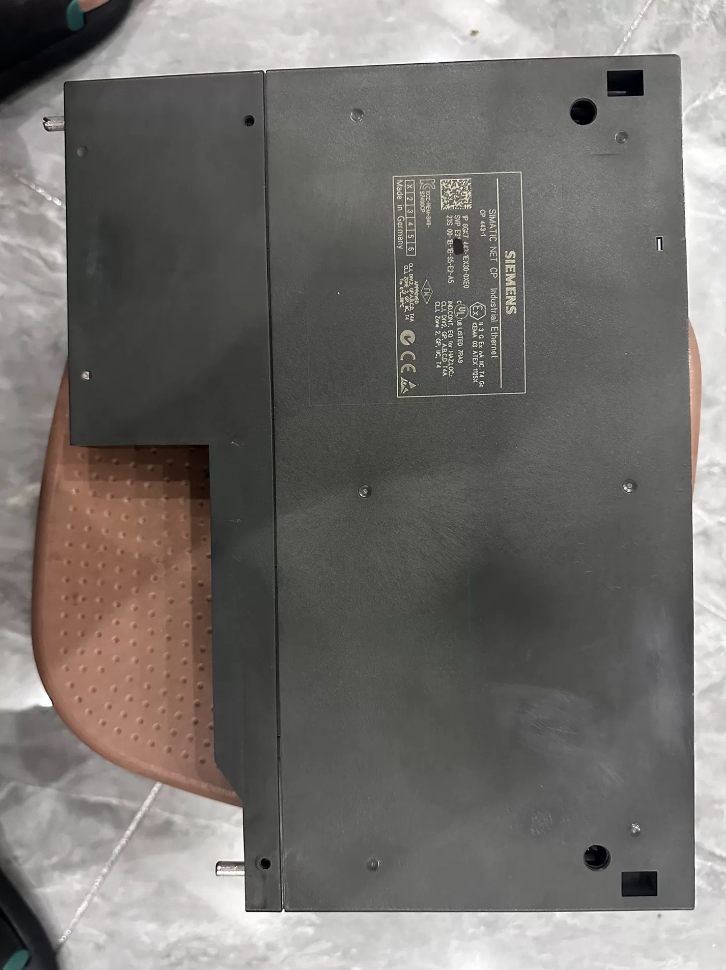

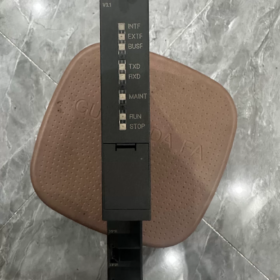
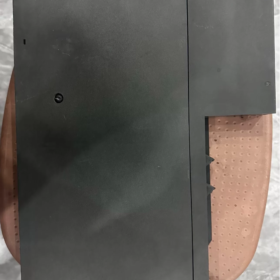
6GK7443-1EX30-0XE0 este un CP 443-1 Industrial Ethernet Communications Processor de Siemens SIMATIC NET series. Este special conceput pentru sistemele PLC redundante SIMATIC S7-400 și S7-400H. This module connects PLC controllers to Industrial Ethernet and acts as a PROFINET IO Controller to realize real-time control of distributed field devices.
As the official upgraded version of the previous CP 443-1 EX20, it integrates a 2-port real-time Ethernet switch and supports bus and ring network topologies. It features Isochronous Real-Time (IRT) comunicare, Media Redundancy, IP access control and extended diagnostics. It serves as the core communication module for Ethernet communication and PROFINET networking in medium and large automation systems. În prezent, the entire S7-400 series has entered the end of its product lifecycle, and this model is mainly used for maintenance, expansion and fault replacement of existing systems.
Aspectul produsului
- Defalcarea codului de model
Număr complet de comandă: 6GK7 443-1EX30-0XE0
- 6GK7: Product category prefix, representing SIMATIC NET industrial communication product series.
- 443: Sub-category, communications processor (CP) dedicated for S7-400 series PLC.
- 1: Bus type, Industrial Ethernet interface.
- EX30: Specification version code, standard CP 443-1 with V3.x firmware and an integrated 2-port 100 Mbps real-time switch.
- 0XE0: Identificatorul versiunii, standard general industrial version without custom functions.
- Parametrii tehnici de bază
3.1 Communication Interface Parameters
| Articol | Caietul de sarcini |
| Cantitate & Type of Interfaces | 2 × RJ45 Industrial Ethernet ports, with built-in 2-port switch |
| Rata de transmisie | 10/100 Negociere automată Mbps, supports auto crossover |
| Performanță în timp real | Supports IRT isochronous real-time communication; minimum update cycle: 250 μs |
| Ring Redundancy | Complies with MRP (Media Redundancy Protocol); ring network recovery time ≤ 300 Domnișoară |
| Port Diagnostics | Independent LINK/ACT LED indicators for each port; supports individual port disablement and manual speed/duplex configuration |
3.2 Protocoale de comunicare & Performanţă
| Articol | Caietul de sarcini |
| PROFINET Functions | Operates as PROFINET IO Controller; connects distributed I/O, convertoare de frecvenţă, servo drives and other field devices |
| Comunicare S7 | Supports both Client and Server modes for PG programming, HMI monitoring and data exchange between multiple PLCs |
| Open Communication | Supports TCP, UDP, ISO-on-TCP (RFC1006); communicates with third-party devices via SEND/RECEIVE instructions |
| Routing Function | Supports S7 routing for program download and device access across different networks |
| Maximum Concurrent Connections | Până la 64 communication connections |
| Maximum Data Size per Packet | ISO-on-TCP: 1452 octeți; Comunicare S7: 8 KB |
3.3 Electric & Parametri mecanici
| Articol | Caietul de sarcini |
| Alimentare electrică | 5 V DC supplied via S7-400 backplane bus; nu este necesară alimentarea externă |
| Consumul de energie tipic | Aproximativ. 7.5 W |
| Lățimea modulului | 40 mm (standard single-width module for S7-400) |
| Slot Occupation | 1 slot of S7-400 rack |
| Metoda de montare | Plug into rack backplane bus and fasten with screws |
| Greutate netă | Aproximativ. 0.45 kg |
| Clasa de protectie | IP20 |
3.4 de mediu & Certification Parameters
| Articol | Caietul de sarcini |
| Temperatura de operare | 0℃ ~ +60℃ (montaj orizontal); 0℃ ~ +40℃ (montaj vertical) |
| Depozitare / Transportation Temperature | -40℃ ~ +70℃ |
| Altitudine de instalare | No derating required below 2000 m |
| Gradul de poluare | Max. Gradul de poluare 3 |
| Certificari | IEC 61131-2, CE, UL, cULus, FM |
- Compatible Scope & Modele alternative
4.1 Compatible PLC Models
Full range of standard S7-400 CPUs (CPU firmware version ≥ V4.1; firmware upgrade required for older versions)
S7-400H fault-tolerant redundant CPUs; supports dual-CP configuration for redundant communication links
Compatible with S7-400F/FH fail-safe CPUs for safety-related communication applications
4.2 In-brand Alternative Models
Upgrade Replacements within the Same Series
Direct Upgrade: Fully replaces legacy models 6GK7443-1EX20-0XE0 and 6GK7443-1EX11-0XE0. Simply update the module model in STEP7 hardware configuration. It is backward compatible with all basic communication functions and adds new features including IRT real-time communication and MRP ring redundancy.
Higher-end Version: 6GK7443-1GX30-0XE0 (CP 443-1 Avansat). Echipat cu 1 × Gigabit Ethernet port and 4 × 100 Mbps switch ports. It supports firewall, IPsec encryption, Web server, FTP, email and other IT functions, ideal for high-security and multi-port networking scenarios.
Migration for New Systems
Siemens next-generation platform is SIMATIC S7-1500 series, with the corresponding Ethernet module 6GK7543-1AX00-0XE0 (CP 1543-1).
> Nota: S7-1500 modules are completely incompatible with S7-400 racks and backplane buses. This is a full system migration solution and direct single-module replacement is not feasible.
4.3 Note de compatibilitate
S7-400 systems with CPU firmware lower than V4.1 cannot operate with EX30 CP. Please upgrade CPU firmware to V4.1 or above first.
Native IT functions (FTP, Web server, e-mail) supported by older CP models are removed in the standard EX30 version. Select GX30 Advanced version if IT functions are required.
- Supporting Accessories & Expansion Components
| Tip accesoriu | Common Model | Descrierea funcției |
| C-PLUG Memory Card | 6GK1900-0AB00-0AA0 | Stores module configuration and firmware data. Enables plug-and-play replacement without re-downloading programs |
| Industrial Ethernet Cable | 6XV1840 series | Standard Cat5e industrial shielded cable for reliable on-site cabling |
| Fast Connect Plug | 6GK1901-1BB10-2AA0 | Tool-free RJ45 industrial plug for quick field termination |
| Redundancy Synchronization Kit | S7-400H supporting components | Realizes redundant communication switchover and status synchronization for dual-CP configurations |
- Scenarii tipice de aplicare
- Networking for Medium & Large PLC Systems: Applied to S7-400 control systems in metallurgy, putere, petrochimic, tratarea apei și alte industrii. It enables Ethernet data exchange, remote programming and debugging between PLCs, SCADA hosts, HMI panels and engineering stations.
- PROFINET Distributed Control: Acts as PROFINET IO Controller to connect ET200 distributed I/O, G120 frequency converters, V90 servo drives and other field devices, building real-time Industrial Ethernet control systems.
- Communication for Redundant Control Systems: Dual-CP redundant configuration in S7-400H PLC systems provides redundant communication links to ensure uninterrupted communication for high-reliability production facilities.
- Data Exchange Between Multiple Systems: Implements S7 data communication among multiple S7-400 PLCs, as well as TCP/IP open communication with third-party equipment and MES systems.
- Industrial Ring Networking: Leverages the built-in switch and MRP function to build bus and ring Industrial Ethernet networks, reducing the use of external switches and improving network reliability.
- Matricea de depanare
| Fenomen de eroare | Cauza de bază | Soluții pas cu pas |
| All indicators off, module fails to start after power-on | 1. Module not fully inserted, poor backplane bus contact | 1. Re-insert the module after power off, ensure firm connection of backplane connector and tighten screws |
| 2. Anormal 5 V rack power supply or faulty power module | 2. Măsură 5 V backplane voltage and troubleshoot power module and rack bus faults | |
| 3. Hardware damage of the module | 3. Test with a spare module; send for repair if hardware damage is confirmed | |
| LINK indicator off, no port connection | 1. Broken cable or poorly crimped RJ45 connector | 1. Replace with a spare cable and check wire sequence and crimp quality |
| 2. Remote device powered off or faulty port | 2. Verify power supply and port status of the remote device, ensure matching speed and duplex mode | |
| 3. Port disabled in configuration | 3. Open STEP7 hardware configuration, enable the corresponding port and re-download configuration | |
| Communication interrupted between PLC and host computer, red SF indicator steady on | 1. IP address conflict or mismatched network segment | 1. Scan the network via PST tool, check IP addresses and eliminate conflicts |
| 2. Incorrect configuration or exceeded maximum communication connections | 2. Verify connection settings in hardware configuration and ensure connection quantity within limits | |
| 3. Network loop or broadcast storm causing congestion | 3. Inspect network topology, remove redundant loops and enable MRP ring management | |
| Frequent disconnection of PROFINET IO devices | 1. Poor cable shielding and severe on-site electromagnetic interference | 1. Use shielded industrial cables, separate power cables from signal cables and properly ground shielding layers |
| 2. Excessive bus length beyond transmission limit | 2. Control cable length within 100 m for 100 Mbps Cat5e cable; add repeaters for longer distance | |
| 3. Overhigh communication load caused by too short real-time update cycle | 3. Increase PROFINET update cycle appropriately to reduce communication load | |
| MRP ring network failure, redundancy invalid | 1. Broken link in the ring | 1. Inspect each segment of the ring network, locate and repair faulty cables or ports |
| 2. Incorrect ring manager configuration | 2. Check ring manager settings including priority and ring domain | |
| 3. Topology anomaly caused by non-ring devices | 3. Remove non-ring-compatible devices and ensure all ring nodes support MRP | |
| Red BF indicator flickering, abnormal bus communication | 1. Poor backplane bus contact or oxidized pins | 1. Clean backplane connector pins and re-insert the module |
| 2. Corrupted module firmware or firmware version incompatible with CPU | 2. Update firmware to compatible version via C-PLUG card, or restore factory settings and re-download configuration | |
| 3. Defective C-PLUG card or corrupted configuration data | 3. Replace C-PLUG card and rewrite configuration data |
Indicator Description: SF = System Fault (Roşu), BF = Bus Fault (Roşu). Each RJ45 port is equipped with a green LINK/ACT indicator.
Tabel de comparație: CP443-1 EX30 vs EX20
The 6GK7443-1EX30-0XE0 is the officially designated upgraded replacement for 6GK7443-1EX20-0XE0. It adopts fully upgraded hardware architecture with enhanced protocol support and real-time performance. It is backward compatible with basic communication functions and can directly replace the old model. Please update hardware configuration in STEP7 and re-download the project after replacement.
Compararea parametrilor de bază
| Element de comparație | 6GK7443-1EX20-0XE0 (Versiune veche) | 6GK7443-1EX30-0XE0 (New Version) |
| Hardware Interfaces | 1 × RJ45 port + 1 × AUI/ITP coaxial port, no built-in switch | 2 × Industrial RJ45 ports, built-in 2-port 10/100 Mbps real-time switch, supports bus & ring topologies |
| Firmware Architecture | V2.x firmware | New-generation V3.x firmware |
| Consumul de energie tipic | Aproximativ. 8.6 W | Aproximativ. 7.5 W (13% power reduction) |
| PROFINET Real-Time Performance | Only RT real-time communication; min. update cycle: 1 Domnișoară | Supports IRT isochronous real-time communication; min. update cycle: 250 μs, suitable for high-precision motion control |
| Ring Redundancy | No MRP support; external ring switch required | Native MRP Media Redundancy Protocol support; recovery time ≤ 300 Domnișoară, no extra devices needed |
| Maximum Connections | 32 concurrent communication connections | 64 concurrent communication connections (doubled capacity) |
| IP Access Control | Nu este acceptat | Native Access Control List (ACL) support to restrict IP access and improve network security |
| Fast Startup | Nu este acceptat | Fast Startup enabled; module initialization time reduced by 30% |
| PROFIenergy | Nu este acceptat | PROFIenergy protocol supported for standby power management of field devices |
| Diagnosticarea rețelei | Basic port status diagnosis | Extended network diagnostics including port statistics, link quality monitoring and fault location |
| Clock Synchronization | Basic NTP synchronization | High-precision clock synchronization for PROFINET IRT |
| IT Functions (FTP/Web/Email) | Built-in basic IT functions | Standard version without embedded IT functions; select GX30 Advanced version for IT requirements |
| C-PLUG Memory Card | Nu este acceptat | C-PLUG card supported for plug-and-play module replacement |
Note cheie pentru înlocuire
- Configuration Modification: După înlocuire, you must change the module model to EX30 in STEP7 hardware configuration, recompile and download the project. Hot-swap without configuration update is not allowed.
- CPU Firmware Compatibility: Replacing EX20 has no CPU firmware version restrictions and works with all S7-400 CPUs. Upgrading from earlier EX11/EX10 requires CPU firmware ≥ V4.1.
- Interface Migration: If the old AUI/ITP coaxial interface was used, rewire to RJ45 Ethernet as the coaxial port is removed in EX30.
- IT Function Migration: If the original system relies on FTP, Web server, email alarm and other IT functions, upgrade to 6GK7443-1GX30-0XE0 (Versiune avansată) since standard EX30 does not support these features.
- Redundant System Compatibility: Single-module replacement is available for S7-400H systems. Dual-CP redundant configuration is also supported with full compatibility to original redundant communication mechanism.



NH42-63-318x560.png "Comutatoare de transfer automat de tip PC CHINT (ATS)NH42-63/4SZ")



