 Контактор,автоматический выключатель,датчик,Кодер,ПЛК,Конвертер

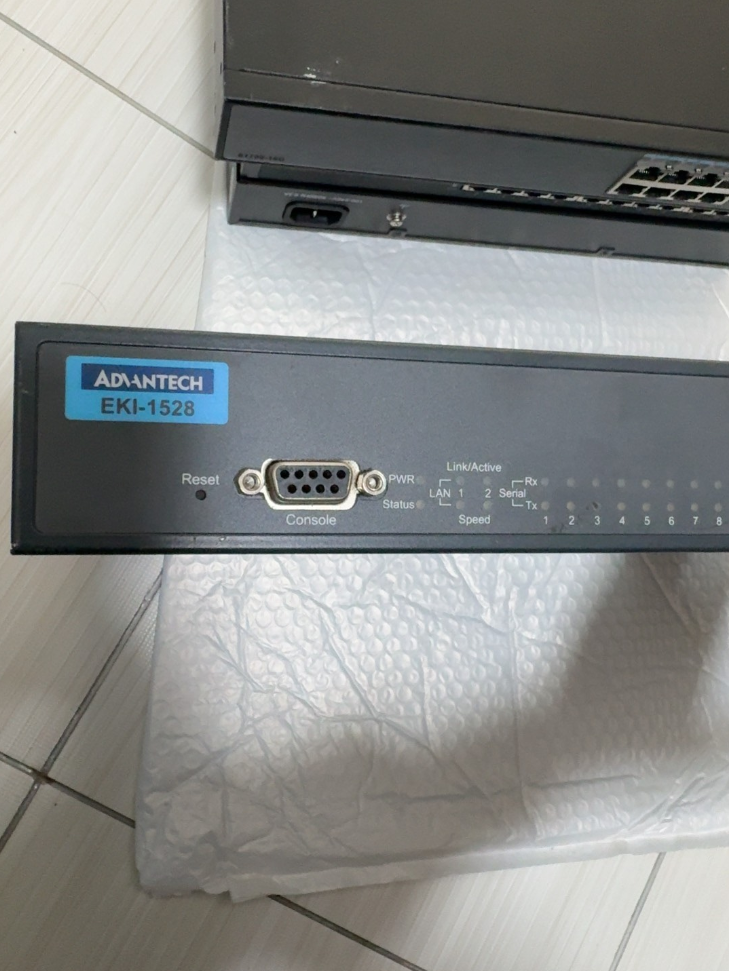


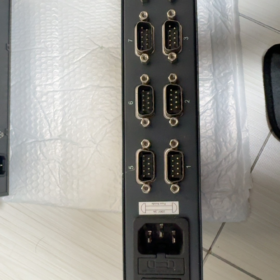
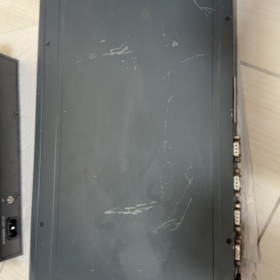
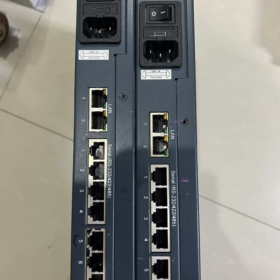
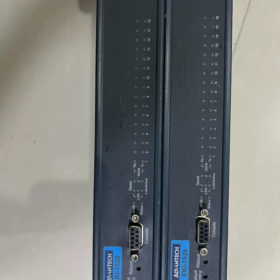
Advantech EKI-1526 — это 16-портовый сервер последовательных устройств промышленного класса RS-232/422/485 имеет конструкцию для монтажа в стойку высотой 1U и двойное резервирование Ethernet.. Он легко подключает традиционные последовательные устройства к сети Ethernet для удаленного управления и сбора данных.. Его основные преимущества включают в себя программно-конфигурируемые типы последовательных портов., широкий диапазон рабочих температур, высокая защита от электростатического разряда, и богатая поддержка протоколов связи. Широко применяется в промышленной автоматизации., интеллектуальный транспорт, энергетический менеджмент и другие области.
- Определение сегмента модели (Стандартная номенклатура)
| Сегмент | Стандартный код | Значение | Подробное описание |
| ДОБАВКА | ДОБАВКА | Линия продуктов для промышленной связи Advantech Ethernet | Встроенный интерфейс Ethernet, Сосредоточение внимания на промышленном сетевом коммуникационном оборудовании |
| 1526 | 1526 | Номер серии продукта | 16-порт сервера последовательных устройств (1528 это 8-портовая версия) |
| Суффикс-код | Н / я / ИЗ / В постоянного тока, и т. д.. | Расширение функций / Тип мощности | • Н: Гигабитный Ethernet |
| • Я: Широкотемпературная версия (-40°С~70°С) | |||
| • ЧТО: Широкая температура + Источник питания постоянного тока | |||
| • В постоянного тока: Источник питания постоянного тока (12-48В постоянного тока) | |||
| • CE: Соответствует сертификации CE ЕС | |||
| Версия | V2 | Версия оборудования | 2Аппаратное обеспечение нового поколения с повышенной производительностью, поддержка скорости передачи данных до 976.5 кбит/с |
- Основные параметры спецификации (Официальные данные)
| Категория | Параметр | Стандартная модель (ЭКИ-1526) | Широкотемпературная модель (ЭКИ-1526И) | Примечания |
| Основные характеристики | Тип продукта | 16-Сервер последовательных устройств порта | То же, что и слева | 1U-стойка, Металлический корпус SECC, защита IP30 |
| Размеры (Ш×В×Г) | 438×43,6×259,2 мм | То же, что и слева | Стандартный монтаж в 19-дюймовую стойку | |
| Масса | 3.1 кг | То же, что и слева | Без упаковки | |
| Рабочая температура | -10°С ~ 60°С | -40°С ~ 70°С | Температура хранения: -40°С ~ 80°С | |
| Влажность | 5%~95% относительной влажности, неконденсирующийся | То же, что и слева | Адаптируется к влажной промышленной среде. | |
| среднее время безотказной работы | >60,000 часы | То же, что и слева | Высоконадежная конструкция | |
| Сетевой интерфейс | Количество портов | 2 × RJ45 | То же, что и слева | Поддерживается резервирование локальной сети, автоматический MDI/MDIX |
| Скорость | 10/100 Мбит/с (ЭКИ-1526) | То же, что и слева | Двойные независимые MAC-адреса, резервирование сети | |
| 10/100/1000 Мбит/с (ЭКИ-1526Н) | ||||
| Изоляционная защита | Встроенный 1.5 магнитная изоляция кВ | То же, что и слева | Антиэлектромагнитные помехи, улучшенная стабильность | |
| Последовательная связь | Количество портов | 16 порты | То же, что и слева | Программно настраиваемый последовательный режим |
| Тип интерфейса | ДБ9 (RJ45 опционально) | То же, что и слева | Поддерживает переключение RS-232/422/485. | |
| Скорость передачи данных | 50~921,6 кбит/с (Стандартный) | То же, что и слева | Поддерживается пользовательская скорость передачи данных | |
| 50~976,5 кбит/с (Версия V2) | ||||
| Биты данных | 5, 6, 7, 8 | То же, что и слева | Гибкая совместимость с различными последовательными устройствами | |
| Паритет | Никто / Странный / Даже / Отметка / Космос | То же, что и слева | Полная совместимость с промышленными протоколами | |
| Стоп-биты | 1, 1.5, 2 | То же, что и слева | Соответствует требованиям связи различных устройств | |
| Защита | 15Полная последовательная защита KV ESD | То же, что и слева | Антистатический дизайн промышленного класса. | |
| Функция RS-485 | Автоматический контроль потока данных, 2/4-проводная поддержка | То же, что и слева | Не требуется ручное переключение направления TX/RX. | |
| Энергетическая система | Вход переменного тока | 100~240 В переменного тока, 50~60 Гц | То же, что и слева | Потребляемая мощность: 5.6Вт, 0.3А@110В, 0.2А@220В |
| Вход постоянного тока | 12~48 В постоянного тока | То же, что и слева | Широкий вход напряжения для промышленного источника питания | |
| Защита | Перенапряжение / Перегрузка по току / Защита от обратной полярности | То же, что и слева | Конструкция защиты электропитания промышленного уровня | |
| Функции программного обеспечения | Режимы работы | Виртуальный COM, TCP-сервер/клиент, UDP, Modbus-шлюз | То же, что и слева | Возможность многопротокольного преобразования |
| Методы настройки | Веб-браузер, Телнет, Утилита Windows, Серийная консоль | То же, что и слева | Гибкость для различных сценариев управления. | |
| Сетевые протоколы | IPv4/IPv6, DHCP, DNS, SNMP MIB-II | То же, что и слева | Полная поддержка управления сетью | |
| Функции безопасности | Защита паролем, IP-фильтрация, SSL/TLS (Версия V2) | То же, что и слева | Обеспечьте безопасную передачу данных | |
| Сертификаты | Согласие | CE, ФКС, UL, Класс I Дивизион 2 | То же, что и слева | Соответствует мировым стандартам промышленной безопасности. |
- Список аксессуаров (Официально рекомендуется)
| Название аксессуара | Функция | Рекомендуемое количество | Примечания |
| Комплект для монтажа в стойку | Стандартные кронштейны для монтажа в 19-дюймовую стойку | 1 набор за единицу | Стандарт включен |
| Шнур питания | Версия переменного тока: Силовой кабель IEC C13 | 1 ПК за единицу | Выбирайте в зависимости от типа мощности |
| версия постоянного тока: Силовой кабель терминала Phoenix | |||
| Последовательный кабель | Переходной кабель DB9-RJ45 / Прямой кабель DB9 | 1 ПК на порт | Для последовательного подключения устройства |
| Ethernet-кабель | Сетевой кабель Cat5e/Cat6 (1-2м) | 2 шт. за единицу | Для подключения двух портов Ethernet |
| Конфигурационное программное обеспечение | Диспетчер устройств Advantech | 1 набор | Доступно на компакт-диске или на официальном сайте. |
| Руководство пользователя | Бумага / электронное руководство по эксплуатации | 1 копировать | Включает быстрые шаги настройки |
| Гарантийный талон | 5-гарантийный талон на год | 1 копировать | Стандартная гарантия на промышленную продукцию Advantech |
- Конкурент & Список межбрендовых замен (Прямая совместимость)
| Бренд | Модель | Ключевые параметры | Совместимость / Разница | Рекомендации по замене |
| Advantech той же серии | ЭКИ-1526Н | 16-порт, Гигабитный Ethernet, IP30 | Более высокая скорость сети, идентичные другие характеристики | Выбирайте высокоскоростную передачу по сети |
| Advantech той же серии | ЭКИ-1526И | 16-порт, широкий диапазон температур (-40°С~70°С) | Расширенный диапазон рабочих температур | Открытый / приложения для суровых условий окружающей среды |
| Advantech той же серии | ЭКИ-1528 | 8-порт, те же другие параметры | Половина количества портов, меньший размер | Сценарии с меньшим количеством последовательных устройств |
| МОХА | НПорт 5616-8-DT | 16-порт, РС-232/422/485, двойная локальная сеть | Поддержка аналогичных протоколов, более зрелое программное обеспечение для настройки | Пользователи, знакомые с экосистемой MOXA |
| Сименс | Серия SCALANCE XB-200 | Промышленный переключатель + последовательный серверный модуль | Высокая интеграция, бесшовное соединение с ПЛК Siemens | Приоритет систем автоматизации Siemens |
| Феникс Контакт | ПЕРЕКЛЮЧАТЕЛЬ ФЛ 2208 + PSI-МОДЕМ | Выключатель + комбинация последовательных шлюзов | Модульная конструкция, сильная масштабируемость | Сценарии, требующие гибкого расширения портов |
| Внутренняя альтернатива | ЗЛГ GCOM80-2NET | 16-порт, широкий диапазон температур, полная изоляция | 30%-50% Сниженная цена, полностью совместимые функции | Экономически чувствительные проекты & требования к локализации |
- Рекомендации по выбору & Альтернативные решения
Мнемоника выбора
> 16 последовательные порты с двойной локальной сетью, программный переключатель для режима multi-RS;
> Я за широкую температуру, N для гигабита, Питание переменного/постоянного тока по мере необходимости.
Ключевые соображения по выбору (5 Размеры)
- Соответствие количества портов
16 последовательные устройства: Выбирайте стандарт ЭКИ-1526
8 последовательные устройства: Выберите ЭКИ-1528 (8-портовая версия)
Больше, чем 16 последовательные порты: Подключите несколько устройств последовательно или выберите EKI-1548. (32-порт)
- Адаптация операционной среды
Стандартная промышленная среда (-10°С~60°С): ЭКИ-1526 стандартная версия
Экстремальная среда (-40°С~70°С): Выбирайте широкотемпературную модель ЭКИ-1526И.
Открытый / влажная среда: Добавьте защитный корпус IP67.
- Оценка требований к сети
100Сеть Мбит/с: стандарт ЭКИ-1526
Гигабитный / высокоскоростная передача данных: Выберите ЭКИ-1526Н
Резервирование сети & высокая надежность: Автоматическое переключение двойной локальной сети в стандартной комплектации
- Выбор источника питания
Комната / компьютерный зал: ЭКИ-1526 (мощность переменного тока)
Промышленная сфера / нет коммерческого кондиционера: ЭКИ-1526Т-ВДК (12-48В постоянного тока)
Нестабильная электросеть: Добавьте защиту электропитания ИБП
- Требования к расширению функций
Шифрование безопасности: Выберите версию V2 (поддерживает SSL/TLS)
Modbus-шлюз: Стандартный встроенный, дополнительная лицензия не требуется
Удаленное управление: Поддерживает SNMP, интеграция с системой управления промышленной сетью
Рекомендуемые альтернативные решения (3 Сценарии)
| Сценарий применения | Рекомендуемое решение | Преимущества |
| Оптимизация затрат | Отечественные альтернативы (ЗЛГ GCOM80-2NET, Серия Кайланд КИЕН) | 30%-50% снижение затрат, Совместимость функций, соответствует требованиям локализации |
| Обновление протокола | ЭКИ-1526 + Конвертер протоколов Advantech | Добавить OPC UA, Преобразование PROFINET и других промышленных протоколов |
| Интеграция функций | ЭКИ-1526В2 + Модуль периферийных вычислений Advantech | Комплексный сбор последовательных данных + периферийные вычисления + доступ к облачной платформе |
- Соблюдение требований в области авиаперевозок & Сертификация CE (Международная торговля)
- Соблюдение требований в области авиаперевозок
Нет встроенной литиевой батареи / суперконденсатор: Классифицируется как обычное промышленное электронное оборудование., нет особых ограничений на авиаперевозки
Категория транспорта: Сорт 9 разные опасные грузы (неопасен при реальной транспортировке)
Код ТН ВЭД: 85176239 (Оборудование промышленной сети связи)
Стандарт упаковки: Соответствует ISTA 3A во избежание повреждений при транспортировке.
- Информация о сертификации CE
Соответствующие директивы: 2014/30/Евросоюз (ЭМС), 2011/65/Евросоюз (РоХС), 2014/35/Евросоюз (НВД)
Стандарты испытаний: В 55011 (Промышленные ЭМИ), В 61000-6-2 ( Промышленный иммунитет)
Номер сертификации: Доступно на официальном сайте Advantech после ввода полного номера модели.
- Случаи применения & Адаптация отрасли
Типичные случаи применения
- Умная фабрика: Соединять 16 ПЛК/датчики; использовать двойное резервирование Ethernet для сбора данных производственной линии; поддержка преобразования протокола Modbus TCP/RTU и бесшовное соединение с системой MES.
- Умная сеть: Сеть 16 последовательные устройства подстанции (реле защиты, счетчики энергии); широкотемпературная модель адаптируется к внешним условиям; двойная локальная сеть обеспечивает надежную передачу данных.
- Железнодорожный транзит: 16-сбор данных канальных датчиков для вагонов поездов; Питание постоянного тока адаптируется к системе автомобиля; высокая защита от электростатического разряда от сложных электромагнитных сред.
- Нефтехимическая промышленность: Удаленный мониторинг 16 данные приборов на нефтеперерабатывающих заводах; Класс I Дивизион 2 сертификация соответствует требованиям взрывоопасных зон; поддержка удаленной настройки и диагностики неисправностей.
Руководство по отраслевой адаптации
| Промышленность | Преимущества адаптации | Рекомендуемая конфигурация |
| Промышленная автоматизация | Многосерийное централизованное управление, гибкое преобразование протоколов | ЭКИ-1526Н + Программное обеспечение виртуального COM + Промышленный переключатель |
| Энергия & Власть | Широкотемпературный дизайн, высокая надежность, двойное резервирование локальной сети | ЭКИ-1526И + Мощность постоянного тока + Модуль молниезащиты |
| Железнодорожный транзит | Совместимость с мощностью автомобиля, устойчивый к вибрации, улучшенная ЭМС | ЭКИ-1526ТИ-ВДК + Противоударный монтажный кронштейн |
| нефтехимическая | Сертификация взрывобезопасности, удаленное управление, низкое энергопотребление | ЭКИ-1526И + Изолятор безопасности + Резервный источник питания |
Advantech EKI-1526 — это высоконадежный и гибкий сервер последовательных устройств промышленного уровня.. Благодаря 16-портовой конструкции высокой плотности, программно-конфигурируемые последовательные режимы, и двойное резервирование локальной сети, он идеально соответствует требованиям преобразования сети последовательных устройств на промышленных объектах.. Поддержка нескольких режимов работы, включая Virtual COM, TCP/UDP и шлюз Modbus, его можно легко интегрировать в основные системы промышленной автоматизации для реализации удаленного управления и сбора данных традиционного серийного оборудования.. Его версии для широкого диапазона температур и несколько вариантов мощности еще больше расширяют возможности его применения в экстремальных условиях и особых сценариях..
Полный список моделей серии EKI-1526
- 16-Основные модели портов
| Полная модель | Скорость локальной сети | Рабочая температура | Источник питания | Основные функции |
| ЭКИ-1526 | 10/100Мбит/с | -10℃~60℃ | 220 В переменного тока | Стандартный 16-портовый RS232/422/485 |
| ЭКИ-1526И | 10/100Мбит/с | -40℃~70℃ | 220 В переменного тока | Промышленная широкотемпературная версия |
| ЭКИ-1526Н | 10/100/1000Мбит/с | -10℃~60℃ | 220 В переменного тока | Стандартный + Двойная гигабитная локальная сеть |
| ЭКИ-1526НИ | 10/100/1000Мбит/с | -40℃~70℃ | 220 В переменного тока | Широкая температура + Двойной гигабит |
| ЭКИ-1526-ВДК | 10/100Мбит/с | -10℃~60℃ | 12~48 В постоянного тока | Версия с питанием постоянного тока |
| ЭКИ-1526И-ВДК | 10/100Мбит/с | -40℃~70℃ | 12~48 В постоянного тока | Широкая температура + мощность постоянного тока |
| ЭКИ-1526Н-ВДК | 10/1000Мбит/с | -10℃~60℃ | 12~48 В постоянного тока | Гигабитный + мощность постоянного тока |
| ЭКИ-1526В2 | 10/100Мбит/с | Стандартная температура | переменного тока | Аппаратное обеспечение V2, более высокая скорость передачи данных + SSL-шифрование |
- Модели родственных серий (8/32-Порт Альтернатива)
| Модель | Последовательные порты | Позиционирование | Сценарий прямой замены |
| ЭКИ-1528 | 8 Порты | Приложение для небольшого сайта | ≤8 последовательных устройств, космос & экономия средств |
| ЭКИ-1548 | 32 Порты | Шкаф высокой плотности | Над 16 последовательные порты, один блок заменяет два ЭКИ-1526 |
Определение суффикса единой модели
Без суффикса: Стандартная температура -10~60℃, 100Мбит/с локальная сеть, Мощность переменного тока 220 В
я: Промышленная широкая температура -40℃~70℃
Н: Сеть модернизирована до Dual Gigabit Ethernet
В постоянного тока: Поддерживает широкодиапазонный вход постоянного тока 12–48 В постоянного тока.
ИЗ: Широкая температура + адаптация постоянного тока для промышленных автомобилей
V2: 2оборудование nd-поколения, максимальная скорость передачи данных 976,5 кбит/с, Поддерживается шифрование SSL/TLS
Быстрые шаги по подключению оборудования
- Включите устройство: переменного тока для питания от сети / Постоянный ток для входа 12–48 В постоянного тока
- Сетевой порт: LAN1/LAN2 подключается к коммутатору или ПК, поддерживается двойное резервирование локальной сети
- Последовательный порт: DB9 подключается к устройствам RS232/485/422.; переключение режима через веб-страницу
- Индикатор питания: PWR горит постоянно = нормально; LINK мигает = сетевая связь активна
Основные шаги веб-конфигурации
- Установите IP-адрес ПК в тот же сегмент: 192.168.1.х
- Введите IP-адрес по умолчанию в браузере: 192.168.1.1
- Имя пользователя по умолчанию / пароль: `админ / админ`
- Основные настройки:
Изменить IP-адрес устройства, маска подсети, шлюз
Глобальная последовательная конфигурация: единая скорость передачи данных / биты данных / паритет / стоп-биты
Последовательный режим: выберите виртуальный COM / TCP-сервер / TCP-клиент / Шлюз Modbus по необходимости
3 Общие руководства по настройке приложений
- Режим виртуального COM (Самый распространенный)
Приложение: Устаревшее последовательное программное обеспечение / Программное обеспечение SCADA, используемое в качестве локального COM-порта
- Установите последовательный режим на Virtual COM на веб-странице.
- Установите Advantech Device Manager на ПК
- Поиск устройства → привязка последовательных портов → автоматическое назначение COM3 ~ COM20
- Используйте соответствующий номер COM непосредственно в SCADA или прикладном программном обеспечении.
- Режим шлюза Modbus (Для ПЛК & Метры)
Приложение: Преобразование Modbus RTU в Modbus TCP для последовательных приборов через Ethernet
- Установите последовательный режим на шлюз Modbus на веб-странице.
- Настройка последовательных параметров: 9600/8N1 для соответствия инструменту
- Установите адрес подчиненного устройства и интервал опроса
- Доступ к хосту через Modbus TCP с использованием IP-адреса устройства + номер порта
- Конфигурация с двойным резервированием локальной сети (Двухканальная защита от отключения)
Приложение: Критические производственные линии, электросеть, компьютерные залы без присмотра
- Войдите в сеть → Резервирование в веб-интерфейсе.
- Включить двойное резервирование локальной сети
- Подключите LAN1 и LAN2 к разным коммутаторам соответственно.
- Автоматическое плавное переключение и отсутствие потери данных в случае выхода из строя любого сетевого кабеля.
Быстрое устранение неполадок
- Невозможно получить доступ к веб-странице: Установите IP-адрес ПК на 192.168.1.xxx., отключить брандмауэр
- Сбой последовательной связи: Переключение режима RS232/485/422 на веб-странице, проверьте скорость передачи данных и четность
- Виртуальный COM в автономном режиме: Обновить драйвер, установить статический IP-адрес устройства, избегать динамического IP-адреса DHCP
- Двойная локальная сеть без переключения: Подтвердите, что резервирование включено; убедитесь, что два коммутатора не находятся в одном контуре
Полное руководство по настройке резервирования двойной локальной сети Advantech EKI-1526
EKI-1526 поддерживает двойное резервирование локальной сети Master-Backup со временем переключения. <1 второй. После включения через веб-интерфейс, он автоматически обнаруживает неисправности канала и выполняет плавное переключение при сбое, чтобы обеспечить бесперебойную промышленную связь.
- Принцип работы двойного резервирования локальной сети
EKI-1526 оснащен двумя независимыми портами Ethernet. (ЛВС1/ЛВС2) и независимые MAC-адреса:
Мастер-порт: Переносит весь сетевой трафик при нормальной работе
Резервный порт: Отслеживает состояние главного порта в режиме реального времени и берет на себя управление только в случае сбоя главного порта.
Механизм переключения: Автоматически переключается на резервный порт при отключении соединения локальной сети. (отключение кабеля / отказ переключателя), время переключения <1 второй без потери данных
Механизм восстановления: После восстановления главного порта, настраивается для автоматического переключения назад или сохранения на резервном порту
- Подготовка к подключению оборудования
Рекомендуемые топологии (Избегайте единой точки отказа)
| Режим подключения | Описание | Сценарий применения |
| Двойное резервирование коммутатора | LAN1 для коммутатора A, LAN2 для коммутатора B; оба коммутатора подключаются к базовой сети | Критические производственные линии, необслуживаемые комнаты; предотвратить выход из строя одного переключателя |
| Одиночный коммутатор, двойной порт | LAN1/LAN2 подключаются к разным портам одного и того же коммутатора. | Бюджет ограничен; защита только от одного порта / отказ кабеля |
| Двойная сегментация сети | LAN1 для производственной сети, LAN2 для сети управления; услуга & управление изолировано | Сценарии безопасности, требующие сетевой изоляции |
Этапы подключения аппаратного обеспечения
- Выключите устройство, подключить последовательные устройства и источник питания
- Подключите LAN1/LAN2 к коммутаторам (рекомендуется использовать двойные переключатели)
- Включение питания; индикаторы проверки: PWR горит постоянно, оба индикатора LAN LINK мигают нормально
- Подробные шаги веб-конфигурации
- Основные настройки сети (Обязательный)
- Установить статический IP-адрес ПК: 192.168.1.х (тот же сегмент, что и для устройства по умолчанию)
- IP-адрес доступа через браузер по умолчанию: 192.168.1.1, авторизоваться: `админ/админ`
- Перейдите в «Конфигурация Ethernet» → «Ethernet». 1: Установить IP-адрес главного порта, маска подсети, шлюз
- Перейдите в «Конфигурация Ethernet» → «Ethernet». 2: Установить IP-адрес резервного порта (рекомендуется тот же сегмент, например. 192.168.1.2), маска подсети, шлюз
- Нажмите «Сохранить»., устройство автоматически перезагружается (о 1 минута)
- Включить двойное резервирование локальной сети (Основная конфигурация)
- Войдите в веб-интерфейс снова после перезагрузки.
- Войдите в сеть → Резервирование
- Установите флажок «Включить резервирование двойной локальной сети».
- Выберите режим резервирования:
Мастер-Резервное копирование (По умолчанию): LAN1 в качестве мастера, LAN2 в качестве резервной копии, автоматическое переключение при сбое
Баланс нагрузки: Оба порта работают одновременно для разделения трафика (поддерживается частичной прошивкой)
- Установить режим переключения назад:
Авто: Автоматическое переключение обратно на мастер после восстановления (По умолчанию)
Руководство: Оставайтесь на резервном порту; требуется ручное переключение после основного восстановления
- Установить интервал обнаружения: По умолчанию 1 второй, регулируемый 500 мс~10 с (1рекомендуется)
- Нажмите «Сохранить»., резервирование вступает в силу немедленно
- Расширенная конфигурация (Необязательный)
| Параметр | Рекомендуемое значение | Описание |
| Пакет сердцебиения | Давать возможность | Включите обнаружение пульса для более высокой точности ошибок |
| Интервал сердцебиения | 100РС | Интервал отправки пульса; короче = более быстрое обнаружение |
| Количество аварийных переключений | 3 | Переключайтесь только после 3 последовательные сбои во избежание ложного переключения |
| Обнаружение отсутствия связи | Давать возможность | Обнаружение канала физического уровня (отключение кабеля и т. д.) |
- Проверка функции резервирования
- Проверка неисправности канала
- Нормальное состояние: Статус сети → Статус сети показывает, что LAN1 активна., ЛВС2 в режиме ожидания
- Отсоедините кабель LAN1:
Индикатор устройства: ЛВС1 выключена, LAN2 горит постоянно
Обновления веб-статуса: LAN2 становится активной, переключение <1с
Проверьте последовательную связь через Virtual COM. / Модбус TCP, без перерыва
- Подключите кабель LAN1.:
Автомобильная мода: LAN1 возобновляет работу, LAN2 переходит в режим ожидания
Ручной режим: Оставаться в локальной сети 2; требуется ручное переключение в веб-интерфейсе
- Тест на отказ переключателя
- Выключите коммутатор, подключенный к главному порту.
- Устройство переключается на резервный порт в течение 1 второй
- Восстановите питание главного переключателя и убедитесь, что обратное переключение работает нормально.
- Распространенное устранение неполадок
| Явление неисправности | Возможная причина | Решение |
| Невозможно включить резервирование | Версия прошивки слишком старая | Обновите прошивку до последней версии с официального сайта. |
| Связь прервана после переключения | Неправильный IP-адрес резервного порта. | Убедитесь, что мастер & резервные порты в том же сегменте с согласованным шлюзом |
| Частые ложные переключения | Интервал обнаружения слишком короткий | Увеличить интервал до 2 с., установите счетчик аварийного переключения на 5 |
| Нет автоматического переключения обратно после основного восстановления | Для переключения обратного режима установлено значение «Вручную». | Измените значение на «Авто» или переключитесь вручную в Интернете. |
| Оба порта LAN отключены | Конфликт конфигурации сети | Проверьте повторяющиеся настройки IP-адреса и маски подсети. |
- Мнемоника конфигурации
> Три шага для двойного резервирования локальной сети: сначала установите IP, включить резервирование второй;
> Двойные переключатели позволяют избежать одной точки; всегда проверяйте аварийное переключение после настройки.
- Выбор оборудования: Критические объекты выбирают двойные коммутаторы; обычные сайты выбирают один коммутатор с двумя портами
- IP-планирование: Для удобства управления рекомендуется использовать главный и резервный порты в одном сегменте сети. & переключение
- Выбор режима: Промышленный контроль отдает приоритет Master-Backup; сбор данных может использовать баланс нагрузки
- Политика обратного переключения: Автоматические сайты выбирают «Авто».; места ручного вмешательства выберите Вручную
- Проверка теста: Выполните тест переключения канала после настройки, чтобы обеспечить надежное резервирование при реальных сбоях.
Двойное резервирование локальной сети EKI-1526 можно быстро настроить через веб-интерфейс.. Ядро включает резервирование и правильно настраивает главный/резервный IP-адрес и политику переключения.. Сотрудничество с топологией с двумя коммутаторами, эффективно устраняет единичные неисправности в промышленных сетях и обеспечивает высокую надежность последовательной связи устройств.. После развертывания рекомендуется полная функциональная проверка..





NH42-63-318x560.png "Автоматические переключатели резерва типа PC CHINT (АТС)НХ42-63/4СЗ")



