 Контактор,автоматический выключатель,датчик,Кодер,ПЛК,Конвертер

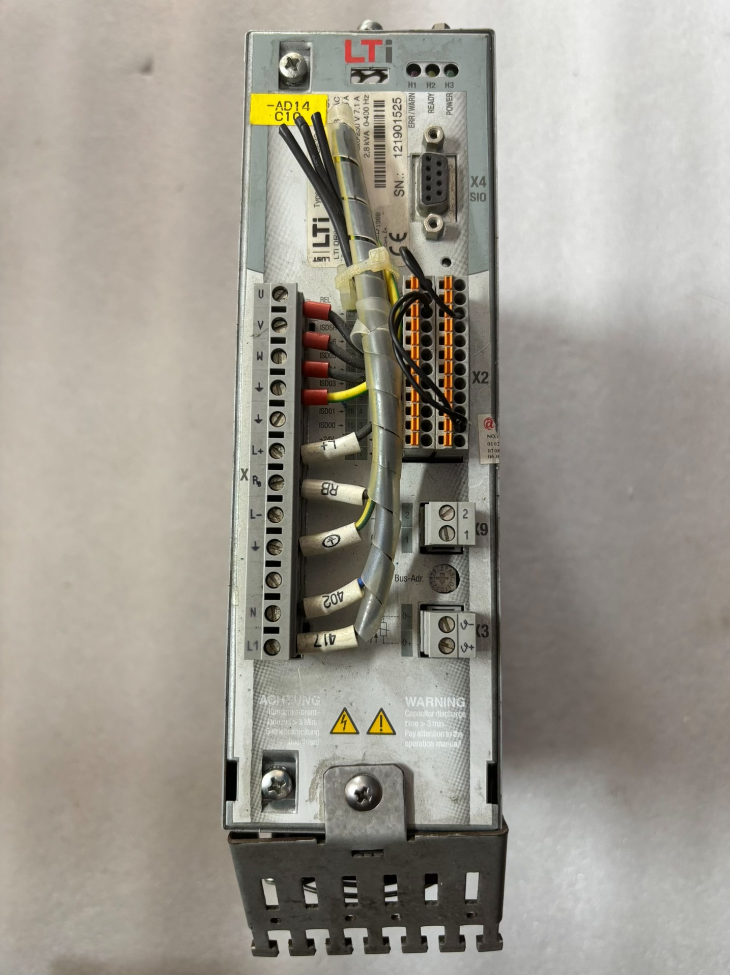

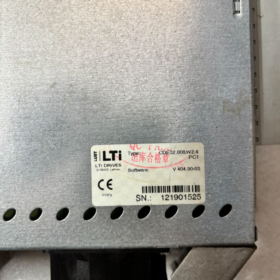
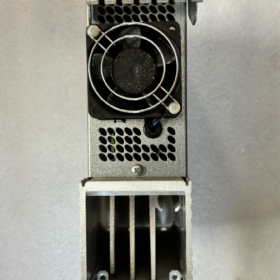
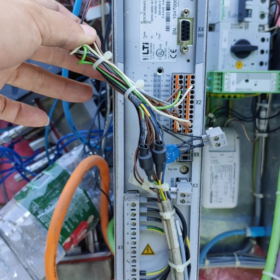
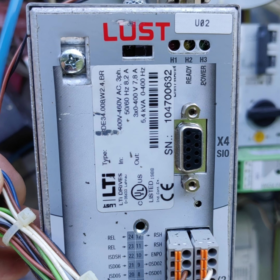
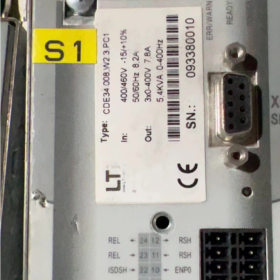
похоть (Германия), позже приобретен KEBA. Серия CDE3000 полностью снята с производства., на рынке доступны только новые излишки или отремонтированные единицы.
- Разбивка кода модели
CDE32.008.W2.4
- CDE: Серия продуктов → CDE3000 компактный сервопривод (универсальный сервопривод, поддерживает синхронные/асинхронные двигатели, встроенный тормозной транзистор)
- 32: Код класса напряжения
32 = 1/3-фазный переменный ток, 230 В (200…240В)
34 = класс переменного тока 400 В
- 008: Номинальный ток → Номинальный непрерывный выходной ток 7,1 А, совместим с серводвигателями мощностью ~1,5 кВт
- Вт: Ветка прошивок (Платформа W, отличается от ранней платформы C-прошивки)
- 2.4: Версия прошивки V2.4
Общий суффикс полного порядка: CDE32.008.W2.4.PC1
PC1 = стандартный CANopen (ДСП402) интерфейс связи; Profibus и другие карты расширения опционально
- Основные электрические характеристики
| Элемент | Спецификация |
| Входной источник питания | 1~3-фазный переменный ток 200–240 В, 50/60 Гц |
| Номинальный выходной ток | 7.1 А (непрерывный) |
| Пиковый выходной ток | 14.2 А (2× перегрузочная способность) |
| Совместимые двигатели | Синхронные серводвигатели с постоянными магнитами / Асинхронные инверторные двигатели |
| Режимы управления | Цикл положения, петля скорости, петля крутящего момента; импульсная команда & поддерживается управление по полевой шине |
| Интерфейс энкодера | Инкрементальный энкодер (ТТЛ/RS422); модуль резольвера опционально |
| Встроенное торможение | Встроенный тормозной транзистор, требуется внешний тормозной резистор |
| Цифровой ввод/вывод | 8ОТ / 2ДЕЛАТЬ, Аналоговый вход ±10 В, релейный выход |
| Стандарт связи | Стандартный CANopen DSP402; Profibus-DP расширяемый |
| Метод охлаждения | Монтаж на опорной плите, охлаждение |
| Рабочая температура окружающей среды | 0℃~+40℃ (установка шкафа), конденсация запрещена |
| Класс защиты | IP20 (для внутреннего применения в шкафу) |
- Обзор аппаратных интерфейсов
Х1: Основной вход питания L/N/PE; выходная мощность двигателя U/В/Вт
Х2: Клеммный блок управления (DI/DO, аналоговые сигналы, давать возможность, аварийная остановка)
Х4: Порт клавиатуры для KP200; коммуникационный порт для ввода в эксплуатацию программного обеспечения
Х5: Интерфейс обратной связи энкодера
Х9: Моторный тормозной привод (24V тормозная катушка)
Внешние аксессуары: Тормозной резистор, Панель оператора КП200, кабель для ввода в эксплуатацию, Карта памяти параметров SmartCard
- Программное обеспечение для ввода в эксплуатацию
Название программного обеспечения: Диспетчер дисков (ранее LUST ServoManager)
Поддерживает чтение/запись прошивки, загрузка параметров, осциллограф, электронная конфигурация редуктора
Совместим со всеми версиями прошивки W2.0~W2.4.; связь через RS232 / Кабель USB-RS232
- Прекращение производства & Решения по замене
⚠️Оригинальный производитель прекратил выпуск серии CDE3000.; модель для прямой замены OEM недоступна
Вариант 1: Запчасти той же серии (приоритет обслуживания)
Взаимозаменяемый эквивалент: CDE32.008 с любой прошивкой W2.x (W2.2/W2.3/W2.4 взаимно совместимы; параметры требуют повторной загрузки)
Примечание: CDE32.008 ≠ CDA32.008; аппаратные распиновки несовместимы, прямая замена не допускается!
Вариант 2: Замена KEBA нового поколения (полная модернизация машины)
После того, как KEBA приобрела LUST, соответствующая платформа: Серия KeDrive D3
Рекомендуемая эквивалентная модель: КеДрайв Д3-230/А008 (230 В переменного тока, 7.5Класс)
Риски: Клеммная проводка, программное обеспечение и структуры параметров совершенно разные. Требуется реконструкция проводки и программы ПЛК; замена plug-and-play невозможна
- Распространенные коды неисправностей (Универсальный для CDE3000)
| Код неисправности | Значение | Типичные причины |
| Е-ОК | Перегрузка по току | Короткое замыкание двигателя, повреждение изоляции на землю, моторный глох, выход из строя силового модуля |
| Э-ОВ | Перенапряжение на шине постоянного тока | Нет тормозного резистора во время замедления, высокая инерционная нагрузка |
| Э-УФ | Пониженное напряжение шины постоянного тока | Отсутствует входная фаза, падение напряжения питания |
| Е-ENC | Ошибка энкодера | Сломанный кабель энкодера, неправильная проводка, неисправный кодер |
| Электронный процессор | Ошибка системной прошивки | Поврежденные параметры, неисправность материнской платы; попытаться сбросить заводские параметры |
| Э-ТМП | Перегрев привода | Плохая теплоотдача, чрезмерная температура окружающей среды |
- Рекомендации по ошибкам выбора
- Не путайте CDE / ЦКБ / CDA: Аппаратное обеспечение трех серий несовместимо друг с другом.;
- Файлы параметров приводов с W-прошивкой и C-прошивкой не подлежат взаимозаменяемости.;
- Если исходное устройство CDE32.008.W2.4.PC1, замена должна быть оснащена ПК1 (CANopen);
- Встроенный тормозной транзистор не может работать без нагрузки.; согласованный тормозной резистор обязателен;
- Для подержанных приводов, сначала подтвердите версию прошивки. Устаревшая прошивка может быть несовместима с параметрами оригинального оборудования..
Полный список программного обеспечения хост-компьютера для сервопривода LUST CDE32.008.W2.4
Следует различать две категории:
1) OEM-программное обеспечение для ввода в эксплуатацию: Настройка параметров, обновление прошивки, осциллограф, диагностика неисправностей (специального назначения; не может управлять оборудованием во время нормального производства)
2) Программное обеспечение для управления производственным хостом: ПЛК / программное обеспечение для промышленного контроля / Программное обеспечение HMI для автоматизированного управления производством в режиме реального времени (по полевой шине или импульсным командам)
Прошивка привода: W2.4 (Платформа прошивки W), несовместим с программным обеспечением для старых платформ C-прошивки.
- Официальное специализированное программное обеспечение для ввода в эксплуатацию (Только OEM-инструмент)
- Диспетчер дисков (Ранее СервоМенеджер) [Обязательный]
✅ Требования к совместимой версии
Минимальная версия: Версия 3.40 и выше; Версия 3.50 / Рекомендуется версия 3.60
⚠️ DriveManager V3.80 разработан для более поздних платформ ServoC и KeDrive.. Используйте V3.50 для оптимальной совместимости с CDE3000. (W2.4).
❌ WinConfig не поддерживается.! WinConfig работает только для серии CDA с прошивкой C и не может подключиться к серии CDE-W.
Способы подключения связи
Терминал Х4: Последовательный порт RS232 (Кабель для ввода в эксплуатацию DB9) подключается напрямую к COM-порту ПК; Можно использовать адаптер USB-RS232, рекомендуется изолированный преобразователь
Нет родного USB-порта; прямое USB-соединение с накопителем не поддерживается
Основные функции
Идентификация двигателя, трехконтурная настройка ПИД-регулятора, загрузка/скачивание/сохранение файлов параметров
Обновление прошивки для чтения/записи (поддерживаются все прошивки W2.x, включая W2.4)
Встроенный осциллограф трассировки, мониторинг тока/положения/скорости в реальном времени, чтение истории неисправностей
Электронная передача, режим возврата в исходное положение, концевой выключатель, Конфигурация параметров CANopen
Поддерживаемая ОС: Windows ХР / Вин7 / Вин10 (32/64-кусочек); Win11 требует режима совместимости для частичных сборок
- Локальная панель оператора (Базовый ЧМИ, не программное обеспечение для ПК)
КП200 / Ручная панель оператора KP300, подключен к X4. Только для местного ручного ввода в эксплуатацию; удаленное управление ПК недоступно.
- Программное обеспечение для управления производственным хостом (Для нормальной работы оборудования)
CDE32.008.W2.4 (Версия PC1 = стандартный CANopen DS402) поддерживает два канала управления:
① Управление полевой шиной CANopen; ② Направление импульса + аналоговое управление
(1) Программное обеспечение хост-контроля на базе CANopen (Протокол DS402)
Привод реализует стандарт CiA301/CiA402 CANopen., не зависит от протокола и марки контроллера
- КОДЕСИС V3
С надстройкой CANopen Manager; импортируйте файл LUST CDE3000 EDS для управления положением/скоростью/крутящим моментом
Применимый: Бекхофф, Инновации, Феникс Контакт, Advantech и другие промышленные ПК с программным ПЛК
- Портал ТИА (ПЛК Сименс)
S7-1200/1500 в сочетании с коммуникационным модулем CANopen, настраивается через файл EDS
- GX работает / GX работает3 (Мицубиси)
Серия Q/L/R с главным модулем CANopen
- МоушнВоркс, OpenPCS (Контроллеры движения в реальном времени)
- КЕБА КЕМРО Студия (контроллер КЕБА, изначально совместим с дисками LUST)
- Общие инструменты мониторинга CANopen (Только ввод в эксплуатацию, не для длительного производственного контроля)
CANalyzer, Диван, CANExplorer, Монитор IXXAT CanOpen
Цель: Мониторинг сообщений по шине, Чтение/запись SDO для устранения неполадок. Не подходит в качестве программного обеспечения для управления производственным хостом.
Важное примечание: CDE3000 не имеет встроенной поддержки EtherCAT.; Попытки связи по EtherCAT завершатся неудачно.!
(2) Расширенная версия Profibus-DP (С дополнительной интерфейсной картой CM-DPV1)
Если привод оснащен модулем Profibus, совместим с:
Портал ТИА, GX работает, RSLogix и другое программное обеспечение, поддерживающее главные станции Profibus.
- Конфигурация ЧМИ & Программное обеспечение для мониторинга (Косвенное сервоуправление)
Невозможно напрямую управлять сервоприводом; инструкции, передаваемые через ПЛК
Вайнтек ЭБПро, МКГС, Сименс WinCC Гибкий/WinCC, прикосновение, Зажигание
Путь связи: HMI → ПЛК → CANopen → CDE32.008 Сервопривод
- Критические ограничения & Подводные камни прошивки W2.4
- ❌ Нет специального программного обеспечения для управления сервоприводом через ПК через RS232.
X4 RS232 зарезервирован исключительно для ввода в эксплуатацию DriveManager.. Производительность последовательного порта в режиме реального времени низкая; никогда не используйте RS232 для управления движением во время производства. Использовать шину CANopen / импульсные сигналы для оперативного управления.
- ❌ DriveManager предназначен исключительно для ввода в эксплуатацию.. Он не может служить производственным хост-программным обеспечением.. Поддерживается только режим тестового толчка., непригоден для непрерывной автоматизированной работы.
- ❌ Несовместимость прошивок: CDE W-прошивка (W2.2/W2.3/W2.4) ≠ C-прошивка; файлы параметров не могут быть импортированы взаимно.
- Кабель для ввода в эксплуатацию: Для кабеля X4 RS232 требуется специальный нуль-модемный перекрестный последовательный кабель.; прямой кабель не обеспечивает связь.
- Напоминание о замене: CDE3000 снят с производства. Новое программное обеспечение KEBA KeDrive не может обнаружить серию CDE3000 и не может ввести этот привод в эксплуатацию..
- Упрощенная сводка выбора
Ввод в эксплуатацию на месте, резервное копирование параметров, обновление прошивки: Диспетчер дисков V3.50 (Единственный вариант)
Автоматизированный контроль производства: Программное обеспечение ПЛК (CODESYS/TIA/GXWorks и т. д.) + CANopen DS402
Устранение неполадок полевой шины: CANExplorer / Инструменты IXXAT
Полная установка & Руководство по эксплуатации LUST DriveManager (Для CDE32.008.W2.4)
Важные предварительные условия
- Рекомендуемая версия программного обеспечения: Диспетчер дисков V3.50; V3.60 можно использовать. V3.80 и выше запрещены (новое программное обеспечение KeDrive не распознает W-прошивку CDE3000)
- Поддерживаемый диск: CDE32.008.W2.4 (Платформа прошивки W)
- Коммуникационный порт: Драйв Х4 (Порт ввода в эксплуатацию RS232). Нет родного USB-интерфейса.; только RS232 / Доступен USB-RS232
- ❌ WinConfig поддерживает только старые версии C-прошивок серии CDA.; невозможно подключить серию CDE-W
- Подготовка оборудования (Спецификация критического кабеля связи)
1.1 Определение контактов порта ввода в эксплуатацию X4 (Сторона привода Mini-DIN, 5 контактов)
| Приколоть | Сигнал | Описание |
| 1 | +15В | Блок питания панели оператора КП200; не используется для ввода в эксплуатацию ПК |
| 2 | передача (Передача привода) | → ПК Последовательный RxD |
| 3 | RxD (Получить диск) | → Последовательный TxD для ПК |
| 4 | Северная Каролина | Нет связи |
| 5 | Земля | Сигнальная земля |
1.2 Проводка для специального пуско-наладочного кабеля (Нуль-модемный перекрестный кабель)
ПК DB9, гнездо ↔ Привод X4
DB9 Pin2 (ПК, Техас) → X4 Контакт 3 (Привод RX)
DB9 Pin3 (ПК прием) → X4 Контакт 2 (Поездка в Техас)
DB9 Pin5 (Земля) → X4 Контакт 5 (Земля)
⚠️ Стандартный прямой последовательный кабель не может установить связь.! Требуется нуль-модемный перекрестный кабель
Отдавайте предпочтение адаптерам USB-RS232 на чипсете FTDI.. Недорогие модули CH340 часто страдают от нестабильной связи..
- Этапы установки программного обеспечения (Вин7/Вин10/Вин11)
2.1 Предварительная настройка для Windows
1) Включить .NET Framework 3.5 (Панель управления → Программы → Включение и отключение функций Windows.)
2) Используйте только английские пути для установочного пакета.; избегайте папок с китайскими иероглифами
3) Щелкните правой кнопкой мыши `Setup.exe` и установите свойства совместимости.:
Режим совместимости: Окна 7
✅ Запустите эту программу от имени администратора
2.2 Процедура установки
- Извлеките установочный пакет и запустите `Setup.exe`
- Выберите английский язык (Китайские локализованные версии склонны к сбоям; Английский рекомендуется для промышленного ввода в эксплуатацию)
- Установить по пути по умолчанию, не изменять каталог установки
- После установки, щелкните правой кнопкой мыши ярлык на рабочем столе еще раз, чтобы подтвердить: Запуск от имени администратора + Совместимость с Win7
- Необязательный: Установите дополнительную базу данных двигателей MotorData для идентификации двигателей.
Распространенная проблема Win11: Отключите целостность памяти и принудительное использование подписи драйверов, чтобы устранить аномалии последовательной связи..
- Процедура подключения связи (Высший приоритет)
Шаг 1. Включение оборудования.
- Основное питание привода включено, включение сервопривода не требуется
- Подключите кабель ввода в эксплуатацию между адаптером USB-последовательный порт ПК и приводом X4.
- Откройте диспетчер устройств Windows., записать назначенный номер COM-порта (например. COM3)
Шаг 2. Настройте связь внутри DriveManager.
- Запустите DriveManager
- Верхнее меню: `Связь → Настройка соединения`
- Фиксированные параметры (неизменяемый для CDE W-прошивки)
Интерфейс: RS232
Скорость передачи данных: 57600
COM-порт: Выберите COM-порт, указанный в диспетчере устройств.
8 биты данных, 1 стоп-бит, нет паритета, аппаратное управление потоком отключено
- Нажмите【Подключиться】, чтобы установить соединение.
✅ Успешное подключение: Модель привода `CDE32.008 W2.4` отображается на левой панели с версией встроенного ПО.
❌ Сбой подключения: См. контрольный список устранения неполадок ниже.
- Пошаговое руководство по основным функциям на месте
Функция 1: Загрузить параметры привода (Резервное копирование, Необходим для обслуживания)
- Установлено активное общение
- Меню: `Активное устройство → Параметры загрузки`
- Выберите место сохранения, используйте английский/цифры только для имени файла и пути
- Расширение файла: файл параметров `.par` (W-файл прошивки, несовместим с дисками с C-прошивкой)
Рекомендую перед капитальным ремонтом оборудования создать две отдельные резервные копии..
Функция 2: Загрузить параметры в привод (Восстановить / Замена сервопривода)
- Общение онлайн
- `Активное устройство → Параметры загрузки`
- Выберите сохраненный файл резервной копии `.par`
- Отметьте необходимые категории параметров во всплывающем окне, нажмите Продолжить
- После завершения загрузки, программа предлагает перезагрузить диск; цикл включения и выключения питания, чтобы изменения вступили в силу
⚠️ Файлы параметров доступны для взаимной загрузки между W2.2/W2.3/W2.4., но проверьте ключевые параметры двигателя после загрузки.
Функция 3: Идентификация двигателя (Первый ввод в эксплуатацию нового двигателя)
Предварительное условие: Двигатель отсоединен от нагрузки и может свободно вращаться.; обеспечить безопасную рабочую зону!
- Связь активна, привод с приводом
- Меню: `Настройка → Настройка двигателя`
- Ввод данных паспортной таблички вручную: номинальный ток, номинальная скорость, пары полюсов, количество строк кодера
- Выберите тип кодировщика (Инкрементный TTL-энкодер)
- Нажмите «Идентификация»
Статическая идентификация: Мотор стационарный, измеряет параметры обмотки (рекомендуется в первую очередь)
Динамическая идентификация: Двигатель вращается на низкой скорости для полной трехконтурной настройки параметров.
- Параметры ПИД генерируются автоматически после идентификации; сохранять параметры в ОЗУ диска
Функция 4: Конфигурация рабочего режима (Пульс / Аналоговый / CANopen)
`Настройка → Предустановленные решения`
Встроенные стандартные шаблоны:
ТСТ_1: Аналоговый режим крутящего момента ±10 В
SCT_1: Аналоговый режим скорости
ПОТ_1: Импульсный режим позиционирования
CAN_1: Управление шиной CANopen DS402 (стандарт для версии PC1)
Выберите шаблон и загрузите его для инициализации режима управления одним щелчком мыши..
Функция 5: Трассировка осциллографа (Регистрация неисправностей & Мониторинг формы сигнала)
- `Диагностика → Осциллограф`
- Добавьте переменные мониторинга: Фактическое положение, командная позиция, скорость, Напряжение шины постоянного тока, выходной ток
- Настройка цикла выборки и условий запуска (триггер неисправности / непрерывный отбор проб)
- Начать приобретение; поддерживается экспорт сигналов для анализа отказов
Функция 6: Чтение неисправностей & Перезагрузить
- `Диагностика → Буфер ошибок` для просмотра исторических кодов неисправностей и данных в реальном времени при возникновении неисправности.
- Подтверждение неисправности: `Активное устройство → Квитирование ошибок`
Функция 7: Обновление прошивки (Флэш-обновление W2.4【Высокий риск】)
⚠️ Во время обновления перебои в подаче электроэнергии не допускаются.! Потеря питания приводит к невозможности загрузки диска!
- Резервное копирование всех параметров перед работой
- Меню `Дополнительно → Загрузить новую прошивку`
- Выберите файл прошивки CDE32 W-платформы `.fw`.
- Подождите, пока напишу; Светодиод диска мигает попеременно
- Автоматическая перезагрузка; проверьте версию прошивки после переподключения
Разрешена только прошивка серии W.; никогда не прошивайте C-прошивку!
- Распространенные ошибки & Контрольный список устранения неполадок при сбое связи
Самая частая ошибка: `Нет ответа от диска`
- Неправильный тип кабеля (используется прямой кабель) → Замените нуль-модемным перекрестным последовательным кабелем.
- Неправильный COM-порт / неисправный драйвер USB-последовательный порт → Измените USB-порт и повторно определите COM-устройство.
- Неправильная скорость передачи данных: Должно быть 57600; 9600/115200 неверный
- Привод не запитан должным образом; отсутствует питание управления
- Клавиатура КП200, подключенная к Х4! X4 не может одновременно подключить клавиатуру и кабель для ввода в эксплуатацию.; выбери только один
- Программное обеспечение не запущено с правами администратора → Доступ к последовательному порту запрещен.
- Инструменты последовательной отладки, занимающие COM-порт на ПК; закройте все остальное последовательное программное обеспечение
- Обязательные ограничения, специфичные для CDE32.008 W2.4
- DriveManager предназначен только для ввода в эксплуатацию.; не может служить хост-программным обеспечением для производства в реальном времени. Используйте CANopen / импульсная команда для нормальной работы
- Файлы параметров `.par` W-прошивки не могут быть импортированы в приводы CDA C-прошивки., и наоборот
- X4 RS232 обеспечивает низкую производительность в реальном времени.; строго запрещено для управления движением
- Отключение питания во время обновления прошивки повреждает загрузчик; требуется профессиональный ремонт
- Не открывайте одинаковые файлы параметров попеременно с версиями программного обеспечения V3.50 и V3.80.
- Избегайте китайских иероглифов, пробелы и специальные символы в путях сохранения параметров
- Стандартный рабочий процесс ввода в эксплуатацию на месте
Включение привода → Подключите кабель для ввода в эксплуатацию → Установите связь через DriveManager → Загрузите исходную резервную копию параметров → Проверьте буфер ошибок и сбросьте аварийные сигналы → Проверьте параметры двигателя / выполнить идентификацию → Настроить режим управления (CANopen) → Настройте ПИД-регулятор скорости/положения → Пробный запуск с помощью осциллографа → Снова сохраните параметры → Выключите и включите питание для проверки



NH42-63-318x560.png "Автоматические переключатели резерва типа PC CHINT (АТС)НХ42-63/4СЗ")



