 Контактор,автоматический выключатель,датчик,Кодер,ПЛК,Конвертер

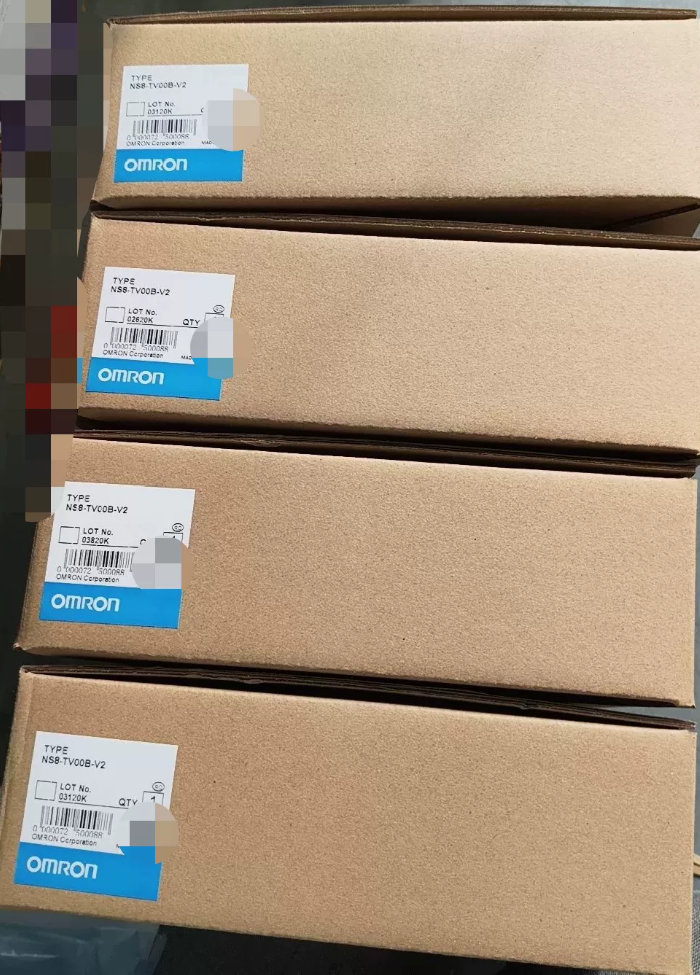

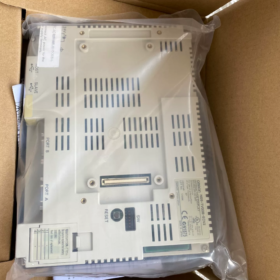
Разбивка кода модели
NS8-TV00B-ECV2
НС8: серия НС, 8.4-дюймовый программируемый терминал HMI
ТВ: Цветной TFT ЖК-дисплей
00: Стандартная модель, без видеовхода (TV01 = поддерживает видеомодуль)
Б: Черный безель (модель без “Б”: светло-серый безель NS8-TV00-ECV2)
ЕС: Встроенный порт Ethernet
V2: 2аппаратная версия второго поколения
Перекрестная ссылка внутри серии: NS8-TV00B-V2 = Нет Ethernet; NS8-TV00B-ECV2 = стандартное оснащение Ethernet
- Основные характеристики оборудования
| Элемент | Параметр |
| Отображать | 8.4″ Цветной TFT ЖК-дисплей, Разрешение 640×480(VGA) |
| Цвета дисплея | 65,536 цвета (16-кусочек) |
| Сенсорный тип | Аналоговый резистивный сенсорный экран |
| Источник питания | 24 В постоянного тока (Допустимый диапазон:20.4~27,6 В), Макс. потребляемая мощность ≤18 Вт |
| Память программ | 60 МБ |
| Интерфейсы | ✅ Ethernet 10/100BASE-T |
| ✅ Двойной RS232C (ДБ9) | |
| ✅ USB-ведомый (Загрузка/скачивание программы) | |
| ✅ USB-хост (USB-накопитель / Мышь) | |
| Передняя защита | IP65 / НЕМА4 (При правильной герметизации после монтажа панели) |
| Рабочая температура | 0~50℃; Температура хранения -20~60℃ (Нет конденсата) |
| Габаритные размеры | 315(Вт) × 241(ЧАС) × 48.5(Д) мм |
| Размеры выреза в панели | 298 × 224 мм |
| Подсветка | Люминесцентная лампа CCFL с холодным катодом (Срок службы ок.. 50,000 часы; после старения произойдет пожелтение и потускнение) |
- Информация о программном обеспечении
Программное обеспечение: NS-Designer версия 6.X
Протоколы связи: ОМРОН Ссылка на хост, ФИНС Ethernet. Совместимость с ПЛК серии CJ/CS/CP1H/CP1E.; также поддерживает Modbus RTU/TCP
⚠️ Несовместимо с Sysmac Studio.; не может напрямую заменить HMI серии NA/NJ
- Уведомление о жизненном цикле продукта
✅ Официальное прекращение производства (ЕОП)
Доступная поставка: Новые излишки и бывшие в употреблении отремонтированные агрегаты; цены на запчасти продолжают расти.
Решения по замене
- Прямая замена на месте (Предпочтительный, совместимый монтажный вырез)
НА8-12W101-В2 (8.4-дюймовая серия NA; широкий экран, обратите внимание на разницу в разрешении, проект экрана нуждается в полной переработке)
- Решение для миграции с минимальными модификациями программы
Б/у NS8-TV00B-ECV2
- Отечественные альтернативы: Вайнвью, Кинко 8-дюймовый ЧМИ; требует полноэкранной перерисовки и отладки связи.
- Распространенные неисправности & Напоминания о ловушках
- Типичный отказ: Старение подсветки CCFL, приводящее к черному экрану. Возможна замена ленты подсветки или модификация светодиодной подсветки..
- Неисправность сенсорного экрана: Старение сенсорной панели; можно приобрести независимую замену сенсорного стекла.
- Сбой связи Ethernet: Чип Ethernet модели ECV2 уязвим к электростатическому повреждению.. Для кабелей связи рекомендуется защита от перенапряжения..
- Совместимость программы: Проекты, разработанные для аппаратного обеспечения версии 2, нельзя открыть непосредственно на устройствах ранней версии 1..
- Различие в заказе: Не путайте NS8-TV00B-V2 (Нет Ethernet) и ECV2 (С Ethernet).
- Типичные применения
Станки, упаковочное оборудование, оборудование для литья под давлением, конвейерные линии, проекты модернизации, оснащенные классическими ПЛК OMRON (CP1H, CJ1M, CS1G).
Если необходимо, могу дополнить:
Текст САПР с размерами выреза панели
Определение назначения контактов заднего интерфейса
Пошаговое руководство по настройке связи FINS Ethernet через NS-Designer
Простое руководство по модификации подсветки
Программное обеспечение для OMRON NS8-TV00B-ECV2
- Эволюция программного обеспечения
Это устройство относится к аппаратному обеспечению серии NS V2. (-ЕСВ2)
- Оригинальное автономное программное обеспечение: НС-Дизайнер (Максимальная версия V6)
- Позже интегрированное программное обеспечение: CX-дизайнер
✅ CX-Designer в настоящее время широко распространен
CX-Designer интегрирован в пакет программного обеспечения CX-One., Установка CX-One имеет приоритет.
- Рекомендации по выбору версии
- CX-One 4.0 / 4.1 (Самый стабильный, широко используется в промышленной автоматизации)
Встроенный CX-Designer, полностью совместим с NS8-TV00B-ECV2.
- Более новый CX-One 4.2/4.3 также совместимы, но требуется настройка режима совместимости под Win10/Win11.
- ❌ Sysmac Studio НЕ поддерживается.!
Sysmac Studio поддерживает только серии NA/NJ/NX.; он не может работать с устаревшими сенсорными экранами NS..
- Форматы файлов проекта
Исходный файл проекта: `.ipp`
Скомпилированный файл загружен в HMI: `.tsp`
- Важные примечания
- Старые проекты NS-Designer можно открывать и конвертировать непосредственно с помощью CX-Designer.; обратное преобразование недоступно.
- Способы загрузки программы: Ethernet(ФИНС), USB-кабель Б, Последовательный порт RS232.
- NS8-TV00B-ECV2 — аппаратное обеспечение версии 2.; выберите точную модель NS8-TV00B-ECV2 в программном обеспечении, избегайте выбора версии V1.
- Обновление прошивки HMI можно выполнить в CX-Designer..
- Напоминание о частой путанице
Многие пользователи путают разные программы:
HMI серии NB → NB-Designer
Новое поколение Северной Америки/Нью-Джерси → Sysmac Studio
Сенсорный экран Legacy NS → CX-Designer (Люкс CX-One)
Если необходимо, я могу предоставить:
Процедуры загрузки проектов HMI через FINS Ethernet
Руководство по настройке совместимости CX-One под Win11
Процесс операции по загрузке и расшифровке программы
Полный список поддерживаемых протоколов связи для OMRON NS8-TV00B-ECV2
Аппаратные интерфейсы: Двойной RS232C (Порт А / Порт Б; Порт B переключается на RS422/485) + Встроенный Ethernet-разъем RJ45. + USB-хост + USB-ведомый
Программное обеспечение: CX-дизайнер (Люкс CX-One). Все протоколы можно выбрать в [Настройки связи] проекта.
- Протоколы для порта Ethernet (Встроенный в ECV2.)
Для подключения ПЛК OMRON, загрузка программы и связь с хостом ПК
- ФИНС Ethernet (UDP/TCP) [Первичный протокол]
Для ПЛК CJ1M/CJ2M/CS1G/CP1H/CP1E OMRON, наиболее часто используемый.
- Модбус TCP (Владелец)
Прямое подключение к приборам Modbus TCP и ПЛК сторонних производителей..
- Ссылка на контроллер (Ethernet-маршрутизация)
- Ссылка на память (Ethernet)
Обмен данными с пользовательским программным обеспечением хоста ПК.
- Протоколы последовательного порта (RS232C / RS422/485)
✅ Собственные протоколы OMRON (Для подключения ПЛК OMRON)
- НТ Линк 1:1 / НТ Линк 1:Н (Скоростной сериал)
Совместим с серией CJ/CS/CP1H. (Классическая последовательная связь для серии NS)
- Ссылка на хост (1:1)
Устаревшие ПЛК OMRON: ЦВМ1, C200H, CPM1A, и т. д..
- КомпоВэй/Ф
Прямое подключение к контроллерам температуры OMRON E5CC/E5AZ и датчикам., переадресация ПЛК не требуется.
✅ Стандартные промышленные протоколы
- Модбус РТУ (Владелец)
Преобразователи частоты, инструменты, ПЛК сторонних производителей (Поддерживается только RTU, Modbus ASCII не поддерживается.)
- Ссылка на память (Серийный)
Последовательный обмен данными между хостом ПК и HMI.
✅ Сторонние последовательные протоколы ПЛК
Мицубиси: Протокол MC (3Рамка С/4С) → Серия FX/Q
Роквелл АБ: Протокол DF1
Дж.Э. Фанук: Протокол SNP-X
Сименс: Сименс 3964(Р)/РК512 (S5/старый серийный номер S7, S7 Ethernet не поддерживается)
⚠️ Критическое ограничение: Родной S7 TCP / Профинет / CC-Link недоступны. Невозможно подключить S7-1200/1500 напрямую через Ethernet.; Для связи с новыми ПЛК Siemens необходим шлюз Modbus TCP..
- Функции USB-порта (Не может использоваться для связи с ПЛК., только периферийное соединение & загрузка программы)
- USB-ведомый (Тип-Б): Подключите ПК CX-Designer для загрузки/скачивания программы.
- USB-хост (Тип-А): USB-накопитель (Регистрация данных, импорт программы), USB-принтер, мышь
❌ USB не может обмениваться данными с ПЛК.
- Основные инженерные ошибки
- Порт A и порт B могут одновременно запускать разные протоколы., позволяет одному HMI независимо подключать два комплекта оборудования.
- NS8-TV00B-ECV2 работает только как коммуникационный мастер., не может действовать как подчиненный. Он не может быть активно прочитан/записан внешними ПЛК..
- Порт Ethernet и последовательные порты одновременно поддерживают параллельную связь..
- Версия прошивки влияет на стабильность протокола: Обновите прошивку системы HMI до версии V8 или выше для повышения надежности протоколов сторонних производителей..
- ЭтерНет/IP, ОПЦ ЮА, Profinet не поддерживается изначально.
- Различие: Протоколы серии NS несовместимы с серией NA/NB..
Рекомендуемые схемы связи
- ПЛК серии OMRON CJ/CP → FINS Ethernet (Первый выбор)
- Несколько контроллеров температуры E5CC → CompoWay/F (RS485)
- Инверторы & Общие приборы → Modbus RTU (RS485) или Modbus TCP
- Модернизация оборудования Mitsubishi FX → Протокол MC (Серийный)
Если необходимо, я могу предоставить:
Выполните шаги настройки для связи FINS Ethernet.
Схема подключения и шаблон параметров CX-Designer для Modbus RTU
Точки настройки для двух последовательных портов, одновременно управляющих несколькими устройствами
Поддерживаемые операционные системы для CX-Designer (Соответствие NS8-TV00B-ECV2)
CX-Designer встроен в пакет программного обеспечения CX-One.. Все приведенные ниже описания относятся к широко используемому CX-One V4.x. (CX-Designer V3.x) — стабильная версия для редактирования проектов HMI серии NS..
- Официально поддерживаемые операционные системы
✅ Официально подтверждено & рекомендуется
- Окна 7 (32кусочек / 64кусочек; Профессиональный / Предприятие / Окончательное издание)
- Окна 8.1 (32кусочек / 64кусочек; Требуется установка системного патча KB2919355.)
- Окна 10 (32кусочек / 64кусочек; Про / Предприятие / LTSC все совместимо)
- Окна 11 (Только 64бит. Нет официальной сертификации; проверено, работоспособен на практике, настройка режима совместимости обязательна)
❌ Официально не поддерживается
Windows ХР, Windows Виста: Совместим только с устаревшей версией CX-Designer V2.. Не рекомендуется для редактирования проекта NS8-TV00B-ECV2., риск повреждения проектов и сбоев загрузки прошивки.
Оригинальная Windows 8: Плохая совместимость, не рекомендуется OMRON.
Все серверные системы Windows (Сервер2016/2019 и т. д.): Нет официальной гарантии; частичные среды могут работать нестабильно.
- Практические советы по работе с различными ОС (Предотвращение ловушек на промышленной площадке)
1) Windows7 64бит
⭐ Предпочтительная ОС с максимальной стабильностью
Редко возникают ошибки связи или сбои загрузки/выгрузки.; стандартная конфигурация для промышленных полевых компьютеров.
2) Windows10 64бит (LTSC 2019/2021 Рекомендуется)
Хорошая совместимость; щелкните правой кнопкой мыши установщик → Запуск от имени администратора во время установки.
После установки: Настройка ярлыка CX-Designer: Режим совместимости Windows7 + Запуск от имени администратора.
3) Windows11 64бит
⚠️ Не сертифицирован официально., работает в рамках практической проверки
Общие риски: Периодическое отключение во время загрузки программы через USB., нестабильная связь FINS Ethernet.
Две обязательные настройки:
- Ярлык CX-Designer → Свойства → Режим совместимости.: Windows7
- Отключить целостность памяти (Безопасность Windows → Безопасность устройства → Изоляция ядра)
- Важные ограничения
- Нет отдельного 64-битного исполняемого файла CX-Designer.. Программное обеспечение представляет собой 32-битную программу, работающую через подсистему WOW64 в 64-битной Windows..
- Избегайте компактных/зеленых портативных релизов CX-One.; высокий риск сбоя подключения к NS8-TV00B-ECV2 и повреждения проекта.
- MacOS, Линукс: Нет встроенной поддержки. Работает только через виртуальную машину (VMware под управлением Win7/Win10).
- Различие границ программного обеспечения:
CX-дизайнер: Серия НС (NS8-TV00B-ECV2)
Сисмак Студия: NA/ID/NX, Не могу открыть NS-проекты
- Минимальные требования к оборудованию
Разрешение дисплея ≥1024×768
Полная установка CX-One: ≥4 ГБ свободного места на жестком диске
ОЗУ ≥4 ГБ (8ГБ или выше рекомендуется для Win10/Win11)





NH42-63-318x560.png "Автоматические переключатели резерва типа PC CHINT (АТС)НХ42-63/4СЗ")



