المقاولين,قاطع الدائرة,الاستشعار,التشفير,بلك,محول

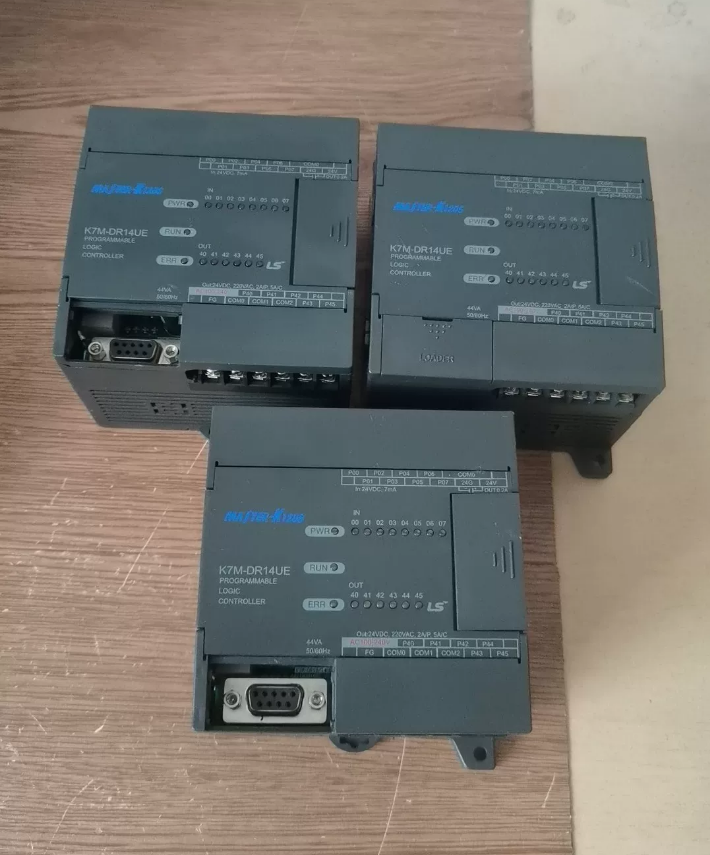

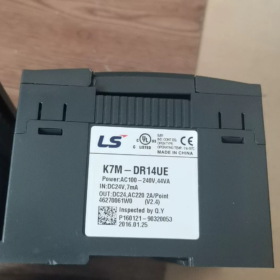
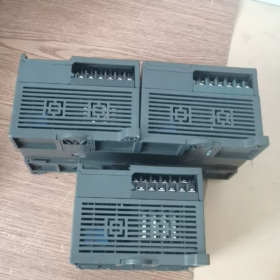
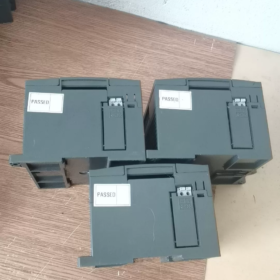
فك رمز النموذج
K7M-DR14UE
- K7M: CPU main unit of MASTER-K120S series
- د: DC24V digital input
- ر: تتابع الإخراج
- 14: إجمالي نقاط الإدخال/الإخراج 14 (8من + 6يفعل)
- ش: Wide-range power supply AC85~264V (يعمل بالتيار المتردد)
- ه: النسخة الاقتصادية
امتياز: Standard model K7M-DR14U (without E). Hardware functions differ and cannot be directly replaced.
- المواصفات الكهربائية الأساسية
| غرض | مواصفة |
| إجمالي الإدخال/الإخراج | 14 نقاط; 8من / 6يفعل |
| الإدخال الرقمي | DC24V sink input (نبن), opto-isolated, X00~X07 |
| تتابع الإخراج | 6 relay outputs Y00~Y05; Resistive load per contact: AC250V/2A; DC30V/2A; Not applicable for high-frequency switching |
| مزود الطاقة | AC 85~264V wide-range AC input |
| قدرة البرنامج | 2خطوات ك |
| Program Retention | Supercapacitor backup; No lithium battery required |
| Onboard Communication | RS485 فقط (No RS232 on economy model); Modbus RTU and إل إس proprietary protocol supported |
| قدرة التوسع | الأعلى. 3 وحدات التوسعة; Maximum overall I/O 120 نقاط |
| وظائف عالية السرعة | No built-in high-speed counter, pulse output or PID control for economy version |
| تصاعد | تركيب السكك الحديدية DIN |
| بيئة التشغيل | 0~55°C, لا التكثيف, dust-proof industrial environment |
- التمييز الرئيسي & ملاحظات الاختيار
- K7M-DR14UE (اقتصاد) VS K7M-DR14U (معيار)
DR14UE: RS485 فقط; No high-speed counter, pulse output or PID, فعالة من حيث التكلفة;
DR14U: RS232+RS485 onboard; supports high-speed counter, positioning and PID;
⚠️ Program logic is compatible, but hardware functions vary. Verify process requirements before replacement.
- نوع الإخراج: DR(تتابع) vs DT(الترانزستور)
DR Relay: Suitable for solenoid valves and contactors, high-frequency pulse output unavailable;
DT Transistor: Used for servo/stepper pulse control.
- برامج البرمجة
Software Name: KGL-WIN (Windows-only)
Communication for download: RS485; LS dedicated programming cable required.
- التطبيقات النموذجية
Small standalone automation, conveyor equipment, packaging auxiliary machinery, simple assembly lines, التحكم في التدفئة والتهوية وتكييف الهواء (HVAC)., logic control for low-voltage panel systems;
❌ Not suitable for: تحديد المواقع المؤازرة, high-frequency pulse output, closed-loop PID temperature control (hardware functions absent on economy model).
- Reference Economy Models in the Same Series
K7M-DR10UE:6د/4ج
K7M-DR14UE:8DI/6DO (Model covered herein)
K7M-DR20UE:12DI/8DO
K7M-DR30UE:18DI/12DO
- استكشاف الأخطاء وإصلاحها الشائعة & إرشادات الأسلاك
- Do not overload relay output contacts. Use intermediate relays for frequently switched loads;
- RS485 wiring: Do not reverse A/B lines; install terminating resistors at both ends of the bus;
- Digital input accepts DC24V NPN signals only; PNP sensors cannot be wired directly;
- Programs are backed up by supercapacitor. Risk of program loss if power-off duration exceeds 72 ساعات.
Programming Software for LS K7M-DR14UE (MASTER-K120S)
Full Software Name
KGL-WIN (also written as KGLWIN)
✅ Sole compatible software; XG5000/XGWorks cannot be used for K120S series (XG software exclusively for XGT PLC series, لا تخلط).
- Recommended Version
Stable mainstream release: KGL-WIN V3.66
Supports full MASTER-K series: K10S/K80S/K120S(K7M)/K200S; fully compatible with K7M-DR14UE economy CPU.
- لغات البرمجة المدعومة
مخطط سلم LD (الأكثر استخداما على نطاق واسع)
قائمة تعليمات إيل
مخطط الوظائف التسلسلية SFC
❗ST Structured Text is not supported (software limitation of legacy version)
- OS Compatibility Notes
Originally developed for Windows XP / Win7
Win7: Install and run directly;
Win10 / Win11 (64-قليل): Compatibility mode mandatory
عملية: Right-click Setup.exe → Properties → Compatibility → Check Run this program in compatibility mode for Windows 7 + Run as administrator. Otherwise communication failures or software crashes may occur.
- Communication Methods for Program Download
K7M-DR14UE economy version equipped with RS485 only, no RS232 port
Two download solutions:
- USB to RS485 debugging cable (A/B wiring);
- RS232/485 converter + LS dedicated download cable.
بروتوكولات الاتصال: LS proprietary Cnet protocol, مودبوس ار تي يو.
- Important Comparison to Avoid Mistakes
| سلسلة PLC | برامج البرمجة |
| MASTER-K120S (K7M-xxx) | KGL-WIN |
| XGT Series (XGK/XGI) | XG5000 / XGWorks |
- Additional Information
Software is free, no encryption, hardware dongle not required;
Supports online monitoring and manual I/O force function;
No offline simulation. Physical PLC hardware is mandatory for debugging.
إذا لزم الأمر, أستطيع أن أقدم:
① KGL-WIN communication parameter setup procedure
② RS485 download cable pinout definition
③ Troubleshooting checklist for upload/download errors of DR14UE
Complete Introduction to KGL-WIN Operation Interface (LS MASTER-K120S / K7M Series)
Applicable Model: K7M-DR14UE, Recommended software version V3.66 Chinese Version
Important Premise: KGL-WIN is legacy Windows architecture software. No built-in offline simulation, physical PLC hardware required for debugging; only supports LD Ladder Diagram / قائمة تعليمات إيل / مخطط الوظائف التسلسلية SFC, ST Structured Text not supported.
- Global Interface Layout (من الأعلى إلى الأسفل)
- Menu Bar
- Standard Speed Toolbar
- Ladder Element Toolbar
- Left Pane: Project Window (Project Tree)
- Central Area: Program Main Editor Window
- قاع: Message / Information Window
- Bottommost: Status Bar
- Detailed Function of Each Zone
2.1 Top Menu Bar (Chinese UI)
| قائمة طعام | High-frequency On-site Functions |
| Project | مشروع جديد, open/save project; PLC model selection (MASTER-K120S mandatory); program & comment import/export; communication parameter setting, project options |
| Edit | Copy, cut, paste, find(Ctrl+F), يستبدل, jump to step(Ctrl+G), rung comment editing |
| View | Toggle Ladder Diagram ↔ Instruction List【Ctrl+Space】; display address/comment; cross-reference of operands; adjust ladder width |
| Online | Connect PLC, تحميل البرنامج, program download, RUN/STOP PLC, online monitor, force I/O, release force, clear PLC memory【Core debugging menu】 |
| أداة | Ladder element toolkit; program syntax check; operand monitoring table; print configuration |
| نافذة | Float layout, reset interface layout |
| Help | Instruction manual, software version information |
⚠️ Critical step for new project: Select MASTER-K120S as PLC model. Wrong selection leads to download failure for K7M-DR14UE.
2.2 Tier1: Standard Speed Toolbar
Common icons:
New Project|Open|Save|Program Syntax Check|Connect PLC|Download Program|Upload Program|Start Monitor|Stop Monitor|Run PLC|Stop PLC|Find
2.3 Tier2: Ladder Element Toolbar (Core for Programming)
Only active under Ladder Diagram mode, shortcut keys:
F3: عادة فتح جهة الاتصال
F4: جهة اتصال مغلقة عادة
F5: Horizontal Line
F6: Vertical Line
F9: Output Coil
F10: Application Instructions (Timer T, Counter C, MOV transfer, arithmetic operations etc.)
Arrow cursor: Selection mode (move components)
2.4 Left Pane: Project Window (Project Tree)
Fixed four nodes after project creation:
- برنامج
Double-click to open ladder editor; location for all logic rung programming.
- المعلمة
Not commonly used for DR14UE economy CPU without high-speed counter/PID; parameters for high-speed functions available for standard CPUs.
- Variable/Comment
Add Chinese comments for X/Y/M/T/C/D operands; comments can be saved locally or downloaded to PLC for maintenance convenience.
- مهمة الإدخال/الإخراج
Preview native I/O: X00~X07 (المدخلات), Y00~Y05 (النواتج); preview address allocation of expansion modules.
2.5 Central Program Editor Window
Core workspace with multi-tab support:
- Ladder Diagram Mode (الأكثر شيوعًا)
Program logic written by rung; conducting branches are highlighted automatically during online monitoring;
- Instruction List Mode (ذاكري)
Display mnemonic codes; convenient for instruction copy and error troubleshooting; toggle shortcut 【Ctrl+Space】;
- مخطط الوظائف التسلسلية SFC
Step flow programming, less widely adopted.
Editing Mode Distinction
Offline Mode: Grey title bar; program editing only, no PLC connection;
Online Monitor Mode: Highlighted title bar, real-time operand refresh; I/O force available.
2.6 Bottom Message Window
Two primary functions:
- Syntax error alert: Red text prompts address error, illegal instruction after compilation;
- Communication log: Display connect/disconnect status, download progress, PLC fault codes.
2.7 Bottommost Status Bar (Indispensable for Debugging)
Information from left to right:
- Step number and rung number of cursor position;
- Communication Status: Offline / Online;
- PLC operation mode: يجري / قف;
- Monitor enable status;
- Insert / Overwrite mode;
- Detected PLC model information.
- Standard Operating Workflow (Step-by-step Operation)
- Project → New Project → Select Model【MASTER-K120S】
- Double-click Program under left project tree to open ladder editor
- Program logic with ladder element toolbar
- Click Program Check to eliminate syntax errors
- Project → Communication Setting: Select COM port (corresponding COM number of USB-to-485 adapter), protocol CNET
- Online → Connect PLC
- Online → Download Program (PLC must be under STOP mode)
- Online → Run PLC, enable monitor to verify logic execution
- Operation Pitfalls Specifically for K7M-DR14UE (Economy Version)
- Do not configure high-speed counter, pulse output or PID parameters in software; hardware does not support, download alarm will occur;
- DR14UE only has RS485 port; do not select RS232 in communication settings;
- Run Program Check before every download;
- Offline simulation button is invalid; physical PLC hardware required;
- Software prone to crash on Win10/Win11: Set compatibility mode Windows7 + تشغيل كمسؤول.
- Frequently Used Shortcut Keys
Ctrl+Space: Toggle Ladder Diagram ↔ Instruction List
Ctrl+F: Find operand address
Ctrl+H: Replace operand address
Ctrl+G: Jump to specified step number
F3/F4/F9: Quick insert contact / لفائف
Ctrl+S: Save project


NH42-63-318x560.png "مفاتيح النقل التلقائي من نوع الكمبيوتر الشخصي CHINT (المنشطات الأمفيتامينية)NH42-63/4SZ")