 Contactor,circuit breaker,sensor,Encoder,PLC,Converter

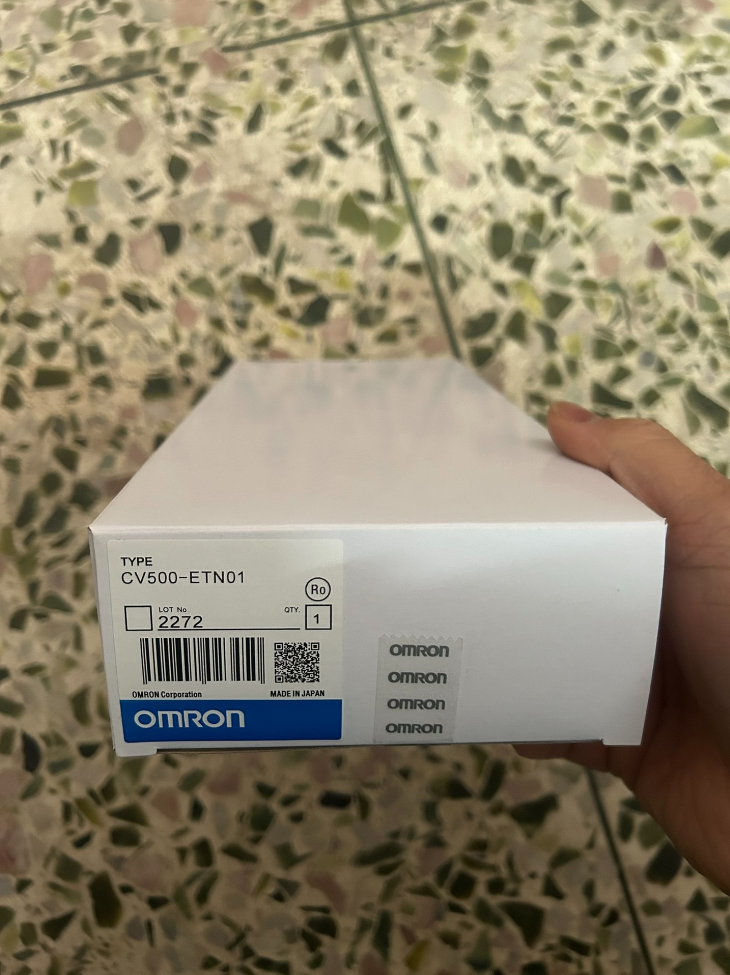

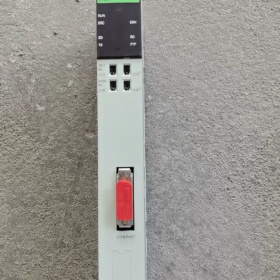
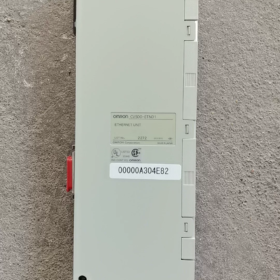
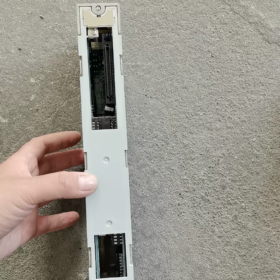
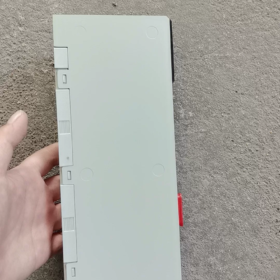
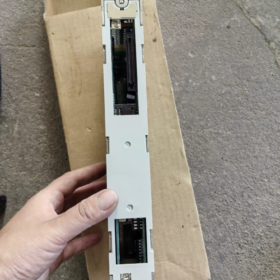
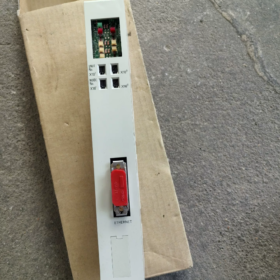
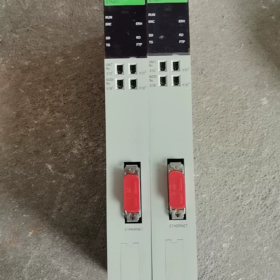
This is a 10 Mbps Ethernet communication module for CV-series PLCs. It supports TCP/IP, UDP/IP, FINS protocols and FTP server functions, enabling data communication between PLCs, host computers and other PLC devices.
- Model Code Explanation
| Code Segment | Description |
| CV500 | Omron SYSMAC CV-series PLC module, compatible with CPU units of CV500, CV1000, CV2000 and CVM1 series |
| ETN | Identifier for Ethernet communication function |
| 1 | Product version number, basic Ethernet unit |
- Main Specifications
| Item | Specifications | Remarks |
| Basic Features | ||
| Communication Standard | Ethernet Version 2 (IEEE 802.3 compliant) | CSMA/CD access method supported |
| Transmission Rate | 10 Mbps (baseband transmission) | Fixed speed |
| Transmission Medium | Coaxial cable (10BASE5) | Maximum segment length: 500 m |
| Max. Nodes per Segment | 100 nodes | Node spacing must be a multiple of 2.5 m |
| Communication Ports | 8 concurrent communication ports | Supports simultaneous operation of multiple applications |
| Supported Protocols | TCP/IP, UDP/IP, FINS, FTP Server | Socket interface communication available |
| Electrical Characteristics | ||
| Power Supply | Powered by PLC backplane | Max. current consumption: 1.7 A (including transceiver) |
| Transceiver Power Output | 12 VDC, max. 0.35 A | Powers external transceivers |
| Connector | 15-pin D-sub (IEEE 802.3 compliant) | Equipped with slide lock mechanism |
| Physical Dimensions | ||
| Dimensions | 34.5×250×98.1 mm (W×H×D) | Standard size for CV-series modules |
| Weight | 500 g (approx. 1.1 lb) | Weight including housing |
| Mounting Position | Designated slots on CPU rack or expansion CPU rack | Depends on backplane type; maximum 4 units per PLC |
| Functional Features | ||
| Network Diagnostics | PING response, inter-node test, error logging | Self-diagnosis and network status monitoring supported |
| FTP Function | File read & write (for RAM/EEPROM cards) | Requires V1-version CPU and PLC in PROGRAM mode |
| Data Buffer | TCP: 4 KB (Tx/Rx); UDP: 9 KB (Tx) / 9.016 KB (Rx) | Refer to Appendix F for detailed configuration |
| Max. Communication Distance | 2.5 km per system (multiple segments via repeaters) | Single segment: max. 500 m |
- Full Model List (CV-series Ethernet Units)
| Model | Name | Key Features | Application Scenarios |
| CV500-ETN01 | Ethernet Unit | Basic 10 Mbps Ethernet, 8 ports, FINS/FTP supported | Standard industrial Ethernet communication, HMI & host monitoring |
| CV500-ETN11 | Enhanced Ethernet Unit | More protocols, higher performance | Complex network environments, multi-system integration |
| CV500-MC221 | Ethernet Module | Rich integrated functions, Modbus TCP supported | Communication with third-party devices, SCADA integration |
| CV500-ETN21 | High-speed Ethernet Unit | 10/100 Mbps auto-negotiation | High-volume data transmission, real-time monitoring systems |
> Note: Orders for CV500-ETN01 were suspended in March 2012, and full production ceased around 2017.
- Replacement Models & Competitor Comparison
4.1 Official Omron Replacement Solutions
| Original Model | Recommended Replacement | Compatibility | Improvements |
| CV500-ETN01 | CS1W-ETN21 | PLC needs to be upgraded to CS1 series | 10/100 Mbps auto-negotiation, extended protocol support |
| CV500-ETN01 | CJ1W-ETN21 | PLC needs to be upgraded to CJ1 series | Compact size, higher performance, PROFINET supported |
| CV500-ETN01 | Built-in Ethernet of NJ/NX Series | Full PLC upgrade required | EtherNet/IP & Gigabit Ethernet supported, integrated motion control |
4.2 Cross-brand Competitor Comparison (Function Compatibility)
| Brand | Model | Transmission Rate | Supported Protocols | Price Range |
| Siemens | CP 343-1 | 10/100 Mbps | TCP/IP, UDP, PROFINET | Medium-High |
| Mitsubishi | QJ71E71-100 | 10/100 Mbps | TCP/IP, UDP, MC Protocol | Medium |
| Schneider Electric | 140NOE77101 | 10/100 Mbps | TCP/IP, UDP, Modbus | Medium-High |
| Rockwell Automation | 1756-ENBT | 10/100 Mbps | TCP/IP, UDP, EtherNet/IP | High |
| Omron | CV500-ETN01 | 10 Mbps | TCP/IP, UDP, FINS, FTP | Low (Discontinued) |
- Application Environment & Industry Cases
5.1 Applicable Scenarios
Industrial Automation Production Lines: Communication between PLCs and host monitoring systems for production data acquisition and remote control.
Process Control Systems: Data exchange among multiple PLCs for distributed control in chemical and power industries.
Logistics & Warehousing Systems: Control of AGVs and conveyors, data interaction with WMS.
Building Automation: Integration of HVAC and security systems for centralized monitoring and management.
Semiconductor Equipment: Precision control and data collection; FTP-based program update.
5.2 Not Recommended Scenarios
High-speed Real-time Control: Limited to 10 Mbps, not suitable for millisecond-level response requirements.
Modern Industrial Networks: Does not support Gigabit Ethernet, EtherNet/IP and other new protocols.
New Equipment Development: Discontinued; no official technical support or spare parts supply.
Long-distance Communication: Single segment limited to 500 m; additional repeaters increase costs for long-range transmission.
5.3 Typical Application Cases
Case 1: Monitoring System for Automotive Component Production Lines
Configuration: 3 sets of CV1000 PLC + CV500-ETN01, connected via coaxial cables
Functions: Real-time collection of stamping, welding and assembly data, uploaded to SCADA system
Advantages: 8 concurrent connections for simultaneous communication with HMI, database server and remote monitoring terminals
Key Technology: FINS for inter-PLC data sharing; FTP for remote program update
Case 2: Data Acquisition for Food & Beverage Filling Lines
Configuration: CV500 PLC + CV500-ETN01 + Barcode Reader + Weighing Sensor
Functions: Collect bottle weight, production date and batch information, transmit to MES via Ethernet
Advantages: UDP for high-speed data transmission; TCP ensures reliability of critical data
Troubleshooting: PING command and inter-node test for quick network fault diagnosis
- Troubleshooting & Maintenance Guide
6.1 LED Indicator Diagnosis
| Indicator | Color | Status | Meaning | Solution |
| RUN | Green | Off | Module not running | Check power supply and restart PLC |
| ERC | Red | On | Invalid node address (out of 1–126) or hardware failure | Reset node address; check module connection |
| ERH | Red | On | PC error, wrong unit number or I/O table setting | Verify unit number; reconfigure I/O table |
| ERH | Red | Blinking | IP address unset or invalid | Reconfigure IP address |
| SD/RD | Orange | Off | No data transmission/reception | Check network wiring and communication parameters |
| FTP | Orange | On | FTP server active | Normal status |
| TS | Orange | On | Inter-node test in progress | Normal status |
6.2 Common Faults & Solutions
| Fault Phenomenon | Possible Causes | Solutions |
| Communication failure | 1. Conflicting unit/node number | 1. Power off and reset unit number (00–15) & node number (1–126) |
| 2. Incorrect IP address | 2. Check for IP address conflict | |
| 3. Loose cable connection | 3. Inspect locking of 15-pin D-sub connector | |
| 4. Defective transceiver | 4. Replace with a functional transceiver | |
| FTP transmission failure | 1. Non-V1 CPU version | 1. Confirm V1 CPU (e.g. CV500-CPU01-EV1) |
| 2. PLC not in PROGRAM mode | 2. Switch PLC to PROGRAM mode | |
| 3. Memory card write-protected | 3. Disable write protection on memory card | |
| 4. Unsupported card type | 4. Use RAM or EEPROM card (EPROM is read-only) | |
| Slow communication speed | 1. Overloaded network | 1. Reduce concurrent connections (≤8) |
| 2. Buffer overflow | 2. Optimize data volume and expand buffer | |
| 3. Excessive transmission distance | 3. Shorten transceiver cable (≤50 m) | |
| Intermittent disconnection | 1. Power fluctuation | 1. Stabilize PLC power supply |
| 2. Electromagnetic interference | 2. Separate communication cables from power cables; use shielded cables | |
| 3. Overheated transceiver | 3. Ensure good ventilation for transceivers |
6.3 Maintenance Schedule & Notes
| Maintenance Item | Cycle | Operation Notes |
| Module Cleaning | Every 3 months | Power off first; remove dust with dry compressed air. Do not use liquid cleaners. |
| Connector Inspection | Every 6 months | Check for loose connection and pin oxidation; clean if necessary. |
| Network Test | Every 1 month | Run PING test and inter-node test to verify network quality. |
| Firmware Check | Every 1 year | Confirm firmware version; update with professional tools if required. |
| Spare Parts Preparation | For critical systems | Prepare replacement modules or overall upgrade plans due to product discontinuation. |
- Selection Guidelines & Quick Reference
7.1 Three Key Points for CV500-ETN01 Selection
- PLC Compatibility: Only for CV/CVM1 series; not compatible with CS/CJ series.
- Communication Demand: 10 Mbps speed and 8 concurrent ports for basic Ethernet communication.
- Product Lifecycle: Discontinued. Select replacement models for new projects.
7.2 Troubleshooting Tips
LED off → Check power; LED blinking → Check IP address; steady red LED → Check parameter settings
Data transfer failure → Verify PROGRAM mode; unstable connection → Check EMI shielding; low speed → Reduce network load
7.3 Priority of Replacement Solutions
- Series upgrade path: CV500 → CS1 → CJ1 → NJ/NX
- Function matching: Ensure compatibility with original protocols (FINS/FTP) and new requirements
- Cost evaluation: Balance the cost of module replacement and full system upgrade
Supplementary Content: Application Environment & Industry Cases
- Application Environment (Compatibility & Restrictions)
1.1 Hardware & System Compatibility
PLC Platform: Exclusive to CPU racks and expansion racks of Omron CV500/CV1000/CV2000/CVM1 series. Max. 4 units per PLC.
Network Topology: 10BASE5 thick coaxial cable. Single segment: max. 500 m; node spacing: multiple of 2.5 m; max. 100 nodes per segment. Total distance up to 2.5 km with repeaters.
Communication Protocols: TCP/IP, UDP/IP, FINS, FTP Server. 8 concurrent ports for multi-device communication.
Electrical Environment: Backplane power supply (1.7 A); external transceiver: 12 VDC / 0.35 A. Operating temperature: 0–55 °C. Keep away from inverters and large motors to avoid strong electromagnetic interference.
1.2 Applicable Scenarios (Advantages)
✅ Renovation & Maintenance of Old Production Lines: Network upgrade for legacy CV-series PLCs (replacing traditional RS-232/422).
✅ Medium & Low-speed Data Acquisition: For non-real-time applications such as production status, temperature and pressure monitoring.
✅ Multi-PLC Networking: Networking of 3–10 CV-series PLCs in one workshop for FINS-based data exchange.
✅ Host Monitoring (SCADA): Data exchange between PLCs, industrial PCs and HMIs for process visualization and remote operation.
✅ Remote Program Update: Read/write CPU programs via FTP (RAM/EEPROM card), reducing on-site card plugging operations.
1.3 Restricted Scenarios (Limitations)
❌ High-speed Real-time Control: 10 Mbps bandwidth insufficient for motion control, servo synchronization and high-frequency closed-loop control (e.g. packaging machines, high-speed machine tools).
❌ New Equipment Development: Discontinued since 2012; risk of spare parts shortage and no official support.
❌ Modern Industrial Networks: Incompatible with 100 Mbps/Gigabit Ethernet, EtherNet/IP, PROFINET, Modbus TCP and other mainstream industrial protocols.
❌ Long-distance & Complex Topology: Complicated cabling for coaxial cables, poor anti-interference performance and high maintenance costs.
- Major Industry Applications (Popular in 2000–2010)
2.1 Automotive Component Production Lines (Most Common)
Configuration: 3 × CV1000-CPU01-EV1 + CV500-ETN01 + 10BASE5 coaxial network + SCADA industrial PC
Process: Stamping, welding, assembly and inspection. Collect equipment status, output and yield data and upload to MES. FINS for inter-PLC safety interlock (e.g. welding stations).
Improvement: Replaced old RS-485 multi-drop network to solve slow speed and frequent disconnection. 8 concurrent ports support connection with HMI, MES and remote maintenance terminals simultaneously.
2.2 Food & Beverage Filling Lines
Configuration: CV500-CPU01 + CV500-ETN01 + Weighing Sensor + Barcode Reader + FTP Server
Process: Bottle washing, filling, capping, labeling and inspection. UDP for high-speed transmission of bottle weight, batch number and production date; TCP guarantees reliability of yield and alarm data. FTP for remote recipe update.
Value: Cost-effective PLC-Ethernet-MES closed-loop system, meeting product traceability requirements for food industry.
2.3 Chemical Process Control (Explosion-proof & High Reliability)
Configuration: Redundant CVM1-CPU21-V2 + 2 × CV500-ETN01 (main/backup) + Redundant coaxial network + DCS host
Process: Reactor temperature & pressure control, pipeline flow monitoring and valve interlock. FINS for data exchange with DCS. PING and inter-node test for fast fault location.
Environmental Adaptability: Wide temperature range and vibration resistance, suitable for dusty and humid chemical workshops.
2.4 Building Automation (HVAC & Security)
Configuration: CV2000-CPU01 + CV500-ETN01 + Air-conditioning Controller + Fire Alarm System + Access Control System
Functions: Centralized temperature & humidity control for central air conditioning, fire alarm linkage and access data upload. 8 concurrent ports manage multiple subsystems simultaneously.
Advantages: Cost-effective and reliable Ethernet solution for large buildings in the 2000s with easy maintenance.
2.5 Semiconductor Equipment (Legacy Non-critical Processes)
Configuration: CV500-CPU01-EV1 + CV500-ETN01 + Wafer Inspection Station + Data Server
Process: Status monitoring and data recording for non-critical processes such as wafer cleaning and packaging. FTP for inspection report upload and remote program download.
Note: Only applied to legacy equipment and non-high-speed processes. New devices adopt EtherNet/IP or Gigabit Ethernet.
- On-site Application Tips & Upgrade Recommendations
3.1 On-site Application Tips
IP Planning: Node address: 1–126 (no duplication); Subnet mask: 255.255.255.0
Wiring Rules: Keep coaxial cables at least 30 cm away from power cables. Ensure waterproof and well-grounded connectors.
Maintenance Routine: Run PING test monthly; clean modules and connectors quarterly; back up programs annually.
3.2 Upgrade & Replacement Suggestions (Year 2026)
Short-term Maintenance: Use original second-hand CV500-ETN01 as spare parts; use third-party compatible products with caution.
Mid-term Upgrade: Migrate PLC to CS1/CJ1 series, adopt CS1W-ETN21 / CJ1W-ETN21 (10/100 Mbps auto-negotiation, FINS & Modbus TCP supported).
Long-term Renovation: Upgrade to NJ/NX series with built-in Gigabit Ethernet, supporting EtherNet/IP and PROFINET for Industry 4.0 applications.





NH42-63-318x560.png "CHINT PC-type automatic transfer switches (ATS)NH42-63/4SZ")



