 Schütz,Leistungsschalter,Sensor,Encoder,SPS,Konverter

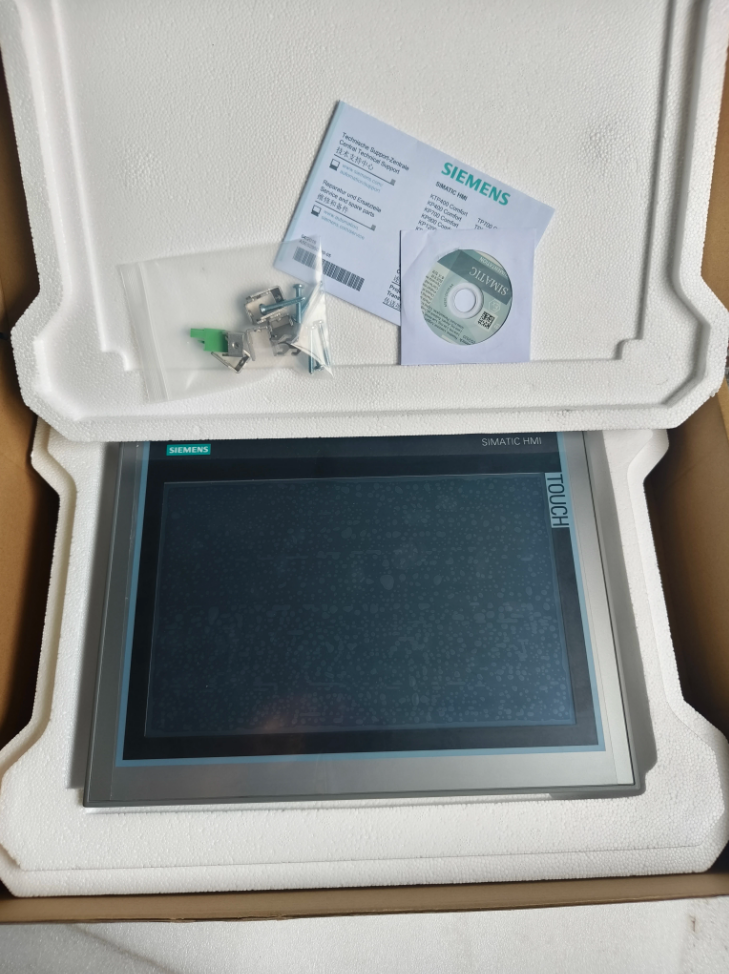

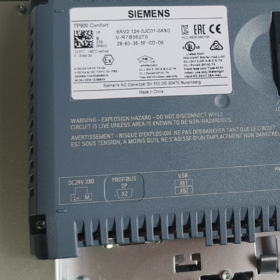
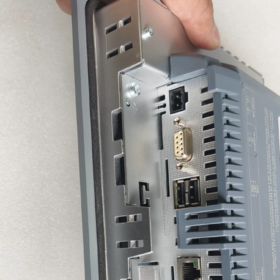
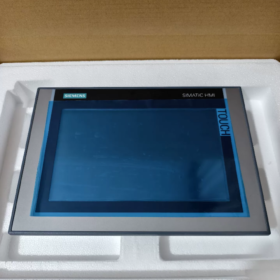
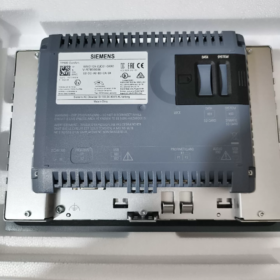
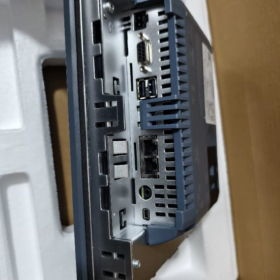
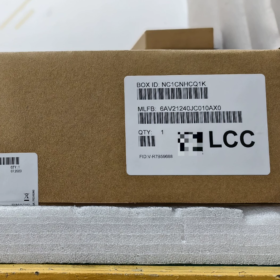
SIEMENS SIMATIC HMI TP900 Comfort Panel
- Aufschlüsselung der Modellnummern
| Teil des Modells | Beschreibung |
| 6AV2 | Hauptproduktkategorie für SIEMENS HMI Mensch-Maschine-Schnittstelle |
| 124 | Serienkennung für TP900 Comfort (9-Zoll-Touch-Comfort-Panel) |
| 0JC01 | Hardwareversion und Konfigurationscode (Standardversion mit PROFINET- und MPI/PROFIBUS DP-Schnittstellen) |
| 0AX0 | Softwareversion und Regionalcode (Windows CE 6.0, internationale Version) |
SIEMENS HMI-Modellliste & Markenübergreifender Modellvergleich
- Übersicht über das SIEMENS HMI-Produktportfolio
Die SIEMENS-SIMATIC-HMI-Familie deckt eine vollständige Palette industrieller HMIs vom Einstiegsmodell bis zum High-End-Gerät ab, unterteilt in sechs Hauptserien:
| Produktserie | Positionierung | Hauptmerkmale | Typische Anwendungen |
| SMART LINE-Serie | Wirtschaftlich, für kleine Automatisierungsanlagen | Kostengünstig, Perfekt kompatibel mit S7-200 SMART | Eigenständige Ausrüstung, kleine Produktionslinien, OEM-Maschinen |
| Basisserie | Standard, für kleine bis mittlere Automatisierung | Voll ausgestattet, moderate Kosten, mehrere Bildschirmgrößen | Kleine bis mittlere Steuerungssysteme, Prozessüberwachung, Maschinenbetrieb |
| Comfort-Serie | High-End, für mittlere bis große Automatisierung | Kraftvolle Kommunikation, mehrere Schnittstellen, hohe Auflösung | Komplexe Systeme, Multitasking-Koordination, erweiterte Visualisierung |
| Einheitliche Serie | High-End der neuen Generation, für die Industrie der Zukunft | Multi-Touch, HTML5-Unterstützung, Edge-Computing | Industrie 4.0, Intelligente Fabriken, Projekte zur digitalen Transformation |
| Mobile-Serie | Tragbar, für den mobilen Einsatz | Drahtlose Kommunikation, flexible Installation, geeignet für raue Umgebungen | Wartung großer Geräte, mobile Überwachung, Inspektion der Produktionslinie |
| Schlüsselserie | Gewidmet, für eine schnelle Bedienung | Reines Tastaturdesign, vormontiert, zeitsparende Installation | Einfache Steuerungsaufgaben, Szenarien ohne komplexe Grafiken |
- Vollständige Modellliste der SIEMENS HMI-Serie
2.1 SMART LINE-Serie (6AV6648)
| Modell | Produktname | Bildschirmgröße | Auflösung | Betrieb | Hauptschnittstellen | Softwareanforderung |
| 6AV6648-0AC11-3AX0 | SCHLAU 700 IE V1 | 7″ | 800×480 | Berühren | Serieller Anschluss | WinCC flexible SMART |
| 6AV6648-0BC11-3AX0 | SCHLAU 1000 IE V1 | 10.1″ | 1280×800 | Berühren | Serieller Anschluss | WinCC flexible SMART |
| 6AV6648-0DC11-3AX0 | SCHLAU 700 IE V4 | 7″ | 800×480 | Berühren | Ethernet + Seriell | WinCC flexible SMART V4 |
| 6AV6648-0EC11-3AX0 | SCHLAU 700 IE V5 | 7″ | 800×480 | Berühren | Ethernet + Seriell | WinCC flexible SMART V5 |
| 6AV6648-0EE11-3AX0 | SCHLAU 1000 IE V5 | 10.1″ | 1280×800 | Berühren | Ethernet + Seriell | WinCC flexible SMART V5 |
2.2 Basisserie (6AV2123)
| Modell | Produktname | Bildschirmgröße | Auflösung | Betrieb | Kommunikationsschnittstelle | Softwareanforderung |
| 6AV2123-2DB03-0AX0 | KTP400 Basic PN | 4.3″ | 480×272 | Tastenfeld + Berühren | PROFINET | WinCC Basic V13+ |
| 6AV2123-2GB03-0AX0 | KTP700 Basic PN | 7″ | 800×480 | Tastenfeld + Berühren | PROFINET | WinCC Basic V13+ |
| 6AV2123-2JB03-0AX0 | KTP900 Basic PN | 9″ | 800×480 | Tastenfeld + Berühren | PROFINET | WinCC Basic V13+ |
| 6AV2123-2MB03-0AX0 | KTP1200 Basic PN | 12″ | 1280×800 | Tastenfeld + Berühren | PROFINET | WinCC Basic V13+ |
| 6AV2123-2DB03-0AX1 | KTP400 Basic DP | 4.3″ | 480×272 | Tastenfeld + Berühren | MPI/PROFIBUS DP | WinCC Basic V13+ |
| 6AV2123-2GB03-0AX1 | KTP700 Basic DP | 7″ | 800×480 | Tastenfeld + Berühren | MPI/PROFIBUS DP | WinCC Basic V13+ |
2.3 Comfort-Serie (6AV2124)
| Modell | Produktname | Bildschirmgröße | Auflösung | Betrieb | Hauptschnittstellen | Softwareanforderung |
| 6AV2124-0DC01-0AX0 | TP400 Komfort | 4.3″ | 480×272 | Nur berühren | PROFINET + MPI/PROFIBUS DP | WinCC Comfort V11+ |
| 6AV2124-1DC01-0AX0 | KP400 Komfort | 4.3″ | 480×272 | Nur Tastatur | PROFINET + MPI/PROFIBUS DP | WinCC Comfort V11+ |
| 6AV2124-0GC01-0AX0 | TP700 Komfort | 7″ | 800×480 | Nur berühren | PROFINET + MPI/PROFIBUS DP | WinCC Comfort V11+ |
| 6AV2124-1GC01-0AX0 | KP700 Komfort | 7″ | 800×480 | Nur Tastatur | PROFINET + MPI/PROFIBUS DP | WinCC Comfort V11+ |
| 6AV2124-0JC01-0AX0 | TP900 Komfort | 9″ | 800×480 | Nur berühren | PROFINET + MPI/PROFIBUS DP | WinCC Comfort V11+ (zuvor abgefragtes Modell) |
| 6AV2124-1JC01-0AX0 | KP900 Komfort | 9″ | 800×480 | Nur Tastatur | PROFINET + MPI/PROFIBUS DP | WinCC Comfort V11+ |
| 6AV2124-0MC01-0AX0 | TP1200 Komfort | 12″ | 1280×800 | Nur berühren | PROFINET + MPI/PROFIBUS DP | WinCC Comfort V11+ |
| 6AV2124-1MC01-0AX0 | KP1200 Komfort | 12″ | 1280×800 | Nur Tastatur | PROFINET + MPI/PROFIBUS DP | WinCC Comfort V11+ |
| 6AV2124-0QC02-0AX1 | TP1500 Komfort | 15″ | 1280×800 | Nur berühren | PROFINET + MPI/PROFIBUS DP | WinCC Comfort V11+ |
| 6AV2124-1QC02-0AX1 | KP1500 Komfort | 15″ | 1280×800 | Nur Tastatur | PROFINET + MPI/PROFIBUS DP | WinCC Comfort V11+ |
| 6AV2124-0UC02-0AX1 | TP1900 Komfort | 19″ | 1280×1024 | Nur berühren | PROFINET + MPI/PROFIBUS DP | WinCC Comfort V11+ |
| 6AV2124-0XC02-0AX1 | TP2200 Komfort | 22″ | 1920×1080 | Nur berühren | PROFINET + MPI/PROFIBUS DP | WinCC Comfort V11+ |
2.4 Einheitliche Serie (6AV2181/6AV2128)
| Modell | Produktname | Bildschirmgröße | Auflösung | Betrieb | Hauptschnittstellen | Softwareanforderung |
| 6AV2128-3GB06-0AX1 | MTP700 Unified Comfort | 7″ | 800×480 | Multi-Touch | PROFINET | WinCC Unified Comfort V16+ |
| 6AV2128-3KB06-0AX1 | MTP1000 Einheitlicher Komfort | 10″ | 1280×800 | Multi-Touch | PROFINET | WinCC Unified Comfort V16+ |
| 6AV2128-3MB06-0AX1 | MTP1200 Einheitlicher Komfort | 12″ | 1280×800 | Multi-Touch | PROFINET | WinCC Unified Comfort V16+ |
| 6AV2128-3QB06-0AX1 | MTP1500 Einheitlicher Komfort | 15″ | 1280×800 | Multi-Touch | PROFINET | WinCC Unified Comfort V16+ |
| 6AV2128-3UB06-0AX1 | MTP1900 Einheitlicher Komfort | 19″ | 1280×1024 | Multi-Touch | PROFINET | WinCC Unified Comfort V16+ |
| 6AV2128-3XB06-0AX1 | MTP2200 Unified Comfort | 22″ | 1920×1080 | Multi-Touch | PROFINET | WinCC Unified Comfort V16+ |
| 6AV2123-3GB32-0AW0 | MTP700 Unified Basic | 7″ | 800×480 | Multi-Touch | PROFINET | WinCC Unified Basic V18 Update 3+ |
| 6AV2123-3KB32-0AW0 | MTP1000 Unified Basic | 10″ | 1280×800 | Multi-Touch | PROFINET | WinCC Unified Basic V18 Update 3+ |
- Markenübergreifender Modellvergleich: SIEMENS HMI vs. große Marken
3.1 SIEMENS vs. Rockwell PanelView
| Rockwell-Modell | SIEMENS-Äquivalent | Bildschirmgröße | Betrieb | Hauptunterschiede |
| PanelView Component C300 | KTP400 Komfort | 4.3″ | Berühren + Tastenfeld | Stromversorgung (Wechselstrom→Gleichstrom), Differenz der Ausschnittsmaße |
| PanelView 800 7″ | KTP700 Basic | 7″ | Berühren / Tastenfeld | Konfiguration der Kommunikationsschnittstelle, Softwarekompatibilität |
| PanelView Plus 6 1000 | TP1200 Komfort | 10.4″/12.1″ | Nur berühren | Unterschiedliche Auflösung, keine Tastaturoption |
| PanelView Plus 7 1250 | TP1500 Komfort | 12.1″/15″ | Nur berühren | Verbesserte Displaygröße, umfassendere Funktionen |
| PanelView Plus 7 Leistung | TP1900 Komfort | 15″/19″ | Nur berühren | Hochleistungsprozessor, größerer Speicher |
3.2 SIEMENS vs Schneider Magelis
| Schneider-Modell | SIEMENS-Äquivalent | Bildschirmgröße | Betrieb | Hauptunterschiede |
| Magelis STO 4.3″ | KTP400 Basic | 4.3″ | Berühren + Tastenfeld | Anzahl der Schnittstellen, Softwareplattform (Vijeo Designer vs. WinCC) |
| Magelis GTU 7″ | TP700 Basic | 7″ | Nur berühren | Drahtlose Kommunikation, Flexibilität bei der Installation |
| Magelis GTO 10″ | TP1200 Komfort | 10″ | Nur berühren | Unterstützung mehrerer Protokolle, Speicherkapazität |
| Magelis iPC | SIEMENS Industrie-PC + WinCC | 15–22″ | Berühren / Maus & Tastatur | Volle PC-Funktionalität, Windows-Betriebssystem |
3.3 SIEMENS gegen Mitsubishi GOT
| Mitsubishi-Modell | SIEMENS-Äquivalent | Bildschirmgröße | Betrieb | Hauptunterschiede |
| GS2107-WTBD-N | SCHLAU 700 IE V5 | 7″ | Nur berühren | Schnittstellenkonfiguration (Mitsubishi mit zusätzlichem CF-Slot), Software (GT Designer vs. WinCC) |
| GT2510-VTBD | TP1200 Komfort | 10.4″ | Nur berühren | Nennleistung, Bildschirmauflösung |
| GT2705-VTBD | TP1500 Komfort | 10.4″ | Nur berühren | Betriebsspeicher (80MB), Anzahl der Kommunikationsschnittstellen |
| GT2710-VTBA | TP1900 Komfort | 15″ | Nur berühren | Hochleistungs-CPU, größere Speicherkapazität |
3.4 SIEMENS gegen Omron NB/NS
| Omron-Modell | SIEMENS-Äquivalent | Bildschirmgröße | Betrieb | Hauptunterschiede |
| NB5Q-TW00B | KTP400 Basic | 4.3″ | Berühren + Tastenfeld | Ersetzt die abgekündigte NT-Serie, vereinfachte Funktionen |
| NB7W-TW00B | TP700 Basic | 7″ | Nur berühren | Hohe Auflösung, Multiprotokoll-Unterstützung |
| NS10-TV00B | TP1200 Komfort | 10″ | Nur berühren | Auslaufmodell, ersetzt durch NB-Serie oder SIEMENS TP-Serie |
| NS12-TS01B | TP1500 Komfort | 12″ | Nur berühren | Erweiterte Funktionen, unterstützt mehrere Kommunikationsprotokolle |
- Modellauswahl & Ersatzempfehlungen
- Auswahlgrundsätze: Wählen Sie je nach Projektumfang die passende Serie aus, funktionale Anforderungen, Budget, und zukünftige Erweiterung
Kleine Projekte: Vorzugsweise SMART LINE oder Basic-Serie
Mittlere Projekte: Basic- oder Comfort-Serie empfohlen
Große/komplexe Projekte: Comfort- oder Unified-Serie
- Ersatzhinweise:
Für markenübergreifenden Ersatz, Achten Sie auf die Kompatibilität der Ausschnittmaße, Stromversorgung, und Kommunikationsschnittstellen
Softwaremigration: Die HMI-Konfigurationssoftware ist nicht markenübergreifend kompatibel; Eine Sanierung des Projekts ist erforderlich
Funktionsanpassung: Stellen Sie sicher, dass das Ersatzmodell alle funktionalen Anforderungen des Originalsystems erfüllt, insbesondere spezielle Kommunikationsprotokolle und erweiterte Funktionen
- Upgrade-Vorschläge:
Legacy-Modelle (z.B., OP/MP-Serie) Es wird empfohlen, auf die Comfort- oder Unified-Serie aufzurüsten
Benutzer der Basic-Serie können für erweiterte Funktionen auf Unified Basic upgraden
Benutzer der Comfort-Serie können problemlos auf Unified Comfort umsteigen, um Multi-Touch- und HTML5-Unterstützung zu erhalten
SIEMENS HMI bietet ein umfassendes Produktprogramm von der wirtschaftlichen SMART LINE bis zur High-End-Unified-Serie, Erfüllung der Anforderungen verschiedener industrieller Automatisierungsszenarien. Für markenübergreifenden Ersatz, focus on key factors including screen size, Betriebsmodus, communication interfaces, and software compatibility. It is recommended to refer to official technical documentation of each brand before selection to ensure full compliance with project requirements.
- Recommended Operating Environment
- Industrielle Szenarien: Manufacturing automation lines, process control systems, machinery operation panels, power and water treatment facilities, automotive and food & beverage industries
- Network Environment: Supports mainstream industrial protocols including PROFINET IRT/MRP, PROFIBUS DP, MPI
- Installation: Standard-Panelmontage (horizontal/vertikal), suitable for control cabinet embedded installation
- Kompatible Controller: S7-1200/1500/300/400 series PLCs, also supports third-party controllers
- Ersatz & Upgrade-Optionen
| Ersatztyp | Modell | Beschreibung |
| Upgrade der gleichen Serie | 6AV2124-0JC01-0AX1 | Updated hardware version, fixes known issues |
| Leistungssteigerung | 6AV2124-0MC01-0AX0 | TP1200 Komfort (12″, 1280×800 resolution) |
| Funktionserweiterung | 6AV2124-0JC01-0AX0 + Erweiterungsmodul | Adds extra communication interfaces or storage capacity |
| New-Generation Replacement | 6AV2181-4JS00-0AX0 | Comfort Panel 2nd Generation (verbesserte Leistung, erweiterte Sicherheitsfunktionen) |
- Offizielle Bestellinformationen
Offizielle Bestellnr.: 6AV2124-0JC01-0AX0 (SIEMENS Industrial Mall Standardnummer)
Packliste: Einzelpanel mit Montagezubehör, Stromkabel, Kurzanleitung
Garantie: 2 Jahre (SIEMENS Originalfabrik)
Kaufkanäle: SIEMENS Industrial Mall
– WhatsApp: 86-13811255435
- Komplette TP900 Comfort-Modellliste
| Modell | Beschreibung |
| 6AV2124-0JC01-0AX0 | Standardversion mit PROFINET- und MPI/PROFIBUS DP-Schnittstellen |
| 6AV2124-0JC01-0AX1 | Updated hardware version |
| 6AV2124-0JC01-0AX2 | Mit Sicherheitsfunktionen (SIL 2/PL d) |
| 6AV2124-0JC01-0AX3 | Weittemperaturversion (Betriebstemp: -20°C bis +60°C) |
| 6AV2124-0JC01-0AX4 | ATEX-zertifizierte Version für explosionsgefährdete Bereiche |
- Hinweise zur technischen Implementierung
- Installation: Achten Sie auf eine gute Abdichtung zwischen Panel und Schaltschrank; ausreichend Wärmeableitungsraum auf der Rückseite
- Kommunikationskonfiguration: PROFINET unterstützt die IRT-Echtzeitkommunikation, Geeignet für Bewegungssteuerungsanwendungen
- Datensicherung: Sichern Sie die Projektkonfiguration regelmäßig per SD-Karte oder USB
- Softwarekompatibilität: Für optimale Leistung und Sicherheit wird TIA Portal V15 oder höher empfohlen
- Wartung: Vermeiden Sie langfristige direkte Sonneneinstrahlung; Reinigen Sie den Touchscreen regelmäßig bei ausgeschaltetem Gerät
6AV2124-0JC01-0AX0 ist ein klassisches SIEMENS 9-Zoll-Touch-Comfort-Panel, Wird zur Prozessvisualisierung und Betriebssteuerung in kleinen bis mittleren Automatisierungssystemen verwendet. Es verfügt über starke Kommunikationsfähigkeiten und eine stabile Leistung auf Industrieniveau, weit verbreitet in verschiedenen industriellen Szenarien. Für detailliertere technische Dokumente, Bitte beachten Sie die offiziellen Datenblätter von SIEMENS oder wenden Sie sich an den technischen Support von SIEMENS.
SIEMENS HMI-Modellliste & Markenübergreifender Modellvergleich
(Der doppelte Abschnitt wurde in der Übersetzung als identisch mit oben zusammengefasst; Es wird durchgehend durchgehend Englisch verwendet)





NH42-63-318x560.png "Automatische Transferschalter vom Typ CHINT PC (ATS)NH42-63/4SZ")



