 Contacteur,disjoncteur,capteur,Encodeur,API,Convertisseur

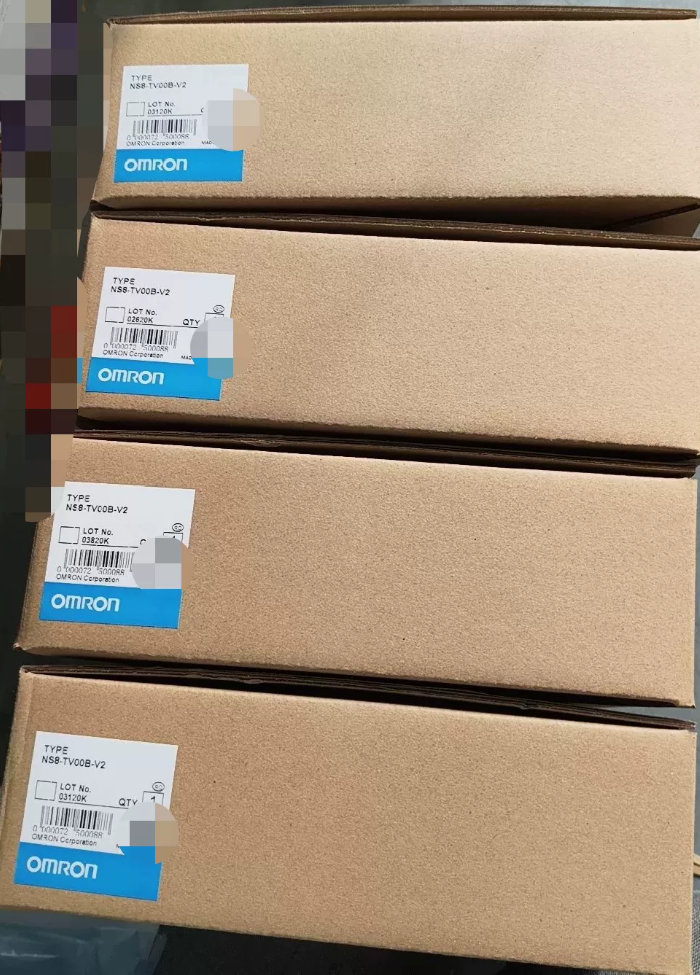

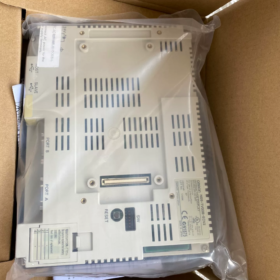
Répartition du code modèle
NS8-TV00B-ECV2
NS8: Série NS, 8.4-IHM terminal programmable en pouces
TV: Écran LCD couleur TFT
00: Modèle standard, sans entrée vidéo (TV01 = prend en charge le module vidéo)
B: Lunette noire (modèle sans “B”: cadre gris clair NS8-TV00-ECV2)
CE: Port Ethernet intégré
V2: 2version matérielle de 2ème génération
Référence croisée au sein de la série: NS8-TV00B-V2 = Pas d'Ethernet; NS8-TV00B-ECV2 = Standard équipé d'Ethernet
- Spécifications matérielles de base
| Article | Paramètre |
| Afficher | 8.4″ Écran LCD couleur TFT, Résolution 640×480(VGA) |
| Couleurs d'affichage | 65,536 couleurs (16-peu) |
| Type tactile | Écran tactile résistif analogique |
| Alimentation | DC24V (Plage autorisée:20.4~27,6 V), Consommation électrique maximale ≤18W |
| Mémoire du programme | 60 Mo |
| Interfaces | ✅Ethernet 10/100BASE-T |
| ✅ Double RS232C (DB9) | |
| ✅ Esclave USB (Téléchargement/téléchargement de programme) | |
| ✅ Hôte USB (Clé USB / Souris) | |
| Protection avant | IP65 / NEMA4 (Lorsqu'il est correctement scellé après le montage du panneau) |
| Température de fonctionnement | 0~50℃; Température de stockage -20 ~ 60 ℃ (Pas de condensation) |
| Dimensions hors tout | 315(W) × 241(H) × 48.5(D) mm |
| Dimensions de découpe du panneau | 298 × 224 mm |
| Rétroéclairage | Lampe fluorescente à cathode froide CCFL (Durée de vie env.. 50,000 heures; le jaunissement et la gradation se produiront après le vieillissement) |
- Informations sur le logiciel
Logiciel de programmation: NS-Designer version 6.X
Protocoles de communication: OMRON Lien hôte, FINS-Ethernet. Compatible avec les automates des séries CJ/CS/CP1H/CP1E; prend également en charge Modbus RTU/TCP
⚠️ Non compatible avec Sysmac Studio; ne peut pas remplacer directement l'IHM de la série NA/NJ
- Avis sur le cycle de vie du produit
✅ Fin Officielle de Production (POE)
Approvisionnement disponible: Stock excédentaire neuf et unités rénovées d'occasion; les prix des pièces détachées continuent d'augmenter.
Solutions de remplacement
- Remplacement direct sur place (Préféré, découpe de montage compatible)
NA8-12W101-V2 (8.4-pouces série NA; écran large, noter la différence de résolution, le projet d'écran a besoin d'une refonte complète)
- Solution de migration avec modification minimale du programme
NS8-TV00B-ECV2 d'occasion
- Alternatives nationales: Vue sur le vin, IHM Kinco 8 pouces; nécessite un redessinage plein écran et un débogage de la communication.
- Défauts courants & Rappels des pièges
- Échec typique: Vieillissement du rétroéclairage CCFL conduisant à un écran noir. Le remplacement de la bande de rétroéclairage ou la modification du rétroéclairage LED est réalisable.
- Dysfonctionnement tactile: Vieillissement de l'écran tactile; Verre tactile de remplacement indépendant disponible à l'achat.
- Échec de la communication Ethernet: La puce Ethernet du modèle ECV2 est vulnérable aux dommages électrostatiques. Une protection contre les surtensions est recommandée pour les câbles de communication.
- Compatibilité des programmes: Les projets développés pour le matériel V2 ne peuvent pas être ouverts directement sur les premières unités V1.
- Distinction de commande: Ne confondez pas NS8-TV00B-V2 (Pas d'Ethernet) et ECV2 (Avec Ethernet).
- Applications typiques
Machines-outils, machines d'emballage, équipement de moulage par injection, lignes de convoyeurs, projets de rétrofit équipés d'automates OMRON classiques (CP1H, CJ1M, CS1G).
Si nécessaire, je peux compléter:
Texte CAO des dimensions de découpe du panneau
Définition de l'affectation des broches de l'interface arrière
Guide étape par étape pour la configuration de la communication Ethernet FINS via NS-Designer
Guide d'utilisation simple pour la modification du rétroéclairage
Logiciel de programmation pour OMRON NS8-TV00B-ECV2
- Évolution du logiciel
Cette unité appartient au matériel NS Series V2 (-ECV2)
- Logiciel autonome original: NS-Designer (Version maximale V6)
- Logiciel intégré ultérieur: Concepteur CX
✅ CX-Designer est actuellement largement adopté
CX-Designer est intégré à la suite logicielle CX-One, L'installation de CX-One est prioritaire.
- Recommandation de sélection de version
- CX-Un 4.0 / 4.1 (Le plus stable, largement utilisé dans l'automatisation industrielle)
Concepteur CX intégré, entièrement compatible avec NS8-TV00B-ECV2.
- CX-One plus récent 4.2/4.3 sont également compatibles, mais la configuration du mode de compatibilité est requise sous Win10/Win11.
- ❌ Sysmac Studio n'est PAS pris en charge!
Sysmac Studio prend uniquement en charge les séries NA/NJ/NX; il ne peut pas fonctionner avec les anciens écrans tactiles NS.
- Formats de fichiers de projet
Fichier de projet source: `.ipp`
Fichier compilé téléchargé sur HMI: `.tsp`
- Remarques importantes
- Les anciens projets NS-Designer peuvent être ouverts et convertis directement avec CX-Designer; reverse conversion is not available.
- Program download methods: Ethernet(PALMES), USB-B cable, Port série RS232.
- NS8-TV00B-ECV2 is V2 hardware; select exact model NS8-TV00B-ECV2 in software, avoid selecting V1 version.
- HMI firmware upgrade can be performed within CX-Designer.
- Common Confusion Reminder
Many users mix up different software:
NB series HMI → NB-Designer
NA/NJ new generation → Sysmac Studio
Legacy NS touch screen → CX-Designer (CX-One Suite)
Si nécessaire, je peux fournir:
Procedures for downloading HMI projects via FINS Ethernet
CX-One compatibility settings guide under Win11
Operation process for program upload and decryption
Full List of Supported Communication Protocols for OMRON NS8-TV00B-ECV2
Interfaces matérielles: Dual RS232C (Port A / Port B; Port B switchable to RS422/485) + Built-in RJ45 Ethernet + Hôte USB + USB Slave
Logiciel: Concepteur CX (CX-One Suite). All protocols can be selected in [Paramètres de communication] of project.
- Protocoles pour le port Ethernet (Intégré sur ECV2)
Pour connecter l'automate OMRON, téléchargement du programme et communication avec l'hôte PC
- FINS-Ethernet (UDP/TCP) [Protocole principal]
Pour automates OMRON CJ1M/CJ2M/CS1G/CP1H/CP1E, le plus couramment utilisé.
- Modbus-TCP (Maître)
Connexion directe aux instruments Modbus TCP et aux automates tiers.
- Lien du contrôleur (Routage Ethernet)
- Lien mémoire (Ethernet)
Échange de données avec un logiciel hôte PC personnalisé.
- Protocoles de port série (RS232C / RS422/485)
✅ Protocoles natifs OMRON (Pour connexion PLC OMRON)
- Lien NT 1:1 / Lien NT 1:N (Série haute vitesse)
Compatible avec les séries CJ/CS/CP1H (Communication série classique pour la série NS)
- Lien hôte (1:1)
Automates OMRON hérités: CVM1, C200H, CPM1A, etc..
- CompoWay/F
Connexion directe aux contrôleurs de température OMRON E5CC/E5AZ et aux capteurs, aucun transfert PLC requis.
✅ Protocoles industriels standards
- Modbus RTU (Maître)
Variateurs de fréquence, instruments, automates tiers (Uniquement RTU pris en charge, Modbus ASCII n'est pas pris en charge)
- Lien mémoire (En série)
Échange de données en série entre l'hôte PC et l'IHM.
✅ Protocoles série PLC tiers
Mitsubishi: Protocole MC (3Cadre C/4C) → Série FX/Q
Rockwell AB: Protocole DF1
GE Fanuc: Protocole SNP-X
Siemens: Siemens 3964(R.)/RK512 (S5/ancienne série S7, S7 Ethernet n'est pas pris en charge)
⚠️ Limitation critique: TCP S7 natif / Profinet / CC-Link n'est pas disponible. Impossible de connecter le S7-1200/1500 directement via Ethernet; Une passerelle Modbus TCP est requise pour la communication avec les nouveaux automates Siemens.
- Fonctions du port USB (Ne peut pas être utilisé pour la communication API, uniquement connexion périphérique & téléchargement du programme)
- USB Slave (Type B): Connectez PC CX-Designer pour le téléchargement/téléchargement du programme
- Hôte USB (Type-A): Clé USB (Enregistrement de données, importation de programme), Imprimante USB, souris
❌ L'USB ne peut pas communiquer avec l'automate
- Notes sur les pièges techniques clés
- Le port A et le port B peuvent exécuter différents protocoles simultanément, permettant à une IHM de connecter deux ensembles d'équipements indépendamment.
- NS8-TV00B-ECV2 fonctionne uniquement en tant que maître de communication, ne peut pas agir en tant qu'esclave. Il ne peut pas être lu/écrit activement par des automates externes.
- Le port Ethernet et les ports série prennent en charge la communication parallèle en même temps.
- La version du micrologiciel affecte la stabilité du protocole: Mettez à niveau le micrologiciel du système IHM vers la version V8 ou supérieure pour une meilleure fiabilité des protocoles tiers.
- EtherNet/IP, OPC-UA, Profinet n'est pas supporté nativement.
- Distinction: Les protocoles de la série NS sont incompatibles avec les séries NA/NB.
Schémas de communication recommandés
- Automate OMRON série CJ/CP → FINS Ethernet (Premier choix)
- Plusieurs contrôleurs de température E5CC → CompoWay/F (RS485)
- Onduleurs & Instruments généraux → Modbus RTU (RS485) ou Modbus TCP
- Mise à niveau d'équipement Mitsubishi FX → Protocole MC (En série)
Si nécessaire, je peux fournir:
Étapes de configuration complètes pour la communication Ethernet FINS
Schéma de câblage et modèle de paramètres CX-Designer pour Modbus RTU
Points de configuration pour deux ports série pilotant plusieurs appareils simultanément
Systèmes d'exploitation pris en charge pour CX-Designer (Correspondant à NS8-TV00B-ECV2)
CX-Designer est intégré à la suite logicielle CX-One. Toutes les descriptions ci-dessous s'appliquent à CX-One V4.x largement déployé (CX-Designer V3.x) — la version stable pour l'édition des projets HMI de la série NS.
- Systèmes d'exploitation officiellement pris en charge
✅ Officiellement validé & recommandé
- Fenêtres 7 (32peu / 64peu; Professionnel / Entreprise / Édition ultime)
- Fenêtres 8.1 (32peu / 64peu; Installation du correctif système KB2919355 requise)
- Fenêtres 10 (32peu / 64peu; Pro / Entreprise / LTSC tous compatibles)
- Fenêtres 11 (Seulement 64 bits. Pas de certification officielle; vérifié opérationnel dans la pratique, configuration du mode de compatibilité obligatoire)
❌ Officiellement non pris en charge
Windows XP, Windows Vista: Uniquement compatible avec l'ancien CX-Designer V2. Non recommandé pour l'édition de projets NS8-TV00B-ECV2, risque de projets corrompus et d'échecs de téléchargement du firmware.
Fenêtres d'origine 8: Mauvaise compatibilité, non recommandé par OMRON.
Tous les systèmes Windows Server (Serveur2016/2019 etc.): Aucune garantie officielle; les environnements partiels peuvent fonctionner avec instabilité.
- Conseils d'utilisation pratiques pour différents systèmes d'exploitation (Éviter les pièges des sites industriels)
1) Windows7 64 bits
⭐ Système d'exploitation préféré avec une stabilité maximale
Rencontrez rarement des erreurs de communication ou des échecs de téléchargement/téléchargement; configuration standard pour ordinateurs de terrain industriels.
2) Windows10 64 bits (LTSC 2019/2021 Recommandé)
Bonne compatibilité; cliquez avec le bouton droit sur le programme d'installation → Exécuter en tant qu'administrateur pendant l'installation.
Après l'installation: Configurer le raccourci CX-Designer: Mode de compatibilité Windows7 + Exécuter en tant qu'administrateur.
3) Windows11 64 bits
⚠️ Non officiellement certifié, fonctionne sous test pratique
Risques courants: Déconnexion intermittente lors du téléchargement du programme USB, communication Ethernet FINS instable.
Deux réglages obligatoires:
- Raccourci CX-Designer → Propriétés → Mode de compatibilité: Windows7
- Désactiver l'intégrité de la mémoire (Sécurité Windows → Sécurité des appareils → Isolation du noyau)
- Restrictions importantes
- Pas d'exécutable CX-Designer 64 bits autonome. Le logiciel est un programme 32 bits exécuté via le sous-système WOW64 sur Windows 64 bits..
- Évitez les versions CX-One portables compactes/vertes; risque élevé d'échec de connexion au NS8-TV00B-ECV2 et de dommages au projet.
- Mac OS, Linux: Pas de support natif. Opérable uniquement via une machine virtuelle (VMware exécutant Win7/Win10).
- Distinction des limites du logiciel:
Concepteur CX: Série NS (NS8-TV00B-ECV2)
Sysmac Studio: NA/ID/NX, Impossible d'ouvrir les projets NS
- Configuration matérielle minimale requise
Résolution d'affichage ≥1024×768
Installation complète de CX-One: ≥4 Go d'espace disque libre
RAM ≥4 Go (8Go ou supérieur recommandé sous Win10/Win11)





NH42-63-318x560.png "Commutateurs de transfert automatiques de type PC CHINT (ATS)NH42-63/4SZ")



