 コンタクタ,サーキットブレーカー,センサー,エンコーダ,PLC,コンバータ

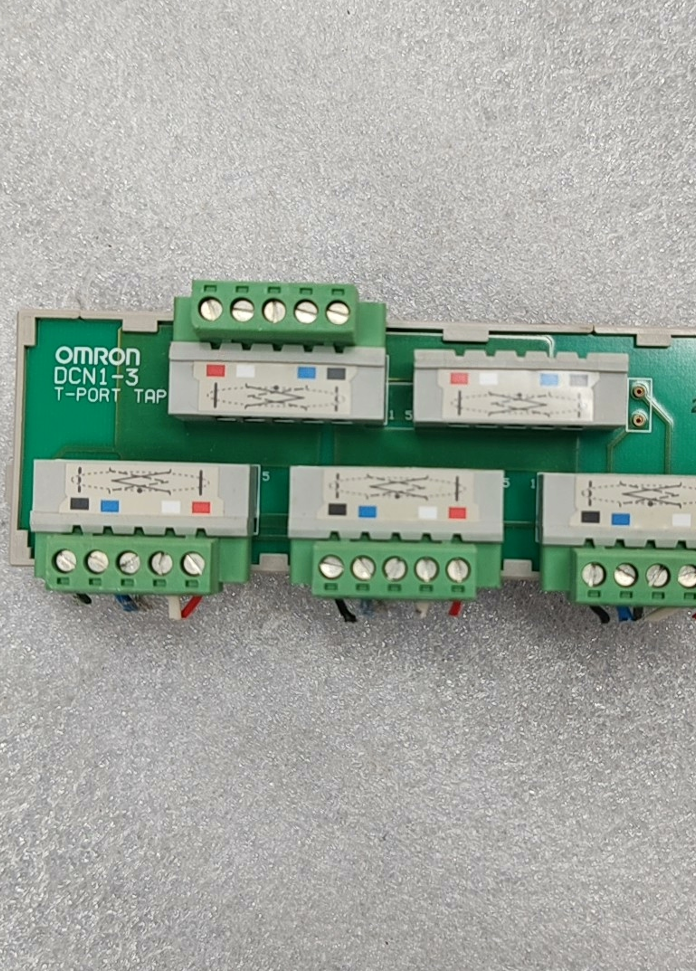

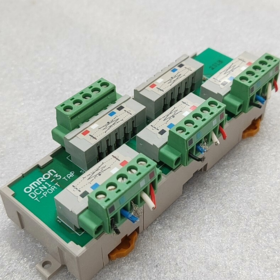
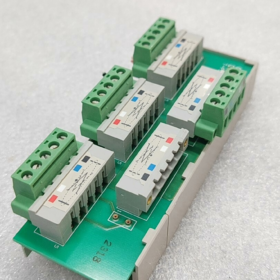
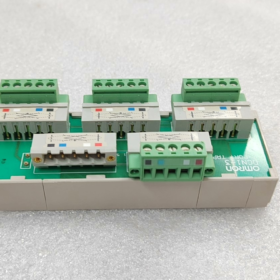
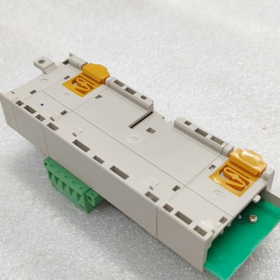
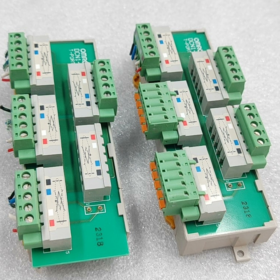
DCN1-3T-ポート = DCN1-3. 業界では一般に DeviceNet T 分岐スプリッタとして知られています / 3-ポートTAP端子台, it is printed with the marking “T-PORT TAP” and serves as a dedicated branching module for オムロン DeviceNet fieldbus.
Model Suffix Differentiation (Mandatory Reading for Procurement)
| モデル | Configuration Description |
| DCN1-3 (bare unit) | ベースのみ, without 5 sets of terminal blocks; XW4B terminals must be ordered separately |
| DCN1-3C | Standard equipped with 5 side-entry screw terminals (most widely used in industry) |
| DCN1-3NC | Top-entry latch-type terminals for screw-free fast wiring |
- Hardware Port Structure (5-channel 5-pin DeviceNet Standard)
- 2 Main Line Ports: Bus trunk line input and output for daisy-chain networking
- 3 Branch Ports: までサポート 3 DeviceNet slave devices connected simultaneously (センサー, remote I/Os, インバータ)
- Built-in Terminating Resistor Socket: Blue plug-in terminal on the module side. 信号の反射を抑えるためにバス端に 121Ω の終端抵抗を挿入する必要があります
ピンの定義 (標準 5 ピン DeviceNet):
1: V− (パワーネガティブ), 2: CAN_L, 3: CAN_H, 4: V+ (パワーポジティブ), 5: シールドグランド
Ⅲ. コア電気 & 機械仕様
- 電気定格
バス規格: デバイスネット2.0A / 2.0B
供給電圧: DC11~24V (バスパワー)
単一分岐電流定格: マックス. 4あ; モジュールの合計定格電流: 8あ
終端抵抗のマッチング: ビルトイン取付位置, 121Ω付属 / 0.25W抵抗器
サポートされているボーレート: フルレンジ 125k / 250k / 500 kbps
- 環境 & 取付仕様
取り付け: 標準 35mm DIN レールへのスナップオン取り付け
全体の寸法: 142(L) × 45(W) × 31.3(D) mm
正味重量: 110 g
動作温度: -10℃ ~ +55℃
保管温度: -25℃ ~ +70℃, 湿度 5%~95% 結露なきこと
保護クラス: IP20 (キャビネット設置のみ; 屋外での露出使用には適していません)
- ネットワーキングの原則 & アプリケーションシナリオ
- ネットワークトポロジ
DCN1~3の2つのメインポートは幹線に直接接続されています。, 独立した設備を利用して 3 分岐ポート.
利点: 現場でのワイヤの被覆剥きや接合は不要; 1 つのブランチの障害は、バス全体の通信を中断することなく分離されます。.
制限: 分岐ごとのケーブルの合計長は DeviceNet 仕様に準拠する必要があります (最大. 100 ブランチあたりのメートル 500 kbps).
- 代表的な産業用途
自動車組立ライン, 包装機械, 物流仕分けライン
Omron DeviceNet リモート I/O の分岐分割 (DRTシリーズ), 3G3MV / 3G3RX インバータ, E3Z / E2Eバスセンサー
- 包装内容明細書 & オプションのアクセサリ
DCN1-3C の標準工場パッケージ
- 1 × DCN1-3本体
- 5 5ピンネジ端子セット XW4B-05C1-H1-D
- 1 × 121Ωバス終端抵抗
別途注文可能なアクセサリ
DCN1-3 (ターミナルレスバージョン): 端末は別途購入が必要です
DCN1-1 / DCN1-2: コンパクト1ポート / 2-ポートTAP (同じシリーズ内の代替モデル)
DCA1シリーズ DeviceNetバスケーブル, 組み立て済みの M12 コネクタ
- 一般的なトラブルシューティング マトリックス
| 故障現象 | 根本的な原因 | 解決 |
| バススキャン中に分岐デバイスが検出できない | 端子圧着の緩み; CAN_H / CAN_L を反転 | 端子の増し締め; 赤と青の信号線のピン割り当てを確認します。 |
| 深刻な通信ラグ & バス全体でのパケット損失 | バスの両端に終端抵抗が取り付けられていない | リンクの遠端にある DCN1 モジュールに整合抵抗を挿入します。 |
| 電源投入後、分岐機器に電力が供給されない | V+ の緩い圧着 / V−電源ケーブル | ピンの配線を検査する 1 そして 4 |
| 単一分岐デバイスの頻繁な切断 | 長すぎる分岐ケーブル; 非接地シールド | 分岐ケーブルを短くする; シールド端子をキャビネットのアースバーに接続します |
Ⅶ. シリーズ間の代替比較
| モデル | 支店数 | ケーブル入口タイプ | アプリケーションシナリオ |
| DCN1-1C | 1 支店 | 側面ネジ端子 | シングルポイントデバイス用の短い分岐 |
| DCN1-2C | 2 枝 | 側面ネジ端子 | 2台のスレーブデバイスを備えたコンパクトなレイアウト |
| DCN1-3C | 3 枝 | 側面ネジ端子 | 中央多方向分割 (主流モデル) |
| DCN1-4C | 4 枝 | トップエントリー | 複数のデバイスを備えた高密度のキャビネット レイアウト |
インストールを完了する & オムロン DCN1-3 コンフィグレーションマニュアル (DCN1-3T-ポート)
DCN1-3はDeviceNet専用のT型3路分岐端子台です。 (一般にT-PORTと呼ばれます). 全体の操作は 6 つのステップで構成されます: 機械的取り付け → 端子配線 → 終端抵抗設定 → ネットワークトポロジ準拠 → PLC ソフトウェア設定 → 電源投入テスト. すべての操作は電源を切断した状態で実行する必要があります.
- 準備ツール & 材料
- 標準付属品 (DCN1-3C端子搭載版)
DCN1-3本体, 5 5ピンネジ端子セット XW4B-05C1-H1-D, 1 ×121Ω終端抵抗
- ツール
マイナスドライバー, ワイヤーストリッパー, 専用5芯シールドDeviceNetケーブル (赤 = V+, 黒=V−, 白 = CAN_H, 青 = CAN_L, 裸線 = ドレンシールド)
- ソフトウェア
CXプログラマー + CXインテグレーター (オムロン DeviceNet ネットワーク設定ツール)
- ステップ 1: 機械式 DIN レール取り付け (電源が切断されました)
- レールラッチ: 上部と下部のラッチはユニットの底部にあります. まず標準の 35mm DIN レールの上端に引っ掛けます。, 次に、カチッという音がしてロックされたことを確認するまで、下部のラッチを押し下げます。.
- 除去: 下部のラッチを外側につまみ、上に持ち上げてユニットを取り外します.
- 代替固定: DINレールが無い場合, ユニットをキャビネットの背面プレートに両側のΦ3.5取り付け穴で固定します.
- 環境要件: IP20定格, キャビネット内部のみに使用. インバータやコンタクタなどの高干渉源から遠ざけてください。; 使用環境範囲: -10~+55℃.
Ⅲ. ステップ 2: 端子の定義 & 標準配線 (主要な手順)
- 統一された 5 ピンのピン配列 (すべての端末で同一)
| ピン番号. | ワイヤーの色 | 信号名 | 機能の説明 |
| 1 | 黒 | V− | 24V バス電源マイナス |
| 2 | 青 | CAN_L | 通信差動マイナス信号線 |
| 3 | 白 | CAN_H | 通信差動正信号線 |
| 4 | 赤 | V+ | 24Vバスパワープラス |
| 5 | 裸銅線 | ドレンシールド | ケーブルシールド接地 |
- の区別 5 端子 (2 Main Line Ports + 3 Branch Ports; 幹線はマークされた 2 つの端子に接続する必要があります)
ターミナル 1 (): トランクIN (PLCマスタ局からの入力 / 先行するバスセグメント)
ターミナル 2 (): トランクアウト (次のバスセグメントへの出力)
> キーノート: 2 つの端子は最小限の内部抵抗で直接接続されており、主幹線を伝送する必要があります。. 残り 3 マークのない端子は、DRT リモート I/O を含む外部スレーブ デバイス用の分岐ポートです。, インバータとバスセンサー.
端子 3/4/5: ブランチ用の独立したブランチ出力 1 / 2 / 3
- 端子配線手順
- XW4B端子台を引き抜き、全ての止めネジを緩めます。.
- ストリップ 5 ケーブル端からの mm 絶縁; 裸のドレインシールド線をピンに個別に圧着します 5.
- ワイヤーを順番通りに挿入してください: 赤からピン4, 黒からピン1へ, 白からピン3, 青からピン 2, ネジを完全に締めます (1つのピンホールに複数のワイヤを入れることは禁止されています).
- 端子台を再度取り付け、配線の緩みや露出した導体がないことを確認します。.
- シールド接地規則: 片端接地. Pin5 シールドは PLC マスターキャビネット内でのみアースバーに接続してください; 通信を中断する両端接地によって生じる循環電流を避けるために、リモートデバイスの端でシールドを浮かせたままにしておきます。.
- ステップ 3: 終端抵抗の取り付け (安定した通信に不可欠; よくあるエラーポイント)
- DCN1-3 ユニットの右側にある専用の黒いソケットは、付属の 121Ω 終端抵抗用に確保されています。.
- ルール: DeviceNet トランクライン全体の物理的な両端に 121Ω 抵抗を 1 つだけ取り付けてください。; 中間の DCN1 スプリッタには終端抵抗を取り付けてはなりません.
例: リンクの開始点として PLC マスター ポートに抵抗を取り付けます。; 最後のデバイスに別の抵抗を取り付けます / バス全体の最後の DCN1; すべての中間 DCN1 ユニットの抵抗ソケットを空のままにします.
- 禁止: フィッティング 3 1 つのバス上に複数の抵抗があるとバス電圧が低下し、デバイスの切断が発生します。.
- ステップ 4: 必須の配線トポロジ & 長さの仕様 (違反により直接通信が失敗する)
- トポロジ要件: リニアトランクを採用する必要があります + 短い枝. 星形またはツリー形の並列配線は禁止されています.
- 分岐の長さの制限 (細いケーブルの規格)
500 kbps: マックス. 単一の枝の長さ ≤ 6 m; ネットワーク上のすべての分岐の合計長さ ≤30 m
250 kbps: マックス. 単一の枝の長さ ≤ 6 m; ネットワーク上のすべての分岐の合計長さ ≤78 m
125 kbps: マックス. 単一の枝の長さ ≤ 6 m; ネットワーク上のすべてのブランチの合計長さ ≤156 m
- 配線の分離: 最小限のクリアランスを維持してください 10 DeviceNet ケーブルと電源ケーブルの間の cm; 交差が避けられない場合は直角に交差する. 長時間の平行敷設は禁止.
- 電流容量: マックス. 4 単一のブランチごとに; 合計モジュール電流 ≤ 8 A. 追加の電源が必要なマルチデバイスブランチには、補助的な DeviceNet パワースプリッタ DCN1-1P を追加する必要があります.
- ステップ 5: PLC ソフトウェアのネットワーク構成 (CXインテグレーター)
DCN1-3 は物理的なケーブル分割のみを実行します。, アドレスがなく、独立したソフトウェア構成は必要ありません. バスマスターとダウンストリームスレーブのみを設定する必要があります:
操作の流れ
- CX-Programmerを起動し、新規プロジェクトを作成します。; シーケンサCPUを追加 (CJ1 / CP1 / NJシリーズ) DeviceNet マスターモジュールを挿入します (例えば. CJ1W-DRM21).
- マスターモジュールを右クリック→CX-Integratorネットワーク設定ツールを起動.
- グローバルバスのボーレートを設定する (ネットワーク上のすべてのデバイスは同一のボーレートを共有する必要があります: 125 / 250 / 500 kbps).
- クリック [ネットワークスキャン]; ソフトウェアは、DCN1 ~ 3 の 3 つのブランチに接続されているすべてのスレーブ デバイスを自動的に識別します。.
- 一意のノードアドレスを割り当てる (1~63, 重複はありません) 各スレーブデバイスへ.
- I/Oデータマッピングを設定し、ネットワークパラメータをPLCマスターステーションにダウンロードします。.
- プロジェクトを保存し、構成ツールを閉じます.
Ⅶ. ステップ 6: 電源投入, 通信テスト & トラブルシューティング
- 電源投入シーケンス
- すべての配線を再確認してください, 正確性を確保するための終端抵抗とシールド接地.
- 最初に PLC と DeviceNet バスの電源を入れます.
- ブランチ上のスレーブ デバイスの電源を順番にオンにする (remote I/Os, インバータ, 等).
- コミュニケーションの受け入れ基準
PLCマスタユニットのRUNインジケータが点灯のまま; ERRインジケーターが消灯したまま.
スキャンされたすべてのスレーブは、CX-Integrator で赤い障害マーカーなしでオンライン ステータスを表示します.
パケット損失や通信エラーのない、スレーブ I/O 信号への安定した読み取り/書き込みアクセス.
クイックトラブルシューティングマトリックス
| 故障現象 | 根本的な原因 | 解決 |
| バス全体でデバイスが検出されませんでした | CAN_H / CAN_L を反転; 支線端末に接続された幹線; 両端に終端抵抗はありません | ピンのワイヤを交換する 2 そして 3; トランクのルートを変更します * マーク付き端子; 両端に121Ωの抵抗を取り付けます |
| 単一ブランチのデバイスがオフラインになる | 分岐ケーブルが超過している 6 メートル; 端子圧着の緩み; 過負荷分岐電流 | 分岐ケーブルを短くする; 端子の増し締め; 補助バスパワーモジュールを追加する |
| 断続的な通信遅延 & ランダムな切断 | 両端シールド接地; 電源ケーブルとの並列配線; 過剰な終端抵抗が取り付けられている | リモートエンドのフロートシールド; 個別のケーブル配線; 2 つのリンク端にのみ抵抗を保持します |
| デバイスに 24V 電源が供給されていない | ルーズV+ / V−ピン; バス供給電力が不十分です | 赤と黒の電源ケーブルを再度圧着します; DCN1-1P パワースプリッターを取り付けます |
VIII. 交渉不可能な設置禁止事項
- 幹線を次の場所に配線しないでください。 3 マークのない分岐端子, 異常な通信インピーダンスを引き起こします.
- 2 つの物理バス端以外の DCN1 ユニットには終端抵抗を取り付けないでください。.
- 分岐ケーブルの長さを超えたものは使用しないでください。 6 メートル.
- CAN_H 信号線と CAN_L 信号線を逆にしないでください.
- 一つの配線端子穴に複数の導体を挿入しないでください。.
- キャビネットなしで屋外に設置しないでください (IP20(防水等級なし)).





NH42-63-318x560.png "CHINT PC型自動切替スイッチ (ATS)NH42-63/4SZ")



