 コンタクタ,サーキットブレーカー,センサー,エンコーダ,PLC,コンバータ

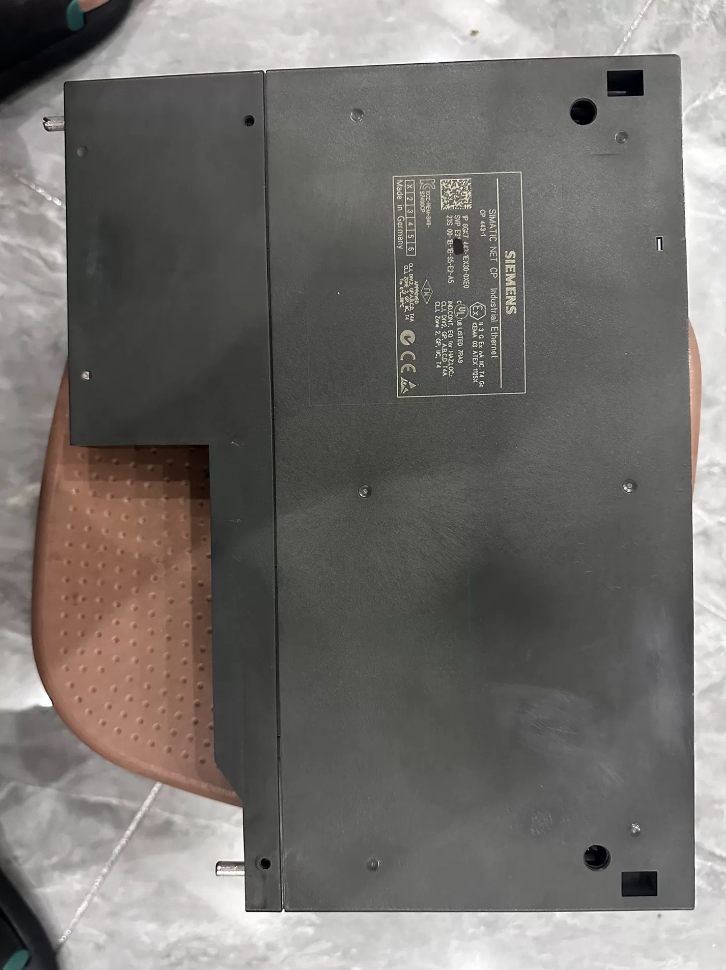

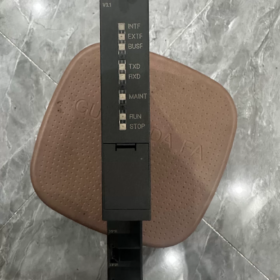
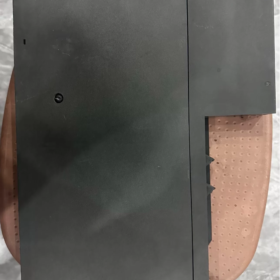
6GK7443-1EX30-0XE0 は CP です。 443-1 産業用イーサネット通信プロセッサ の シーメンス SIMATIC NETシリーズ. SIMATIC S7-400 および S7-400H 冗長 PLC システム用に特別に設計されています。. このモジュールは、PLC コントローラを産業用イーサネットに接続し、PROFINET IO コントローラとして機能して、分散フィールド デバイスのリアルタイム制御を実現します。.
旧CPの正式アップグレード版として 443-1 EX20, 2 ポートのリアルタイム イーサネット スイッチを統合し、バスおよびリング ネットワーク トポロジをサポートします。. アイソクロナスリアルタイム機能を搭載 (IRT) コミュニケーション, メディアの冗長性, IP アクセス制御と拡張診断. 中規模および大規模オートメーション システムにおけるイーサネット通信および PROFINET ネットワーキングのコア通信モジュールとして機能します。. 現在, S7-400 シリーズ全体が製品ライフサイクルの終わりに入っています, このモデルは主にメンテナンスに使用されます, 既存システムの拡張と障害の置き換え.
製品の外観
- モデルコードの内訳
完全な注文番号: 6GK7 443-1EX30-0XE0
- 6GK7: 製品カテゴリのプレフィックス, SIMATIC NET産業用通信製品シリーズを代表する.
- 443: サブカテゴリ, 通信プロセッサ (CP) S7-400シリーズPLC専用.
- 1: バスの種類, 産業用イーサネットインターフェース.
- EX30: 仕様バージョンコード, 標準CP 443-1 V3.x ファームウェアと統合 2 ポートを搭載 100 Mbps リアルタイム スイッチ.
- 0XE0: バージョン識別子, カスタム機能のない標準の一般産業用バージョン.
- コア技術パラメータ
3.1 通信インターフェースパラメータ
| アイテム | 仕様 |
| 量 & インターフェースの種類 | 2 × RJ45 産業用イーサネット ポート, 2ポートスイッチ内蔵 |
| 伝送速度 | 10/100 Mbps オートネゴシエーション, オートクロスオーバーをサポート |
| リアルタイムパフォーマンス | IRTアイソクロナスリアルタイム通信をサポート; 最小更新サイクル: 250 μs |
| リングの冗長性 | MRPに準拠 (メディア冗長プロトコル); リングネットワークの復旧時間 ≤ 300 MS |
| ポート診断 | 各ポートに独立した LINK/ACT LED インジケーター; 個別のポートの無効化と手動の速度/二重構成をサポート |
3.2 通信プロトコル & パフォーマンス
| アイテム | 仕様 |
| PROFINET 機能 | PROFINET IO コントローラとして動作; 分散 I/O を接続する, 周波数変換器, サーボドライブおよびその他のフィールドデバイス |
| S7通信 | PG プログラミングのクライアント モードとサーバー モードの両方をサポート, HMI監視と複数PLC間のデータ交換 |
| オープンなコミュニケーション | TCPをサポート, UDP, TCP 上の ISO (RFC1006); SEND/RECEIVE命令を介してサードパーティのデバイスと通信します |
| ルーティング機能 | さまざまなネットワークにわたるプログラムのダウンロードとデバイス アクセスのための S7 ルーティングをサポート |
| 最大同時接続数 | まで 64 通信接続 |
| パケットあたりの最大データ サイズ | TCP 上の ISO: 1452 バイト; S7通信: 8 KB |
3.3 電気 & 機械的パラメータ
| アイテム | 仕様 |
| 電源 | 5 V DC は S7-400 バックプレーン バス経由で供給されます; 外部電源は不要です |
| 標準的な消費電力 | 約. 7.5 W |
| モジュール幅 | 40 mm (S7-400用の標準シングル幅モジュール) |
| スロット占有率 | 1 S7-400ラックのスロット |
| 取付方法 | ラックのバックプレーンバスに差し込み、ネジで固定します |
| 正味重量 | 約. 0.45 kg |
| 保護クラス | IP20 |
3.4 環境 & 認証パラメータ
| アイテム | 仕様 |
| 動作温度 | 0℃~+60℃ (水平取り付け); 0℃~+40℃ (垂直取り付け) |
| ストレージ / 輸送温度 | -40℃~+70℃ |
| 設置高度 | 以下ではディレーティングは不要です 2000 メートル |
| 汚染度 | マックス. 汚染度 3 |
| 認証 | IEC 61131-2, CE, UL, cULus, FM |
- 対応範囲 & 代替モデル
4.1 対応PLC機種
標準 S7-400 CPU の全範囲 (CPUファームウェアバージョン≧V4.1; 古いバージョンにはファームウェアのアップグレードが必要)
S7-400H フォールトトレラント冗長 CPU; 冗長通信リンクのためのデュアル CP 構成をサポート
安全関連の通信アプリケーション向けに、S7-400F/FH フェールセーフ CPU と互換性があります。
4.2 ブランド内代替モデル
同じシリーズ内のアップグレード交換
直接アップグレード: 従来のモデル 6GK7443-1EX20-0XE0 および 6GK7443-1EX11-0XE0 を完全に置き換えます。. STEP7 ハードウェア構成でモジュール モデルを更新するだけです. すべての基本的な通信機能と下位互換性があり、IRT リアルタイム通信や MRP リング冗長性などの新機能が追加されています。.
上位バージョン: 6GK7443-1GX30-0XE0 (CP 443-1 高度な). 搭載 1 × ギガビットイーサネットポートと 4 × 100 Mbpsスイッチポート. ファイアウォールをサポートしています, IPsec暗号化, ウェブサーバー, FTP, 電子メールおよびその他の IT 機能, 高セキュリティおよびマルチポート ネットワーキング シナリオに最適.
新しいシステムのための移行
シーメンスの次世代プラットフォームは SIMATIC S7-1500 シリーズ, 対応するイーサネット モジュール 6GK7543-1AX00-0XE0 を使用 (CP 1543-1).
> 注記: S7-1500 モジュールは S7-400 ラックおよびバックプレーン バスと完全に互換性がありません. これは完全なシステム移行ソリューションであり、単一モジュールを直接交換することは現実的ではありません。.
4.3 互換性に関する注意事項
V4.1 より前の CPU ファームウェアを搭載した S7-400 システムは、EX30 CP では動作できません. まず CPU ファームウェアを V4.1 以降にアップグレードしてください.
ネイティブIT機能 (FTP, ウェブサーバー, 電子メール) 古い CP モデルでサポートされていた機能は、標準の EX30 バージョンでは削除されました. IT機能が必要な場合はGX30 Advancedバージョンを選択してください.
- サポートアクセサリ & 拡張コンポーネント
| アクセサリの種類 | 共通モデル | 機能の説明 |
| C-PLUGメモリーカード | 6GK1900-0AB00-0AA0 | モジュール構成とファームウェアデータを保存します. プログラムを再ダウンロードせずにプラグアンドプレイで交換可能 |
| 産業用イーサネットケーブル | 6XV1840シリーズ | 信頼性の高い現場配線用の標準 Cat5e 産業用シールド ケーブル |
| 高速接続プラグ | 6GK1901-1BB10-2AA0 | 工具不要の RJ45 産業用プラグで現場での迅速な終端を実現 |
| 冗長同期キット | S7-400H サポートコンポーネント | デュアルCP構成時の冗長通信切替とステータス同期を実現 |
- 典型的なアプリケーションシナリオ
- 中規模向けネットワーキング & 大型PLCシステム: 冶金分野の S7-400 制御システムに適用, 力, 石油化学, 水処理およびその他の産業. イーサネットデータ交換を可能にします, PLC間のリモートプログラミングとデバッグ, SCADAホスト, HMI パネルとエンジニアリング ステーション.
- PROFINET 分散制御: PROFINET IO コントローラとして機能し、ET200 分散 I/O に接続します, G120 周波数コンバータ, V90 サーボドライブおよびその他のフィールドデバイス, リアルタイム産業用イーサネット制御システムの構築.
- 冗長制御システムの通信: S7-400H PLC システムのデュアル CP 冗長構成は、冗長通信リンクを提供し、信頼性の高い生産施設の中断のない通信を保証します。.
- 複数のシステム間のデータ交換: 複数の S7-400 PLC 間の S7 データ通信を実装します。, サードパーティ機器や MES システムとの TCP/IP オープン通信も可能.
- 産業用リングネットワーキング: 内蔵スイッチとMRP機能を活用してバスおよびリング産業用イーサネットネットワークを構築, 外部スイッチの使用を減らし、ネットワークの信頼性を向上させます。.
- トラブルシューティング マトリックス
| 故障現象 | 根本的な原因 | 段階的な解決策 |
| すべてのインジケーターがオフ, 電源投入後にモジュールが起動しない | 1. モジュールが完全に挿入されていません, バックプレーンバスの接触不良 | 1. 電源をオフにした後、モジュールを再度挿入します, バックプレーンコネクタがしっかりと接続されていることを確認し、ネジを締めます |
| 2. 異常な 5 Vラック電源または電源モジュールの故障 | 2. 測定 5 V バックプレーン電圧と電源モジュールとラックバスの障害のトラブルシューティング | |
| 3. モジュールのハードウェア損傷 | 3. 予備のモジュールでテストする; ハードウェアの損傷が確認された場合は修理に出す | |
| LINKインジケーター消灯, ポート接続がありません | 1. ケーブルの破損または圧着が不十分な RJ45 コネクタ | 1. 予備のケーブルと交換し、ワイヤの順序と圧着品質を確認します。 |
| 2. リモートデバイスの電源がオフになっているか、ポートに障害があります | 2. リモートデバイスの電源とポートのステータスを確認します, 速度と二重モードが一致していることを確認する | |
| 3. 設定でポートが無効になっています | 3. STEP7 ハードウェア構成を開く, 対応するポートを有効にして設定を再ダウンロードします | |
| PLCとホストコンピュータ間の通信が中断されました, 赤色のSFインジケーターが点灯 | 1. IPアドレスの競合またはネットワークセグメントの不一致 | 1. PST ツール経由でネットワークをスキャンする, IPアドレスをチェックして競合を排除する |
| 2. 構成が間違っているか、最大通信接続数を超えています | 2. ハードウェア構成の接続設定を確認し、接続数が制限内であることを確認します。 | |
| 3. ネットワークループまたはブロードキャストストームにより輻輳が発生する | 3. ネットワークトポロジを検査する, 冗長ループを削除し、MRP リング管理を有効にします。 | |
| PROFINET IO デバイスが頻繁に切断される | 1. ケーブルのシールドが不十分で、現場での深刻な電磁干渉が発生する | 1. 産業用シールドケーブルを使用する, 電源ケーブルを信号ケーブルから分離し、シールド層を適切に接地します。 |
| 2. バスの長さが伝送制限を超えています | 2. ケーブル長を以下の範囲内で制御します 100 メートル 100 Mbps Cat5e ケーブル; 長距離用にリピーターを追加する | |
| 3. リアルタイム更新サイクルが短すぎるため、通信負荷が高くなりすぎる | 3. PROFINET 更新サイクルを適切に増やして通信負荷を軽減します。 | |
| MRP リング ネットワーク障害, 冗長性が無効です | 1. リング内のリンクが切れている | 1. リングネットワークの各セグメントを検査する, 故障したケーブルまたはポートを見つけて修復する |
| 2. リングマネージャーの構成が正しくありません | 2. 優先順位やリングドメインなどのリングマネージャー設定を確認します。 | |
| 3. 非リングデバイスによって引き起こされるトポロジ異常 | 3. リング非互換デバイスを削除し、すべてのリング ノードが MRP をサポートしていることを確認します。 | |
| BFインジケーターが赤点滅, バス通信異常 | 1. バックプレーンバスの接触不良またはピンの酸化 | 1. バックプレーンのコネクタピンを清掃し、モジュールを再挿入します |
| 2. 破損したモジュールファームウェア、またはCPUと互換性のないファームウェアバージョン | 2. C-PLUGカード経由でファームウェアを互換性のあるバージョンに更新します, または工場出荷時の設定を復元して構成を再ダウンロードします | |
| 3. C-PLUG カードの欠陥または構成データの破損 | 3. C-PLUGカードを交換し、設定データを書き換えます |
インジケーターの説明: SF = システム障害 (赤), BF = バス障害 (赤). 各 RJ45 ポートには緑色の LINK/ACT インジケータが装備されています.
比較表: CP443-1 EX30 対 EX20
6GK7443-1EX30-0XE0 は、正式に指定された 6GK7443-1EX20-0XE0 のアップグレードされた代替品です。. 完全にアップグレードされたハードウェア アーキテクチャを採用し、プロトコル サポートとリアルタイム パフォーマンスが強化されています。. 基本的な通信機能との下位互換性があり、古いモデルを直接置き換えることができます。. STEP7でハードウェア構成を更新し、置き換え後にプロジェクトを再ダウンロードしてください。.
コアパラメータの比較
| 比較項目 | 6GK7443-1EX20-0XE0 (旧バージョン) | 6GK7443-1EX30-0XE0 (新しいバージョン) |
| ハードウェアインターフェース | 1 × RJ45ポート + 1 × AUI/ITP 同軸ポート, 内蔵スイッチなし | 2 × 産業用 RJ45 ポート, 2ポート内蔵 10/100 Mbps リアルタイム スイッチ, バスをサポート & リングトポロジー |
| ファームウェアのアーキテクチャ | V2.x ファームウェア | 新世代 V3.x ファームウェア |
| 標準的な消費電力 | 約. 8.6 W | 約. 7.5 W (13% 電力削減) |
| PROFINET のリアルタイム パフォーマンス | RTのみのリアルタイムコミュニケーション; 分. 更新サイクル: 1 MS | IRTアイソクロナスリアルタイム通信をサポート; 分. 更新サイクル: 250 μs, 高精度なモーション制御に最適 |
| リングの冗長性 | MRP サポートなし; 外部リングスイッチが必要です | ネイティブ MRP メディア冗長プロトコルのサポート; 回復時間 ≤ 300 MS, 追加のデバイスは必要ありません |
| 最大接続数 | 32 同時通信接続 | 64 同時通信接続 (容量が2倍) |
| IPアクセス制御 | サポートされていません | ネイティブアクセス制御リスト (ACL) IP アクセスを制限し、ネットワーク セキュリティを向上させるサポート |
| 高速スタートアップ | サポートされていません | 高速スタートアップが有効になっています; モジュールの初期化時間が短縮されました 30% |
| プロファイエナジー | サポートされていません | フィールドデバイスのスタンバイ電源管理用に PROFIenergy プロトコルをサポート |
| ネットワーク診断 | 基本的なポート状態診断 | ポート統計を含む拡張ネットワーク診断, リンク品質の監視と障害位置 |
| クロック同期 | 基本的な NTP 同期 | PROFINET IRT の高精度クロック同期 |
| IT機能 (FTP/Web/電子メール) | 基本的なIT機能を内蔵 | IT機能が組み込まれていない標準バージョン; IT要件に合わせてGX30 Advancedバージョンを選択してください |
| C-PLUGメモリーカード | サポートされていません | プラグアンドプレイモジュール交換用に C-PLUG カードをサポート |
交換時の注意事項
- 構成の変更: 交換後, STEP7 ハードウェア構成でモジュール モデルを EX30 に変更する必要があります, プロジェクトを再コンパイルしてダウンロードする. 構成更新なしのホットスワップは許可されません.
- CPUファームウェアの互換性: EX20 の交換には CPU ファームウェアのバージョン制限はなく、すべての S7-400 CPU で動作します。. 以前の EX11/EX10 からアップグレードするには、CPU ファームウェア ≥ V4.1 が必要です.
- インターフェースの移行: 旧AUI/ITP同軸インターフェースを使用していた場合, EX30 では同軸ポートが削除されているため、RJ45 イーサネットに再配線します.
- IT機能の移行: 元のシステムが FTP に依存している場合, ウェブサーバー, 電子メールアラームおよびその他の IT 機能, 6GK7443-1GX30-0XE0 へのアップグレード (上級版) 標準の EX30 はこれらの機能をサポートしていないため、.
- 冗長システムの互換性: S7-400H システムでは単一モジュールの交換が可能です. デュアルCP冗長構成もサポートされており、独自の冗長通信メカニズムと完全な互換性があります。.



NH42-63-318x560.png "CHINT PC型自動切替スイッチ (ATS)NH42-63/4SZ")



