 접촉기,회로 차단기,감지기,인코더,PLC,변환기

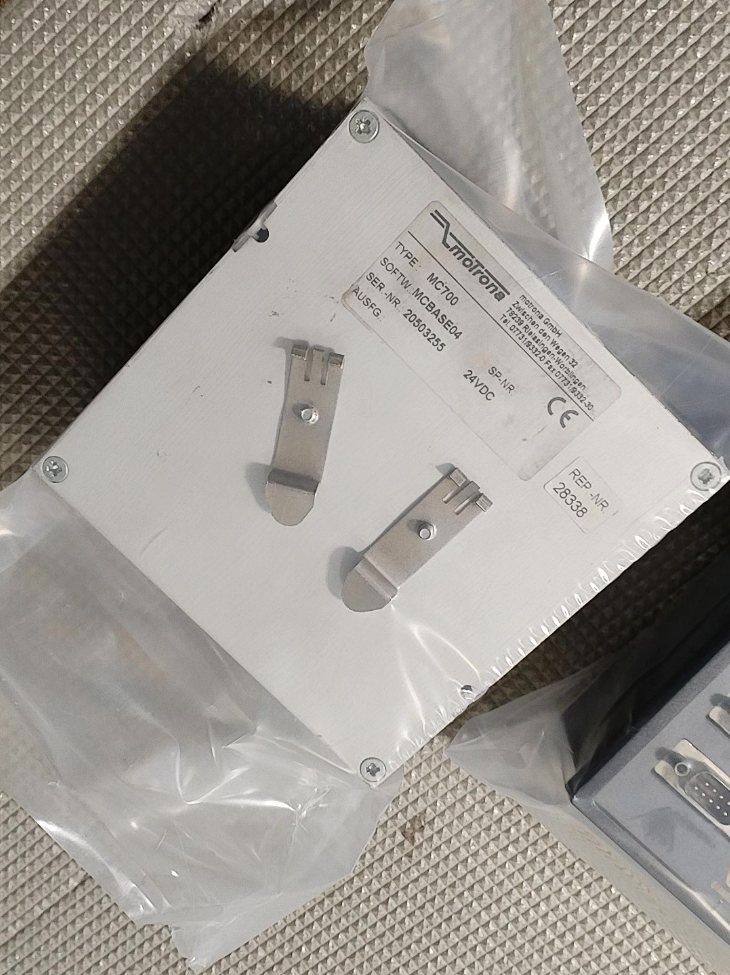

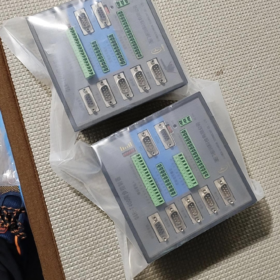
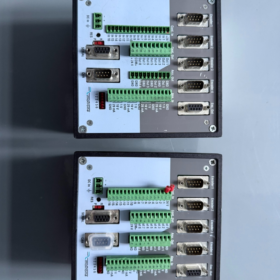
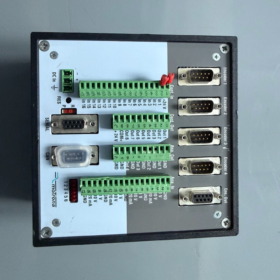
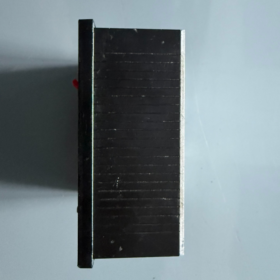
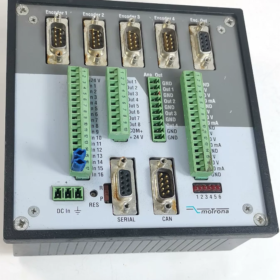
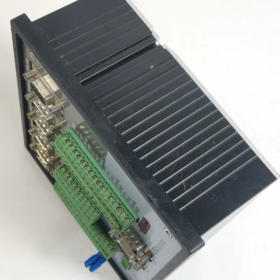
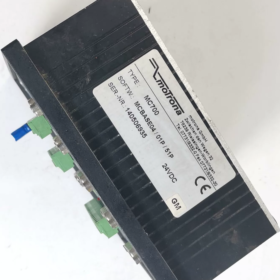
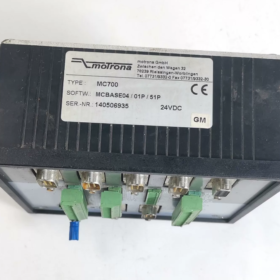
Motrona (독일), DIN레일 마운트, max. 4axis. Unified hardware; different firmware files enable flyingsaw, rotary crosscutter, multiaxis synchronization, unwinder/winder tension control. Hardwareplusfirmwarelicense concept. 더 이상 사용되지 않음 / 단종; direct successor: MC800.
- Main Hardware Specifications
| 목 | 사양 |
| 축 | 1‑4 axes, ±10 V analog output for servo / 4‑quadrant drives |
| Encoder Inputs | 4 channels RS‑422 differential encoders, 300‑400 kHz max. |
| 아날로그 입력 | 4 채널, 12-조금, configurable ±10 V / 0-20mA |
| 아날로그 출력 | 4 채널, 12-조금, ±10 V speed reference output |
| 디지털 입력 | 16 PNP inputs (10‑30 VDC) |
| 디지털 출력 | 4 push‑pull outputs, 단락 보호 |
| 의사소통 | RS232 / RS485, CANopen (CiA‑DS301) |
| 전원공급장치 | 18‑35 VDC, reverse‑polarity protection, typical 300 mA |
| 설치 | DIN‑rail snap‑in mounting |
| 소프트웨어 | OS5.1 (PC tool for firmware download & parameter setup) |
Panelmount variant within the same family: MC720. Identical hardware & 입출력; adds frontpanel LCD & keys for parameter editing without a PC.
- Firmware (Application Software, License Required)
Identical MC700 hardware; functionality depends on loaded firmware plus valid license key.
- BY701: Multiaxis synchronization, 전자 기어링, phase trimming; for printing & coating masterfollower applications
- FS701: Flyingsaw, for fixedlength cutting of tubes & profiles
- CT701: Eccentric / swing flyingshear
- CT703: Rotary crosscutter, rotary flying knife for film & webbased cutting
- WR701: Unwinder / winder, traverse winding, 장력 조절 (speedmode diameter calculation, lowtension winding)
- TB701: Dedicated bagmachine firmware
작동 원리: hardware + firmware file + license key. Without valid license, only test mode is available; production operation is blocked.
- 일반적인 응용 분야
Web processing lines, bagmaking machines, tube cuttolength lines, flyingshear cuttolength for steel sheets, 라벨 인쇄, slitting machines, 코팅 & laminating synchronization, unwinderwinder tension control.
Can run standalone or act as subordinate motion unit controlled by PLC via CANopen / RS485.
±10 V analog reference to servo drives; does not drive motors directly.
- 정지 & 교체 옵션
- Original manufacturer upgrade: MC800
Improved hardware, higher processing bandwidth, adds EtherCAT / 프로피네트. Corresponding firmware: FS801 / BY801 / WR801. Identical application logic; existing process parameters can be migrated for dropin replacement for MC700 projects.
- 3rdparty domestic alternatives
Domestic flyingshear / 동기화 컨트롤러; 또는 PLC motioncontrol modules (requires custom programming of flyingsaw / rotarycutter algorithms).
- Usedunit purchasing notes
- MC700 hardware itself is universal. Firmware and license are critical. Verify firmware revision and valid license key for secondhand units. No license = no productionmode operation.
- Encoder ports and DA analog outputs are common aging points. Test encoder reception and ±10 V analogoutput accuracy upon receipt.
- OS5.1 is legacy Windows software; run in compatibility mode under Win10 / Win11.
- Relevant Manuals
MC700 hardware manual (배선, I/O assignment)
Applicationspecific firmware manuals (FS701 / CT703 / WR701 etc., processparameter tuning)
I can prepare further documents on request:
Detailed comparison table: MC700 vs MC800
Keyparameter list for specific firmware e.g. CT703 rotary cutter / FS701 flying saw
Selection guidelines for domestic replacement solutions
Practical Engineering Application Cases for Motrona MC700
MC700 implements different processes via dedicated firmware + license. Unified hardware, ±10 V analog control of servo drives. Widely used in webprocessing, 절단, 포장, tubeprocessing industries. Standalone operation or PLCcontrolled via CANopen / RS485.
Case 1: Tube / Profile FlyingSaw | FS701 (Flyingsaw firmware)
Machine type: Cuttolength flyingsaw lines for steel tube, aluminum profiles, PVC hoses, lightsteel keels
Process logic: Master encoder measures incoming material speed. Flyingsaw carriage servo synchronizes with moving material; cutting occurs during synchronous travel. After cutting, carriage fastreturns to home position while the line keeps running continuously.
Field performance: Line speed up to 120150 m/min, cutlength accuracy ±0.3 mm. Scurve acceleration / deceleration reduces mechanical shock under dynamically changing line speeds.
I/O allocation: 1×master encoder (material feed), 1×follower encoder (carriage); digital DI for cuttrigger signal; DA ±10 V reference to flyingsaw servo; CANopen interface for PLC to download target cutlength.
Key benefit: No complex flyingsaw algorithm programming required on PLC; parameteronly configuration. Maintains cut accuracy under linespeed fluctuations.
Case 2: Rotary CrossCutter for Film & 종이 | CT703 (Rotary crosscutter firmware)
Machine type: 부직포, BOPP film, labelstock, corrugatedpaper rotary crosscutters; intermittentprinting & rotarypunching equipment.
Process logic: Rotary knife roll synchronizes with web line speed for continuous onthefly crosscutting. Supports marksensor triggering for printregistered cutting besides simple fixedlength cutting.
Process features: Sinus² motion profile for smooth kniferoll movement. Stable cutting during line accelerationdeceleration. Dualmode: marktriggered cutting / fixedlength cutting.
Field allocation: Master encoder at traction roll; follower encoder on kniferoll servo; printmark signal to digital DI; ±10 V analog output to kniferoll servo.
Typical performance: Packagingfilm highspeed continuous cutting; typical cut error < ±0.25 mm.
Case 3: Swing / Eccentric FlyingShear for Steel CuttoLength | CT701
Machine type: Steelsheet levellingandcuttolength lines, eccentric swingshear for thinplate cutting.
Process logic: Eccentric knife carriage with cosinecompensated velocity profile. Torque compensation during shear phase absorbs heavy impact from hardmaterial cutting to prevent jamming.
Suitable materials: Carbonsteel / stainlesssteel thin sheets. Mitigates mechanical damage from highcuttingforce shock loads.
Case 4: MultiAxis Synchronization for Printing & 코팅 | BY701 Electronicgear & phasecorrection firmware
Machine type: Labelprinting presses, coatinglaminating machines, multiroll synchronized production lines.
Process logic: Mastervirtualspindle; multiple follower axes follow via electronic gearing with dynamic phase trimming for registeralignment.
일반적인 구성: Up to 4 synchronized axes; registercorrection for multicolor printing. CANopen receives speed and phaseoffset commands from PLC.
System usage: MC700 functions as dedicated synchronization slave unit. PLC sends setpoints only; all motionalgorithm execution is offloaded to MC700 to reduce PLC CPU load.
Case 5: UnwinderWinder & TraverseWinding Tension Control | WR701
Machine type: Filmslitterrewinder, cable winding, foil unwinderrewinder with traversewinding mechanism.
Process logic: Diameter calculation, speedmode tension control. Coordinates unwinder, traction, winder and traverse axes. Dancerroller feedback via analog input for automatic speed correction.
Axis assignment:
1. Winder servo
2. Unwinder servo
3. Traction master axis
4. Traversewinding displacement servo
Process value: Constanttension unwindingwinding, avoids web stretching & wrinkling; achieves neat cablewire layon winding.
Case 6: Bagmaking Machine | TB701 Bagmachinespecific firmware
Machine type: Tubularfilm verticalformfillseal packaging machines for foodgrade bags.
Process logic: Synchronizes film feed, sealingroll and pusher servos. Evaluates printmark sensor signals to align sealing and cutting positions against printed patterns. Guarantees baglength accuracy at high production speed.
특징: Motionprofile optimized for bagmaking; commissioning by parameter setup only, no programming.
Case 7: Intermittent Labelling & Rotary Punching
Machine type: Bottlelabel intermittentprinting, rotary punching, filmlabelling equipment.
Process logic: Actuator accelerates to match substrate webspeed for labelling / punching operation, then fastreturns to home while material runs continuously. Implemented with FS701 firmware.
General Engineeringapplication Key Points
- Unified hardware, firmwarelicense is decisive: Same MC700 hardware can run all above processes by loading different firmware. Always validate license status for secondhand hardware; no license = testmode only, no production.
- Interface note: All cases use ±10 V analogspeed reference to servos (not pulsetrain outputs). Encoders are RS422 differential type.
- Two common system architectures
Mode A: Standalone MC700; HMI / touchscreen connected via RS232 for parameter modification.
Mode B: PLC as CANopen master; downloads length / speed setpoints and reads status & 경보.
- Discontinuation note: MC700 is obsolete. Direct successor MC800 with corresponding firmware FS801 / CT803 / BY801 / WR801 / TB801. Adds EtherCAT support; process parameters can be migrated.
Motrona MC700 OperatingInterface Full Description
MC700 base unit has no local keys or display. Commissioning is exclusively performed via PCbased OS5.1 software over RS232 serial connection. The panelequipped variant is MC720, LCD 포함 & 열쇠; menustructure is fully consistent with OS5.1 software.
- Onboard Hardware Status Indicators (MC700)
Only one red LED status indicator on front face; no operator keys.
| LED 상태 | 의미 |
| 끄다 | No supply voltage |
| Red steady‑on | Run‑mode, normal operation |
| 빨간색으로 깜박임 | Boot‑loader firmware‑download mode (set DIP to Program + hardware reset) |
Small DIP switch on front: 달리다 / Program
- Run position: Normal productionrun mode
- Program position: Bootloader activation for downloading application firmware (FS701 / CT703 / BY701 etc.). Toggle switch then press reset pinhole to enter download mode.
Communication note: DB9RS232 is the only local commissioning port for PC. CANopen is used only for PLC fieldbus exchange; CANopen cannot download firmware.
- PC Commissioning Software OS5.1 (Only Operating Interface for MC700)
Legacy Windows application. Requires compatibilitymode under Win10 / Win11. Supports MC700 / MC800 only; not compatible with newer OS10.0 software.
연결: PC RS232 serial port ↔ MC700 DB9. Serial parameters: 38400 baud, 패리티 없음.
Five Main Sections of OS5.1 Software
- File Menu
- Download Firmware: 핵심 기능
Set DIP to Program, trigger hardware reset to enter bootloader; load .bin applicationfirmware files (FS701, CT703, WR701, BY701 etc.).
Factory default is MCBase testfirmware without process functionality; application firmware must be downloaded for realprocess operation.
- 매개변수 저장: Save parameter set locally as .par backup file
- Load Parameters: Recall backup parameter file and download into controller
- Enter License Key: Input license code. Without license, only testmode available; productionmode blocked.
- Parameter Tab (Core Commissioning View)
Visible parameter groups adapt automatically to loaded firmware: FS701 loads flyingsaw parameters; CT703 loads rotarycutter parameters.
Grouped subpages:
일반적인: Encoder resolution, masterfollower axis assignment, I/O filter, analogoutput offset calibration
운동: Processspecific motion parameters: cutlength, synchronization window, accelerationdeceleration, electronicgear ratio, phase offset, marksensor threshold
Analog IO: Calibration for 4 analoginputs / 출력, ±10 V range, offset & gain adjustment
Digital IO: DI function assignment (시작, 멈추다, marktrigger, homereset), DO output mapping
의사소통: RS485 / CANopen nodeaddress, baudrate configuration
Embedded Monitor pane: Live view of masterspeed, followerpositionerror, analogoutput voltage, I/O states, calculated reeldiameter (WR701 firmware).
Operation commands:
Read: Upload parameters from controller;
Write: Download modified parameters into controller RAM;
Store to Flash: Save to nonvolatile flash memory (persists after powercycle).
- Adjust Tab (Commissioningtest view for workshop debugging)
Allows unitlevel testing without full physical machine setup:
- Virtual masteraxis: Softwaresimulated encoder speed; test flyingsaw motionprofiles without realhardware encoders.
- Manual axis jog: Direct ±10 V analogoutput drive for servo jogging; polarity verification.
- Simulate triggersignals: Software emulation of printmark / cuttrigger inputs to validate process timing sequences.
This testpage works fully without license key, convenient for hardware faultfinding.
- Monitor Tab (Live Status View)
I/O monitoring: Realtime DI / DO status for fast wiring troubleshooting
Encoder values: 주인 / follower encoder counts, followingerror, phasedeviation
Analog values: AI input voltage, DA referenceoutput voltage
Alarm status: Faultcode display (encoder loss, excessive followingerror, license invalid etc.)
- Extras Menu
- LCD Definition: For MC720 frontpanel display definition only. Settings are stored inside controller even on MC700 units without panel. Configure up to 4 custom display pages showing linespeed, cutlength, reeldiameter etc.
- Firmware Info: Show activefirmware revision, license status, hardware serialnumber.
Full OS5.1 Commissioning Workflow
- Powerup controller, DIP in Runposition, establish RS232 communication in OS5.1.
- File → Download Firmware: toggle DIP to Program for firmware download, return DIP to Run after completion.
- Read / edit process parameters; Write to RAM; Store to Flash for powerfail safe retention.
- Perform virtualmachine test inside Adjust tab to validate motionprofiles.
- Enter valid license key to activate productionmode.
- Monitor tab for runtime observation and fault diagnosis.
- MC720 Local LCDKeypad User Interface
MC700 hardware does not include this panel. MC720 shares identical I/O hardware, adds backlit LCD + navigation keys. Menu hierarchy matches OS5.1 software. Onsite parameter modification without PC.
Keyfunctions:
F1: Open main menu
↑ ↓ ← →: Navigate menu items
Enter: Enter submenu / confirm value change
PRG: Return to upperlevel menu
Menu hierarchy mirrors OS5.1:
Main Menu → General / 운동 / IO / 의사소통 / Monitor
4 configurable userdisplay pages (03) for quick view of live process values: linespeed, cutlength, followingerror.
Parameter edits must be finalized with Store to Flash for powercycle persistence.
Important note: Firmware download still requires OS5.1 via RS232. 키패드 & LCD cannot perform firmware updates.
- Alternative Remote Parameteraccess Methods
(Parameter read/write without OS5.1 PCsoftware; firmware download & license entry still impossible)
- RS485: Registerbased protocol. 3rdparty HMI can read/write parameters and monitor status. Cannot download firmware, cannot input license key.
- CANopen: CiADS301 protocol. PLC accesses parameter registers, sends runcommands, reads alarms. Cannot perform firmware download.
Hard rule: Firmware download and licensekey entry can only be accomplished via RS232 with OS5.1. Fieldbus interfaces cannot execute these two operations.
- Common Operational Pitfalls
- MC700 has no display. FlashingredLED only indicates bootloader downloadmode; fault conditions can only be read inside OS5.1 Monitor page.
- Parameter changes written only to RAM via Write will be lost after powercycle. Always execute Store to Flash for permanent saving.
- Run OS5.1 under Win10 / Win11 with WindowsXP compatibility mode enabled, otherwise seriallink dropouts are frequent.
- CANopen / RS485 only support runtimeparameter access. Firmwareupdate and licensekey entry are not supported via fieldbus.
If needed, I can translate further supporting documents:
OS5.1 connectiontroubleshooting checklist
ChineseEnglish crossreference of key parameters for FS701 / CT703
Domesticreplacement selectionnotes





NH42-63-318x560.png "CHINT PC형 자동절환스위치 (ATS)NH42-63/4SZ")



