 Contator,disjuntor,sensor,Codificador,CLP,Conversor

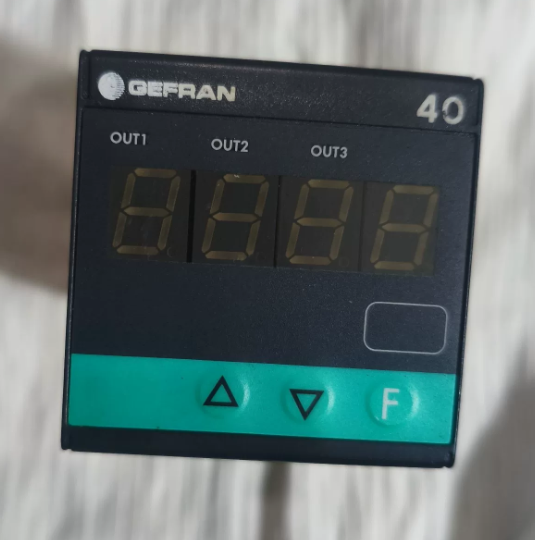
Conclusão: A substituição direta é viável. O hardware, fiação e funções principais são totalmente compatíveis. A única diferença está no software e na versão de conformidade indicada pelo último dígito, o que não afetará a operação normal. Abaixo está o detalhamento dos códigos do modelo, diferenças e diretrizes de substituição.
- Comparação de código de modelo dígito por dígito (Apenas o último dígito difere)
40T-48-4-00-RR-0-0-0-0 (Número da peça. F000187) versus 40T-48-4-00-RR-0-0-0-1 (Número da peça. F000188)
- 40T: Série (40Indicador T48 48×48 mm / Unidade de Alarme)
- 48: Dimensão do painel: 48×48mm (1/16 DE)
- 4: 4-display LED de dígitos
- 00: Fonte de energia: 100…240 V CA/CC
- RR: Saída 1 & Saída 2: Relés duplos (5UM / 250 V e)
- 0: 3terceira saída / Entrada digital / Saída do transmissor: Nenhum
- 0: Interface de comunicação / 4a saída: Nenhum
- 0: Bit reservado
- Último dígito: 0 = Software legado / Versão básica; 1 = Software atualizado / Versão certificada em conformidade (CE, UL, etc.)
- Principais diferenças
Hardware idêntico: Layout do terminal, dimensões de montagem, faixa de alimentação, especificações de contato de relé e tipos de entrada (Entrada universal: Sinal TC/RTD/Linear) são exatamente iguais. Nenhuma modificação de fiação necessária.
Funções idênticas: Ambos suportam 3 pontos de alarme, programação no painel/software e proteção por senha de parâmetro. A única distinção é a versão do firmware e a certificação de conformidade. A versão que termina com 1 é o firmware atualizado totalmente compatível.
Números de peça: Modelo terminando com 0 =F000187; Modelo terminando com 1 =F000188.
- Recomendações de substituição & Notas
- ✅ Substituição direta: Totalmente compatível em termos de instalação, fiação e definição de terminal. Não é necessária religação.
- ⚠️ Funcionamento obrigatório: Reconfigurar parâmetros (tipo de entrada, faixa de medição, limite de alarme, lacuna diferencial, etc.) após a substituição. O novo firmware é totalmente compatível com a lógica de parâmetros herdada.
- Cenário especial: Se o equipamento original exigir rastreabilidade de certificações de conformidade especiais (por exemplo. documentos UL/CE correspondentes), verificar se a consistência estrita do modelo é necessária no local. Para uso funcional geral, nenhum problema ocorrerá.
Referência rápida para substituição: PERIGO 40T-48-4-00-RR-0-0-0-0 / 40T-48-4-00-RR-0-0-1
- Explicação completa do código do modelo (Apenas o último dígito difere)
| Segmento de código | Contente | Descrição | Consistência entre dois modelos |
| 1 | 40T | Série de produtos: 40Controlador de alarme digital T | Totalmente idêntico |
| 2 | 48 | Tamanho do painel: 48×48mm (1/16 Seu padrão) | Totalmente idêntico |
| 3 | 4 | Mostrar: 4-dígito LED tubo digital | Totalmente idêntico |
| 4 | 0 | Fonte de energia: Ampla tensão 100~240 V CA/CC | Totalmente idêntico |
| 5 | RR | Configuração de saída: Duas saídas de alarme de relé independentes | Totalmente idêntico |
| 6 | 0 | 3terceira saída / Entrada digital / Saída do transmissor: Nenhum | Totalmente idêntico |
| 7 | 0 | Porta de comunicação / 4a saída: Nenhum | Totalmente idêntico |
| 8 | 0 | Bit reservado de hardware: Funções reservadas desativadas | Totalmente idêntico |
| 9 | 0 / 1 | Firmware & Versão de conformidade: | Única diferença |
| 0 = Firmware básico | |||
| 1 = Firmware atualizado (Certificado CE/UL) |
> Conclusão Central: 100% compatibilidade na estrutura de hardware, especificações elétricas, terminais e pinos funcionais. A substituição direta é suportada.
- Especificações Técnicas Gerais (Idêntico para ambos os modelos)
| Item | Especificação |
| Dimensão de montagem | 48× painel de 48 mm, recorte padrão DIN |
| Potência Operacional | 100 ~ 240 V CA/CC, Consumo de energia< 3 VA |
| Medindo Entrada | Tipo universal: Termopar (K/J/S/T), IDT Pt100, sinal analógico de tensão/corrente linear |
| Precisão de exibição | ±0,2% FS, Taxa de amostragem: 10 vezes por segundo |
| Saída de relé (RR) | 2-canal passivo contatos normalmente abertos, Avaliação de contato: 5UM / 250 V e |
| Temperatura operacional | 0 ~ +50 ℃ |
| Proteção de entrada | Painel frontal: IP65; Lado terminal: IP20 |
| Resistência Dielétrica | Tensão suportável 2000 V AC entre entrada, saída e fonte de alimentação |
- Definição do pino terminal (Universal para fiação no local, sem religação)
Bloco terminal padrão na parte traseira do dispositivo, total 8 terminais. O layout e as funções do terminal são totalmente idênticos para ambos os modelos.
| Terminal nº. | Função | Instrução de fiação | Observações |
| 1 | Potência L / + | AC ao vivo / CC Positiva | Entrada de energia |
| 2 | Potência N / – | CA Neutro / DC Negativo | Entrada de energia |
| 3 | Medindo Entrada + | Sinal do sensor positivo | Conecte ao termopar/RTD/saída analógica |
| 4 | Medindo Entrada – | Sinal do sensor negativo | Fim comum do loop de sinal |
| 5 | Relé de alarme 1 SEM contato | 1saída de alarme | Corresponde à 1ª lógica de alarme |
| 6 | Relé de alarme 1 Comum | Terminal comum de relé 1 | Contato passivo, não polar |
| 7 | Relé de alarme 2 SEM contato | 2saída de alarme | Corresponde à lógica do 2º alarme |
| 8 | Relé de alarme 2 Comum | Terminal comum de relé 2 | Contato passivo, não polar |
Suplemento: Este modelo não possui saída de transmissor ou porta de comunicação, e todos os terminais são totalmente utilizados. Faça a fiação estritamente de acordo com a tabela acima.
- Teclas do painel & Configuração de parâmetros passo a passo (Obrigatório após substituição)
Descrição chave
`SET`: Entrar no cardápio / Confirmar parâmetro / Mudar o nível do menu
`▲/▼`: Ajustar valor / Opções de troca
`◀`: Dígito de mudança / Voltar ao menu anterior
Etapas completas de configuração (Geral para aplicação em campo)
Etapa 1: Entre no modo de programação
Pressione e segure `SET` para 3 segundos para entrar na interface de configuração de parâmetros. Para algumas unidades, digite a senha padrão de fábrica 0000 e pressione `SET` para confirmar.
Etapa 2: Definir tipo de sinal de entrada (Configuração principal)
- Localize o parâmetro `In.Ty` (Tipo de entrada)
- Use `▲/▼` para selecionar o tipo de sensor:
`K`: Termopar tipo K
`Pt`: IDT Pt100
`0-10`: 0-10V Sinal Analógico
`4-20`: 4-20Sinal Analógico mA
- Pressione `SET` para salvar e prosseguir para o próximo item.
Etapa 3: Definir faixa de medição
- `Lo`: Definir limite inferior de faixa
- `Olá`: Definir limite superior da faixa
- Ajuste de acordo com a faixa real do processo, então pressione `SET` para confirmar.
Etapa 4: Configurar relés de alarme duplos (Correspondente às saídas RR)
- `AL1`: 1valor do primeiro alarme (para relé no terminal 5/6)
- `dF1`: Gap diferencial do 1º alarme (para evitar trocas freqüentes de relés, valor recomendado: 0.5~2,0)
- `AL2`: 2valor do alarme (para relé no terminal 7/8)
- `dF2`: Gap diferencial do 2º alarme
- Selecione o modo de alarme: Alarme de limite alto / Alarme de limite baixo conforme necessário.
Etapa 5: Salvar parâmetros & Saída
Depois que todas as configurações forem concluídas, pressione `◀` repetidamente para retornar à interface principal. Os parâmetros serão salvos automaticamente.
Para bloquear parâmetros contra modificação acidental: Localize `P.cod` e defina uma senha personalizada.
- Lista de verificação no local após substituição (Verifique item por item para evitar falhas)
Inspeção pré-ligação
- Montagem mecânica: Fixe o instrumento no painel sem folga; o tamanho do recorte está em conformidade com 48×48 mm.
- Verificação da fiação: Verifique a energia, circuitos de sensores e relés por tabela de terminais; garantir que não haja conexão solta, fiação errada ou curto-circuito.
- Confirmação de energia: A fonte de alimentação no local é de 100~240 V CA/CC dentro da faixa nominal.
Inspeção pós-ligação
- Teste de inicialização: 4-LED de dígito acende normalmente, sem tela preta ou tremulação.
- Verificação de sinal: Compare a leitura em tempo real com o valor real do sensor; garantir que o desvio esteja dentro da faixa permitida.
- Teste de alarme: Simular condições acima do limite manualmente; confirme se dois relés atuam/desenergizam normalmente e se as cargas externas funcionam corretamente.
- Nova verificação de parâmetros: Manter alcance, valores de alarme e folga diferencial consistentes com as configurações originais.
Verificação de conformidade (Execute conforme necessário)
Locais industriais em geral / Não é necessária rastreabilidade de certificação: Nenhuma operação extra necessária.
Equipamento de exportação / Modelo estrito & consistência do certificado necessária: O novo modelo terminando com 1 é a versão certificada com documentos CE/UL completos para arquivamento.
- Falhas Comuns & Solução de problemas após substituição
| Fenômeno de falha | Possíveis causas | Soluções |
| Nenhuma exibição após ligar | 1. Fiação de alimentação invertida/solta | Reaperte os terminais, medir a tensão de entrada e restaurar a fonte de alimentação nominal |
| 2. Tensão de alimentação fora da faixa | ||
| Flutuante / Leituras imprecisas | 1. Má conexão do sensor | Reconecte os cabos do sensor e verifique o parâmetro In.Ty |
| 2. Tipo de entrada incorreto selecionado | ||
| Leitura normal, mas não retransmite nenhuma ação | 1. Valor de alarme incorreto | Verifique novamente os limites AL1/AL2 e mude o modo de alarme |
| 2. Modo de alarme errado selecionado | ||
| O relé muda com frequência | Folga diferencial excessivamente pequena | Aumentar o valor dF1/dF2 |
| Parâmetros redefinidos automaticamente | Falha ao sair do menu completamente / Teclas do painel presas | Saia totalmente da interface de configuração e limpe assuntos estranhos nas chaves |
- Notas Suplementares
- Compatibilidade de firmware: O firmware atualizado (terminando com 1) é totalmente compatível com versões anteriores da lógica de parâmetros herdada, sem redução de função ou incompatibilidade de protocolo.
- Aquisição de peças de reposição: Ambos os modelos são intercambiáveis para reordenamento. A versão atualizada terminando com 1 é recomendado para uma cobertura de certificação mais ampla.
- Operação de longo prazo: Os dois modelos têm vida útil e capacidade de carga idênticas, e não exigem padrões de manutenção diferenciados.

