 Contacteur,disjoncteur,capteur,Encodeur,API,Convertisseur

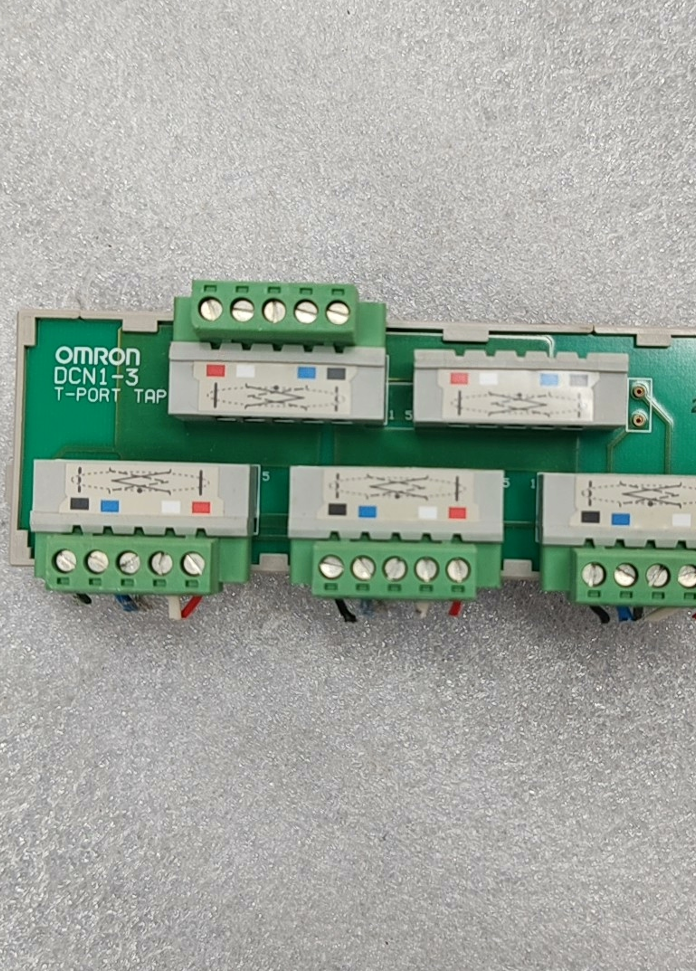

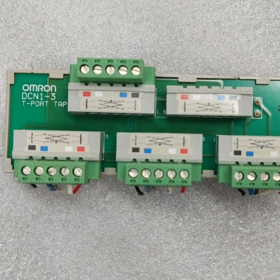
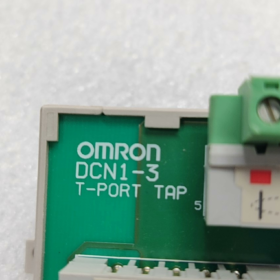
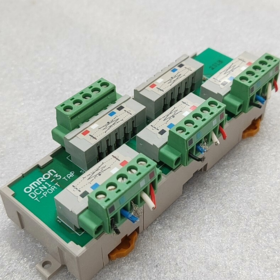
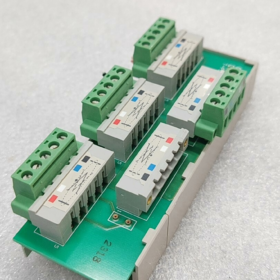
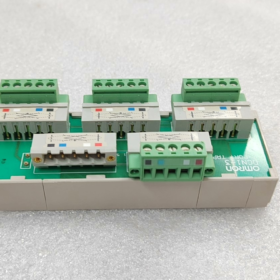
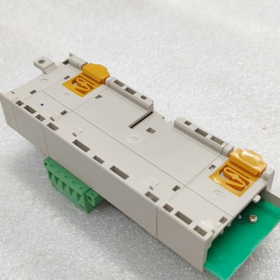
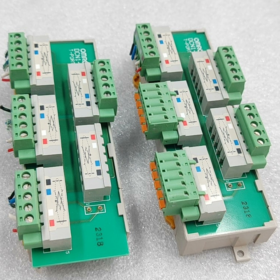
DCN1-3T-PORT = DCN1-3. Communément connu dans l'industrie sous le nom de répartiteur de branche en T DeviceNet / 3-bornier de port TAP, it is printed with the marking “T-PORT TAP” and serves as a dedicated branching module for Omron DeviceNet fieldbus.
Model Suffix Differentiation (Mandatory Reading for Procurement)
| Modèle | Description de la configuration |
| DCN1-3 (bare unit) | Base only, without 5 sets of terminal blocks; XW4B terminals must be ordered separately |
| DCN1-3C | Standard equipped with 5 side-entry screw terminals (most widely used in industry) |
| DCN1-3NC | Top-entry latch-type terminals for screw-free fast wiring |
- Hardware Port Structure (5-channel 5-pin DeviceNet Standard)
- 2 Main Line Ports: Bus trunk line input and output for daisy-chain networking
- 3 Branch Ports: Prend en charge jusqu'à 3 DeviceNet slave devices connected simultaneously (capteurs, remote I/Os, onduleurs)
- Built-in Terminating Resistor Socket: Blue plug-in terminal on the module side. Une résistance de terminaison de 121 Ω doit être insérée à l'extrémité du bus pour supprimer la réflexion du signal.
Définition des broches (DeviceNet standard à 5 broches):
1: V− (Puissance négative), 2: CAN_L, 3: CAN_H, 4: V+ (Puissance positive), 5: Terre du bouclier
III. Électricité de base & Spécifications mécaniques
- Caractéristiques électriques
Norme d'autobus: DeviceNet 2.0A / 2.0B
Tension d'alimentation: C.C 11 ~ 24 V (alimenté par bus)
Courant nominal à branche unique: Max.. 4UN; Courant nominal total du module: 8UN
Résistance de terminaison correspondante: Position de montage intégrée, fourni avec 121Ω / 0.25Résistance W
Débits en bauds pris en charge: Gamme complète 125k / 250k / 500 kbps
- Environnemental & Spécifications de montage
Montage: Montage encliquetable sur rail DIN standard de 35 mm
Dimensions hors tout: 142(L) × 45(W) × 31.3(D) mm
Poids net: 110 g
Température de fonctionnement: -10℃ ~ +55℃
Température de stockage: -25℃ ~ +70℃, Humidité 5 % ~ 95 % sans condensation
Classe de protection: IP20 (pour installation en armoire uniquement; pas pour une utilisation extérieure exposée)
- Principe de mise en réseau & Scénarios d'application
- Topologie du réseau
Les deux ports principaux du DCN1-3 sont directement connectés à la ligne principale, avec équipement indépendant branché sur le 3 ports de succursale.
Avantages: Aucun dénudage ni assemblage de fils sur site requis; les défauts sur une branche sont isolés sans perturber la communication sur l'ensemble du bus.
Restriction: La longueur totale du câble par branche doit être conforme aux spécifications DeviceNet (maximum. 100 m par succursale à 500 kbps).
- Applications industrielles typiques
Lignes d'assemblage automobile, machines d'emballage, lignes de tri logistique
Répartition des branches pour les E/S distantes Omron DeviceNet (Série DRT), 3G3MV / 3Onduleurs G3RX, E3Z / Capteurs de bus E2E
- Liste de colisage & Accessoires en option
Emballage d'usine standard pour DCN1-3C
- 1 × Unité principale DCN1-3
- 5 jeux de bornes à vis 5 broches XW4B-05C1-H1-D
- 1 × Résistance de terminaison de bus 121Ω
Accessoires à commander séparément
DCN1-3 (version sans terminal): Les terminaux doivent être achetés en plus
DCN1-1 / DCN1-2: Compact 1 port / 2-ports TAP (modèles alternatifs au sein de la même série)
Câbles de bus DeviceNet série DCA1, connecteurs M12 pré-assemblés
- Matrice de dépannage commune
| Phénomène de défaut | Cause première | Solution |
| Appareils de dérivation indétectables lors de l'analyse du bus | Sertissage des bornes lâches; CAN_H / CAN_L inversé | Resserrer les bornes; vérifier l'affectation des broches pour les fils de signal rouge et bleu |
| Un retard de communication important & perte de paquets sur tout le bus | Aucune résistance de terminaison installée aux deux extrémités du bus | Insérez les résistances correspondantes dans le module DCN1 à l'extrémité de la liaison |
| Aucune alimentation électrique pour les appareils de dérivation après la mise sous tension | Sertissages lâches sur V+ / Câbles d'alimentation V− | Inspecter le câblage sur les broches 1 et 4 |
| Déconnexion fréquente des appareils monobranches | Câbles de dérivation trop longs; blindage non mis à la terre | Raccourcir les câbles de dérivation; connecter les bornes blindées à la barre de terre de l'armoire |
VII. Comparaison alternative entre séries
| Modèle | Nombre de succursales | Type d'entrée de câble | Scénario d'application |
| DCN1-1C | 1 bifurquer | Bornes à vis latérales | Branche courte pour les appareils à point unique |
| DCN1-2C | 2 succursales | Bornes à vis latérales | Disposition compacte avec deux appareils esclaves |
| DCN1-3C | 3 succursales | Bornes à vis latérales | Division multidirectionnelle centrale (modèle grand public) |
| DCN1-4C | 4 succursales | Entrée supérieure | Disposition d'armoire dense avec plusieurs appareils |
Installation complète & Manuel de configuration pour OMRON DCN1-3 (DCN1-3T-PORT)
Le DCN1-3 est un bornier de dérivation à 3 voies de type T dédié pour DeviceNet (communément appelé T-PORT). L'ensemble de l'opération comprend six étapes: Montage mécanique → Câblage des bornes → Configuration de la résistance de terminaison → Conformité de la topologie du réseau → Configuration du logiciel API → Test de mise sous tension. Toutes les opérations doivent être effectuées avec l'alimentation débranchée.
- Outils préparatoires & Matériels
- Matériaux fournis standard (Version équipée d'un terminal DCN1-3C)
Unité principale DCN1-3, 5 jeux de bornes à vis 5 broches XW4B-05C1-H1-D, 1 Résistance de terminaison × 121 Ω
- Outils
Tournevis à tête plate, pince à dénuder, câble DeviceNet blindé à 5 conducteurs dédié (Rouge = V+, Noir = V−, Blanc = CAN_H, Bleu = CAN_L, Fil nu = écran de drainage)
- Logiciel
Programmeur CX + Intégrateur CX (Outil de configuration réseau Omron DeviceNet)
- Étape 1: Montage mécanique sur rail DIN (Alimentation débranchée)
- Loquets de rail: Les loquets supérieur et inférieur sont situés au bas de l'unité. Accrochez-vous d'abord au bord supérieur d'un rail DIN standard de 35 mm., puis appuyez sur le loquet inférieur jusqu'à ce qu'un clic confirme le verrouillage..
- Suppression: Pincez le loquet inférieur vers l'extérieur et soulevez-le vers le haut pour détacher l'appareil..
- Fixation alternative: Si aucun rail DIN n'est disponible, fixez l'unité à la plaque arrière de l'armoire via des trous de montage Φ3,5 des deux côtés.
- Exigences environnementales: Classé IP20, pour usage intérieur d'armoire uniquement. Tenir à l'écart des sources d'interférences élevées telles que les onduleurs et les contacteurs; plage d'environnement d'exploitation: -10~+55℃.
III. Étape 2: Définition du terminal & Câblage standard (Procédure de base)
- Brochage unifié à 5 broches (Identique pour tous les terminaux)
| Numéro de broche. | Couleur du fil | Nom du signal | Description de la fonction |
| 1 | Noir | V− | 24Puissance du bus V négative |
| 2 | Bleu | CAN_L | Fil de signal négatif différentiel de communication |
| 3 | Blanc | CAN_H | Fil de signal positif différentiel de communication |
| 4 | Rouge | V+ | 24Puissance du bus V positive |
| 5 | Fil de cuivre nu | Bouclier de vidange | Mise à la terre du blindage du câble |
- Distinction de 5 Terminaux (2 Main Line Ports + 3 Branch Ports; Les lignes principales doivent se connecter aux deux terminaux marqués)
Terminal 1 (): Entrée réseau (Entrée depuis la station maître API / segment de bus précédent)
Terminal 2 (): Coffre OUT (Sortie vers le segment de bus suivant)
> Note clé: Les deux terminaux sont directement connectés avec une résistance interne minimale et doivent transporter la ligne principale principale. Le reste 3 les terminaux non marqués sont des ports de dérivation pour les périphériques esclaves externes, y compris les E/S distantes DRT, onduleurs et capteurs de bus.
Terminaux 3/4/5: Sorties de branche indépendantes pour Branch 1 / 2 / 3
- Procédures de câblage des bornes
- Retirez le bornier XW4B et desserrez toutes les vis de réglage..
- Bande 5 mm d'isolation des extrémités des câbles; sertir le fil de protection de drain nu séparément de la broche 5.
- Insérez les fils strictement dans l'ordre: Rouge à Pin4, Noir à Pin1, Blanc à Pin3, Bleu à Pin2, puis serrez complètement les vis (Plusieurs fils dans un trou d'épingle sont interdits).
- Réinstallez le bornier et confirmez qu'il n'y a pas de câblage desserré ni de conducteurs exposés..
- Règle de mise à la terre du bouclier: Mise à la terre à une extrémité. Connectez le blindage Pin5 à la barre de terre uniquement à l'intérieur de l'armoire principale de l'API.; laisser le blindage flottant aux extrémités de l'appareil distant pour éviter la circulation du courant provoqué par une mise à la terre à double extrémité qui perturbe la communication.
- Étape 3: Installation de la résistance de terminaison (Critique pour une communication stable; Point d'erreur commun)
- Une prise noire dédiée sur le côté droit de l'unité DCN1-3 est réservée à la résistance de terminaison de 121 Ω fournie..
- Règle: Installez uniquement une résistance de 121 Ω à chaque extrémité physique de toute la ligne principale DeviceNet.; aucune résistance de terminaison ne doit être installée sur les répartiteurs DCN1 intermédiaires.
Exemple: Installez une résistance sur le port maître de l'automate au début de la liaison.; mettre une autre résistance sur le dernier appareil / dernier DCN1 de tout le bus; laisser les supports de résistance vides sur toutes les unités DCN1 intermédiaires.
- Interdiction: Convenable 3 ou plusieurs résistances sur un bus abaisseront la tension du bus et provoqueront des déconnexions des appareils.
- Étape 4: Topologie de câblage obligatoire & Spécifications de longueur (La violation provoque un échec de communication directe)
- Exigence de topologie: Doit adopter un tronc linéaire + Branches courtes. Le câblage parallèle en étoile ou en arbre est interdit.
- Limites de longueur des branches (Norme de câble fin)
500 kbps: Max.. longueur de branche unique ≤6 m; longueur totale de toutes les branches du réseau ≤30 m
250 kbps: Max.. longueur de branche unique ≤6 m; longueur totale de toutes les branches du réseau ≤78 m
125 kbps: Max.. longueur de branche unique ≤6 m; longueur totale de toutes les branches du réseau ≤156 m
- Séparation des câbles: Maintenir un dégagement minimum de 10 cm entre les câbles DeviceNet et les câbles d'alimentation; traverser perpendiculairement si l’intersection est inévitable. La pose parallèle longue est interdite.
- Capacité actuelle: Max.. 4 Un par succursale; courant total du module ≤8 A. Un répartiteur de puissance DeviceNet supplémentaire DCN1-1P doit être ajouté pour les branches multi-appareils nécessitant une alimentation supplémentaire.
- Étape 5: Configuration réseau du logiciel API (Intégrateur CX)
Le DCN1-3 effectue uniquement la séparation physique des câbles, n'a pas d'adresse et ne nécessite aucune configuration logicielle indépendante. Seuls le maître du bus et les esclaves en aval doivent être configurés:
Flux d'opération
- Lancez CX-Programmer et créez un nouveau projet; ajouter un processeur d'automate (CJ1 / CP1 / série NJ) et insérez un module maître DeviceNet (par exemple. CJ1W-DRM21).
- Cliquez avec le bouton droit sur le module maître → lancez l'outil de configuration réseau CX-Integrator.
- Définir le débit en bauds global du bus (tous les appareils du réseau doivent partager le même débit en bauds: 125 / 250 / 500 kbps).
- Cliquez [Analyse réseau]; le logiciel identifiera automatiquement tous les appareils esclaves connectés aux trois branches du DCN1-3.
- Attribuer une adresse de nœud unique (1~63, pas de doublons) à chaque appareil esclave.
- Configurer le mappage des données d'E/S et télécharger les paramètres réseau vers la station maître API.
- Enregistrez le projet et fermez l'outil de configuration.
VII. Étape 6: Mise sous tension, Test de communication & Dépannage
- Séquence de mise sous tension
- Vérifiez à nouveau tout le câblage, résistances de terminaison et mise à la terre du blindage pour l'exactitude.
- Mettez d'abord sous tension l'automate et le bus DeviceNet..
- Allumer les appareils esclaves sur les branches de manière séquentielle (remote I/Os, onduleurs, etc.).
- Critères d'acceptation des communications
Le voyant RUN du module maître PLC reste allumé fixe; L'indicateur ERR reste éteint.
Tous les esclaves analysés affichent l'état en ligne sans marqueurs de défaut rouges dans CX-Integrator.
Accès stable en lecture/écriture aux signaux d'E/S esclaves sans perte de paquets ni erreurs de communication.
Matrice de dépannage rapide
| Phénomène de défaut | Cause première | Solution |
| Aucun appareil détecté sur tout le bus | CAN_H / CAN_L inversé; ligne principale connectée aux terminaux de dérivation; pas de résistances de terminaison aux deux extrémités | Échanger les fils sur la broche 2 et 3; rediriger le tronc vers * bornes marquées; installez des résistances de 121 Ω aux deux extrémités |
| Les appareils à branche unique sont mis hors ligne | Le câble de dérivation dépasse 6 m; sertissage des bornes lâches; courant de dérivation surchargé | Raccourcir les câbles de dérivation; resserrer les bornes; ajouter un module d'alimentation de bus supplémentaire |
| Retard de communication intermittent & déconnexions aléatoires | Mise à la terre du blindage à double extrémité; routage parallèle avec câbles d'alimentation; trop de résistances de terminaison installées | Blindage flottant aux extrémités distantes; acheminement des câbles séparé; conserver les résistances uniquement aux deux extrémités du lien |
| Pas d'alimentation 24 V pour les appareils | Lâche V+ / Broches en V−; Alimentation bus insuffisante | Re-sertir les câbles d'alimentation rouge et noir; installer le répartiteur de puissance DCN1-1P |
VIII. Interdictions d'installation non négociables
- Ne faites pas passer les lignes principales dans le 3 terminaux de branchement non marqués, ce qui déclenchera une impédance de communication anormale.
- N'installez pas de résistances de terminaison sur les unités DCN1 autres que les deux extrémités du bus physique..
- N'utilisez pas de câbles de dérivation plus longs que 6 mètres.
- N'inversez pas les fils de signal CAN_H et CAN_L.
- N'insérez pas plusieurs conducteurs dans un seul trou de borne de câblage..
- Ne pas installer à l'extérieur sans armoire (IP20 sans indice d'étanchéité).





NH42-63-318x560.png "Commutateurs de transfert automatiques de type PC CHINT (ATS)NH42-63/4SZ")



